Database Proxy Read/Write Splitting Configuration
ダウンロード
フォーカスモード
フォントサイズ
After creating read-only instances, you can purchase a database proxy, configure the connection address policy, and configure the database proxy address in your application to automatically forward write requests to the primary instance and read requests to each read-only instance. This document describes how to configure read/write splitting for the database proxy in the console.
Prerequisites
Operation Steps
Note:
After the database proxy is successfully activated, the attribute of the database proxy connection address defaults to read/write splitting, and the weights of the primary instance and read-only instances are automatically assigned by the system. You can refer to the following steps to configure the read/write attributes and other settings of the database proxy connection address.
1. Log in to the TencentDB for PostgreSQL console.
2. Locate the target instance in the instance list, click the Instance ID, and go to the instance management page.
3. On the instance management page, select the Database Proxy tab.
4. Under Overview > Connection Address, click Adjust Configurations.

Note:
On the access policy page, click Set to go to the configuration page.
5. In the pop-up dialog box, complete the following configurations and click Confirm.
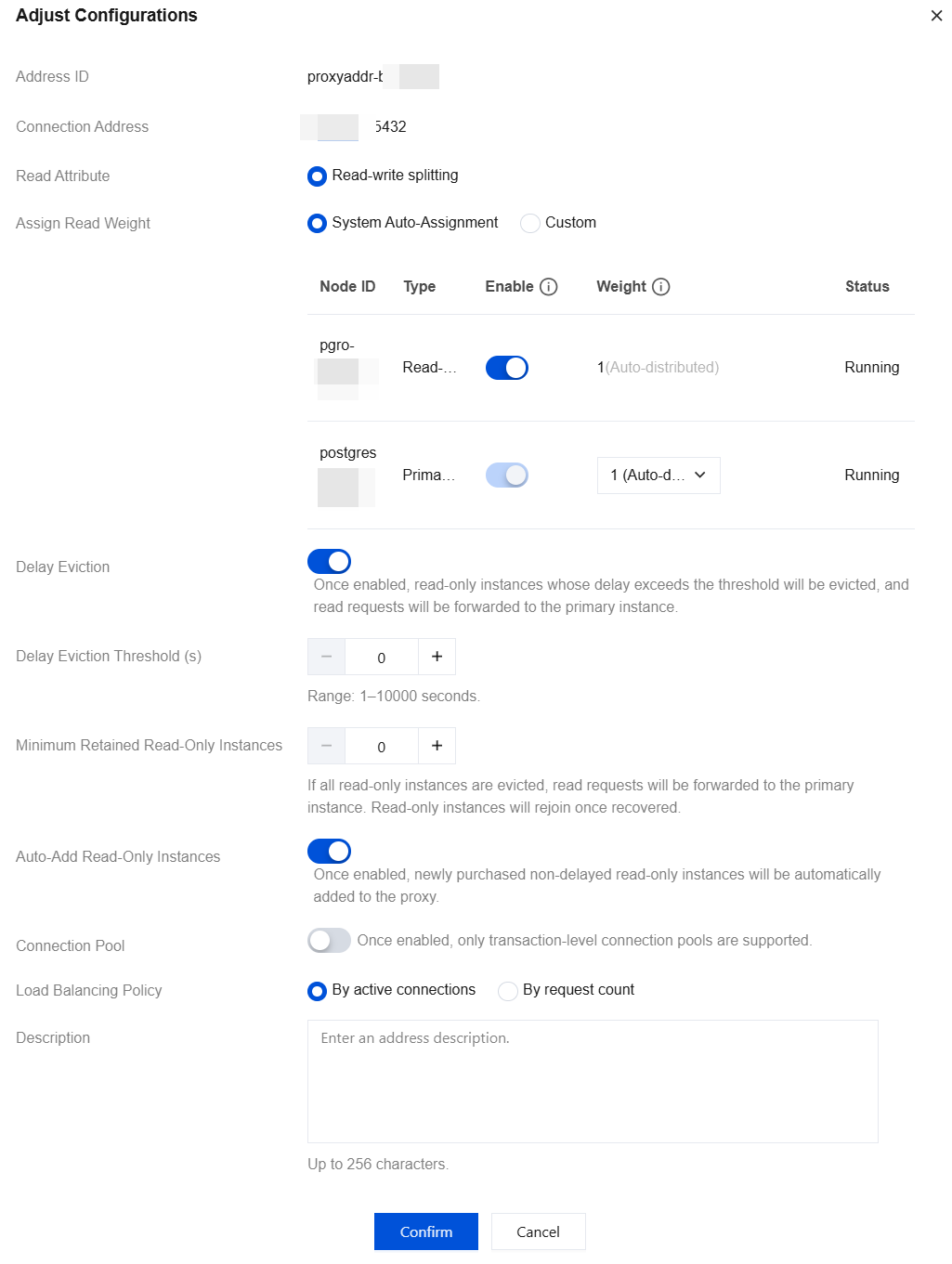
Parameter | Description |
Address ID | Displays the ID of the database proxy connection address. |
Connection Address | Displays the private network connection address of the database proxy. |
Read Attribute | Defaults to read/write splitting. |
Assign Read Weight | The database proxy needs to distribute read requests to different instances. By assigning different read weights to each instance, the database proxy can determine the target instance for forwarding requests based on the weight. The weight can be automatically assigned by the system or customized. If the weight is customized, you can configure the weight for different instances. The descriptions of the enabling status and weight during weight assignment are as follows: Enable: Turning on the switch means that the selected instance will be assigned connections. Turning off the switch means that the selected instance will not be assigned connections. Weight: Weight range: 0-100. 0 means that the corresponding instance will be assigned a weight for connection, but the weight is the lowest. The larger the value, the higher the weight, and the more read requests. After the read weights are assigned, read requests will be routed to the corresponding instances in proportion. For example, if the read weights of Instance 1, Instance 2, and Instance 3 are set to 3, 2, and 1, read requests from the database proxy connection address will be routed to Instance 1, Instance 2, and Instance 3 in the ratio of 3:2:1. Note: The weight here is for read requests (non-transactional). The weight setting takes effect only for new connections. It does not take effect for existing data connections. |
Delay Eviction | Set the delayed removal policy for read-only instances. When this feature is enabled, you can set the delayed removal threshold and the minimum number of read-only instances to retain. Whether this feature is enabled or not, the system always attempts to remove and recover a read-only instance when it fails. Delay Eviction Threshold (s): input an integer greater than or equal to 1, in seconds. Minimum Retained Read-Only Instances: The number is related to the number of read-only instances that the primary instance has. If it is set to 0, after all read-only nodes are removed, all access will be forwarded to the primary instance until the read-only instances rejoin. |
Auto-Add Read-Only Instances | Determine whether to enable this feature. Once it is enabled, newly purchased read-only instances will be automatically added to the database proxy. If the read weight is automatically assigned by the system, a weight is assigned to newly purchased read-only instances according to the specification. If the read weight is customized, the weight of newly purchased read-only instances is 0 by default when they are added. You can click Adjust Configuration on the Database Proxy > Connection Address page to modify the weight. |
Connection Pool | The connection pool feature is mainly used to reduce instance load caused by frequent establishment of new connections in short-connection services. After it is enabled, only transaction-level connection pooling is supported. |
Load Balancing Policy | Set the load balancing policy. Supported options include: by active connections and by number of requests. |
Description | Enter a description for the database proxy connection address for easier management. |
フィードバック