Batch Sequential Naming or Naming with Specified Pattern Strings
ダウンロード
フォーカスモード
フォントサイズ
Scenarios
When you create multiple TDMQ for CKafka (CKafka) instances, if you want their names to follow a specific rule, we provide the feature of sorting suffix numbers automatically in ascending order to create instances in batches and the feature of specifying pattern strings. You can access the features via the purchase page or cloud API.
Sort suffix numbers automatically in ascending order: For the setting of the names of multiple purchased instances, numbers are appended to names to indicate the number of CKafka instances (such as ckafka1, ckafka2, ckafka3...).
Specify pattern strings:
Specify a single pattern string: This approach is suitable for scenarios where you need to create n instances and specify that their names contain a serial number which starts to increase from x (such as ckafka3, ckafka4, ckafka5...).
Specify multiple pattern strings: This approach is suitable for scenarios where you want to create n instance names with multiple prefixes, each prefix having a specified serial number (such as ckafka3-big10-test, ckafka4-big11-test, ckafka5-big12-test...).
Operation Steps
Sorting Suffix Numbers Automatically in Ascending Order
You can set the instances you purchased in batches to have names with the same prefix, with only their serial numbers in ascending order. By default, the serial numbers of successfully created instances start to increase sequentially from 1, and the starting serial number cannot be specified.
The following example assumes you purchased 3 CKafka instances and want the generated instance names to follow the rule "ckafka + serial number" (examples of such instance names include ckafka1, ckafka2, and ckafka3).
1. Purchase 3 instances as instructed in Creating an Instance, and set their names to
ckafka according to the naming rule prefix + serial number on the purchase page, as shown in the figure below:
2. Perform operations as instructed on the page and complete the payment.
Instance name: Specify
ckafka for the InstanceName field.Specifying Pattern Strings
You can set the instances to have complex names with specified serial numbers. Instance names support specifying single or multiple pattern strings. Set instance names based on actual needs. In the name **{R:x}** with specified pattern strings, x indicates the starting serial number for generating instance names. It can only be a positive integer and cannot be a negative number or decimal.
Specifying a Single Pattern String
In the following example, you want to create 3 instances and specify that their serial numbers start to increase from 3.
1. Purchase instances as instructed in Creating an Instance, and set their names to
ckafka{R:3} according to the naming rule prefix + specified pattern string {R:x} on the purchase page, as shown below:
2. Perform operations as instructed on the page and complete the payment.
Instance name: Specify
ckafka{R:3} for the InstanceName field.Specifying Multiple Pattern Strings
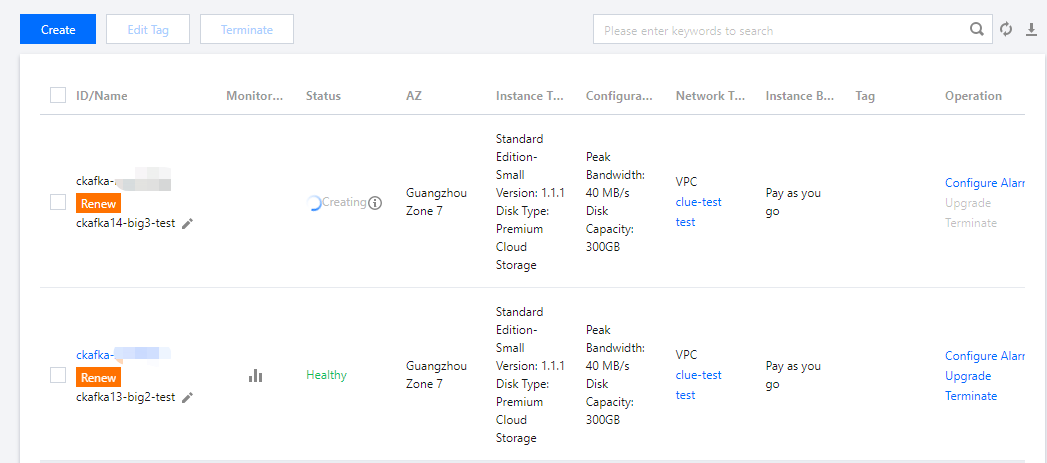
In the following example, you want to create 3 instances and want their names to contain the prefixes ckafka, big, and test, with the prefixes ckafka and big followed by serial numbers that start from 13 and 2, respectively (that is, ckafka13-big2-test, ckafka14-big3-test, and ckafka15-big4-test).
1. Purchase 3 instances as instructed in Creating an Instance, and set their names to
ckafka{R:13}-big{R:2}-test according to the naming rule prefix + specified pattern string {R:x}-prefix + specified pattern string {R:x}-prefix on the purchase page, as shown below:
2. Perform operations as instructed on the page and complete the payment.
Instance name: Specify
ckafka{R:13}-big{R:2}-test for the InstanceName field.Verifying the Result
After you create instances in batches by sorting suffix numbers automatically in ascending order or specifying pattern strings, you can verify the instance name settings through the following operations.
Log in to the CKafka console to view the created instances, and you will find that the instances you purchased in batches have been named according to the rules you set, as shown in the figure below:
フィードバック