Creating Consumer Group
Download
フォーカスモード
フォントサイズ
Scenarios
A consumer group is a scalable and fault-tolerant consumer mechanism provided by Kafka. A consumer group contains multiple consumers, and all consumers in the group collectively consume messages from subscribed topics. A consumer can consume multiple partitions simultaneously, but a partition can only be consumed by one consumer in the consumer group.
Constraints and Limitations
It is recommended that the total number of all automatically and manually created consumer groups under a single instance do not exceed 500. Exceeding this number may result in certain limitations.
Operation Steps
1. Log in to the TDMQ for CKafka (CKafka) console.
2. In the left sidebar, select Instance List, select the target region, and click the ID of the target instance to go to the basic instance information page.
3. On the basic instance information page, select the Consumer Group tab, click Create Consumer Group, and set the consumer group information.
Consumer group name: This is a custom name, must comply with the naming rules, can only contain letters, digits, underscores (_),
hyphens (-), and periods (.), and must start with a letter.Select a topic: In the drop-down list, select topics to which the consumer group will subscribe. You can select multiple topics simultaneously.

4. Click Submit, and you can see the newly created consumer group in the Consumer Group list.
Note:
For consumer groups created in the console, their offset will start from the latest, meaning the consumer group only consumes new messages generated after its creation. If you need to consume historical messages, you can reset the consumption offset in the console before using this consumer group. For details, see Viewing and Manually Resetting a Consumption Offset.
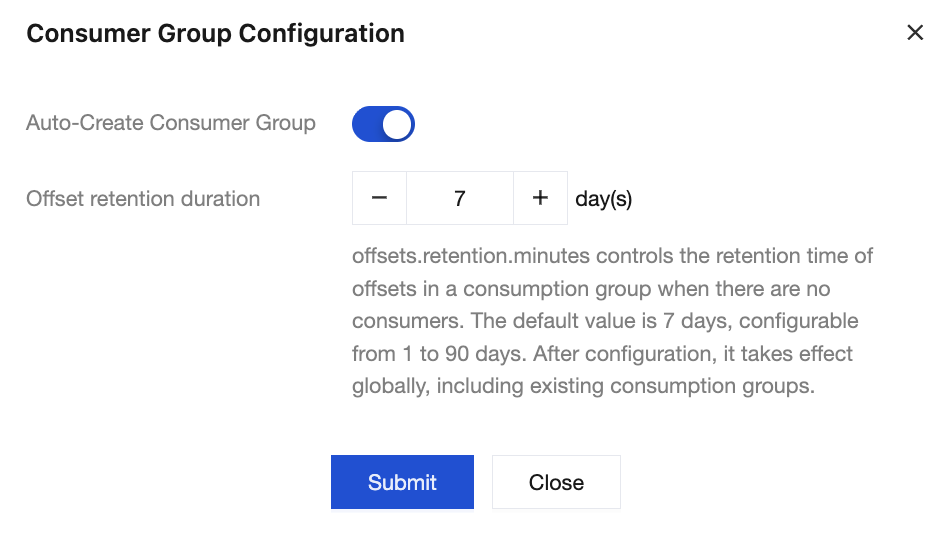
Auto-Create Consumer Group indicates that when a new consumer group subscribes to a topic for the first time, the client automatically checks whether the consumer group exists. If not, and the consumer group name complies with naming rules (can only contain letters, digits, underscores (_),
hyphens (-), and periods (.), and must start with a letter), the system will automatically create this consumer group.CKafka enables the automatic creation of consumer groups by default. You can manually enable or disable this feature in the CKafka console. Once disabled, only existing consumer groups in the console can be used, and new consumer groups cannot be created automatically.
Only the Pro Edition instances with version 2.4.1 or later support manually disabling the automatic creation of consumer groups in the console.
Enabling/Disabling Automatic Creation of a Consumer Group
1. Log in to the CKafka console.
2. In the left sidebar, select Instance List, select the target region, and click the ID of the target instance to go to the basic instance information page.
3. In the Consumer Group Configuration module, click Configuration in the upper-right corner to manually enable or disable the automatic creation of consumer groups.
フィードバック