Configuring a Message Retention Mechanism
Download
フォーカスモード
フォントサイズ
Kafka optimizes storage management through log segment rolling and log retention. Users can implement a message retention mechanism by configuring relevant parameters. The following section introduces the configuration methods and working principles of the message retention mechanism to help you efficiently manage storage resources and balance data availability.
Message Retention Mechanism Overview
Kafka manages the message lifecycle collaboratively through log segment rolling and log retention policy.
Log Segment Rolling
In Kafka, each topic is divided into multiple partitions, and the log of each partition is further divided into multiple segments. Kafka controls the rolling of log segments through the following two methods:
Time-based rolling (segment.ms): When the lifetime of the current active segment exceeds the configured segment.ms, Kafka will close the current segment and create a new one.
Size-based rolling (segment.bytes): When the size of the current active segment reaches the configured segment.bytes, Kafka will close the current segment and create a new one.
Once a log segment is closed, it becomes inactive and is managed by the log retention policy.
Log Retention Principles
The log retention policy of Kafka determines how long messages can be retained or how much space they can occupy before they are deleted. Kafka provides the following two retention policies:
Time-based retention (retention.ms): The retention.ms is configured to specify the message retention period. Inactive segments exceeding this time will be deleted.
Size-based retention (retention.bytes): The retention.bytes is configured to specify the maximum log size per partition. Old segments exceeding this size will be deleted.
When any of the above conditions are met, Kafka will delete the eligible inactive segments.
Note:
The message lifecycle is not directly controlled, but determined by the deletion time of its containing segment: if a segment remains unclosed due to rolling latency, messages will be retained even after they expire.
Diagram of Message Retention Mechanism
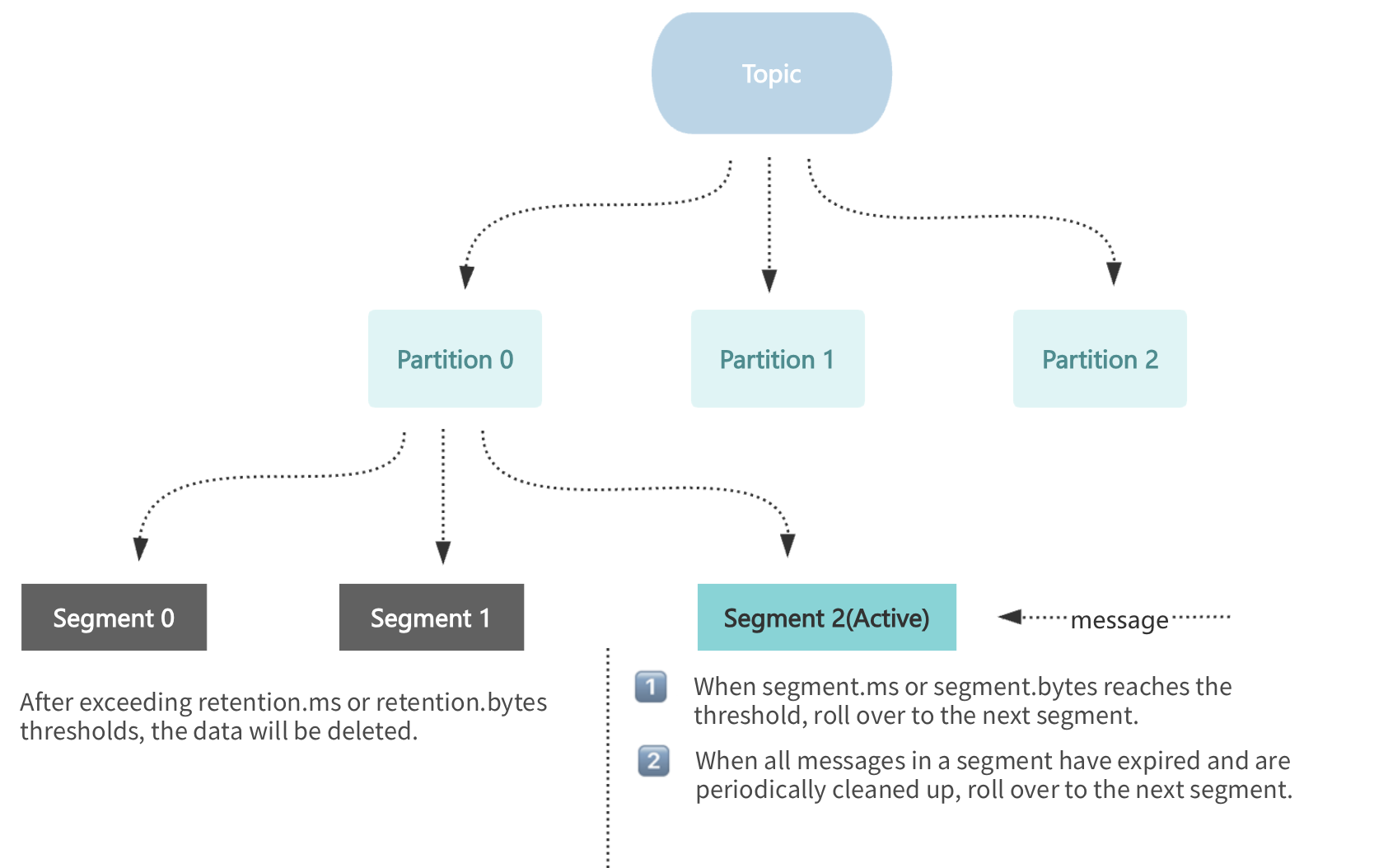
Note:
Kafka deletes files by segment rather than deleting messages individually. If a message is in an active segment, it will not be deleted even if it has expired.
Configuration of Message Retention Mechanisms
Configuration of Log Segment Rolling
Configuration Item | Parameter Name | Default Value | Configuration Range | Practical Meaning |
segment.ms | Segment rolling cycle | 7 days | 1 day to 90 days | The minimum cycle for log segment rolling is 1 day. |
segment.bytes | Maximum segment size | 1GB | Fixed at 1 GB | Each log segment is fixed at 1 GB and cannot be changed. |
Note:
Since segment.ms can be set to a minimum of 1 day, Kafka will force the creation of new segments at least once a day, even if the segment size has not reached 1 GB.
The maximum capacity of each log segment file is 1 GB. When the limit is reached, it will immediately roll over and generate a new segment.
Configuration of Log Retention
Configuration Item | Parameter Name | Default Value | Configuration Range | Practical Meaning |
retention.ms | Message retention period | 3 days | 1 minute to 90 days | The minimum retention period for logs can be as precise as 1 minute. |
retention.bytes | Message retention size | 1GB | 1GB~1024GB | The minimum capacity for log retention is 1 GB (which means at least 1 segment of logs is retained). |
Note:
Kafka will trigger log deletion based on the time or capacity when either condition is met.
TDMQ for CKafka (CKafka) supports dynamic message retention. When the capacity of a disk reaches a certain proportion, it automatically shortens the message retention period. For reference documentation, see Configuring the Disk Watermark Adjustment Policy.
Scenario Examples
Scenario 1: Desired Message Retention of 1 Day
Customer configuration:
The retention.ms is set to 1 day.
The segment.ms is set to 1 day.
Analysis of extreme cases (low log generation volume):
The segment.ms in Kafka can only be set to a minimum of 1 day. When the log volume is exceptionally low, logs roll over once per day, generating a new segment.
Therefore, up to 2 segments can coexist:
The segment generated on the 1st day (already rolled over to inactive).
The currently active segment on the 2nd day.
Inactive segments will be deleted only when the retention conditions are met:
The customer wishes to have the 1st segment deleted after 1 day of the retention period.
However, the current segment should be active at least 1 day before it can be closed and marked as inactive.
The actual messages may be retained for up to 2 days (1 active segment + 1 inactive segment).
Conclusion:
In scenarios with low log volume, in extreme cases, the maximum retention period for messages is actually up to 2 days.
In scenarios with normal log volume, the maximum retention period for messages is actually about 1 day.
Scenario 2: Desired Log Retention of 1 Hour
Customer configuration:
The retention.ms is set to 1 hour.
The segment.ms is set to 1 day.
Analysis of extreme cases (low log generation volume):
Assuming the log volume is extremely low and does not reach 1 GB, the rolling based on the segment.bytes (1 GB) cannot be triggered. Kafka can only force a rolling once after 1 day.
Concurrently active segments always have logs within 1 hour and can only roll over after at least 1 day.
In such cases, messages may actually be retained for: 1 day (inactive segment) + 1 hour (log expiration time), potentially reaching up to 25 hours.
Conclusion:
In scenarios with low log volume, in extreme cases, the maximum retention period for messages is actually up to: 1 day + 1 hour (namely, 25 hours).
List of Configuration Recommendations
Customer Actually Desired Message Retention Period | retention.ms Configuration Recommendation | segment.ms Configuration Recommendation | Actual Maximum Retention Period for Messages | Remarks |
1 hour | 1 day | 1 day | 25 hours (1 day + 1 hour) | Due to the minimum 1-day limit for segment.ms. |
12 hours | 12 hours | 1 day | 1.5 days (1 day + 12 hours) | Due to the minimum 1-day limit for segment.ms. |
1 day | 1 day | 1 day | 2 days | 1 active segment (maximum 1 day) + 1 inactive segment (deleted within 1 day). |
N days | N * 86400000 | 1 day | (N+1) days | The segment.ms rolls over daily and retains at most N + 1 days of logs. |
フィードバック