Traffic Throttling Mechanism
Download
フォーカスモード
フォントサイズ
With the growth of business and the increase in data traffic, when producers and consumers produce/consume large amounts of data or generate requests at extremely high speeds, it may lead to excessive consumption of resources on the broker, causing issues such as network I/O saturation. To prevent excessive resource consumption from affecting the overall business, TDMQ for CKafka (CKafka) has designed a comprehensive traffic throttling solution to implement self-protection for nodes.
Traffic Throttling Solution Overview
Take an instance with a sales specification of 20 MB as an example:
CKafka is deployed with at least 3 nodes to meet customer usage scenarios and requirements. For 20 MB of traffic, each node is designed to handle 6.67 MB of read-write traffic. Therefore, it is recommended to set the number of partitions to approximately 2–3 times the number of nodes to balance request traffic and maximize performance.
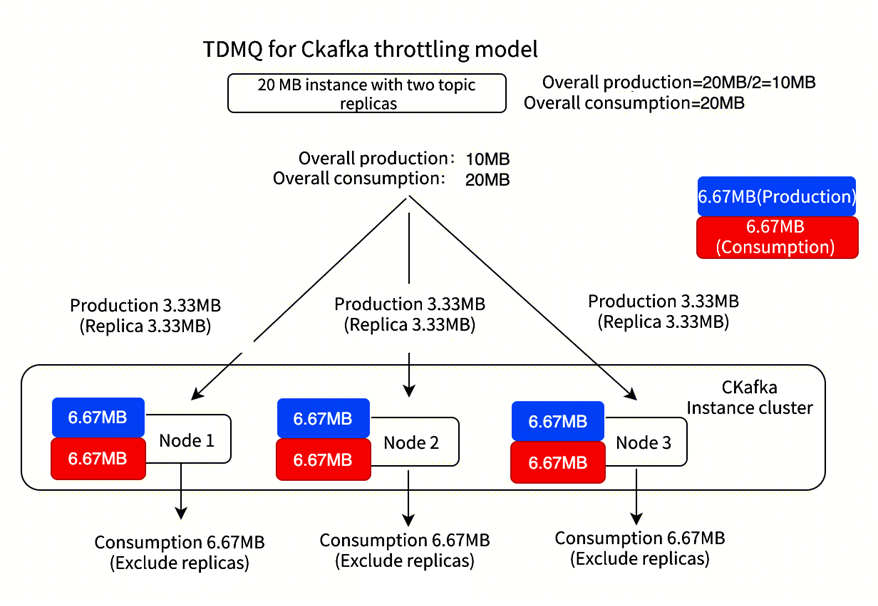
CKafka currently provides traffic throttling capabilities at two levels, as follows:
Cluster-level traffic throttling
The overall limit for write traffic throttling is 20 MB/s, meaning that customers can achieve maximum write traffic (including replicas) of approximately 20 MB/s during load testing. However, with 3 nodes, 6.67 MB/s is configured for each node. Therefore, if a node has only one partition, the maximum write rate is 6.67 MB/s. If a node has two partitions, with replica traffic included, the maximum write rate is 3.33 MB/s.
The overall limit for read traffic throttling is 20 MB/s, meaning that customers can achieve maximum consumption traffic (excluding replicas) of approximately 20 MB/s during load testing.
Topic-level traffic throttling
Customers can configure traffic throttling for a topic. For example, they may configure Topic:Test with 2 replicas, write throttling at 7 MB/s (including replicas), and consumption traffic throttling at 20 MB/s.
Write traffic throttling: 7 MB/s.
Consumption traffic throttling: 20 MB/s.
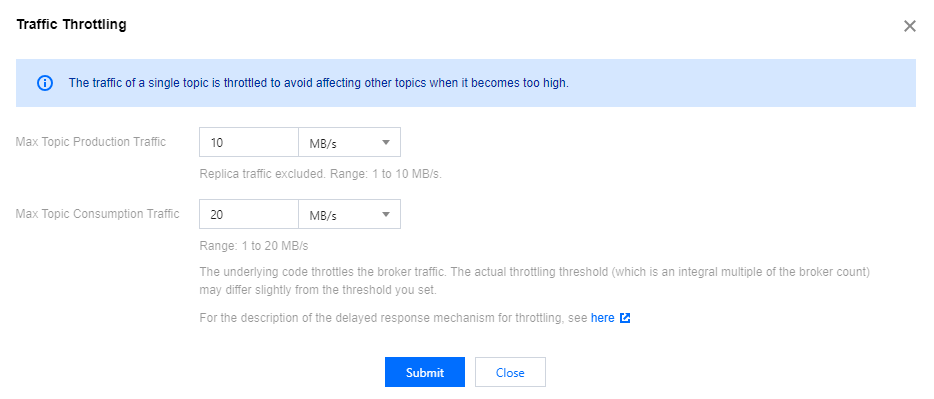
Traffic Throttling Mechanism
CKafka features a soft traffic throttling mechanism. When user traffic exceeds the quota, it resorts to response packet latency, rather than returning an error to the client.
Take API traffic throttling as an example:
Hard traffic throttling: Assume the call frequency is set to 100 calls/s. When client calls exceed 100 calls per second, the server will return an error, and the client needs to handle it according to business logic.
Soft traffic throttling: Assume the call frequency is set to 100 calls/s and the normal duration is 10 ms. When client calls exceed 100 calls per second:
If the number is 110, the duration for this request is 20 ms.
If the number is 200, the duration is 50 ms. This result is client-friendly, as error alarms will not be generated due to traffic surges or fluctuations, allowing business operations to proceed normally.
In summary, in high-traffic scenarios such as Kafka, soft traffic throttling delivers a better user experience.
The relationship between purchased bandwidth and production/consumption bandwidth is as follows:
Maximum production bandwidth (per second) = Purchased bandwidth/Number of replicas
Maximum consumption bandwidth (per second) = Purchased bandwidth
Principle of Traffic Throttling via Response Packet Latency
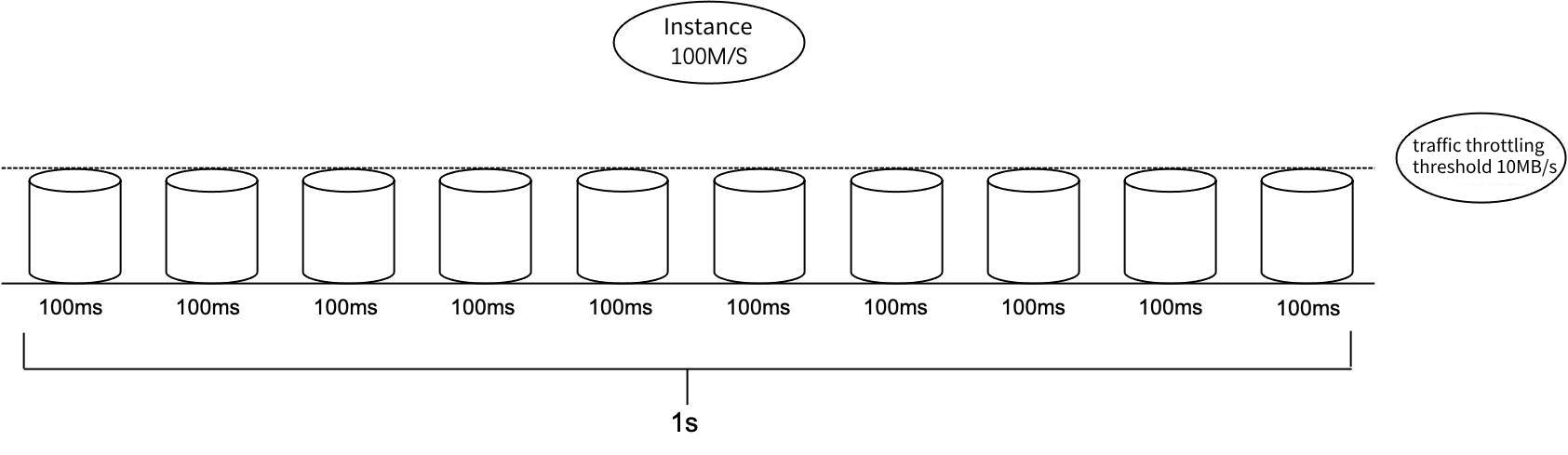
The underlying traffic throttling mechanism of CKafka instances is implemented based on the token bucket principle. Each second is divided into multiple buckets. The unit of each time bucket is ms.
The traffic throttling policy evenly divides each second (1000 ms) into multiple time buckets. For example, if each second is divided into 10 time buckets, the time of each bucket is 100 ms. The traffic throttling threshold for each time bucket is 1/10 of the total instance specification speed. If the TCP request traffic in a time bucket exceeds the throttling threshold of that time bucket, the response packet latency of the request will be increased according to the internal traffic throttling algorithm, so that the client cannot quickly receive TCP response packets to achieve the traffic throttling effect within a period of time.
フィードバック