This is a streaming text-to-speech (TTS) API. Note that it differs from the TencentCloud API in aspects such as parameter style and error codes.
This service uses the WebSocket protocol to synthesize the requested text into audio and synchronously returns the synthesized audio data along with related text information, achieving a "streaming synthesis and playback" effect. Unlike real-time TTS, this API supports streaming text input, making it suitable for scenarios involving word-by-word input from large language models and significantly enhancing the interactive experience.
Before using this API, you need to activate the TTS service and go to the API Key Management page to create a key, which generates an AppID, SecretID, and SecretKey. These credentials are used to generate a signature during API calls, and the signature is used for API authentication.
API Requirements
When integrating the real-time TTS API, you must comply with the following requirements.
Content
Description
Voice types
Supports Chinese and English voices. For voice IDs, see the Voice List page. You can set the corresponding voice ID via the VoiceType API parameter.
Supported Scenarios
General, customer service, emotional, reading, news, and so on. For details, see the Voice List page.
Audio properties
Sampling rate: 8000Hz, 16000Hz, 24000Hz (partially supported; see the Voice List page for details).
Signature-based authentication mechanism. For details, see Signature Generation.
Response format
Audio information is returned as raw binary data via binary-type frames, enabling playback while receiving.
text information is returned as JSON-format data (such as status codes, timestamps, and server events) via text-type frames.
Concurrency limit
By default, a single account is limited to 20 concurrent streams (shared with the real-time TTS API).
If you need to increase the concurrency limit, contact your business manager for consultation.
Call limits
1. Within a single streaming session, the total number of synthesized characters must not exceed 10,000 characters.
2. The input stream can continuously send text for synthesis. If no text is sent for more than 10 minutes, the server will synthesize the cached text normally and then close the connection.
3. Parameters such as speech rate, volume, and emotion can only be set before the input stream is enabled.
Text limits
1. Streaming synthesis text does not support SSML tags.
2. Upon receiving streaming synthesis text, the server caches it, then synthesizes it after sentence segmentation. The punctuation marks used for segmentation include full-width symbols . ; ? !, half-width symbols ; ? !, and line breaks.
3. Text synthesis relies on sentence completeness. Ensure that the synthesized text contains correct punctuation, especially at the end of the text. Otherwise, the text may be cached for an extended period without being synthesized.
API Call Process
The API call process is divided into three phases: the signature handshake phase, the synthesis phase, and the termination phase. In all three phases, the backend returns a text message (including synthesis text timestamps, server events, and so on), which is a JSON-serialized string. The format is described as follows:
Field Name
Type
Description
code
Integer
Status code. 0 indicates normal, and a non-zero value indicates an error has occurred.
message
String
Error description. It displays the specific cause of the error when an error occurs. This text may be frequently updated or changed as business evolves or user experience is optimized.
session_id
String
The unique ID for this session. It is generated and assigned to the call parameters by the client during the handshake phase.
request_id
String
The unique ID for this session. It is automatically generated by the server and returned with the text message.
message_id
String
The unique ID for this message.
result
Result
The TTS text timestamp.
ready
Integer
READY event: A value of 1 for this field indicates that the server is initialized, and the client can start sending text synthesis requests.
final
Integer
FINAL event: A value of 1 for this field indicates that text synthesis is complete, and the client must actively close the WebSocket connection upon receiving it.
heartbeat
Integer
HEARTBEAT event: A value of 1 for this field indicates a heartbeat packet, which can be ignored by the client upon receipt.
The format of the Result struct for the synthesis output is as follows:
Field Name
Type
Description
subtitles
Subtitle Array
The word list for the current passage, with the Subtitle struct format as follows:
Text: A String-type field containing the content of the character.
BeginTime: An Integer-type field indicating the start time of the character within the entire audio stream.
EndTime: An Integer-type field indicating the end time of the character within the entire audio stream.
BeginIndex: An Integer-type field indicating the start position of the character within the entire text, starting from 0.
EndIndex: An Integer-type field indicating the end position of the character within the entire text, starting from 0.
Phoneme: A String-type field containing the phoneme of the character. (Note: This field may return null, indicating that no valid value can be obtained.)
Handshake Phase
Request Format
During the handshake phase, the client actively initiates a WebSocket connection request. The request URL format is as follows:
Replace `<appid>` with the AppID of your Tencent Cloud registered account. You can obtain the AppID from the API Key Management page. The format of {request_parameters} is as follows:
key1=value2&key2=value2...(Both keys and values must be URL-encoded)
Parameter description:
Parameter Name
Required
Type
Description
Action
Yes
String
The name of the API to call. Value: TextToStreamAudioWSv2 (case-sensitive).
AppId
Yes
Integer
The AppId of the account. Ensure that the data type of this field is int.
AccountArea
No
Integer
International account identifier. Value:
0: Indicates a domestic account (default).
1: Indicates an international account.
SecretId
Yes
String
The SecretId of your Tencent Cloud account. You can obtain it on the API Key Management page.
Timestamp
Yes
Integer
The current UNIX timestamp, which records the time when the API request is initiated. For example, 1529223702. If it differs too much from the current time, a signature expiration error will occur.
Expired
Yes
Integer
The validity period of the signature. It is a value that conforms to the UNIX Epoch timestamp specification, measured in seconds. Expired must be greater than Timestamp, and (Expired - Timestamp) must be less than 90 days.
SessionId
Yes
String
The globally unique identifier for TTS. One WebSocket connection corresponds to one identifier. It is generated by the user (UUID is recommended) and can be up to 128 bits in length.
VoiceType
No
Integer
The voice ID. Supports Chinese and English voices. For the complete list of voice IDs, see the Voice List.
Attention:
If you are using the one-sentence version of VRS, enter the fixed value "200000000".
FastVoiceType
No
String
The voice ID for one-shot VRS. Required when a one-shot VRS voice is used.
Volume
No
Float
Volume. Range: [-10, 10], corresponding to the volume level.
The default value is 0, which represents the normal volume level. A larger value indicates a higher volume.
Speed
No
Float
Speech rate. Range: [-2, 6], corresponding to different speech rates:
-2: Indicates 0.6 times.
-1: Indicates 0.8 times.
0: Indicates 1.0 times (default).
1: Indicates 1.2 times.
2: Indicates 1.5 times.
6: Indicates 2.5 times.
If you need a more granular speech rate, you can keep two decimal places, for example, 0.5/1.25/2.81, and so on.
For the conversion between parameter values and actual speech rates, see the code sample.
SampleRate
No
Integer
Audio sample rate
24000: 24k (supported by some voices; see the Voice List for details).
16000: 16k (default)
8000:8k
Codec
Yes
String
Returned audio format
pcm: Returns binary pcm audio (default).
mp3: Returns binary mp3 audio.
EnableSubtitle
No
Boolean
Whether to enable the timestamp feature. The default value is false.
SegmentRate
No
Integer
Sentence segmentation sensitivity threshold. Value range: [0,1,2]. Default value: 0.
A larger value makes sentence segmentation less likely to occur, and the model tends to segment sentences only based on punctuation marks. It is recommended not to adjust this parameter arbitrarily, as doing so may affect the synthesis quality.
Signature
Yes
String
API signature parameter.
I. Signature Phase
Generate Signature
1. Sort all parameters except Signature in lexicographic order, and then concatenate them to obtain the request parameters as follows:
Then, concatenate the request method and the domain address to obtain the signature original text (note the case sensitivity). The format of the signature original text is as follows:
2. Encrypt the signature original text using the SecretKey with HMAC-SHA1, and then perform base64 encoding. For example, for the signature original text from the previous step, SecretKey=*****SkqpeHgqmSz*****, encrypt it using the HMAC-SHA1 algorithm and then perform base64 encoding:
3. After URL-encoding the Signature value (URL encoding is mandatory, and the encoding function must support encoding special characters such as + and =; otherwise, authentication failures may occur intermittently), concatenate it to obtain the URL as follows:
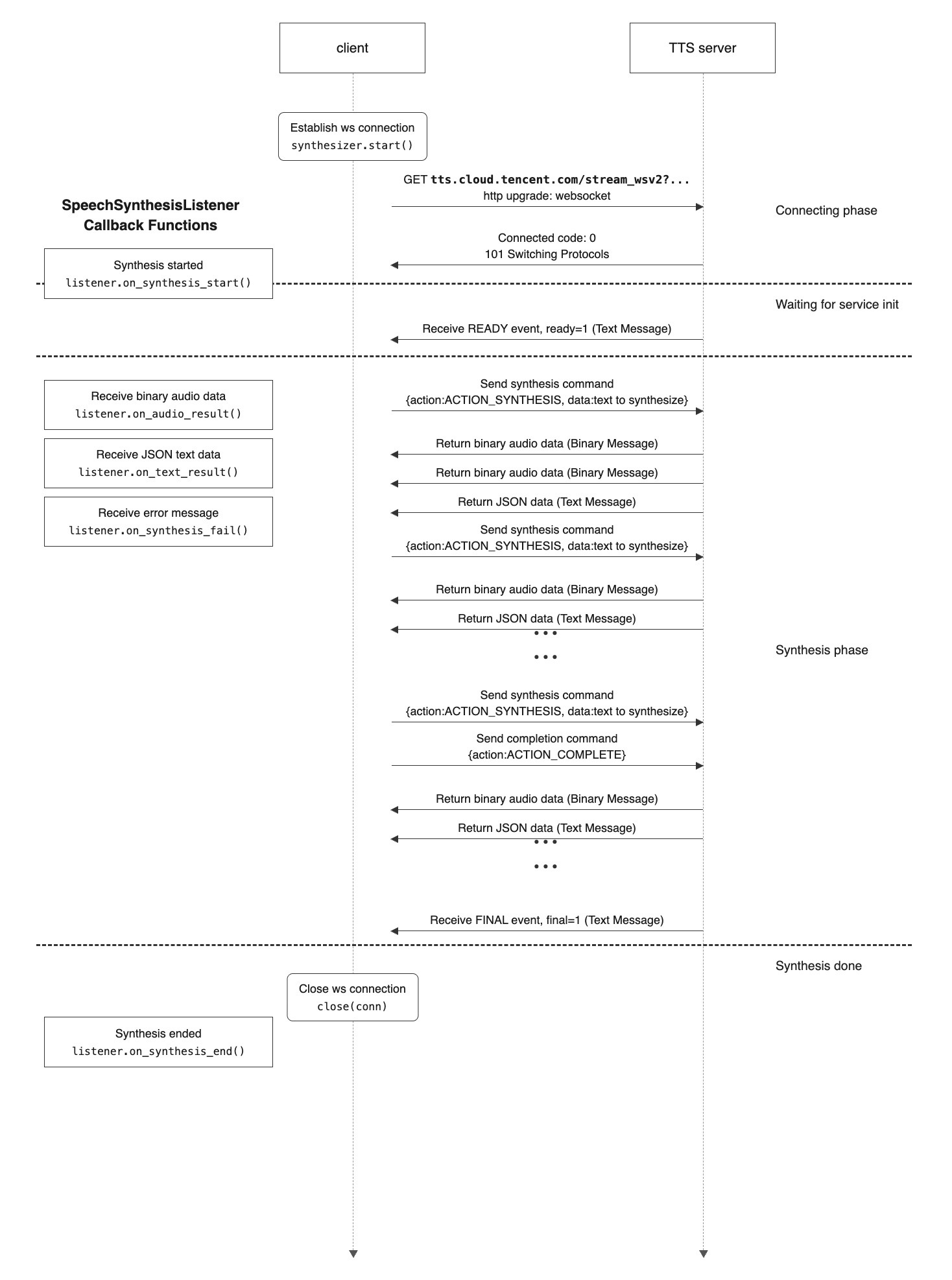
After the client initiates a connection request, the backend establishes the connection and performs signature verification. If the verification succeeds, the backend returns a confirmation message with a code value of 0, indicating a successful handshake. If the verification fails, the backend returns a message with a non-zero code value and disconnects the connection.
After a successful handshake, wait for the server to send the READY event (ready=1) to enter the synthesis phase. The client sends synthesis text as needed. The server caches the text and, after determining that a complete sentence has been received based on punctuation, invokes the synthesis engine.
The client sends the synthesis instruction (ACTION_SYNTHESIS) and the synthesis text as needed. The server caches the text, determines whether a complete sentence has been received based on punctuation, and then invokes the synthesis engine.
Synthesis result: The client must synchronously receive the binary audio data and text data returned by the backend. An example of the text data is as follows:
Error return: If an error occurs during synthesis, the backend returns a message with a non-zero code value and disconnects the connection.
{"code":10001,"message":"Invalid parameter (Please check your parameter VoiceType)","session_id":"b6b10dc0-101a-11ee-9e72-6c92bf65e6fe","request_id":"a2edbe4f-c12f-48e6-8810-fda7a0992f79","message_id":"da63be2f-d44e-4f3b-a2d7-0b19a3748d23","final":0,"result":{"subtitles":null}}
Heartbeat message: During synthesis, the server periodically sends the HEARTBEAT event (heartbeat=1) to maintain the long connection. The client does not need to process it upon receipt.
After the client receives the FINAL event, it closes the WebSocket connection, and the real-time synthesis ends.
IV. Call Flow Diagram
V. Commands, Events, and Formats
5.1 Client Commands
The client sends instructions to the server based on scenario requirements.
Command Types
Command
Term
data
Description
ACTION_SYNTHESIS
Text synthesis command
Text to synthesize
After receiving the READY event, the client can continuously call this instruction to send text for synthesis.
The interval between sending two synthesis instructions must be less than or equal to 10 minutes.
If a send timeout occurs, the server returns a timeout error (error code 10009, for notification only and can be ignored). After normally synthesizing the cached text, it notifies the client to close the connection.
ACTION_COMPLETE
Synthesis completion command
Empty string
After sending all text, the client sends this instruction to notify the server that text transmission is complete.
ACTION_RESET
Clear cache command
Empty string
The synthesis service receives text sent by the client, caches it, and then performs synthesis in batches.
After receiving the RESET instruction, the server side clears the text in the cache that has not yet been synthesized.
Attention:
When an instruction is received, any text that is already in the synthesis process will not be affected.
Command Format
{
"session_id":"dbb8417e-101a-11ee-840e-6c92bf65e6fe", // The unique session id, passed in by the client when establishing the connection.
"message_id":"3b46df26-31f6-11ef-894a-52540037edd7", // The unique idfor this message.
"action":"ACTION_SYNTHESIS", // The instruction type.
"data":"" // The instruction data.
}
5.2 Server Events
The server returns the synthesized text results (such as timestamps), error messages, and server events to the client via text messages.
Event type
The parameter types include final, ready, heartbeat, and others. For details, refer to the return parameter list above. (This field may be extended to include more types in the future.)
Event Format
{
"code":0, // The error code.
"message":"success", // The error message.
"session_id":"dbb8417e-101a-11ee-840e-6c92bf65e6fe", // The unique session id, passed in by the client when establishing the connection.
"request_id":"99207183-3bda-42de-a1f4-6d8838122ad3", // The unique session id, generated by the server and returned with the message.
"message_id":"d56a3fed-0dd6-4dc6-b434-416ae1b69f0f", // The unique idfor this message.
"final":1, // The event type.
"ready":0,
"heartbeat":0,
"result":{ // A server event. This field can be ignored.