Inviting Attendees
다운로드
포커스 모드
폰트 크기
Inviting Attendees
Role: Organizer/Co-Host/Attendee
Inviting Attendees
1. Before the Meeting Starts
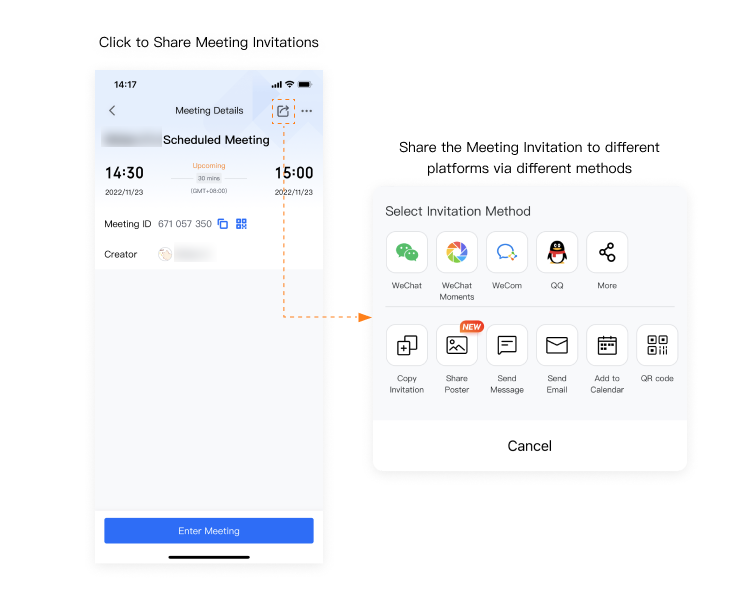
There are two ways to invite attendees before the meeting starts.
a. Tap the icon highlighted in the orange box on the top right-hand corner. Select the method you wish to use to invite attendees.
b. Tap the ellipsis icon to modify the meeting details. You can also invite attendees from this page.
2. During the Meeting
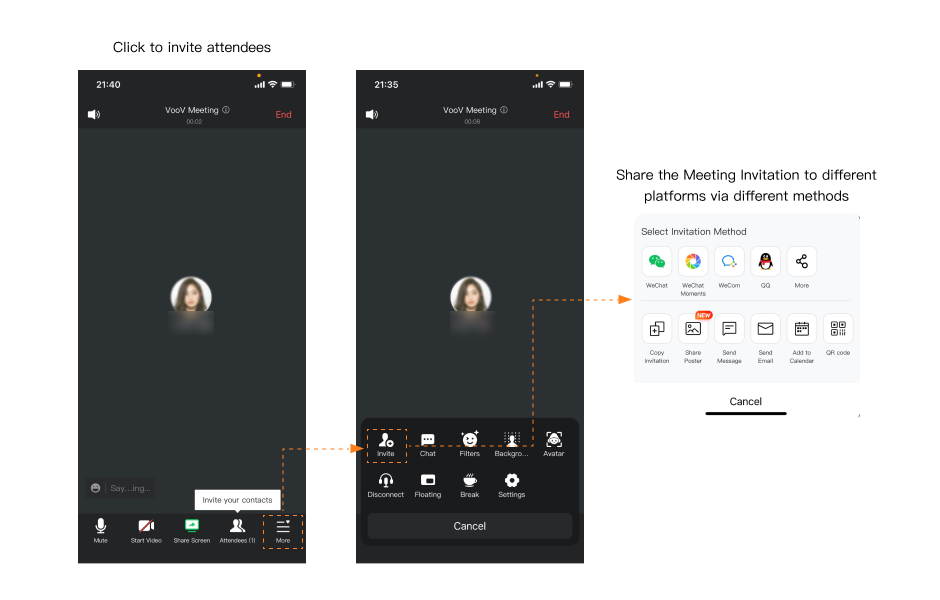
An invitation will be generated once you complete the steps below. You can Copy Invitation and send it to invite attendees.
a. Tap the ellipsis icon highlighted in the orange box at the bottom menu and select Invite.
b. Invite attendees via email, WeChat, SMS or other tools.
피드백