첨부파일이 있는 이메일 전송
다운로드
포커스 모드
폰트 크기
SMTP를 통해 첨부 파일이 있는 이메일을 보내는 방법은 MIME 형식의 이메일 내용을 구성하는 것입니다.
이메일 MIME 형식
이메일 헤더
이메일 헤더에는 발신자, 수신자, 제목, 시간, MIME 버전 및 본문 유형과 같은 중요한 정보가 포함되어 있습니다.
설명:
각 정보를 필드라고 하며, 도메인 뒤에 ‘: ’ 및 정보 내용을 추가하여 구성되며 한 줄 또는 여러 줄에 있을 수 있습니다.
필드의 첫 번째 줄은 ‘상단’에, 즉 왼쪽에 공백 문자(공백 및 탭)없이 작성해야 합니다.
다음 줄은 공백 문자로 시작해야 하며 그 중 하나는 메시지 자체에 고유해서는 안 됩니다(즉, 디코딩 중에 필터링해야 함).
이메일 헤더에는 빈 줄이 허용되지 않습니다. 첫 번째 줄이 비어 있으면 특정 이메일 클라이언트 소프트웨어에서 일부 이메일을 인식할 수 없으며 원본 코드가 표시됩니다.
예시:
콘텐츠 | 예시 |
Date | Mon, 29 Jun 2009 18:39:03 +0800 |
From | abc@123.com |
To | abc1@123.com |
BCC | abc3@123.com |
Subject | test |
Message-ID | 123@123.com |
Mime-Version | 1.0 |
필드 | 설명 |
Bcc | 블라인드 카본 카피 주소 |
Cc | 주소 복사 |
Content-Transfer-Encoding | 콘텐츠 전송 인코딩 방식 |
Content-Type | 컨텐츠 유형 |
Date | 날짜와 시간 |
Delivered-To | 수신자 주소 |
From | 발신자 주소 |
Message-ID | 메시지 ID |
MIME-Version | MIME 버전 |
Received | 전송 경로 |
Reply-To | 회신 주소 |
Return-Path | 회신 주소 |
Subject | 제목 |
To | 수신자 주소 |
이메일 본문
필드 | 설명 |
Content-ID | 콘텐츠 ID |
Content-Transfer-Encoding | 콘텐츠 전송 인코딩 방식 |
Content-Location | 콘텐츠 위치(경로) |
Content-Base | 콘텐츠 기반 위치 |
Content-Disposition | 콘텐츠 배치 방법 |
Content-Type | 컨텐츠 유형 |
일부 필드에는 값 외에 매개변수가 있습니다. 값과 매개변수, 매개변수와 매개변수는 ‘;’로 구분합니다. 매개변수 이름과 매개변수 값은 ‘=’로 구분됩니다.
이메일 본문에는 이메일 헤더의
Content-Type 필드로 유형이 표시되는 이메일의 내용이 포함됩니다.설명:
일반적인 단순 유형은 다음과 같습니다.
text/plain(플레인 텍스트)
text/html(하이퍼 텍스트)
multipart 유형은 MIME 이메일의 핵심입니다. 이메일 본문은 여러 부분으로 나뉘며 각 부분은 빈 줄로 구분된 부분 헤더와 부분 본문으로 구성됩니다.
세 가지 일반적인 multipart 유형이 있습니다.
multipart/mixed
multipart/related
multipart/alternative
각 유형의 의미와 용도는 이름에서 알 수 있습니다. 이들 사이의 계층적 관계는 다음과 같이 요약될 수 있습니다.
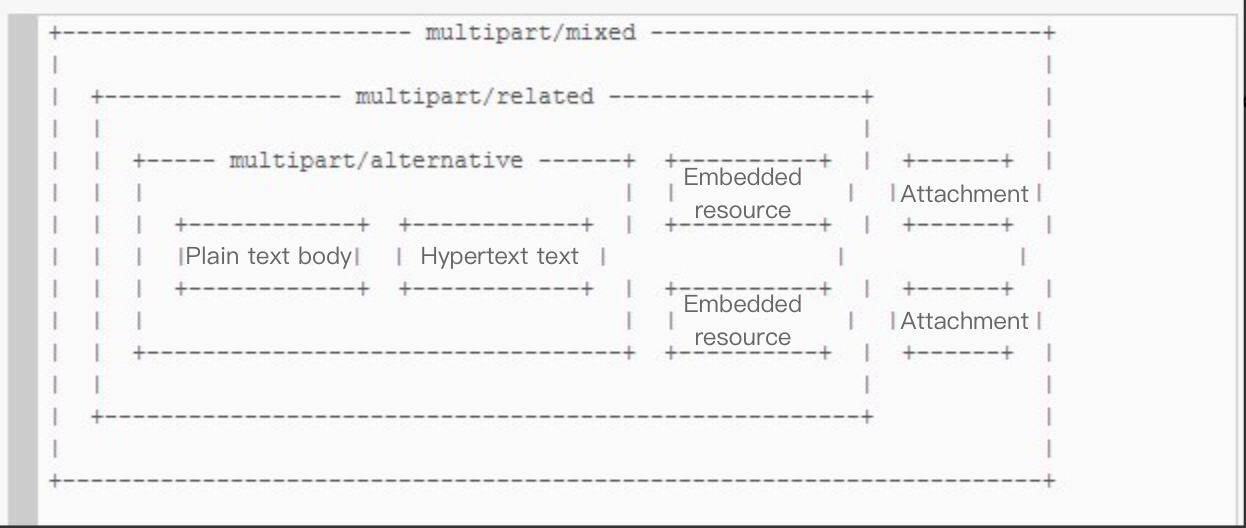
이메일에 첨부 파일을 추가하려면 multipart/mixed 파트를 정의해야 합니다. 포함된 리소스가 있는 경우 최소한 multipart/related 부분을 정의해야 합니다. 일반 텍스트와 하이퍼 텍스트가 공존하는 경우 최소한 multipart/alternative 부분을 정의해야 합니다.
설명:
첨부 파일의 수는 10개를 초과해서는 안 되며, 단일 첨부 파일의 크기는 4M를 초과해서는 안 되며, 모든 첨부 파일의 총 크기는 8M를 초과해서는 안 됩니다. 자세한 내용은 Attachment를 참고하십시오.
Go 코드 예제
package mainimport ("bytes""crypto/tls""encoding/base64""fmt""io/ioutil""log""mime""net""net/smtp""time")// Test465Attachment for port 465func Test465Attachment() error {boundary := "GoBoundary"host := "sg-smtp.qcloudmail.com"port := 465email := "abc@cd.com"password := "***"toEmail := "test@test123.com"header := make(map[string]string)header["From"] = "test " + "<" + email + ">"header["To"] = toEmailheader["Subject"] = "Test465Attachment"header["Content-Type"] = "multipart/mixed;boundary=" + boundary//이 필드는 당분간 사용하지 않습니다. 기본적으로 1.0 전달header["Mime-Version"] = "1.0"//이 필드는 당분간 사용하지 않음header["Date"] = time.Now().String()bodyHtml := "<!DOCTYPE html>\\n<html>\\n<head>\\n<meta charset=\\"utf-8\\">\\n<title>hello world</title>\\n</head>\\n<body>\\n " +"<h1>내 첫 번째 제목</h1>\\n <p>내 첫 번째 단락.</p>\\n</body>\\n</html>"message := ""for k, v := range header {message += fmt.Sprintf("%s: %s\\r\\n", k, v)}buffer := bytes.NewBuffer(nil)buffer.WriteString(message)contentType := "Content-Type: text/html" + "; charset=UTF-8"body := "\\r\\n--" + boundary + "\\r\\n"body += contentType + "\\r\\n"body += "Content-Transfer-Encoding: base64\\r\\n"body += "\\r\\n" + base64.StdEncoding.EncodeToString([]byte(bodyHtml)) + "\\r\\n"buffer.WriteString(body)attachment := "\\r\\n--" + boundary + "\\r\\n"attachment += "Content-Transfer-Encoding:base64\\r\\n"attachment += "Content-Disposition:attachment\\r\\n"attachment += "Content-Type:" + "application/octet-stream" + ";name=\\"" + mime.BEncoding.Encode("UTF-8","./go.mod") + "\\"\\r\\n"buffer.WriteString(attachment)writeFile(buffer, "./go.mod")//끝에 여러 첨부 파일을 연결할 수 있습니다. 첨부 파일은 최대 10개까지 가능하며 각 첨부 파일의 크기는 5M를 초과할 수 없습니다. 모든 첨부 파일의 총 크기는 8–9M를 초과할 수 없습니다. 그렇지 않으면 EOF가 반환됩니다.attachment1 := "\\r\\n--" + boundary + "\\r\\n"attachment1 += "Content-Transfer-Encoding:base64\\r\\n"attachment1 += "Content-Disposition:attachment\\r\\n"attachment1 += "Content-Type:" + "application/octet-stream" + ";name=\\"" + mime.BEncoding.Encode("UTF-8","./bbbb.txt") + "\\"\\r\\n"buffer.WriteString(attachment1)writeFile(buffer, "./bbbb.txt")defer func() {if err := recover(); err != nil {log.Fatalln(err)}}()buffer.WriteString("\\r\\n--" + boundary + "--")message += "\\r\\n" + bodyauth := smtp.PlainAuth("",email,password,host,)err := SendMailWithTLS(fmt.Sprintf("%s:%d", host, port),auth,email,[]string{toEmail},buffer.Bytes(),)if err != nil {fmt.Println("Send email error:", err)} else {fmt.Println("Send mail success!")}return err}// Dial return a smtp clientfunc Dial(addr string) (*smtp.Client, error) {conn, err := tls.Dial("tcp", addr, nil)if err != nil {log.Println("tls.Dial Error:", err)return nil, err}host, _, _ := net.SplitHostPort(addr)return smtp.NewClient(conn, host)}// SendMailWithTLS send email with tlsfunc SendMailWithTLS(addr string, auth smtp.Auth, from string,to []string, msg []byte) (err error) {//create smtp clientc, err := Dial(addr)if err != nil {log.Println("Create smtp client error:", err)return err}defer c.Close()if auth != nil {if ok, _ := c.Extension("AUTH"); ok {if err = c.Auth(auth); err != nil {log.Println("Error during AUTH", err)return err}}}if err = c.Mail(from); err != nil {return err}for _, addr := range to {if err = c.Rcpt(addr); err != nil {return err}}w, err := c.Data()if err != nil {return err}_, err = w.Write(msg)if err != nil {return err}err = w.Close()if err != nil {return err}return c.Quit()}// writeFile read file to bufferfunc writeFile(buffer *bytes.Buffer, fileName string) {file, err := ioutil.ReadFile(fileName)if err != nil {panic(err.Error())}payload := make([]byte, base64.StdEncoding.EncodedLen(len(file)))base64.StdEncoding.Encode(payload, file)buffer.WriteString("\\r\\n")for index, line := 0, len(payload); index < line; index++ {buffer.WriteByte(payload[index])if (index+1)%76 == 0 {buffer.WriteString("\\r\\n")}}}func main() {Test465Attachment()}
Python 코드 예제
#!/usr/bin/env python3# -*- coding: utf-8 -*-import smtplibimport osfrom email.mime.multipart import MIMEMultipartfrom email.mime.text import MIMETextfrom email.mime.base import MIMEBasefrom email import encodersfrom email.utils import formatdatefrom email.header import Headerimport ssldef send_email_with_attachments():# 메일 서버 구성,host = "smtp.qcloudmail.com" # 사이트마다 다른 접속 도메인을 선택하세요port = 465email = "abc@cd.com" # 콘솔에서 등록한 SMTP 사용자 이름password = "****" # 콘솔에서 등록한 SMTP 비밀번호to_email = "test@test123.com"# MIME 메시지 생성msg = MIMEMultipart('mixed')msg['From'] = f"test <{email}>"msg['To'] = to_emailmsg['Subject'] = "Test465Attachment"msg['Date'] = formatdate(localtime=True)msg['Mime-Version'] = "1.0"# HTML 본문 내용html_body = """<!DOCTYPE html><html><head><meta charset="utf-8"><title>hello world</title></head><body><h1>첫 번째 제목</h1><p>첫 번째 단락입니다.</p></body></html>"""# HTML 본문 부분 추가html_part = MIMEText(html_body, 'html', 'utf-8')msg.attach(html_part)# 첨부 파일 추가attachments = ["./중국어_이름.txt"]for attachment_path in attachments:if os.path.exists(attachment_path):try:# 첨부 파일 읽기with open(attachment_path, 'rb') as file:attachment_data = file.read()# MIMEBase 객체 생성attachment_part = MIMEBase('application', 'octet-stream')attachment_part.set_payload(attachment_data)# base64로 인코딩encoders.encode_base64(attachment_part)# 첨부 파일 헤더 정보 설정filename = os.path.basename(attachment_path)encoded_filename = Header(filename, 'utf-8').encode()attachment_part.add_header('Content-Disposition',f'attachment; filename="{encoded_filename}"')msg.attach(attachment_part)print(f"첨부 파일을 성공적으로 추가했습니다: {filename}")except Exception as e:print(f"첨부 파일 {attachment_path} 를(을) 추가하는 동안 오류가 발생했습니다: {e}")else:print(f"첨부 파일이 존재하지 않습니다: {attachment_path}")try:# SSL 컨텍스트 생성context = ssl.create_default_context()# SMTP 서버에 연결하여 이메일 전송with smtplib.SMTP_SSL(host, port, context=context) as server:server.login(email, password)server.send_message(msg)print("이메일이 정상적으로 전송되었습니다!")return Trueexcept Exception as e:print(f"이메일 전송 중 오류가 발생했습니다: {e}")return Falseif __name__ == "__main__":print("첨부 파일이 있는 이메일 전송을 시작합니다...")send_email_with_attachments()
피드백