tencent cloud

Tencent Cloud Lighthouse

문서Tencent Cloud LighthouseUser GuideInstancesGrouping and Managing Instance Resources by Tags

Grouping and Managing Instance Resources by Tags

PDF
포커스 모드
폰트 크기
마지막 업데이트 시간: 2022-05-12 12:24:12

Overview

Tags are key-value pairs provided by Tencent Cloud for easy resource identification. You can use tags to categorize and manage your Lighthouse resources.
This document describes how to manage instance tags in the Lighthouse console.

Usage Limits

There are certain limits on the tag quantity and naming rules. For more information, see Usage Limits.

Directions

Setting instance tag

1. Log in to the Lighthouse console and select an instance.
2. In Instance information on the overview tab, click

after Tag.
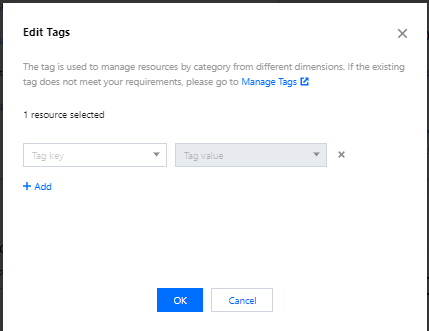
3. In the Edit tag pop-up window, select target instance tags as shown below:

4. Click OK.
5. After a message indicating that the edit was successful is prompted, click OK.

Removing instance tag

1. In Instance information, click

after Tag.
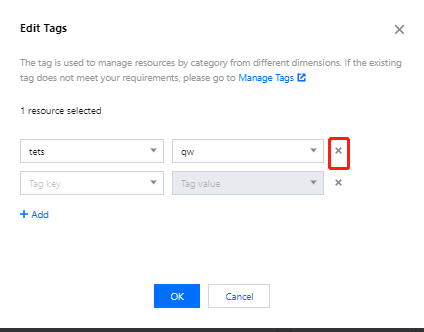
2. In the Edit tag pop-up window, click

after the target tag as shown below:

3. Click OK.
4. After a message indicating that the edit was successful is prompted, click OK.

References

도움말 및 지원

문제 해결에 도움이 되었나요?

피드백