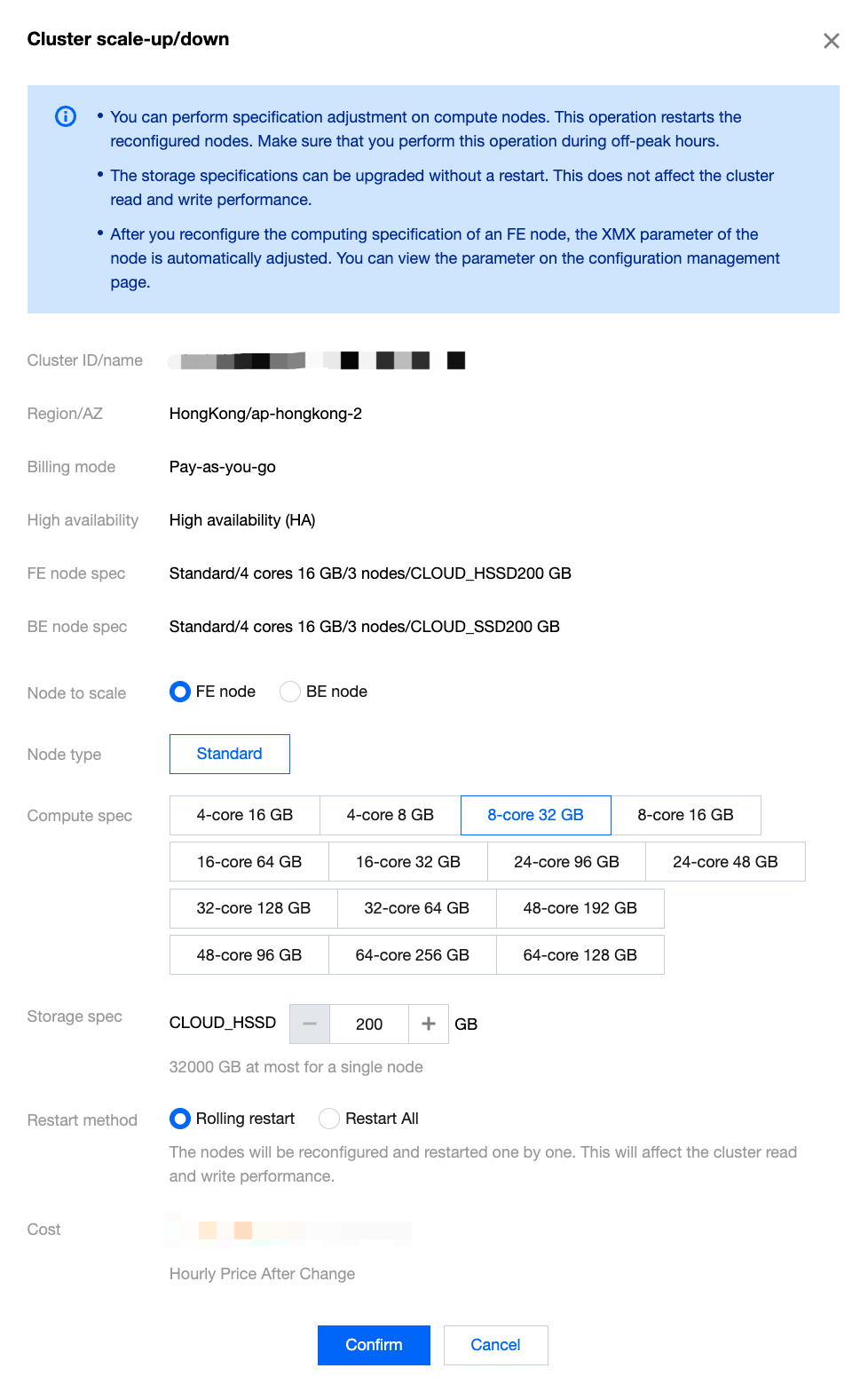
You can use the configuration adjustment feature to adjust the specifications of all FE/BE nodes within the cluster. The compute nodes will restart all nodes of the same type, making the system unreadable and unwritable. Please proceed during off-peak business hours. Upgrading the storage configurations will not affect the cluster's usage.
Note:
Standard nodes support both computing configuration adjustment and scaling up of storage configurations.
High-performance nodes do not support scale-up and scale-down in either compute or storage specifications.
Operation Guide
1. Log in Tencent Cloud TCHouse-D Console, and select Operation > Scale up/down in the cluster where the operation is needed.
2. In the Scale up/down pop-up for the cluster, select the type of node, computing configuration, and storage configuration to adjust.
When scaling up, the computing configuration and storage configuration of nodes can be independently or simultaneously scaled up.
For scaling down, the compute configuration of nodes can only be separately scaled down.
If the scaling involves a change in compute configuration, the relevant nodes need to be restarted. You can choose either rolling restart or full restart as needed. If only the storage configuration is changed, no restart is required.
3. Click Confirm. The cluster will start the scaling operation, which generally takes 5 to 15 minutes.