Setting Instance Project
다운로드
포커스 모드
폰트 크기
TencentDB for SQL Server supports assigning instances to different projects for management.
This document describes how to modify the project of an instance in the console.
Directions
1. Log in to the TencentDB for SQL Server console.
2. In the instance list, find the target instance and click the Instance ID to enter the Instance Details page.
3. Click Switch to Another Project next to the Project, to assign the instance to a project.

Read-only instances are associated instances of the primary instance and should be in the same project as the primary instance.
Assigning and moving database instances across projects will not affect the services provided by the instances.
You need to specify a project to which a new instance belongs when purchasing it. The default is Default Project .
Assigned instances can be reassigned to other projects through the Switch to Another Project feature.
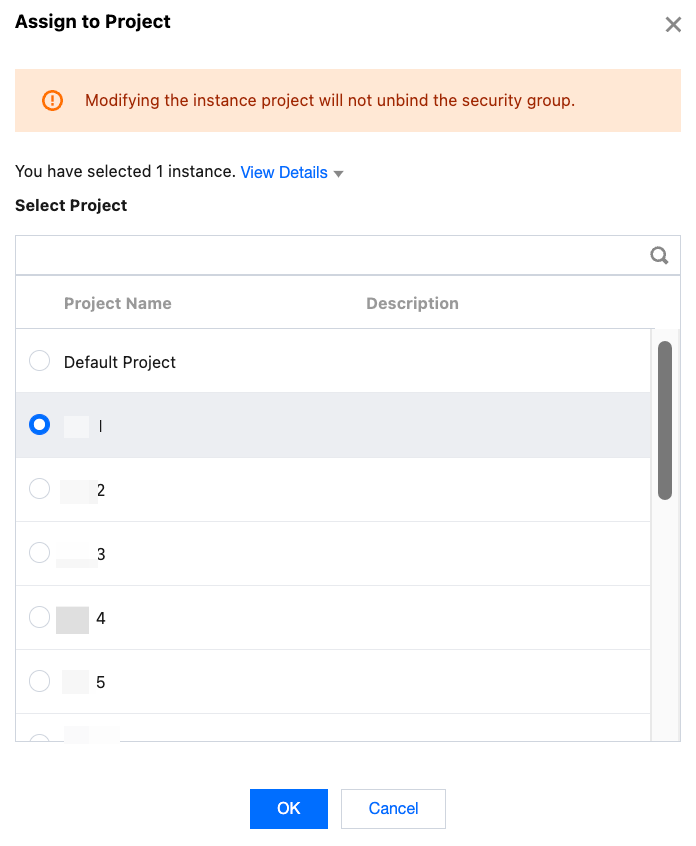
4. In the pop-up window, select the project to which the instance is assigned and click OK .
Note:
Changing the project of an instance will not unbind security groups.
Related APIs
API | Description |
This API is used to modify the project to which a database instance belongs. |
피드백