From Pay-as-You-Go to Monthly Subscription
다운로드
포커스 모드
폰트 크기
TencentDB for SQL Server supports billing pattern conversion, currently only from pay-as-you-go to annual and yearly/monthly subscription. TencentDB for SQL Server enables this billing pattern conversion by generating renewal orders. Please make sure to pay the renewal order on time to ensure the conversion is successful.
Note:
Rest assured that access to your business will not be affected during the billing switch from pay-as-you-go to yearly/monthly subscription.
Operation step
1. Log in to the TencentDB for SQL Server console, select the desired instance in the Instance List, and in the Operations column, choose More > Switch to Yearly/Monthly Subscription.
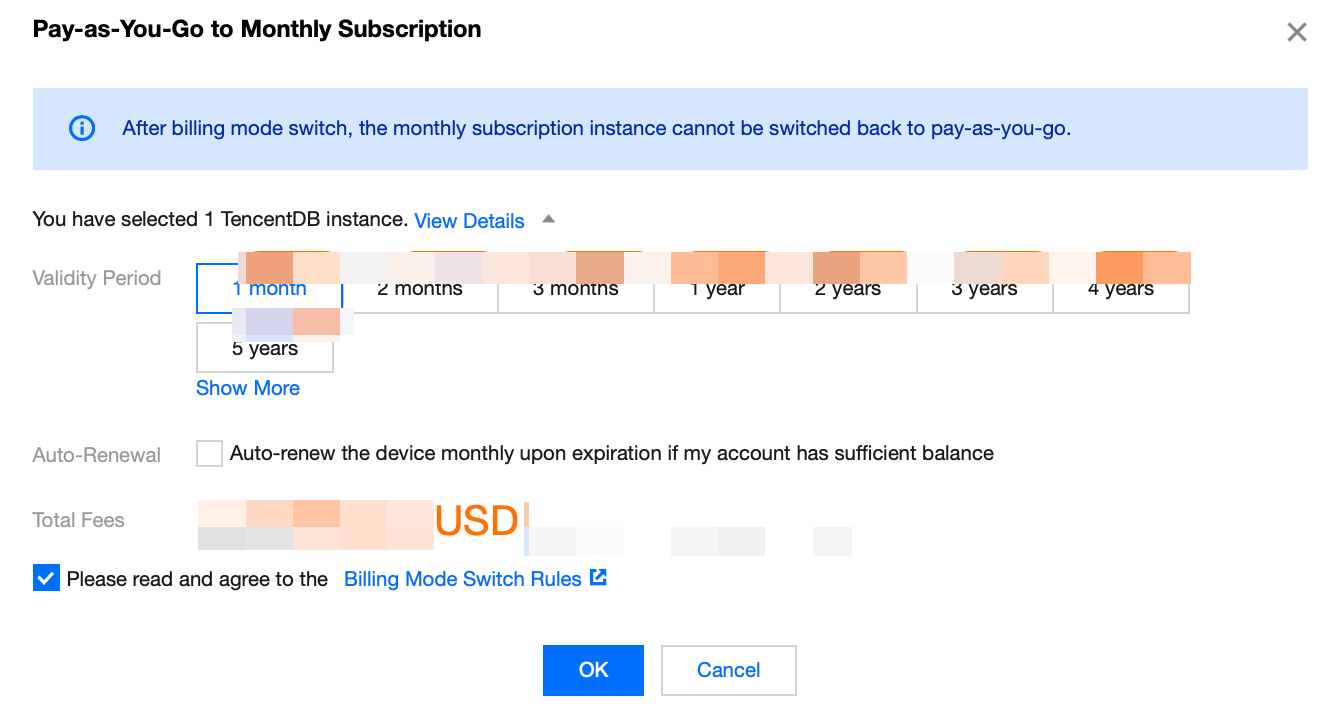
2. In the pop-up window, select the renewal duration, check the box to agree to the rules, and click OK.
Note:
You can also select auto-renewal to automate your subsequent renewals.
Once a pay-as-you-go instance is converted to an annual and yearly/monthly subscription instance, it cannot be switched back to a pay-as-you-go instance.
피드백