Read-Only DR Instance Overview
다운로드
포커스 모드
폰트 크기
Basic Concepts
Read-Only Instance
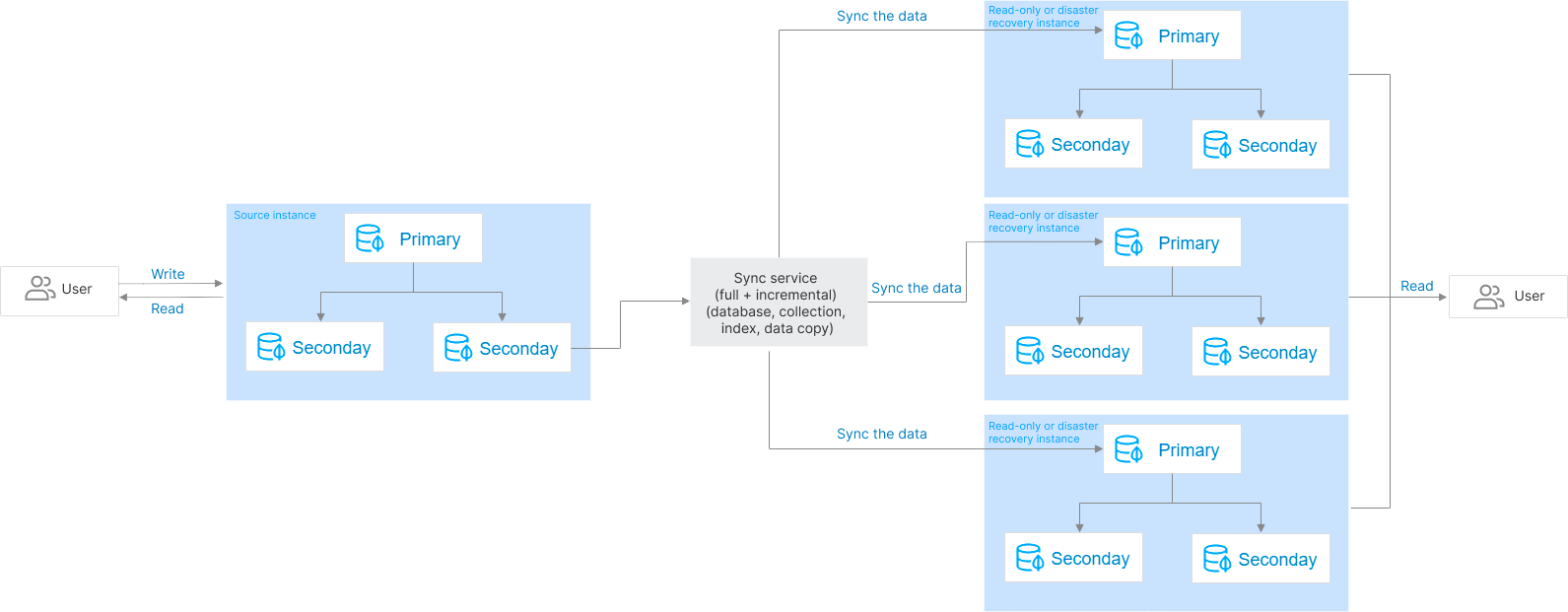
TencentDB for MongoDB allows you to create one or multiple read-only instances in the source instance AZ or other AZs based on the cluster architecture and storage engine of the source instance. The data in the source instance will be automatically synced to read-only instances, which are granted the read-only permission. This helps distribute read requests from the source instance to read-only instances, improving read/write performance and increasing application throughput.
Disaster Recovery Instance
TencentDB for MongoDB allows you to create one or multiple disaster recovery instances in another region based on the cluster architecture and storage engine of the source instance. The data in the source instance will be automatically synced to disaster recovery instances, which are granted the read-only permission. When the region of the source instance is disconnected due to a force majeure event such as power outage or network issue, a disaster recovery instance can be promoted to primary instance to implement cross-region disaster recovery and quickly sustain business needs. This helps you improve the business continuity at low costs and guarantee the data reliability.
Differences between read-only instance and disaster recovery instance
Both read-only and disaster recovery instances are built based on the cluster architecture and storage engine of the source instance. They have the following differences:
Difference | Description | Read-Only Instance | Disaster Recovery Instance |
Architecture type | The system architecture of a read-only or disaster recovery instance cluster, which can be replica set or sharded cluster but not single-node. | Same as that of the source instance. | Same as that of the source instance. |
Cross-region | Whether a read-only or disaster recovery instance can be created in another region based on the source instance. | No | Yes |
Cross-AZ | Whether a read-only or disaster recovery instance can be created in another AZ in the current region based on the source instance. | Yes | Yes |
Database version | Database versions compatible with Mongo include 6.0, 5.0, 4.4, 4.2, and 4.0. | Consistent with the source instance and cannot be upgraded. | Consistent with the source instance and cannot be upgraded. |
Storage engine | The storage engine, which is WiredTiger by default. | Same as that of the source instance. | Same as that of the source instance. |
Instance specifications | The CPU, memory, and disk capacity requirements of a read-only or disaster recovery instance to guarantee the service capacity. | Cannot be lower than those of the source instance. | Cannot be lower than those of the source instance. |
Data write | Data write and database creation and deletion | No | No |
Backup and rollback | Back up data and restore data from backups. | No | No |
Account management | Create or delete database access accounts. | No | No |
Manual disassociation from the source instance | Whether you can manually disassociate a read-only or disaster recovery instance from the source instance in the console. | Not supported. The association between the read-only instance and the source instance is automatically released only after the source instance is terminated. The read-only instance can be promoted to a standard instance and then support normal reads and writes. | Supported. You can promote a DR instance to a standard instance in the console. After promotion, the DR instance becomes a standard instance and supports normal reads and writes, quickly meeting business requirements. |
AZ upgrade | Whether the single-AZ deployment of a read-only or disaster recovery instance can be upgraded to multi-AZ deployment. | Yes | Yes |
How It Works
Read-only and disaster recovery instances can be understood as a data sync service, which continuously syncs the existing and incremental data (including databases, collections, indexes, and documents) of the source instance to the target read-only or disaster recovery instance and grants the target instance only the read-only permission to relieve the pressure on the source cluster.
Once a read-only or disaster recovery instance is created, full data sync will be initiated, and data sync operations will be logged as oplog. After full data sync is completed, the oplog can be replayed to keep incrementally syncing changed or added data. This works similarly to primary-secondary sync in a replica set. The entire process has two stages:
Full sync stage, where full data is synced. Before it starts, the latest oplog timestamp of the source cluster will be recorded. After it starts, the metadata, indexes, and data in all collections in the source cluster will be read and concurrently inserted to collections with the same name in the target. The duration of full sync is proportional to the data volume of the source cluster.
Incremental sync stage, which follows the full sync stage. During this stage, the oplog of the source cluster will be pulled based on the oplog timestamp recorded when the full sync stage starts and then replayed in the target.
Latency description
Due to the delay in data sync, the real-timeness of data sync for read-only instances may not be guaranteed. If your business requires read/write separation and high real-timeness, we recommend that your business read the secondary nodes of the primary instance. For more information, see Connecting to TencentDB for MongoDB Instance. You can log in to the console and go to the RO/DR page to view the status and latency of sync from the primary instance to the target instance.

Performance optimization
Similar to the concurrent replay of oplogs in a MongoDB replica set, the read-only disaster recovery data sync service pulls oplogs to the cache, parses them concurrently, hashes them by table name to ensure table-level order, then linearly hashes each Oplog segment by document ID and assigns oplogs of the same document to the same thread for processing. The threads are replayed to the target in parallel to ensure the performance of incremental data sync, with a sync latency of seconds.
Data security
During incremental sync, the sync service persistently stores the currently synced latest oplog timestamp, and the replay process of the sync service is idempotent. Therefore, the sync service supports checkpoint restart during the incremental sync stage. Even if a failure occurs in the source or target cluster, data security issues won't occur in the sync service.
During incremental data sync, if a primary/secondary switch occurs in the target cluster due to a disk failure or network issue, data may get lost. To address this problem, TencentDB for MongoDB adds an oplog that records the sync progress. The data sync service regularly inserts a sync progress record into the oplog transactions of the target cluster. After a new primary node takes effect, it will locate the latest record in its oplog transactions and sync the data again to prevent data loss.
Sync stability
Each read-only or disaster recovery instance is sustained by a separate data sync service, and each data sync service uses distributed locks and the lease mechanism to guarantee the service uniqueness and availability, monitors the sync task in real time, and fine-tunes the instance regularly to guarantee the data sync stability and reliability.
Impact and Limits
Impact on the source cluster
The impact of the read-only and disaster recovery data sync service is only limited to secondary nodes, and data will be pulled from a secondary node (hidden one preferably) in the source cluster.
During full data sync, the
During incremental data sync, the
During both the full and incremental data sync stages, the sync service will create a cursor for sequential reads on the secondary node to mark the read progress, which has little impact on the secondary node.
Use limits
Read-only and disaster recovery instances are attached to the source instance and cannot exist independently.
Read-only and disaster recovery instances will be unwritable after being created.
After the source instance is terminated, the system will automatically disconnect the sync service and promote a read-only instance to general instance for normal read/write.
Database version: Read-only and disaster recovery instances in a sharded cluster are supported only for version 4.0 and later, while those in a replica set architecture are supported for version 3.2 and later. If a read-only or disaster recovery instance exists for the current instance, upgrading the database version of the current instance is not allowed. Read-only and disaster recovery instances cannot be upgraded either.
Quantity: You can create up to three read-only instances and up to three disaster recovery instances for an instance.
Cluster architecture and storage engine: The cluster architecture and storage engine of a read-only or disaster recovery instance are always the same as those of the source instance and cannot be changed.
Account management: When a read-only or DR instance is created, the account information of the source instance is automatically synced. After the read-only or DR instance is created, if the account or password for accessing the source instance is changed, the password is automatically synced.
Due to network isolation, you cannot create disaster recovery instances in finance zones for source instances in general regions, and vice visa.
Backup and rollback: They are not supported for both read-only and disaster recovery instances.
Data migration: Migrating data to read-only or disaster recovery instances is not supported.
Sync limits
Read-only or disaster recovery instance sync in a replica set is implemented by parsing oplogs, and all DDL operations are supported.
Read-only or disaster recovery instance sync in a sharded cluster is implemented by parsing change streams. A change stream covers an oplog with a layer of application and provides an API to push data in real time. In addition to basic CRUD operations, DDL operations related to database/collection structures and indexes are also supported for the pushed data, including
Billing Overview
Read-only and DR instances are billed in the same way as source instances. You can choose a billing mode based on your actual business needs, with prepaid yearly/monthly subscription billing and postpaid pay-as-you-go billing supported. Billable items include compute and storage resources. For more information, see Billing Overview.
피드백