Role Management
Download
Focus Mode
Font Size
Use Cases
In TencentDB for MongoDB, a Role is an abstract collection of privileges. All data access permissions for an account are obtained by binding roles. MongoDB provides a set of built-in roles to meet general authorization requirements. When the built-in roles cannot cover fine-grained authorization scenarios for your business, you can create custom roles. These custom roles combine the required actions and Resource scopes to achieve fine-grained authorization at the database/collection level or even the command level. This approach is applicable to the following scenarios:
Collection-Level Permission Isolation: When your business requires independent read/write isolation for different collections within the same database (for example, allowing only read access to
order_main and write access to order_log under an order database), use custom roles to precisely restrict permissions to the target collections. This avoids the over-privilege that can result from using coarse-grained roles like readWrite.Command-Level Permission Control: When your business requires accounts to perform only specific operations (for example, only
find and insert, but not drop or update), use custom roles to combine specific Actions. This strictly confines the permission scope to the exact set of commands your business actually needs.Permission Template Reuse and Inheritance: Package common permission combinations (for example, an "Ops Query Role" that includes read-only permissions for multiple frequently queried databases) into a custom role. New accounts can then be directly bound to this role. This avoids repetitive configuration and ensures that all bound accounts are updated synchronously when the role's permissions are adjusted.
Managing Existing Kernel Roles: Custom roles created directly in the MongoDB kernel via mongo shell or drivers can be centrally viewed and managed in the console. This facilitates the inventory of role assets after migration to the cloud.
Feature Description
The Role Management module provides two types of capabilities: role viewing and full lifecycle management of custom roles.
Role Viewing: The role list centrally displays all built-in and custom roles, including information such as role name, category, and authorization scope.
Creating a Custom Role: A new custom role is generated by combining permissions from six sources: global roles, database roles, custom role inheritance, global Actions, database Actions, and collection Actions.
Modifying a Custom Role: Adjust the permission items already configured for a custom role. After modification, the changes take effect synchronously for all accounts bound to that role.
Deleting a Custom Role: Clean up custom roles that are no longer in use to free up the role namespace.
Note:
The MongoDB RBAC permission model consists of four elements: User (account), Role, Privilege, and Resource. Here, Privilege = Action (operation command) + Resource (resource scope). Role management operates on Role objects. The binding operation between an account and a role is completed when you create an account or modify account permissions.
Notes
After creating, modifying, or deleting a role, the system requires 2 minutes for background configuration to take effect. Please wait a moment before using the relevant account to connect to the database.
Custom roles created via the console are stored in the
admin database by default. Custom roles created directly in a non-admin database via mongo shell or drivers are also supported for display and management in the role list.Built-in roles are provided by MongoDB. They can only be viewed and do not support modification or deletion.
Modifying the permissions of a custom role synchronously affects all accounts bound to that role. Before making modifications, confirm the account list and business impact scope.
Prerequisites
The status of the replica set instance or sharded instance of TencentDB for MongoDB is Running.
You have planned the authorization scope for the custom role and identified the databases, collections, or operation commands that need to be covered.
If you need to combine multiple existing roles via "custom role inheritance", confirm the permission scope of the roles to be inherited in advance.
Role Category Description
When an account or a custom role is created, the selectable roles fall into three major categories: database roles, global roles, and custom roles. The resource constraints and selectable scopes for these three types of roles are shown in the table below.
Role Category | Scope | Use Cases |
Database roles | All collections within a single database | Single-database read/write, single-database management |
Global role | All databases within an instance or the entire cluster | Cross-database read/write, cluster management, backup and recovery |
Custom role | Determined by the role definition, and can be scoped down to the collection and Action level. | Fine-grained authorization at the database/table level, permission control at the command level |
Database roles
Database roles apply to a single database. They are commonly used to grant read and write permissions to regular business accounts.
Role name | Feature Description | Typical Use Cases |
read | Performs query operations within the specified database and can read data from all non-system collections. | Business read-only accounts, report query accounts, operational data query accounts. |
readWrite | Performs reads and writes within the specified database, including queries, inserts, updates, deletes, and collection management. | Business read-write accounts are the most commonly used application access role. |
dbOwner | Has the highest permissions within the specified database, includes all capabilities of readWrite, and can perform user management and DMC operations. | Single-database administrators, independent business line DBAs. |
userAdmin | Manages accounts and roles (create, modify, delete) within the specified database but does not have data read/write capabilities. | Database permission administrators, with their duties separated from those of data users. |
dbAdmin | Performs administrative operations within the specified database, such as creating an index, viewing statistics, and modifying collection structures, but does not have data read/write permissions. | Performance optimization personnel, DBA Ops accounts. |
Global Roles
Global roles apply to all databases within an instance or the entire cluster. They are categorized into four groups based on authorization strength, from low to high. You can select the most appropriate group according to your business scenario.
Group 1: Cross-Database Read/Write and Management
Role name | Feature Description | Typical Use Cases |
readAnyDatabase | Has read permissions on all databases within the instance, which is equivalent to binding the read role on each database. | Global read-only accounts, cross-database report analysis accounts. |
readWriteAnyDatabase | Has read and write permissions on all databases within the instance, which is equivalent to binding the readWrite role on each database. | Cross-database business accounts, data migration accounts. |
userAdminAnyDatabase | Has account and role management permissions on all databases within the instance but does not have data read/write capabilities. | Global permissions administrator. |
dbAdminAnyDatabase | Has administrative operation permissions (index, statistics, collection structure) on all databases within the instance but does not have data read/write capabilities. | Global DBA Ops accounts. |
Group 2: Super-Administrator Roles (Grant with Caution)
Attention:
The super-privileged roles (
root and __system) can perform any operation on an instance. It is recommended to grant these roles only for short periods in specific scenarios such as emergency Ops or migration. They are not recommended for long-term assignment to business accounts. The directShardOperations command bypasses the unified routing of mongos. Misuse may cause the cluster to malfunction or even result in data corruption. Use this command only under the guidance of Tencent Cloud technical support.Role name | Feature Description | Typical Use Cases |
root | Has permissions for almost all built-in roles of the instance and can perform any operation on the instance. | Emergency Ops, failure handling. Not recommended for long-term assignment to business accounts. |
__system | An internal MongoDB-specific role that can perform any operation on any object within the cluster. | For MongoDB internal system use only. Not recommended for assignment to any user account. |
Group 3: Cluster Management
Attention:
The
directShardOperations command bypasses the unified routing of mongos. Misuse may cause the cluster to malfunction or even result in data corruption. Use this command only under the guidance of Tencent Cloud technical support.Role name | Feature Description | Typical Use Cases |
clusterManager | Performs management and monitoring operations on the cluster (for example, configuring shards, adding nodes), but does not include data access permissions. | Cluster Ops accounts. |
clusterAdmin | The highest cluster management privilege, combining all capabilities of the clusterManager, clusterMonitor, and hostManager roles. | Cluster-level administrator. |
clusterMonitor | Performs read-only monitoring access to the cluster, and can view cluster running status, node information, slow logs, and so on. | Monitoring collection accounts, inspection accounts. |
hostManager | Performs Ops operations on servers in the cluster (such as disabling nodes and refreshing configurations). | Cluster Ops accounts. |
directShardOperations | Allows direct connection to shard nodes to execute Ops commands (supported only in MongoDB version 8.0 and above). | Use only during maintenance operations or under the guidance of Tencent Cloud technical support. Misuse may cause cluster exceptions or data corruption. |
enableSharding | Allows enabling sharding for databases and performing sharding operations on collections. | Sharded cluster initialization account. |
searchCoordinator | Cluster permissions required for coordinating search workloads such as Atlas Search. | Ops accounts for Atlas Search scenarios. |
Group 4: Backup and Recovery
Role name | Feature Description | Typical Use Cases |
backup | Provides the minimum set of permissions required to perform a full backup of an instance using a backup tool (such as mongodump). | Account for backup tools. |
restore | Provides the set of permissions required to restore backup data to an instance using a recovery tool (such as mongorestore). | Account for restore tools. |
Operation Steps
Step 1: Go to the Role Management Page
1. Log in to the TencentDB for MongoDB console.
2. In the left sidebar, expand the MongoDB dropdown list, and select either Replica Set Instance or Shard Instance (the operations for both are similar).
3. Select a region at the top of the instance list page.
4. Locate the target instance in the instance list.
5. Click the target instance ID to go to the Instance Details page.
6. Select the Database Management tab, click Role Management, and go to the role list page.
Step 2: View the Role List
The role list page centrally displays all built-in and custom roles for the current instance. The table below describes the list fields.

Field Name | Field Description |
Role Name | The unique identifier of a role. Built-in role names are MongoDB standard role names (such as readWrite).A custom role name is the name set during its creation. |
Role Type | The value can be one of the following three types: Database Roles, Global Role, or Custom Role. |
Database | The name of the database to which the role belongs. For global roles and some specific built-in roles, they usually belong to the admin database. |
Authorized Roles and Command | This field is displayed only for custom roles, listing the roles inherited by this role and the directly configured Action list. For built-in roles, this field is '--'. |
Operation | Custom roles support modify and delete operations, while built-in roles only support view operations. |
Note:
The default sorting rules for the list are as follows:
Custom roles are listed first to help users prioritize identifying business-specific role assets.
Roles of the same category are sorted in ascending alphabetical order by role name.
Step 3: Create a Custom Role
On the role list page, click Create Role. In the Create Role window, complete the following configurations and then click OK to finish creation. After waiting for 2 minutes for the system configuration to take effect, you can select this custom role when creating an account or modifying account permissions.
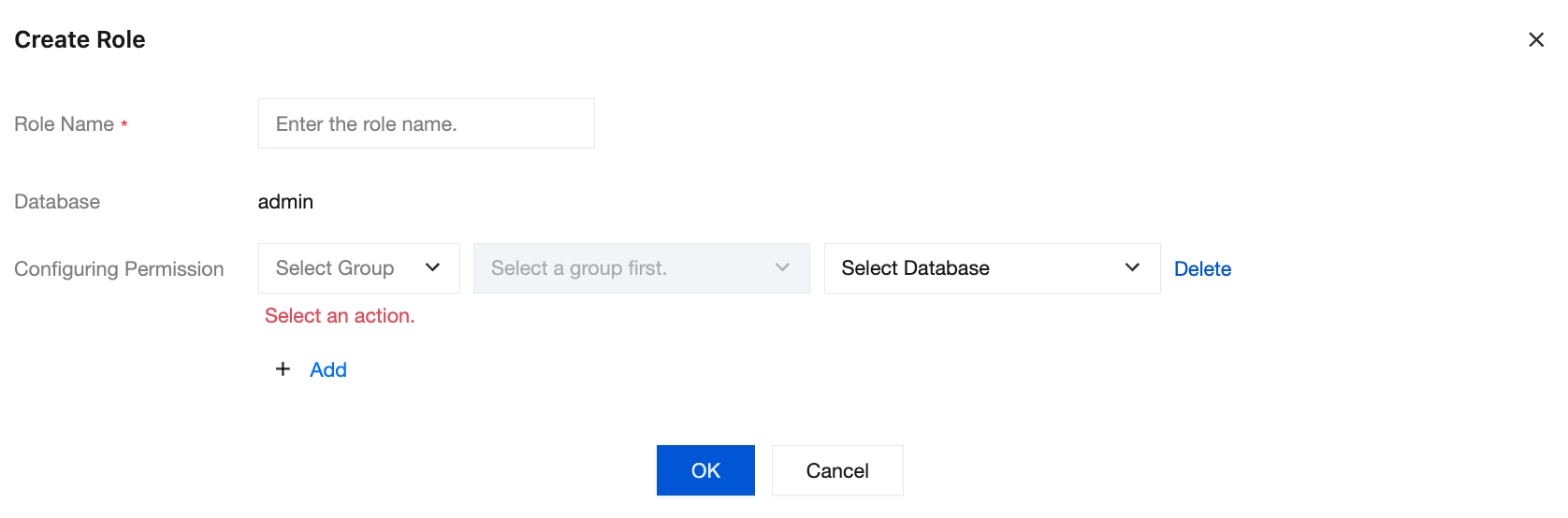
1. Role Name: In the input field, specify a name for the custom role. The role name cannot be modified after creation.
The character length must be 1 - 32.
Only letters (A - Z, a - z), digits (0 - 9), underscores (_), and hyphens (-) are supported. For example,
audit_readonly.Attention:
Custom role names must be unique within the same instance and cannot duplicate MongoDB built-in role names.
2. Configuring Permission: Permissions for a custom role are derived from the following six sources, which can be used individually or in combination.
Click Add to add an authorization record for the same role, enabling the overlay of permissions from multiple sources.
When selecting Database Role and Database Operation, you can click Create in the Select Database dropdown to directly pre-configure authorization records for the new database. The newly created item will be placed at the top of the list.
When selecting Collection Action, you can click Create in the Select Database and Select Collection dropdowns respectively to directly pre-configure authorization records for the new database and collection. The newly created item will be placed at the top of the list.
Note:
The "Create Database" and "Create Collection" operations here only pre-configure authorization records in the console and do not immediately create physical resources in MongoDB. Physical resources are automatically created by MongoDB when data is first written to them.
Permission Source | Description | Difference from Directly Binding a Role to an Account |
Global Role | Inherits permissions from one or more system-defined global roles, and its permissions apply to all databases within the instance. | |
Global Operations | Grants management permissions at the global level by operation command (Action) granularity (such as listDatabases and shutdown). | This granularity is not supported when a role is directly bound to an account. |
Database Role | Inherits permissions from one or more database-specific roles, and its permissions apply to the specified database(s). | |
Database Operation | Grants management permissions at the specified database level by operation command (Action) granularity (such as listCollections and createCollection). | This granularity is not supported when a role is directly bound to an account. |
Operate collection | Grants data operation permissions for a specific Collection within a specified database by operation command (Action) granularity (such as find, insert, update, and remove). | This granularity is not supported when a role is directly bound to an account. |
Custom Role | Inherits permissions from one or more existing custom roles, enabling hierarchical nesting and reuse of permissions. Note: Custom role inheritance does not support circular references (for example, Role A inherits from B, and B inherits from A). The system performs validation and blocks such attempts during creation. |
Step 4: Modify a Custom Role
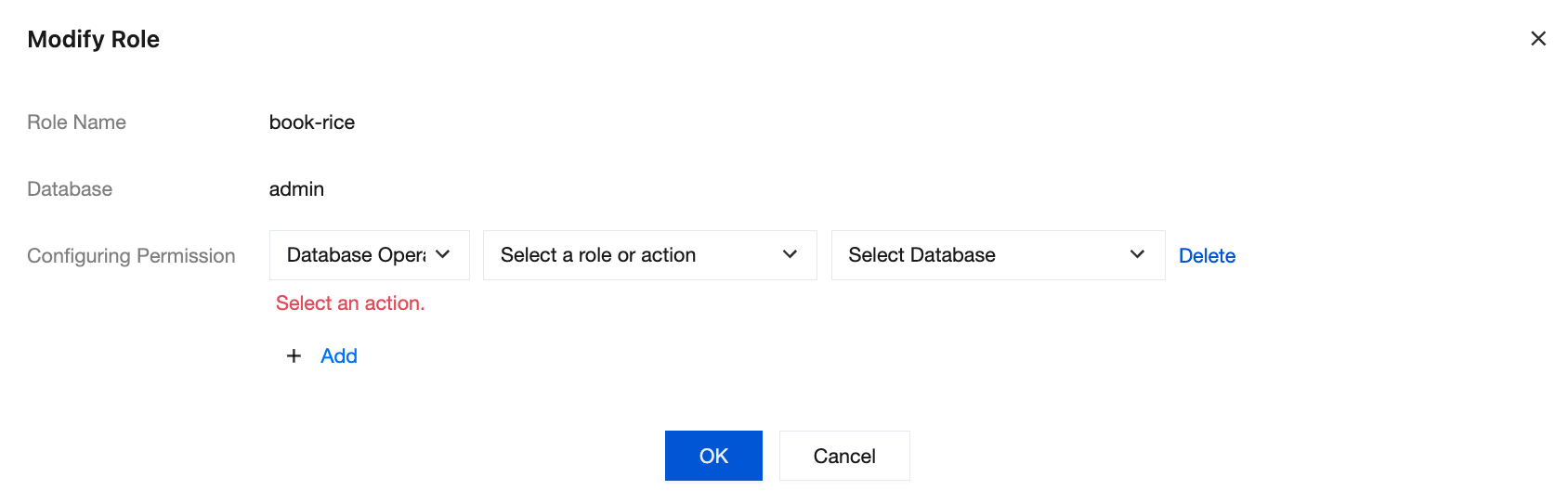
On the role list page, locate the target custom role and click Edit in the Actions column. In the Modify Role window, adjust the permission items. The modification process is the same as creating a custom role. After completing the modifications, click OK to save.
Non-modifiable Items: Role Name cannot be changed once created. To change a role name, delete the original role and create a new one.
Modifiable Items: You can edit and update the binding relationships and specific rules for its six types of permission sources (global roles, global operations, database roles, database operations, collection operations, custom roles).
Note:
After a role is modified or deleted, it is recommended to perform a connection and operation verification using the account bound to that role within 2 - 5 minutes to confirm that the permission changes meet expectations.
Step 5: Delete a Custom Role
On the role list page, locate the target custom role and click Delete in the Actions column. In the Delete Role window that pops up, confirm the operation.
Note:
Built-in roles are system-preset and cannot be deleted. Deleted custom roles cannot be recovered, so please operate with caution. Before a custom role is deleted, it is recommended to back up its permission configuration. You can use the "Permission Preview" feature to copy the corresponding MongoDB command line as a configuration backup.
Related APIs
API | Description |
DescribeInstanceRoles | Querying the role list of the current instance |
CreateInstanceRole | Creating a custom role |
UpdateInstanceRole | Modifying a custom role |
DeleteInstanceRole | Deleting a custom role. |
FAQs
What Is the Difference Between Built-In Roles and Custom Roles?
Built-in roles are provided by MongoDB and cover common authorization scenarios (such as
read and readWrite). Users can only view and use them but cannot modify or delete their permission definitions. Custom roles are created by users based on business needs. They support combining multiple permission sources (global roles / database roles / Actions / existing custom roles) and can be fine-grained down to the level of databases, collections, and individual operation commands. When built-in roles cannot meet the business's fine-grained authorization requirements, it is recommended to use custom roles.Can an Account Still Access the Database After a Bound Custom Role Is Deleted?
No. After a custom role is deleted, accounts bound to that role will immediately lose all permissions granted through it. Before a custom role is deleted, it is recommended to first confirm the binding relationships and complete role replacement or unbinding operations via Account Management.
Does a Custom Role Support Inheritance from Other Custom Roles?
Yes. When creating or modifying a custom role, you can select one or more existing custom roles from the "Custom Role" permission source. The permissions of the inherited roles are merged into the current role. However, the system does not allow circular references, meaning Role A cannot inherit a role that has already directly or indirectly inherited Role A.
Can a Custom Role Created via mongo shell Be Modified in the Console?
Yes. The console automatically identifies custom roles from non-
admin databases and displays them in the role list. Corresponding modification and deletion operations maintain data consistency between the console and the kernel. It is recommended to manage roles uniformly through the console to avoid permission discrepancies for identically named roles between the console and the kernel.How Long Does It Take for Modified Custom Role Permissions to Take Effect?
The background configuration takes 2 minutes to complete before it becomes effective. During this period, operations performed by accounts bound to this role are still subject to the original permissions. It is recommended to modify permissions during an off-peak service period and verify the adjustment results using a test account after the changes take effect.
Documentation
Help and Support
Was this page helpful?
You can also Contact sales or Submit a Ticket for help.
Help us improve! Rate your documentation experience in 5 mins.
Feedback