Single-AZ Upgrade to Multi-AZ
다운로드
포커스 모드
폰트 크기
Use Cases
During routine maintenance and architecture optimization, you can flexibly adjust the AZ deployment of your TencentDB for MongoDB instances based on business requirements. This feature is applicable to the following typical scenarios:
Implement cross-AZ disaster recovery deployment to enhance business high availability.
To ensure business continuity and data reliability, you can upgrade your single-AZ instance to a cross-AZ deployment. The primary and secondary nodes are distributed across different AZs, creating cross-data center disaster recovery. When the primary AZ fails, the system automatically performs failover to ensure high availability of the database service, meeting higher-level business disaster recovery requirements.
Coordinate with business migration and resource planning
When your business architecture undergoes cross-AZ migration or re-planning, you can also flexibly switch your database instance to the target AZ, simplifying Ops operations.
Notes
Note:
During the process of adjusting AZs, the billing method and network connection of an instance may differ depending on its architecture. The details are as follows:
Adjusting the AZ for a replica set instance does not change the existing billing mode, so you can proceed with confidence.
If a sharded cluster instance involves an increase in the number of Mongos nodes during the adjustment process and exceeds the free quota, corresponding fees may be incurred. Please refer to the console for the specific monetary amounts.
After the adjustment is completed, core attributes of the instance, such as specifications and connection addresses, remain unchanged. However, if you also switch the network type (for example, switch to a VPC), the private IP address of the instance will be changed. Your application needs to update the IP address in its connection configuration and reconnect to the database.
Notes
Attention:
Adjusting AZs triggers a primary-secondary switchover, during which the database experiences a momentary disconnection of approximately 10 seconds. We recommend performing this operation during an off-peak service period to avoid impacting your online services.
Prerequisites
The current status of the instance is Running.
Operation Steps
1. Log in to the TencentDB for MongoDB console.
2. In the left sidebar, choose MongoDB > Replica Set Instance or Shard Instance. The operations for replica set instances and sharded cluster instances are similar.
3. Select a region at the top of the instance list page.
4. Locate the target instance in the instance list.
5. Click the Instance ID to go to the Instance Details page.
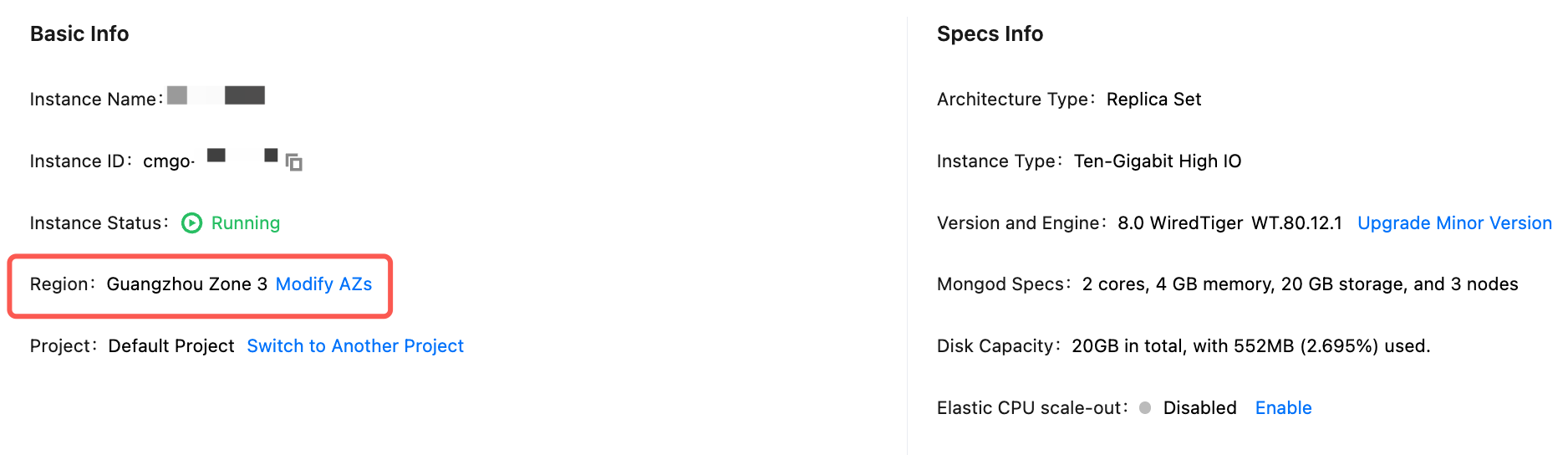
6. On the Instance Details page, click Modify AZs next to Region.
7. In the Modify AZs window, understand the impact of adjusting AZs. For a multi-AZ deployment instance, reconfigure the AZs for the primary node and secondary nodes respectively.
Attention:
Adjusting AZs triggers a primary-secondary switchover, resulting in a momentary disconnection of approximately 10 seconds. Perform this operation during an off-peak service period.
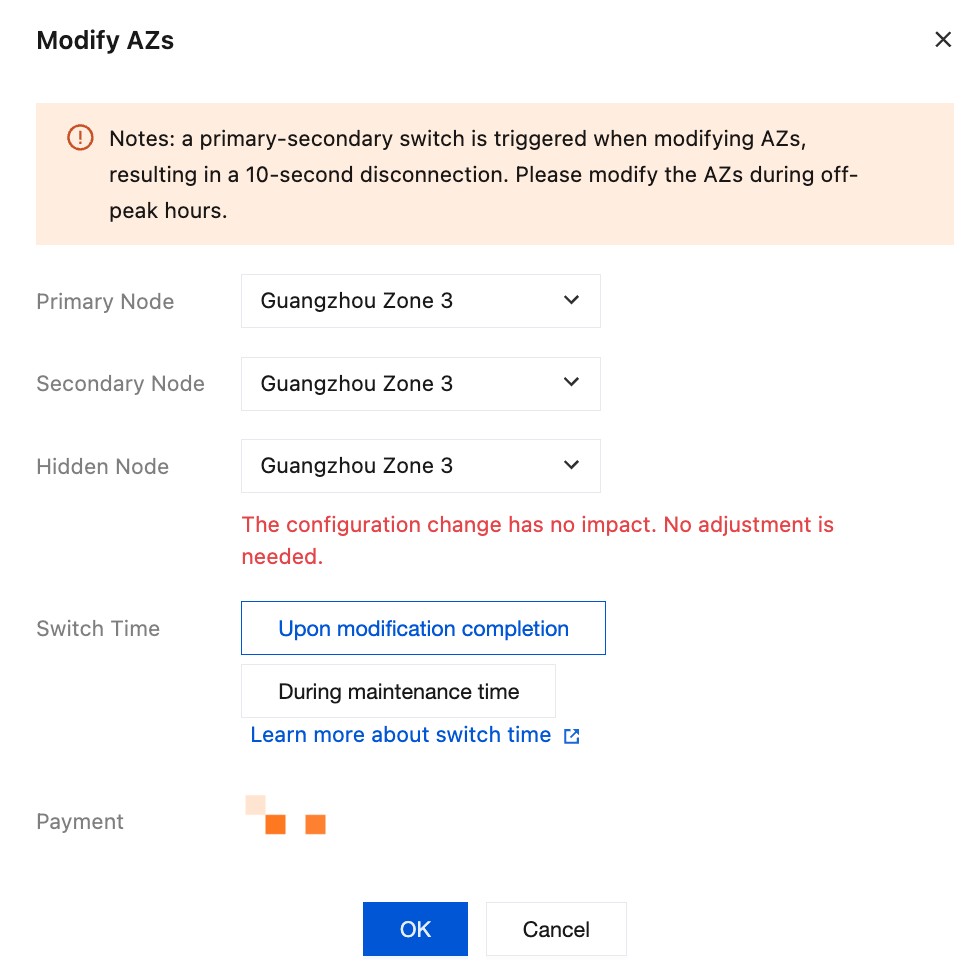
8. Select a time for the AZ switch task after Switch Time. Click Learn more about switch time to adjust the instance maintenance period based on your off-peak hours. For detailed operations, see Adjust Instance Maintenance Time.
Attention:
If a task is scheduled to run During maintenance time, avoid changing it to **Execute immediately** before the maintenance window begins. A conflict between these two modes will cause a system exception. Once a task is initiated, it cannot be stopped manually. To stop a task, submit a ticket to request it.
Upon modification completion: The system will immediately start switching AZs after the configuration is complete.
During maintenance time: The system will start switching AZs within the maintenance period you preset.
9. If a fee is incurred, confirm the Total Fee, click OK, and complete the operation.
10. The instance status changes to Switching AZs. Wait for the task to complete, and you can then view the adjusted AZs.
Recommendations
After adjusting AZs, to ensure optimal network performance, we recommend switching the instance's VPC subnet to the same AZ as your application service. This avoids the higher network latency caused by cross-AZ access. For detailed operations, see Switch Instance Network.
피드백