Intelligent Highlights Integration
Download
포커스 모드
폰트 크기
Highlights Feature Overview
The Highlights feature uses intelligent algorithms to automatically detect and generate highlight clips from videos, enabling users to quickly review and share key moments while helping improve the efficiency of post-production workflows.
Prerequisites
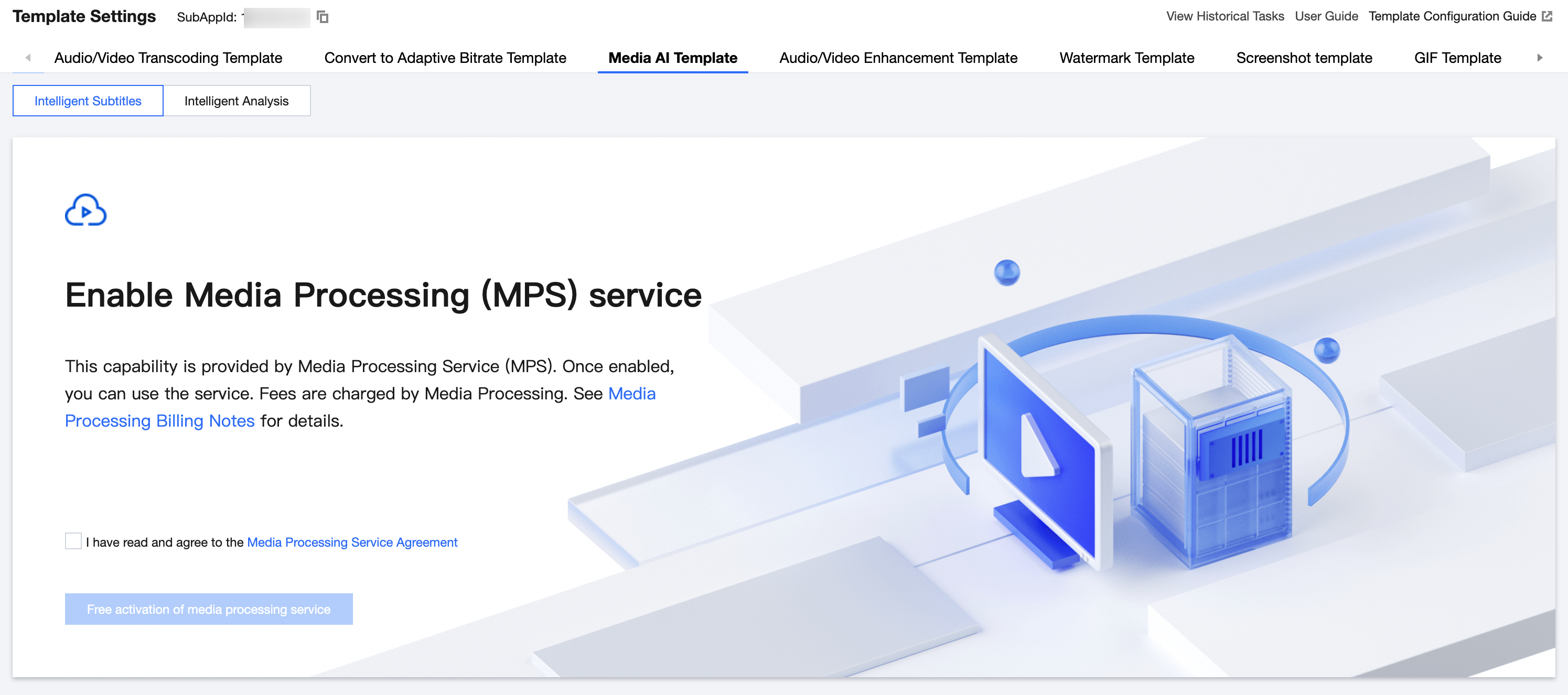
Before integration, you need to activate the MPS (Media Processing Service) on the Media Intelligence Template page. This can be found under Media Processing > Media Processing Template within the VOD (Video on Demand) Console.
Note:
The Highlights feature is powered by Media Processing Service (MPS). Before using this feature, you need to activate both VOD and MPS services.
Feature usage and billing information will be displayed on the Media Processing Service (MPS) platform. For pricing details, please refer to MPS Media AI pay-as-you-go billing.
Highlights Scenarios and Billing
The Highlights feature supports the following versions, which are designed for different video scenarios. For detailed pricing, please refer to the Pay-as-you-go Billing documentation.
Processing Type | Highlights Version | Description | Supported Video Scenarios | Billing |
Offline file processing | Highlights – LLM Version | Powered by large-model-based video understanding, this version automatically analyzes video content to extract key scenes and highlight moments. The video understanding prompt can be customized. | Custom scenarios; panoramic camera videos; VLOG videos; short drama, film, and TV scenarios | Billed as Highlights – LLM Version. |
Offline file processing | Highlights – Advanced Version | Uses advanced highlights algorithms and is mainly designed for sports event videos and gaming/e-sports videos. | Football matches; basketball games; gaming and e-sports videos; general scenarios | Billed as Highlights – Advanced Version. |
Offline file processing | Highlights – Basic Version | This model version will be discontinued starting from December 2025 and will only remain available to existing customers. | | Billed as Highlights – Basic Version. |
Live stream processing | Highlights – Live Stream Processing | Powered by large-model-based video understanding, with model optimization tailored for live streaming scenarios. | Broadcast and new media livestreams; online education livestreams; e-commerce livestreams; financial livestreams; football and basketball livestreams | Billed as Highlights – LLM Version. |
How to Use
Method 1: Use the Console
Initiate a Task
You can initiate a task on the Intelligent Media Asset Management > Audio/Video Management page in the VOD console.
1. Select the video for which you want to initiate a task, and click Media Processing.
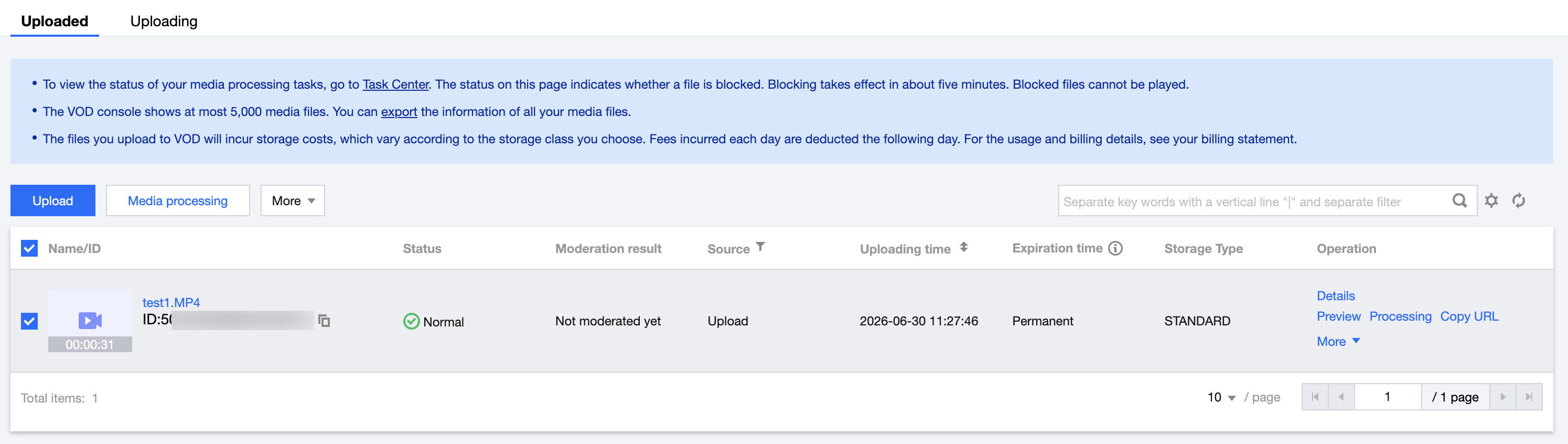
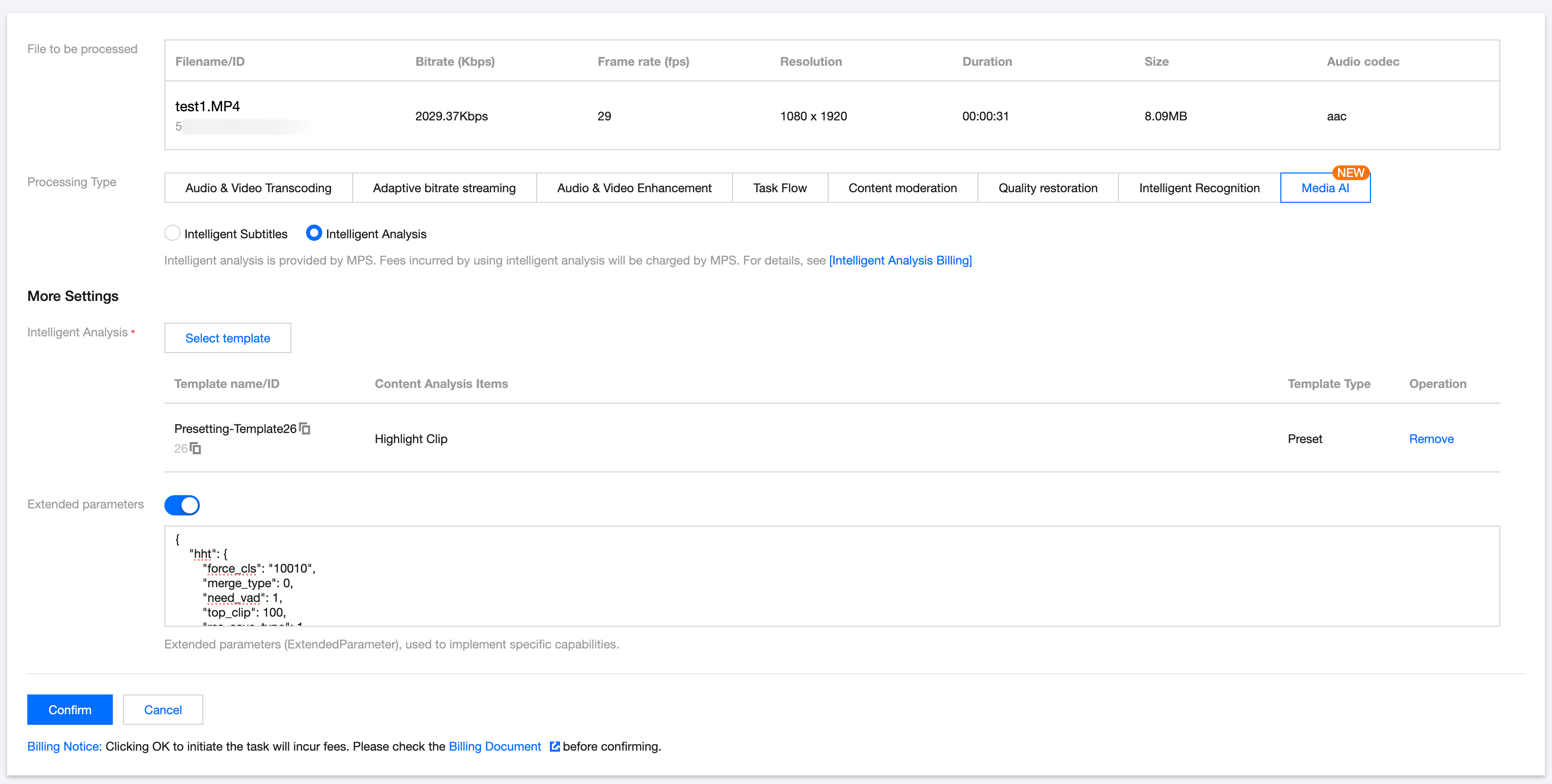
2. For the processing type, select Intelligent Analysis under Media AI. You can then select preset template No. 26 and, based on the Extended Parameter Description below, pass in the required parameters to initiate the task.
Note:
The console automatically escapes the input. Please directly pass in the JSON data instead of an escaped string. Otherwise, the task may fail.
View Task Results
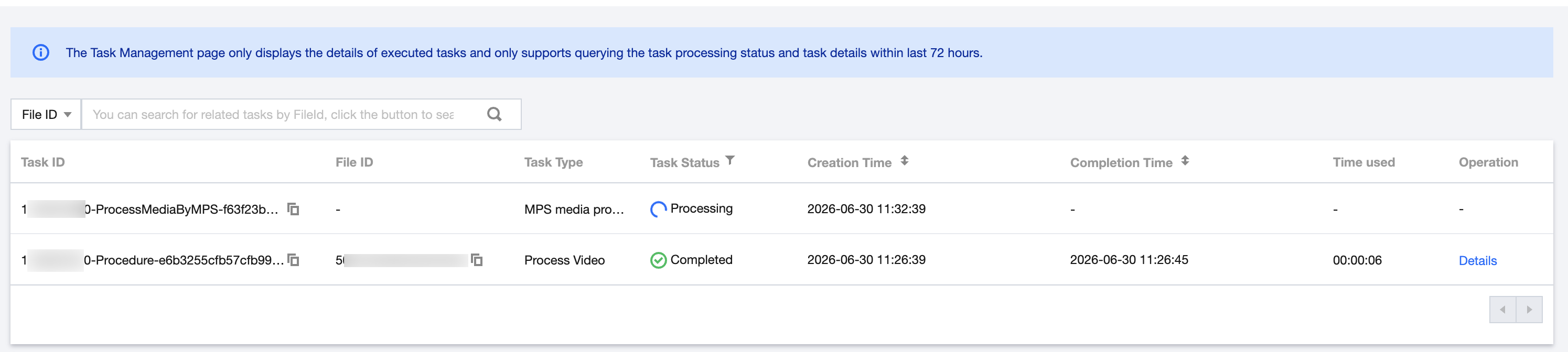
On the Task Center page in the VOD console, find the corresponding task and click Details to view the result.

You can also call the DescribeMediaInfos API to query the results stored in the media asset.
Note:
For tasks using the same template, only the latest task result is retained in the media asset.
Method 2: API Integration
Initiate a Task
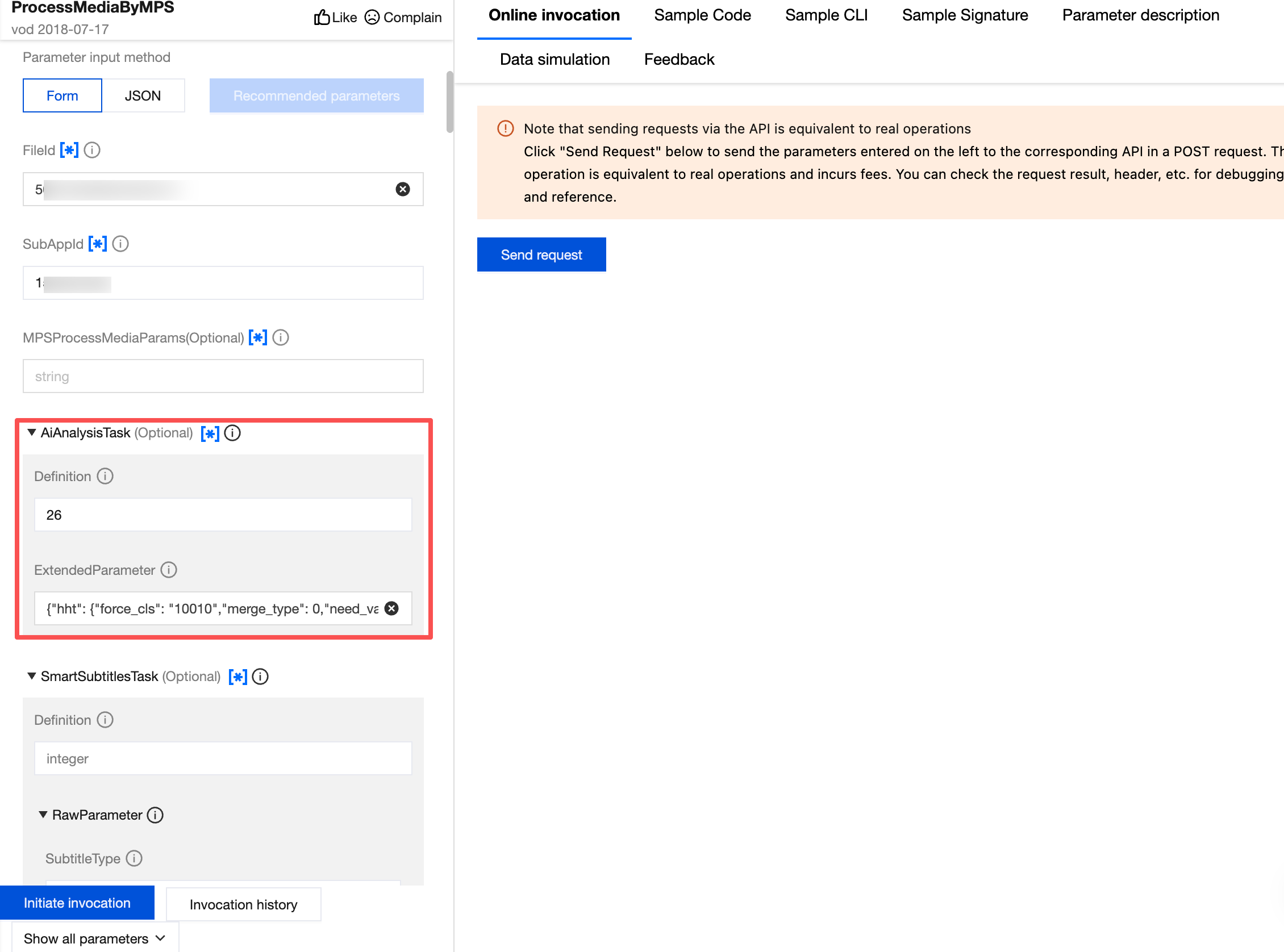
Call ProcessMediaByMPS. Enter the media asset ID to be processed in FileId, and enter the sub-application ID in SubAppId. In the AiAnalysisTask task, set Definition to 26 (preset template). You can configure ExtendedParameter with additional extended parameters as needed to enable specific capabilities.
The following is an example of the AiAnalysisTask parameter for a Highlights task:
{"Definition": 26,"ExtendedParameter":"{\\"hht\\": {\\"force_cls\\": \\"10010\\",\\"merge_type\\": 0,\\"need_vad\\": 1,\\"top_clip\\": 20,\\"res_save_type\\": 1}}"}
Querying Task Results
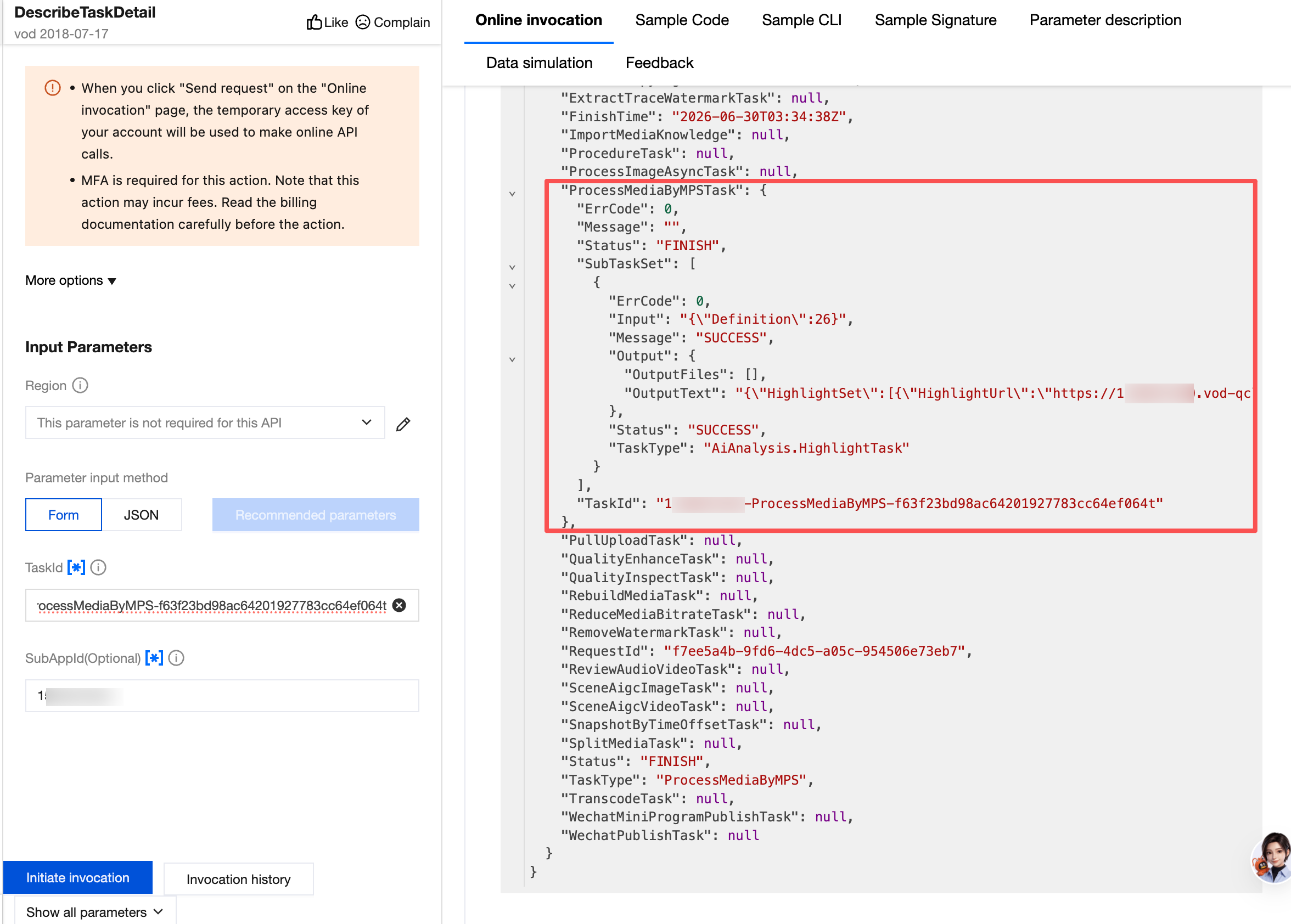
The generated results can be found within the output information of the API response.
Specify Offline Highlights Scenarios and Extended Parameter Examples
Currently, Highlights tasks can only be initiated using preset template No. 26. Custom templates are not supported for adjusting Highlights parameters.To specify the Highlights version, video scenario, or other parameter adjustments, you need to pass in additional extended parameters when initiating the task.The following are common Highlights scenarios and their corresponding extended parameter examples:
Note:
This example mainly describes the processing scenarios supported by the Highlights feature for offline file processing, along with corresponding extended parameter examples.
The example parameters may not deliver the optimal highlights result. We recommend fine-tuning the parameters based on the characteristics of your video. For professional support, please contact us.
Highlights – LLM Version
Custom Scenario
multimodal_prompt allows you to enter your custom prompt requirements. An example of the extended parameters is as follows:// Prompt example. You can customize it as needed. For detailed field definitions, see the appendix below.{"hht":{"top_clip":5,"force_cls":10020,"prompts":{"multimodal_prompt":"Skiing scenario. Output highlight moments featuring people."},"scenario":"Skiing","model_segment_limit":[3,6]}}
Panoramic Camera and VLOG Video Scenarios
Powered by large-model-based video understanding, this version is specifically optimized for multiple scenarios, such as VLOG videos, sports videos, landscape videos, and drone panoramic videos. It can accurately capture highlight moments during shooting and generate high-quality highlight clips. An example of the extended parameters is as follows:
// Highlights for standard videos. For detailed field definitions, see the appendix below.{"hht":{"top_clip":5,"force_cls":10020,"model_segment_limit":[3,6]}}// Highlights for panoramic videos. For detailed field definitions, see the appendix below.{"hht":{"top_clip":5,"force_cls":10020,"model_segment_limit":[3,6],"use_panorama_direct":1,"panorama_video":1}}
Short Drama, Film, and TV Series Scenarios
Powered by large-model-based video understanding, this version is specifically optimized for short drama, film, and TV series videos. It can automatically extract highlight clips, such as protagonist appearance moments and BGM moments, helping improve the efficiency of post-production workflows.
{"hht":{"force_cls":"10010","merge_type":0,"need_vad":1,"top_clip":100,"res_save_type":1,"scenario":"TV Series Highlights"}}
Highlights – Advanced Version
Football Match Scenario
Based on video content understanding, this version automatically identifies and extracts key action events from football match videos, including shots, goals, penalty kicks, red cards, yellow cards, replays, and other key action events.
{"hht":{"force_cls":"4001","merge_type":0,"need_vad":1,"top_clip":100,"res_save_type":1}}
Basketball Match Scenario
{"hht":{"force_cls":"4002","merge_type":0, "need_vad":1, "top_clip":100, "res_save_type":1}}
Appendix: Extended Parameter Field Description
Parameter | Required | Type | Description |
top_clip | No | int | Selects the highlight clips with the highest confidence scores. Default value: 5. Example: "top_clip":10 indicates that up to 10 highlight clips with the highest confidence scores will be output. |
force_cls | No | int | Specifies the highlight category: 10010: Short drama and TV series scenarios 4001: Football<br>4002: Basketball 1001: Honor of Kings 100101: Honor of Kings competition 1003: League of Legends 10020: LLM Highlights, suitable for custom video scenarios, VLOG/landscape video scenarios, and more |
need_vad | No | int | VAD is used to determine the end of a spoken sentence in the video. The VAD extension helps ensure complete speech in the output video. It is enabled by default. 1: Use VAD 0: Do not use VAD |
threshold | No | float | Confidence threshold. Clips below the threshold will be filtered out. Each highlight type has a default threshold setting. Note: We recommend that you do not set this parameter when using the feature for the first time. |
res_save_type | No | int | Specifies whether to store the result. Results are stored by default. 1: Store the result 0: Only output the time segments |
output_pattern | No | string | Output video naming format. {} indicates a placeholder.<br>{year}-{month}-{day}-{hour}-{minute}-{second}_{start_dts}-{end_dts}-{timestamp}-{session}.mp4Default output format: hht-{year}{month}{day}{hour}{minute}-{session}-{timestamp}-index.mp4 |
image_pattern | No | string | image-{start_dts}.jpgThe supported placeholders are the same as above. Default output format: hht-{year}{month}{day}{hour}{minute}-{session}-{timestamp}-index.jpg |
merge_type | No | int | Note: This parameter is available only for offline scenarios. Default value: 5003 indicates no merging, while other scenarios are merged by default. Specifies whether to merge the results into one video: 1: Merge. The top_clip parameter does not take effect.0: Do not merge. The merge_time parameter does not take effect. |
merge_time | No | int | Note: This parameter is available only for offline scenarios. Default value: 5003 indicates actual output duration, while the maximum duration for other scenarios does not exceed one hour. Specifies the output video duration when merging clips into one video. |
prompts | No | Object | Defines the prompt list. You can specify prompts to output the desired results. For usage, see the LLM example. |
scenario | No | string | Specifies the scenario. This parameter takes effect when force_cls is 10020. |
model_segment_limit | No | Array | Note: This parameter controls the expected model output duration. The actual output is still subject to the model result. Specifies the output video duration limit, which will be passed to the model as a reference rather than a mandatory value. This parameter takes effect when force_cls is 10020.Example: "model_segment_limit":[3,6] indicates that the expected LLM output segment duration is 3 to 6 seconds. |
prompts Structure
Parameter | Required | Type | Description |
multimodal_prompt | No | string | Prompt for the multimodal model. |
피드백