tencent cloud

TencentDB for PostgreSQL

Release Notes and Announcements
Release Notes
Product Announcements
Product Introduction
Overview
Features
Strengths
Scenarios
Information Security
Regions and AZs
Product Feature List
Large version lifecycle description
MSSQL Compatible Version
Billing
Billing Overview
Instance Type and Specification
Purchase Methods
Refund
Overdue Payments
Backup Space Billing
Database Audit Billing Overview
Getting Started
Creating TencentDB for PostgreSQL Instance
Connecting to TencentDB for PostgreSQL Instance
Managing TencentDB for PostgreSQL Instance
Importing Data
Migrating Data with DTS
Kernel Version Introduction
Kernel Version Overview
Kernel Version Release Notes
Viewing Kernel Version
Proprietary Kernel Features
Database Audit
Audit Service Description
Activating Audit Service
View Audit Logs
Modify audit services
Audit Performance Description
User Guide
Instance Management
Upgrading Instance
CPU Elastic Scaling
Read-Only Instance
Account Management
Database Management
Parameter Management
Log Management and Analysis
Backup and Restoration
Data Migration
Extension Management
Network Management
Access Management
Data Security
Tenant and Resource Isolation
Security Groups
Monitoring and Alarms
Tag
AI Practice
Using the Tencentdb_ai Plug-In to Call Large Models
Building Ai Applications with the Tencentdb Ai Plug-In
Combining Supabase to Quickly Build Backend Service Based on TencentDB for PostgreSQL
Use Cases
postgres_fdw Extension for Cross-database Access
Automatically Creating Partition in PostgreSQL
Searching in High Numbers of Tags Based on pg_roaringbitmap
Querying People Nearby with One SQL Statement
Configuring TencentDB for PostgreSQL as GitLab's External Data Source
Supporting Tiered Storage Based on cos_fdw Extension
Implement Read/Write Separation via pgpool
Implementing Slow SQL Analysis Using the Auto_explain Plugin
Using pglogical for Logical Replication
Using Debezium to Collect PostgreSQL Data
Set Up a Remote Disaster Recovery Environment for PostgreSQL Locally on CVM
Read-Only Instance and Read-Only Group Practical Tutorial
How to Use SCF for Scheduled Database Operations
Fix Table Bloat
Performance White Paper
Test Methods
Test Results
API Documentation
History
Introduction
API Category
Making API Requests
Instance APIs
Read-Only Instance APIs
Backup and Recovery APIs
Parameter Management APIs
Security Group APIs
Performance Optimization APIs
Account APIs
Specification APIs
Network APIs
Data Types
Error Codes
FAQs
Service Agreement
Service Level Agreement
Terms of Service
Glossary
Contact Us
문서TencentDB for PostgreSQLUse CasesImplementing Slow SQL Analysis Using the Auto_explain Plugin

Implementing Slow SQL Analysis Using the Auto_explain Plugin

PDF
포커스 모드
폰트 크기
마지막 업데이트 시간: 2025-06-09 10:27:42
Note:
Enabling auto_explain requires restarting the database. Plan the operation and maintenance time window in advance.
Enabling auto_explain will incur a certain performance loss, which is related to the specific service. Test thoroughly beforehand.
Enabling auto_explain may result in more occupied disk space due to the generation of excessive logs. Be aware of this.
If you wish to enable auto_explain and download logs, please submit a ticket to get in touch with us.

Description of Key Parameters

The auto_explain plugin offers a feature for automatically logging SQL execution plans. Once this plugin is enabled in the instance, you can configure its detailed capabilities through the parameter settings in the console. Below, key parameters will be explained, while comprehensive details can be found in the official documentation.
auto_explain.log_min_duration
This parameter primarily determines which SQL statements with execution time exceeding a certain duration will have their execution plans recorded. The default value is -1, representing no recording. Custom range is 500-60000 milliseconds.
auto_explain.log_analyze
Adding this parameter can print the actual execution time of the execution plan. Default is off, in disabled state.
auto_explain.log_timing
Adding this parameter can print the statement execution time. Default is off, in disabled state.
auto_explain.log_verbose
Adding this parameter can increase the verbose information output in explain to obtain more detailed execution plan information. Default is off, in disabled state.

Examples

Assume the instance has a database named a_all, and this database has 10 tables under the public schema, namely: student_info_b0, student_info_b1, student_info_b2, student_info_b3, student_info_b4, student_info_b5, student_info_b6, student_info_b7, student_info_b8, student_info_b9
The current TencentDB for PostgreSQL instance has enabled the auto_explain plugin. Its parameter values are as follows:
a_all=> show auto_explain.log_min_duration;
auto_explain.log_min_duration
-------------------------------
800ms
(1 row)

a_all=> show auto_explain.log_analyze;
auto_explain.log_analyze
--------------------------
on
(1 row)

a_all=> show auto_explain.log_verbose;
auto_explain.log_verbose
--------------------------
on
(1 row)

a_all=> show auto_explain.log_timing;
auto_explain.log_timing
-------------------------
on
(1 row)
The following statements are executed:
SELECT user_id, COUNT(*) OVER (PARTITION BY user_id) as countFROM ( SELECT user_id FROM student_info_b0 UNION ALL SELECT user_id FROM student_info_b1 UNION ALL SELECT user_id FROM student_info_b2 UNION ALL SELECT user_id FROM student_info_b3 UNION ALL SELECT user_id FROM student_info_b4 UNION ALL SELECT user_id FROM student_info_b5 UNION ALL SELECT user_id FROM student_info_b6 UNION ALL SELECT user_id FROM student_info_b7 UNION ALL SELECT user_id FROM student_info_b8 UNION ALL SELECT user_id FROM student_info_b9) AS all_students;
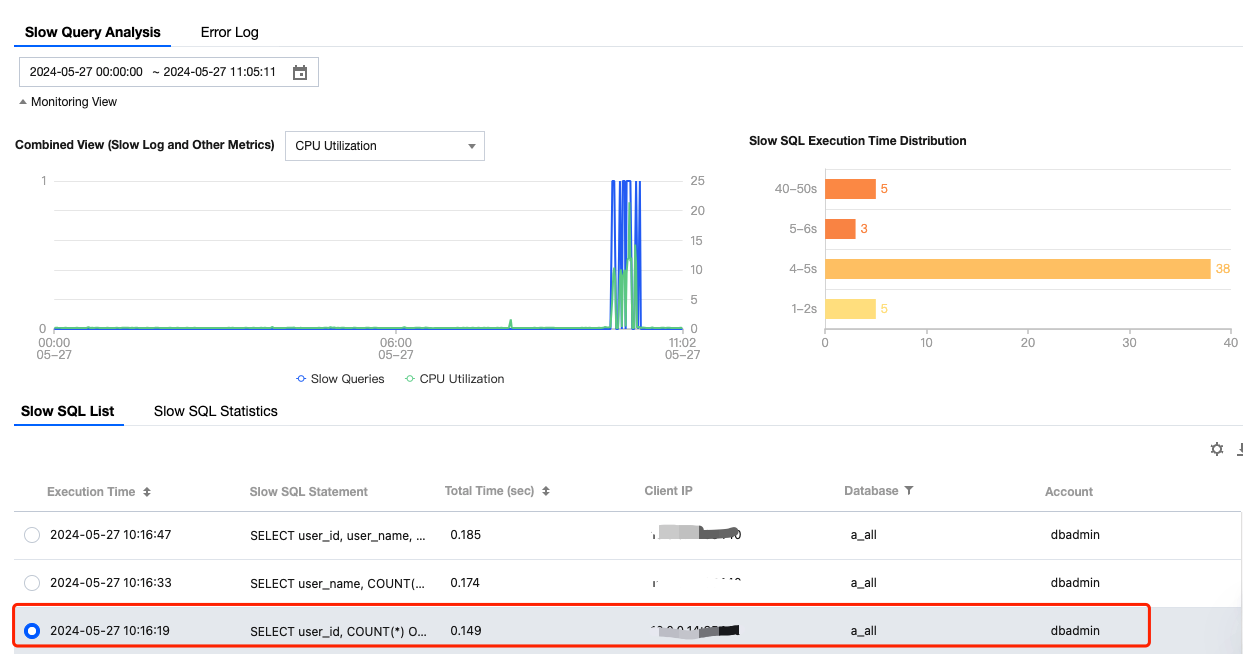
In the TencentDB for PostgreSQL console, the slow log record is shown below:


The execution plan in the downloaded auto_explain logs are as follows:
duration: 147.603 ms plan:
Query Text: SELECT user_id, COUNT(*) OVER (PARTITION BY user_id) as count
FROM (
SELECT user_id FROM student_info_b0
UNION ALL
SELECT user_id FROM student_info_b1
UNION ALL
SELECT user_id FROM student_info_b2
UNION ALL
SELECT user_id FROM student_info_b3
UNION ALL
SELECT user_id FROM student_info_b4
UNION ALL
SELECT user_id FROM student_info_b5
UNION ALL
SELECT user_id FROM student_info_b6
UNION ALL
SELECT user_id FROM student_info_b7
UNION ALL
SELECT user_id FROM student_info_b8
UNION ALL
SELECT user_id FROM student_info_b9
) AS all_students;
WindowAgg (cost=19181.71..21924.66 rows=156740 width=14) (actual time=56.009..116.522 rows=157000 loops=1)
Output: student_info_b0.user_id, count(*) OVER (?)
-> Sort (cost=19181.71..19573.56 rows=156740 width=6) (actual time=55.956..72.756 rows=157000 loops=1)
Output: student_info_b0.user_id
Sort Key: student_info_b0.user_id
Sort Method: external merge Disk: 2448kB
-> Append (cost=0.00..3511.10 rows=156740 width=6) (actual time=0.010..20.861 rows=157000 loops=1)
-> Seq Scan on public.student_info_b0 (cost=0.00..272.74 rows=15674 width=4) (actual time=0.009..1.367 rows=15700 loops=1)
Output: student_info_b0.user_id
-> Seq Scan on public.student_info_b1 (cost=0.00..272.74 rows=15674 width=6) (actual time=0.005..1.302 rows=15700 loops=1)
Output: student_info_b1.user_id
-> Seq Scan on public.student_info_b2 (cost=0.00..272.74 rows=15674 width=6) (actual time=0.004..1.316 rows=15700 loops=1)
Output: student_info_b2.user_id
-> Seq Scan on public.student_info_b3 (cost=0.00..272.74 rows=15674 width=6) (actual time=0.005..1.318 rows=15700 loops=1)
Output: student_info_b3.user_id
-> Seq Scan on public.student_info_b4 (cost=0.00..272.74 rows=15674 width=6) (actual time=0.006..1.320 rows=15700 loops=1)
Output: student_info_b4.user_id
-> Seq Scan on public.student_info_b5 (cost=0.00..272.74 rows=15674 width=6) (actual time=0.005..1.294 rows=15700 loops=1)
Output: student_info_b5.user_id
-> Seq Scan on public.student_info_b6 (cost=0.00..272.74 rows=15674 width=6) (actual time=0.004..1.377 rows=15700 loops=1)
Output: student_info_b6.user_id
-> Seq Scan on public.student_info_b7 (cost=0.00..272.74 rows=15674 width=6) (actual time=0.005..1.327 rows=15700 loops=1)
Output: student_info_b7.user_id
-> Seq Scan on public.student_info_b8 (cost=0.00..272.74 rows=15674 width=6) (actual time=0.006..1.285 rows=15700 loops=1)
Output: student_info_b8.user_id
-> Seq Scan on public.student_info_b9 (cost=0.00..272.74 rows=15674 width=6) (actual time=0.004..1.293 rows=15700 loops=1)
Output: student_info_b9.user_id

Thus, we can clearly view the detailed execution plan for the slow SQL and conduct subsequent service analysis.

도움말 및 지원

문제 해결에 도움이 되었나요?

피드백