Guide for Cross-AZ and Cross-Network Access
다운로드
포커스 모드
폰트 크기
Cross-AZ access in a VPC
If you need to have a Cloud File Storage (CFS) instance shared by multiple Cloud Virtual Machine (CVM) instances in different AZs in the same region, you can configure the CVM and CFS instances into the same VPC to achieve cross-AZ access to resources.
Assume that there is a CVM instance in Guangzhou Zone 1 that needs to use CFS, but file systems cannot be directly created in Guangzhou Zone 1 as the resources are sold out there.
If the CVM instance is in the "Guangzhou Zone 1" subnet of a VPC, you can log in to the VPC console to create a subnet whose AZ is "Guangzhou Zone 3" for the VPC.
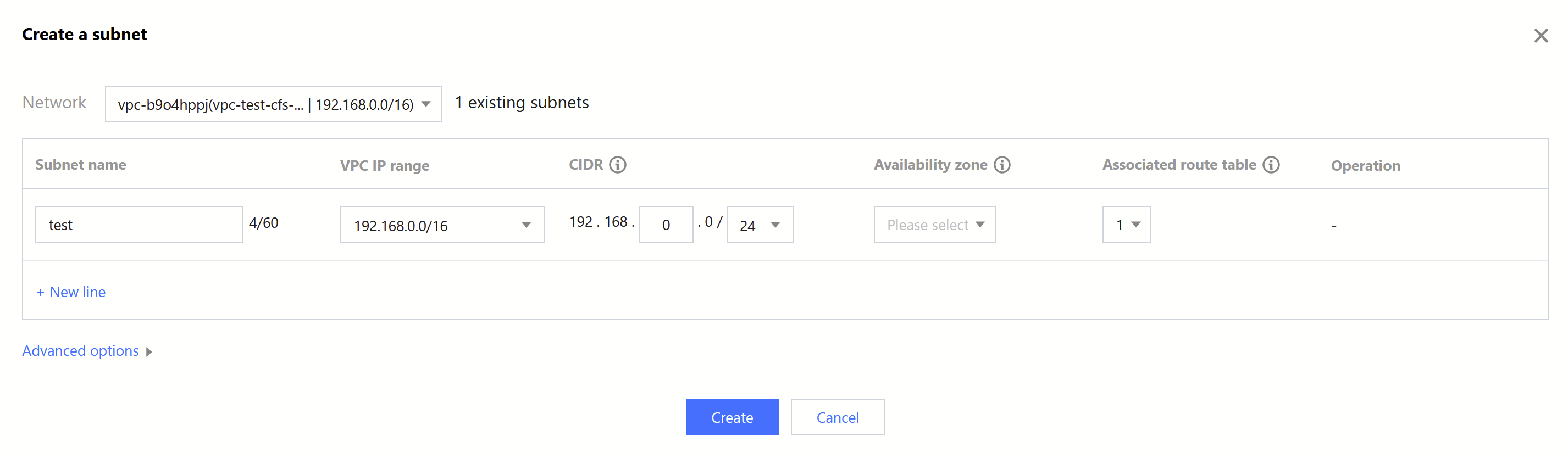
After the subnet is successfully created, go back to the CFS console and select this VPC and the subnet you just created to create resources in Guangzhou Zone 3. The CFS file system can be directly mounted to the CVM instance in the subnet of Guangzhou Zone 1 in this VPC. For more information, see Using CFS File Systems on Linux Clients.
Cross-VPC and cross-region access
CFS supports the following scenarios for resource access.
A CFS instance needs to be shared by multiple CVM instances distributed in different VPCs.
Your CVM and CFS instances are in different VPCs.
Your CVM and CFS instances are in different regions (for better access performance, it is recommended that the CVM instances and CFS be in the same region).
You can use Cloud Connect Network (CCN) to achieve resource access across the CVM instances distributed in VPC-A/VPC-B and CFS instance distributed in VPC-C. For more information, see Connecting Network Instances Under the Same Account.
피드백