Warehouse Configuration
Download
Modo Foco
Tamanho da Fonte
Overview
Warehouse is the core component for data storage configuration in a Setats cluster. It is responsible for managing data storage, metadata access, and the file system interface for all jobs in the cluster. After you create a cluster in Setats, you must configure Warehouse correctly to perform operations such as data read/write, table management, and CheckPoint persistence in your jobs.
Operation Steps
Configuring a WareHouse
After creation is complete, go to the stream-lake engine Setats tab for the compute cluster in Compute Resources and click the icon for Warehouse configuration.
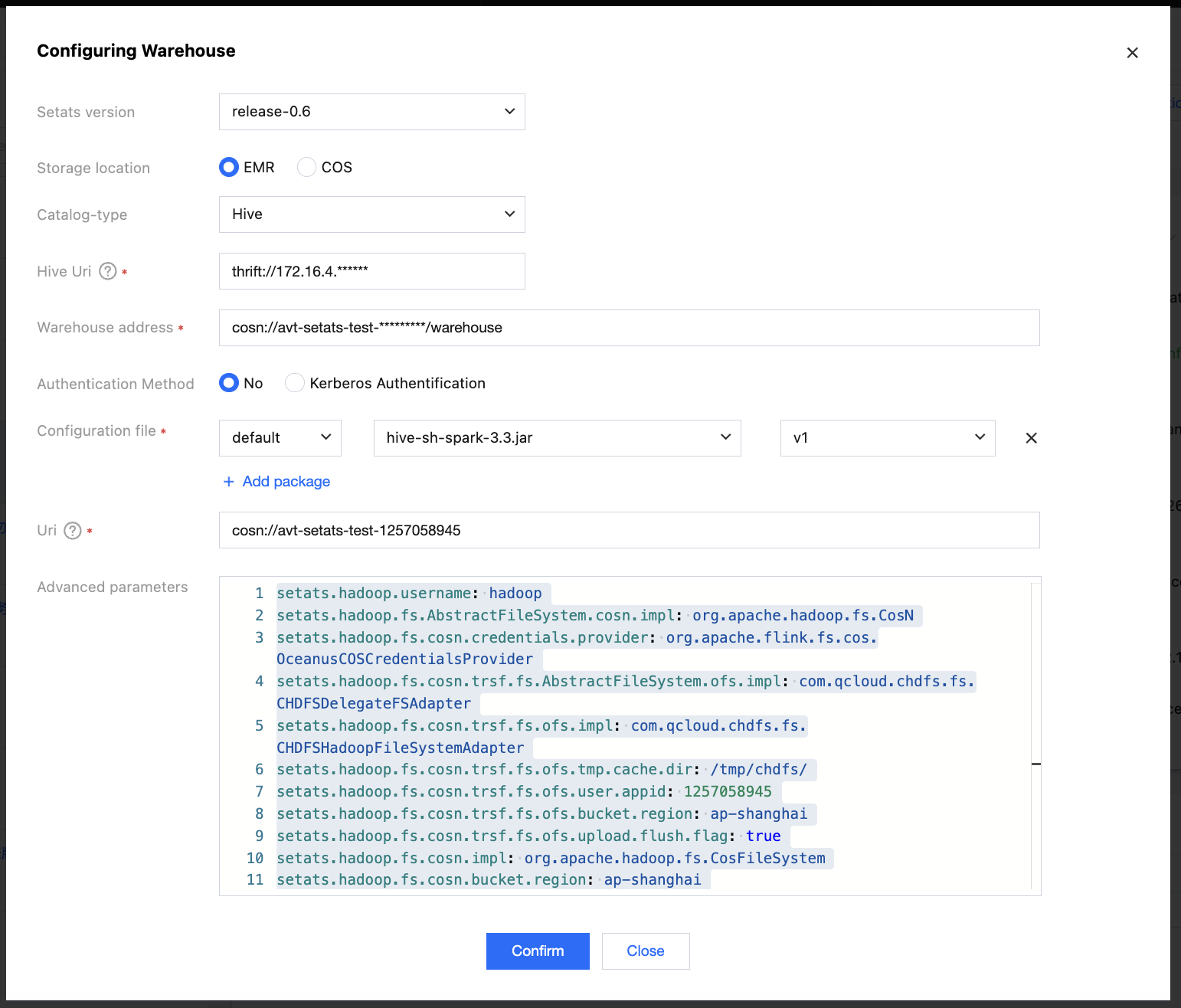
Configuration Items Overview
Configuration Item | Description | Required | Value Range | Default Value |
Setats Version | Setats Version | Yes | 0.6 or above | Latest stable version |
Storage Location | Data storage backend type | Yes | EMR/COS | - |
Catalog-Type | Metadata catalog type | Yes | Hive/Hadoop | - |
Hive Uri | Hive Metastore service address | Conditionally required* | thrift://IP:PORT | - |
Warehouse address | Data warehouse root directory | Yes | HDFS/COS URL | - |
Authentication Method | Security authentication mechanism | Conditionally required | Kerberos/None | None |
Uri | Storage system location address | Yes | Specific storage address | - |
Configuration File | Storage system configuration file | Conditionally required | hdfs-site.xml, and so on | - |
Advanced Parameters | Additional configuration parameters | No | Key-Value format | - |
Attention:
When Catalog-Type is Hive, the Hive Uri is required.
Detailed Configuration Instructions
Storage Location
Specify the type of data storage backend used by the Setats cluster.
Optional values
EMR: Uses HDFS storage from a Tencent Cloud EMR cluster.
COS: Uses Tencent Cloud Object Storage (COS).
Selection suggestions
If you already have an EMR cluster or require low-latency access, choose EMR.
If you require large-scale, low-cost storage, choose COS.
Catalog-Type
Specify the type of metadata catalog to be used.
Optional values
Hive: Uses Hive Metastore as the metadata storage.
Hadoop: Uses the Hadoop File System and supports only file-level metadata.
Hive Uri
The Thrift access address for the Hive Metastore service.
Format: thrift://<IP1>:<PORT1>,thrift://<IP2>:<PORT2>,...
Warehouse Address
The root directory of the Setats repository, where all job data and metadata will be stored.
Format
HDFS:hdfs://<namenode>/<path>
COS:cosn://<bucket-name>/<path>
Naming conventions
Use lowercase letters and underscores for directory names.
Include an environment identifier (dev/test/prod).
Include a project identifier.
Authentication Method
Specify the security authentication mechanism for the storage system.
Optional values
Kerberos: Uses the Kerberos protocol for security authentication (applicable to EMR Kerberos scenarios).
None: Does not use additional authentication (applicable to EMR non-Kerberos or COS scenarios).
Selection suggestions
If Kerberos is enabled on your EMR cluster, select Kerberos.
If Kerberos is not enabled on your EMR cluster, select None.
For COS/CHDFS storage, select None.
Uri
Store the location address of the storage system for connecting to and accessing the storage system.
Format description
Storage Type | Uri Format | Example |
EMR HDFS | HDFS service name or IP address | HDFS11000127 or 10.0.0.1:9000 |
COS | COS bucket identifier | cosn://test-123 |
Configuration Files
The configuration file required by the storage system.
Advanced Parameters
Additional configuration parameters for more granular control over storage behavior.
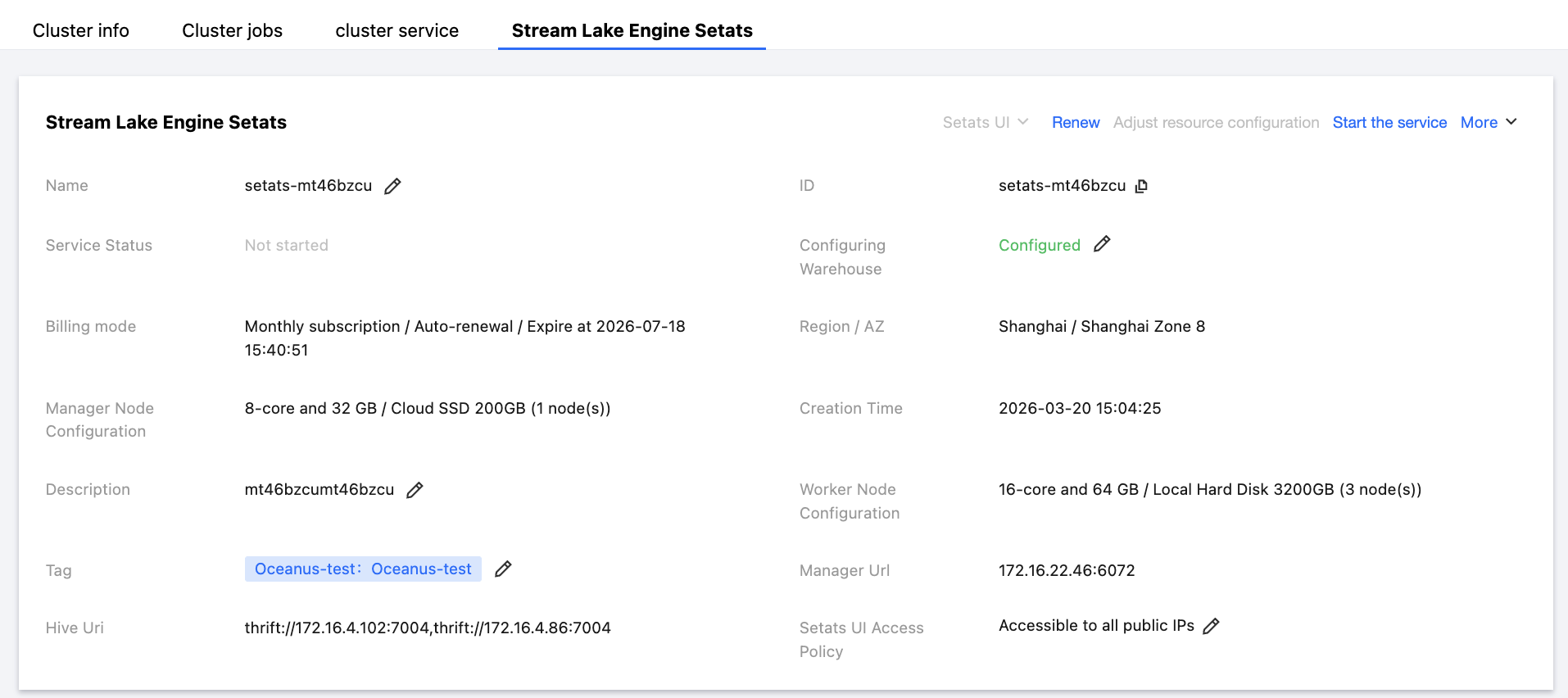
Configuration Completed
Provide the Manager Url for the job to use.
Ajuda e Suporte
Esta página foi útil?
Você também pode entrar em contato com a Equipe de vendas ou Enviar um tíquete em caso de ajuda.
comentários