Checking Cluster Information
Download
Modo Foco
Tamanho da Fonte
To view stream-lake engine Setats information, log in to the SCS console. In Compute Resources, select a compute cluster. Then, on the cluster's Stream-Lake Engine Setats Tag page, create a Setats service. For details, refer to Creating a Stream-Lake Engine Setats Service. After creating a Setats cluster, you can view its information on the Stream-Lake Engine Setats Tag page of the compute cluster in Compute Resources.
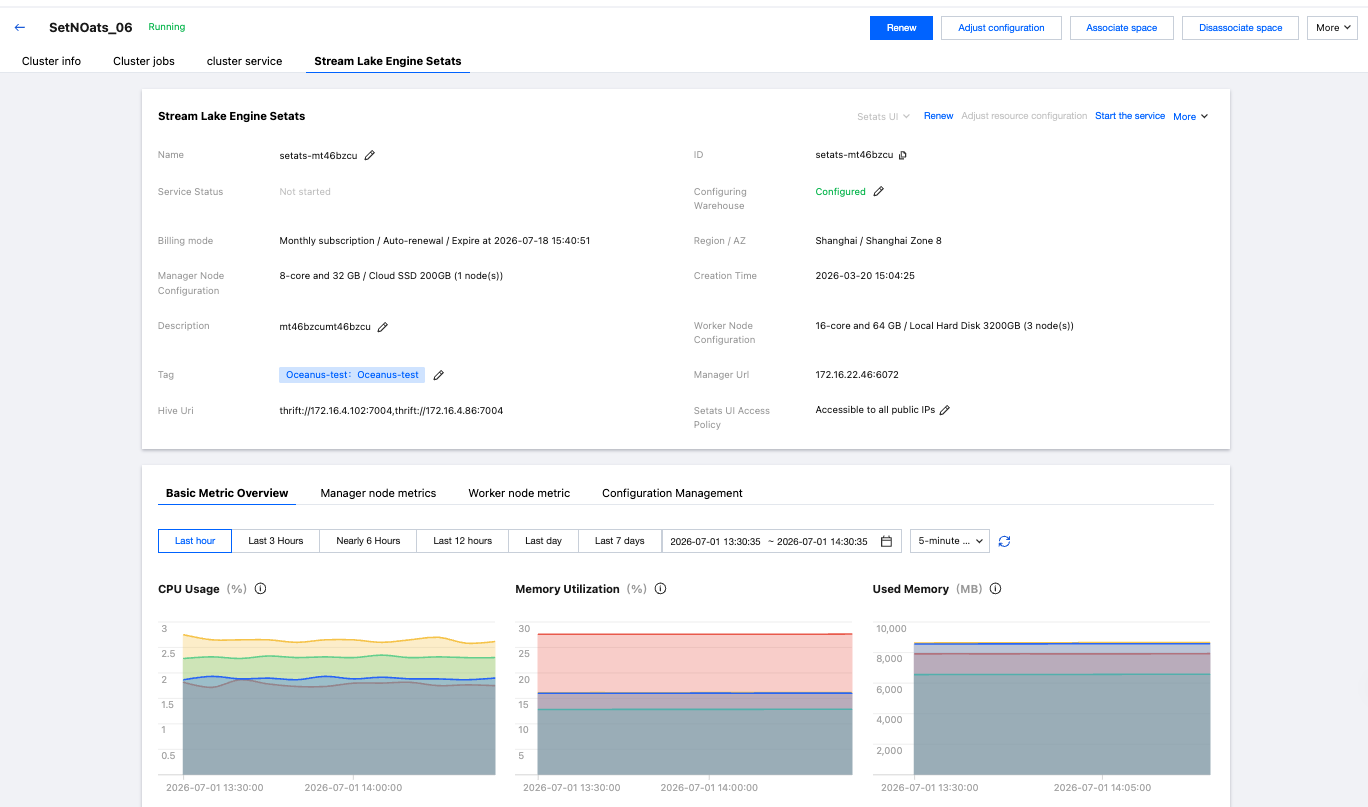
The meanings of the fields related to Setats cluster information are as follows:
Field | Description |
Setats Service Status | Current running status of the Setats cluster |
Warehouse Configuration | Configure Warehouse information. |
Billing Mode | Billing mode, auto-renewal status, and expiration time |
Region/AZ | Region/AZ where this cluster is located |
Manager Node Configuration | Manager node specifications and quantity |
Worker Node Configuration | Worker node specifications and quantity |
Creation Time | Cluster creation time |
Manager URI | Service connection address |
Hive URI | Service connection address |
Tags | Tags attached to the cluster |
Setats UI Access Policy | The access policy for Setats UI can be configured, with public network access enabled by default. |
Ajuda e Suporte
Esta página foi útil?
Você também pode entrar em contato com a Equipe de vendas ou Enviar um tíquete em caso de ajuda.
comentários