Optimizing SQL Execution Through HINT
Download
Modo Foco
Tamanho da Fonte
What Is a Hint
The optimizer typically selects the optimal execution plan for a user's SQL. However, under certain circumstances, such as when statistical information estimates are inaccurate or the cost model is not precise enough, the execution plan generated by the optimizer may not be optimal. In such cases, you can use the Hint mechanism to guide the optimizer in generating a better execution plan.
Hints are case-insensitive and are used immediately after the
SELECT keyword in the form of a /*+ ... */ comment. Separate multiple Hints with spaces or commas. An example is as follows:SELECT /*+ [hint_text] [hint_text] ... */ * FROM ...;
Effective Scope of Hints
Hints take effect on a per-Query Block basis. In a Query statement, each Query Block has a QB_NAME (Query Block Name). The columnar read-only analysis engine generates a QB_NAME for each Query Block sequentially from left to right, following the pattern
@sel_1, @sel_2. For example, consider the following SQL:SELECT * FROM (SELECT * FROM t) t1, (SELECT * FROM t) t2;
This SQL contains three Query Blocks. The outermost Query Block, which contains the
SELECT statement, is named sel_1. The two SELECT subqueries are named sel_2 and sel_3 respectively, with the numbers increasing sequentially. Within a Hint, you can use QB_NAME to control the Hint's scope and target. If a QB_NAME is not explicitly specified in a Hint, the Hint's scope is the Query Block where the Hint itself resides. An example is as follows:SELECT /*+ HASH_JOIN_PROBE(@sel_2 t1) */ * FROM (SELECT t1.a, t1.b FROM t t1, t t2 WHERE t1.a = t2.a) t1, t t3 WHERE t1.b = t3.b;SELECT /*+ HASH_JOIN_PROBE(t1@sel_2) */ * FROM (SELECT t1.a, t1.b FROM t t1, t t2 WHERE t1.a = t2.a) t1, t t3 WHERE t1.b = t3.b;
The two SQL statements above use two different methods to specify QB_NAME in the Hint:
In the first SQL statement, QB_NAME is specified at the first parameter position within the Hint and is separated from other parameters by a space.
In the second SQL statement,
@QB_NAME is appended after the parameters to specify the scope of the Hint.Overview of Supported Hints
The Hint names, syntax, and semantics currently supported by the columnar read-only analysis engine are shown in the following table.
Term | Syntax | Description |
SHUFFLE_JOIN | SHUFFLE_JOIN([@QB_NAME] tbl1_name, tbl2_name ...) | Specifies that the JOIN operation uses the Shuffle method to distribute data. |
BROADCAST_JOIN | BROADCAST_JOIN([@QB_NAME] tbl1_name, tbl2_name ...) | Specifies that the JOIN operation uses the Broadcast method to distribute data. |
HASH_JOIN_BUILD | HASH_JOIN_BUILD([@QB_NAME] tbl1_name, tbl2_name ...) | Specifies the Build-side table in a Hash Join operation. |
HASH_JOIN_PROBE | HASH_JOIN_PROBE([@QB_NAME] tbl1_name, tbl2_name ...) | Specifies the Probe-side table in a Hash Join operation. |
LEADING | LEADING([@QB_NAME] tbl1_name, tbl2_name ...) | Specifies the join Order for JOIN operations. |
SET_VAR | SET_VAR(setting_name = value) | Temporarily modifies system variables at the SQL level. |
PX_JOIN_FILTER_ID / NO_PX_JOIN_FILTER_ID | PX_JOIN_FILTER_ID(rf_id1, rf_id2 ...) NO_PX_JOIN_FILTER_ID(rf_id1, rf_id2 ...) | Controls enabling/disabling the Runtime Filter. |
Detailed Explanation of Hint Syntax
SHUFFLE_JOIN
Description
SHUFFLE_JOIN(t1_name, t2_name ...) controls the columnar read-only analysis engine optimizer to use the Shuffle Join algorithm when JOIN operations are executed: it shuffles and redistributes data from the left and right tables based on the JOIN key before the JOIN is performed.Reference examples
EXPLAIN SELECT /*+ SHUFFLE_JOIN(t1) */ * FROM t1, t2 WHERE t1.id = t2.id;
In this SQL, a JOIN operation is performed between
t1 and t2, and the SHUFFLE_JOIN hint specifies Shuffle Join as the data distribution method. The final execution plan is shown in the figure below. In Details, the EXCHANGE TYPE on lines 2 and 5 changes to HASH, indicating that Hash Shuffle is used.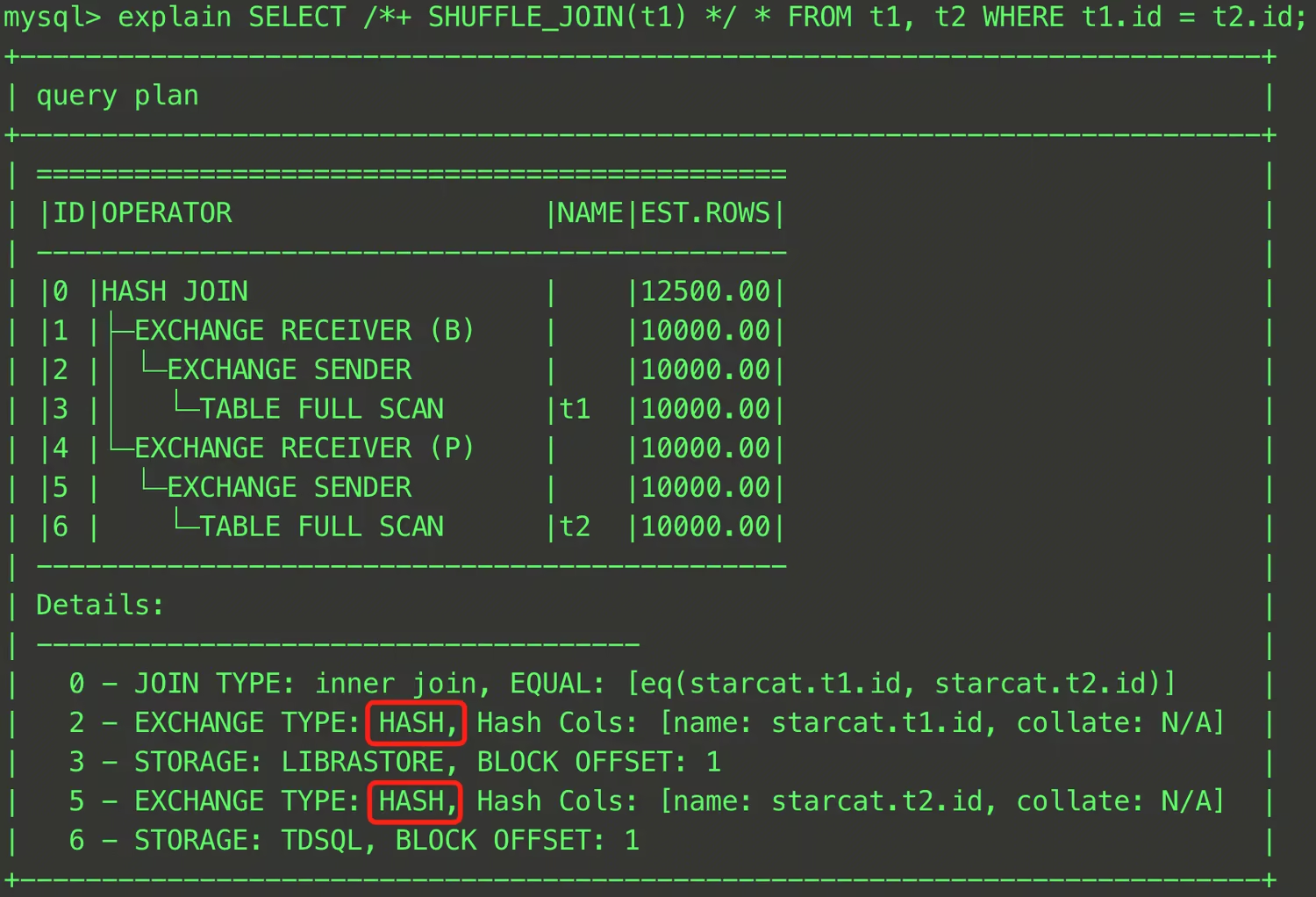
Except for specifying a single table, you can also specify JOIN intermediate results for data redistribution.
EXPLAIN SELECT /*+ SHUFFLE_JOIN((t1@sel_2, t2@sel_2)) */ * FROM (SELECT t1.a, t1.b FROM t t1, t t2 WHERE t1.a = t2.a) t1, t t3 WHERE t1.b = t3.b;
As shown above, you can enclose
t1 and t2 in parentheses and specify a QB_NAME for each table. This allows you to specify that the JOIN intermediate result of t1 and t2 uses Shuffle Join when it is joined with t3.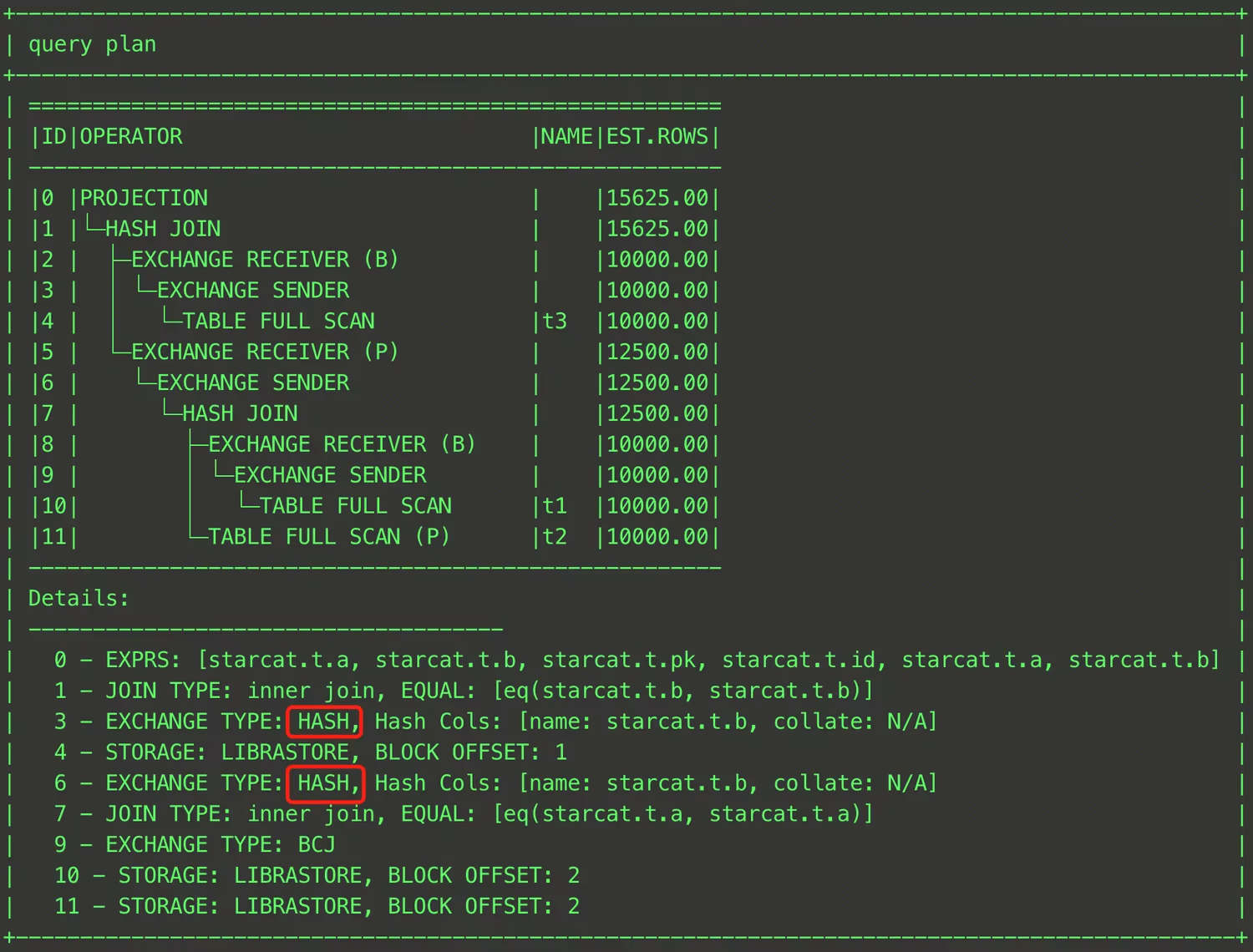
Attention:
This Hint is effective only when a distributed execution plan is generated and is invalid under a single-machine execution plan.
BROADCAST_JOIN
Description
BROADCAST_JOIN(t1_name, t2_name ...) controls the columnar read-only analysis engine optimizer to use the Broadcast Join algorithm when JOIN operations are executed: it broadcasts data from the specified tables to all computing nodes before the JOIN is performed.Reference examples
EXPLAIN SELECT /*+ BROADCAST_JOIN(t1) */ * FROM t1, t2 WHERE t1.id = t2.id;
In this SQL, a JOIN operation is performed between
t1 and t2, and the BROADCAST_JOIN hint specifies Broadcast Join as the JOIN method. The final execution plan is shown in the figure below. In Details, the EXCHANGE TYPE on lines 2 and 5 changes to BCJ, indicating that Broadcast is used.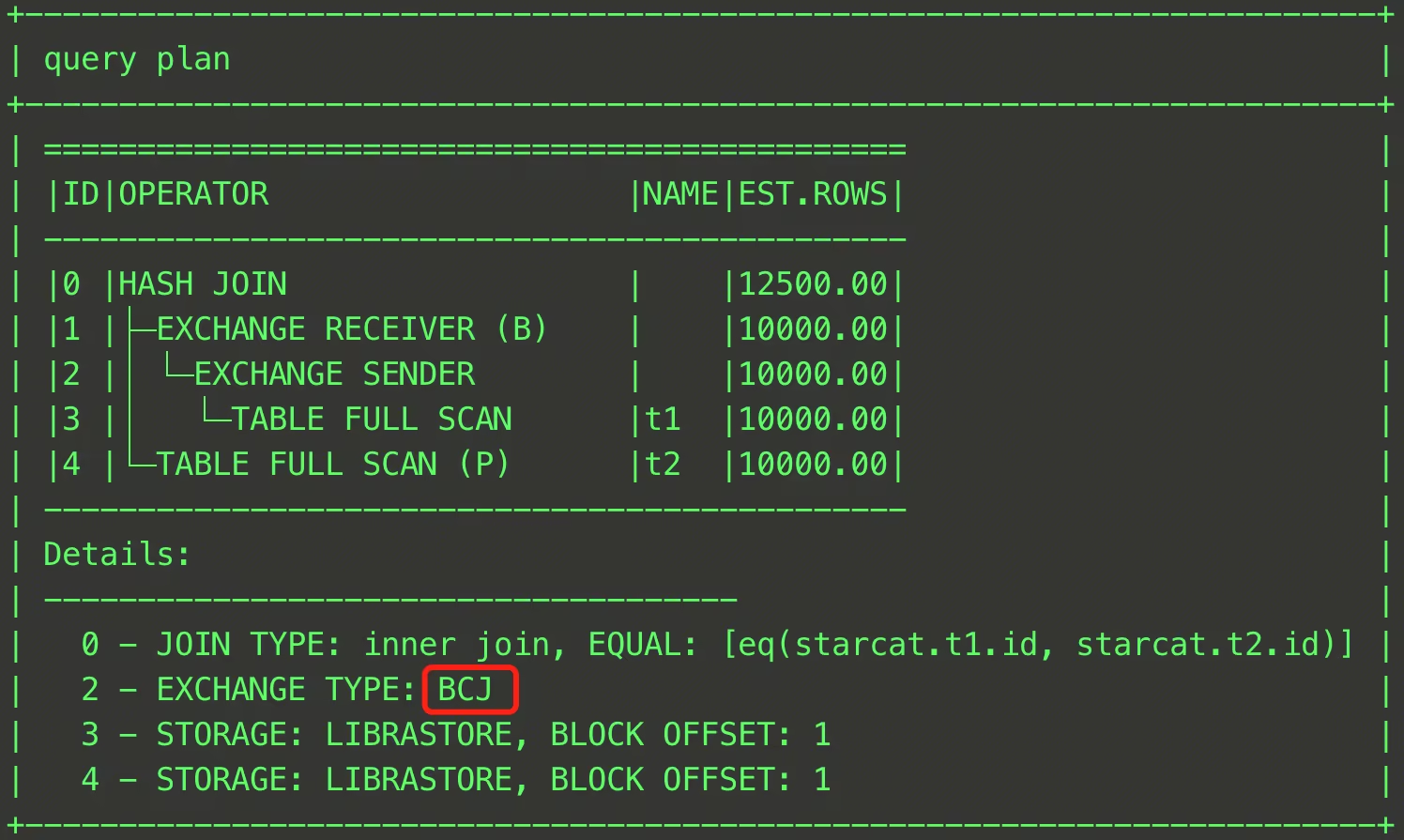
Except for specifying a single table, you can also specify JOIN intermediate results for data broadcast.
EXPLAIN SELECT /*+ BROADCAST_JOIN((t1@sel_2, t3@sel_1)) */ * FROM (SELECT t1.a, t1.b FROM t t1, t t2 WHERE t1.a = t2.a) t1, t t3 WHERE t1.b = t3.b;
As shown above, you can enclose
t1 and t3 in parentheses and specify a QB_NAME for each table. This allows you to specify that the JOIN intermediate result of t1 and t3 uses Broadcast Join when it is joined with the outer table. The result is shown in the figure below.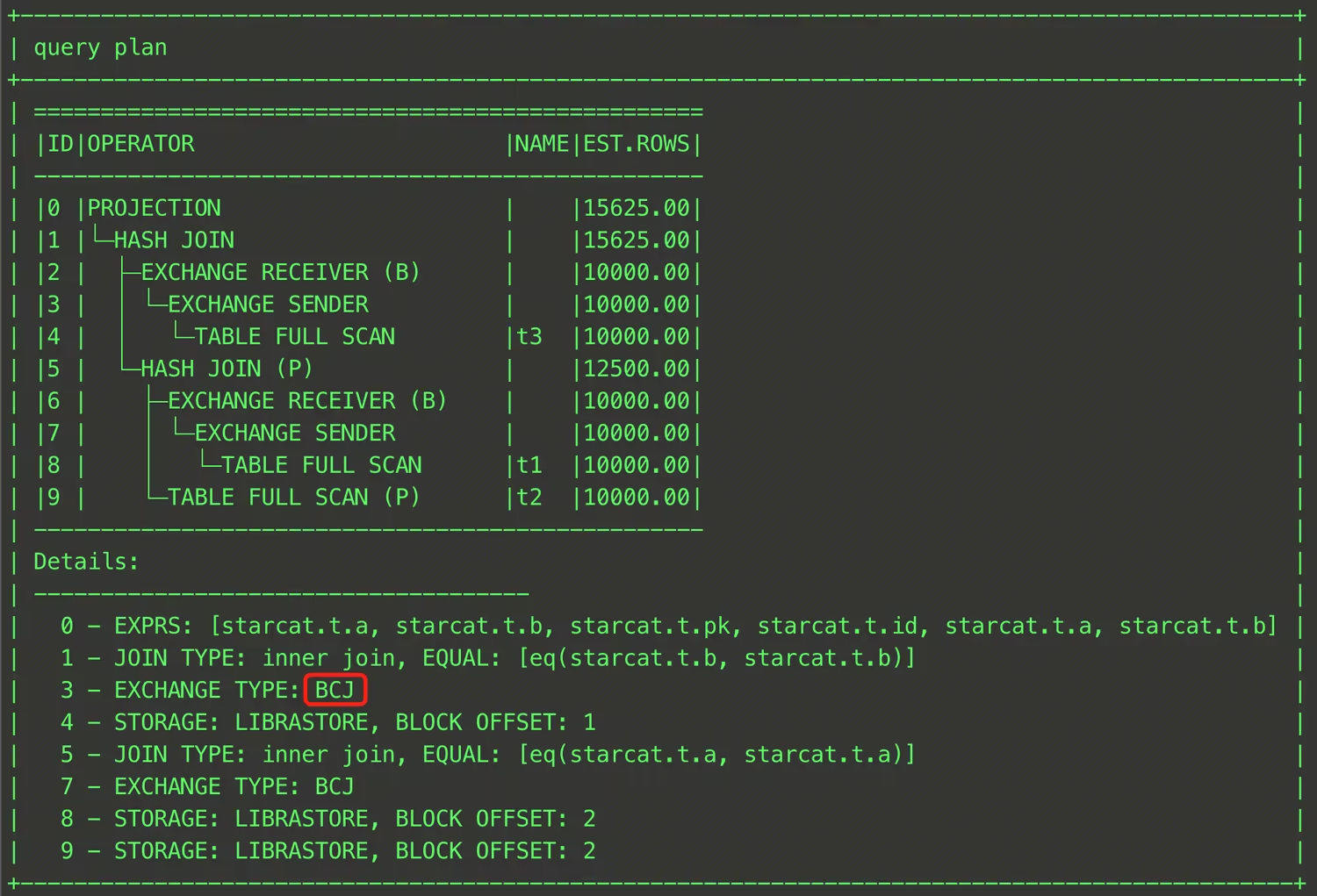
Attention:
This Hint is effective only when a distributed execution plan is generated and is invalid under a single-machine execution plan.
The columnar read-only analysis engine optimizer selects the Build side of a Hash Join as the broadcast table by default. To adjust the broadcast side, use it together with
HASH_JOIN_BUILD.HASH_JOIN_BUILD
Description
HASH_JOIN_BUILD(t1_name, t2_name ...) controls the columnar read-only analysis engine optimizer to use the Hash Join algorithm for the specified tables and to designate those tables as the Build side of the Hash Join, meaning they are used to build the hash table.Reference examples
EXPLAIN SELECT /*+ HASH_JOIN_BUILD(t2) */ * FROM t t1, t t2 WHERE t1.a = t2.a;
This SQL specifies the
t2 table as the Build side of the Hash Join. The final execution plan is shown in the figure below.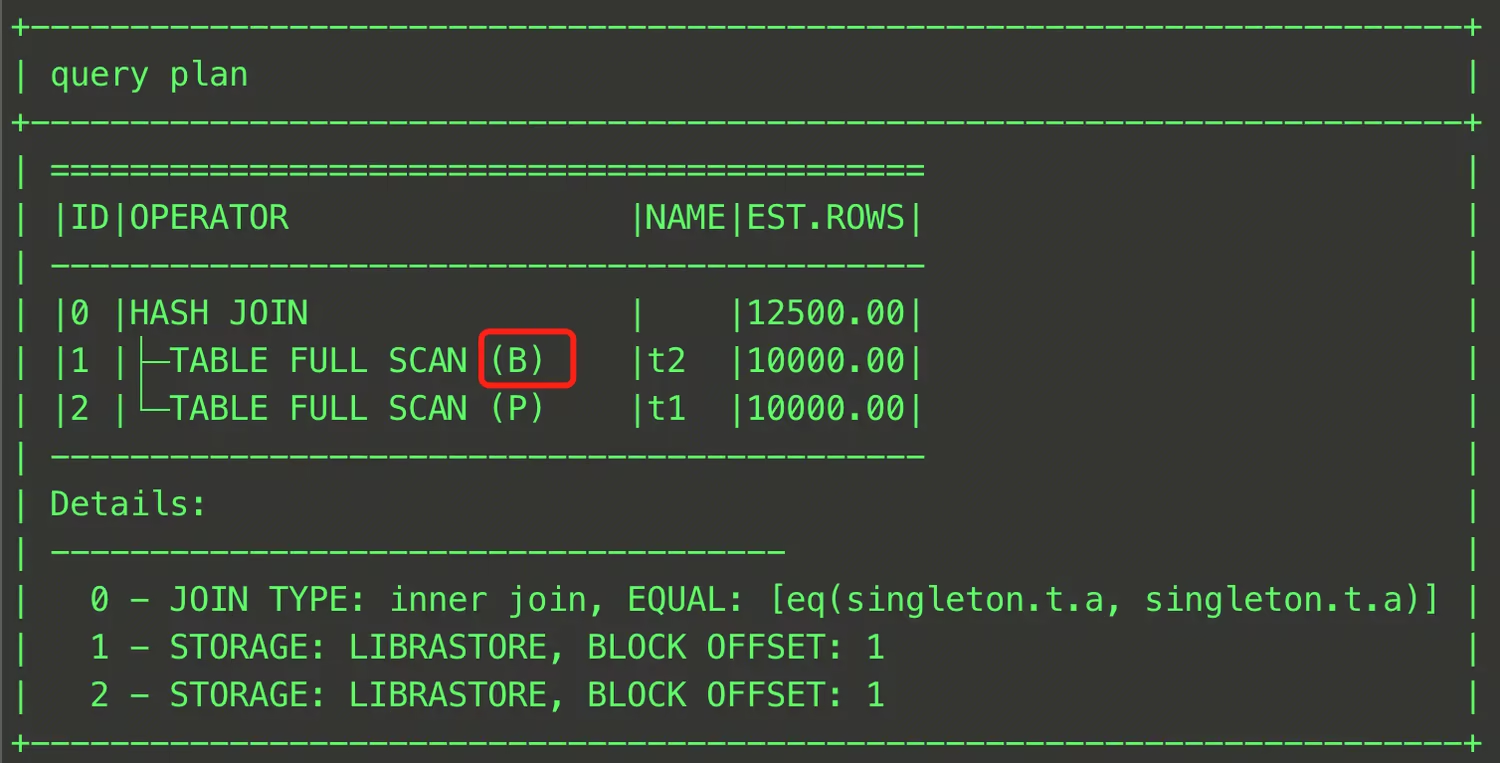
In addition to specifying a single table, you can also specify JOIN intermediate results as the Build side. An example is provided below.
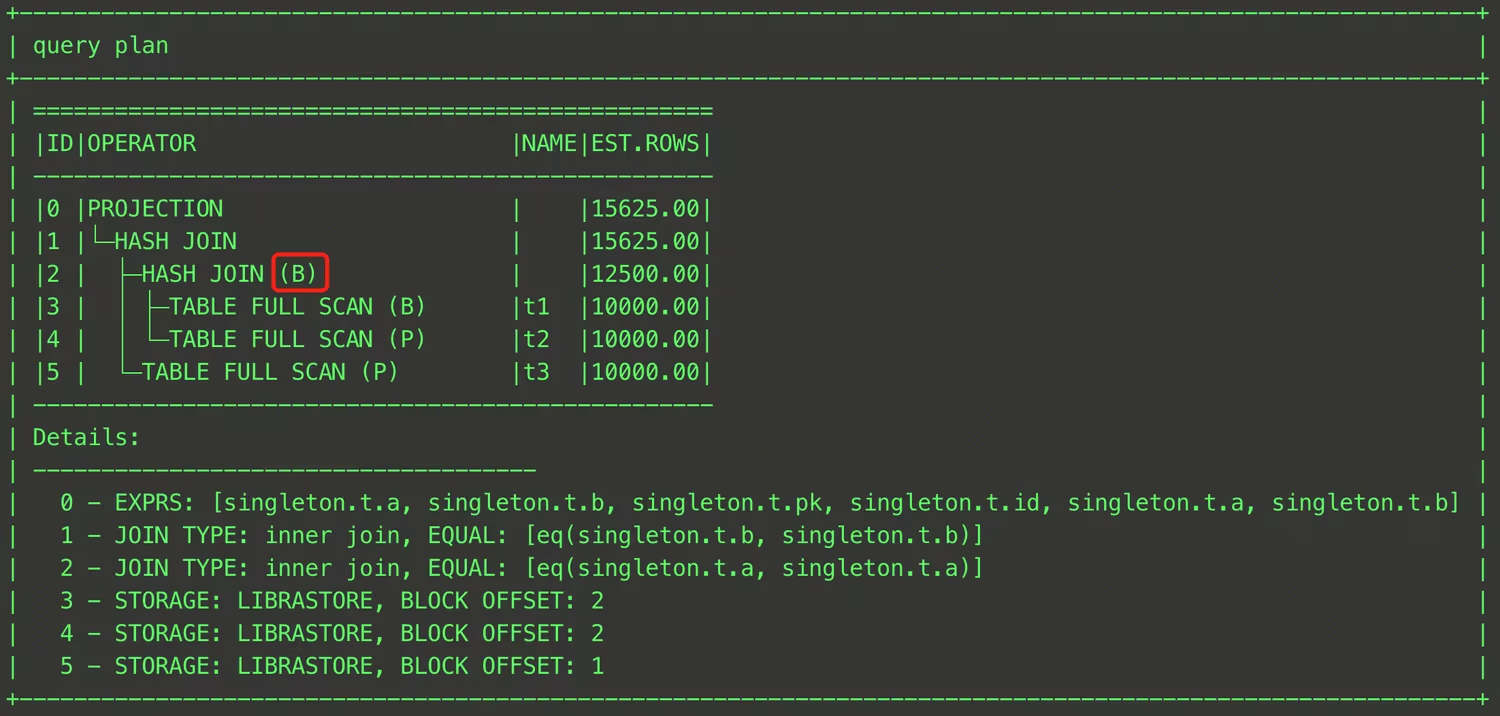
EXPLAIN SELECT /*+ HASH_JOIN_BUILD((t1@sel_2, t3@sel_1)) */ * FROM (SELECT t1.a, t1.b FROM t t1, t t2 WHERE t1.a = t2.a) t1, t t3 WHERE t1.b = t3.b;
As shown above, enclose the relevant tables in parentheses and specify a QB_NAME for each table.
HASH_JOIN_PROBE
Description
HASH_JOIN_PROBE(t1_name, t2_name ...) controls the columnar read-only analysis engine optimizer to use the Hash Join algorithm for the specified tables and to designate those tables as the Probe side of the Hash Join, meaning they are used to probe the hash table.Reference examples
EXPLAIN SELECT /*+ HASH_JOIN_PROBE(t2) */ * FROM t t1, t t2 WHERE t1.a = t2.a;
In this SQL, the
t2 table is designated as the Probe side of the Hash Join. The final execution plan is shown in the figure below.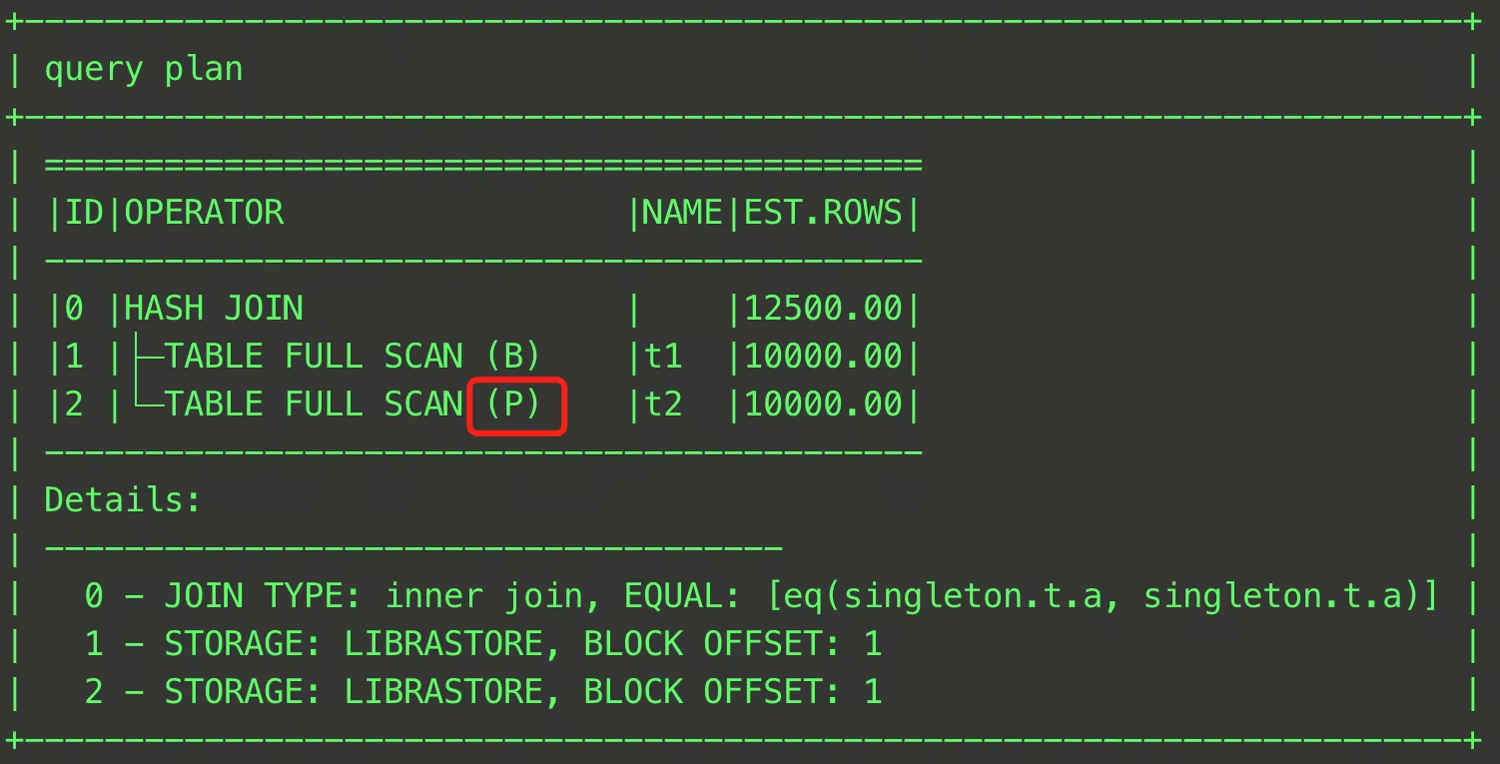
In addition to specifying a single table, you can also specify JOIN intermediate results as the Probe side. An example is provided below.
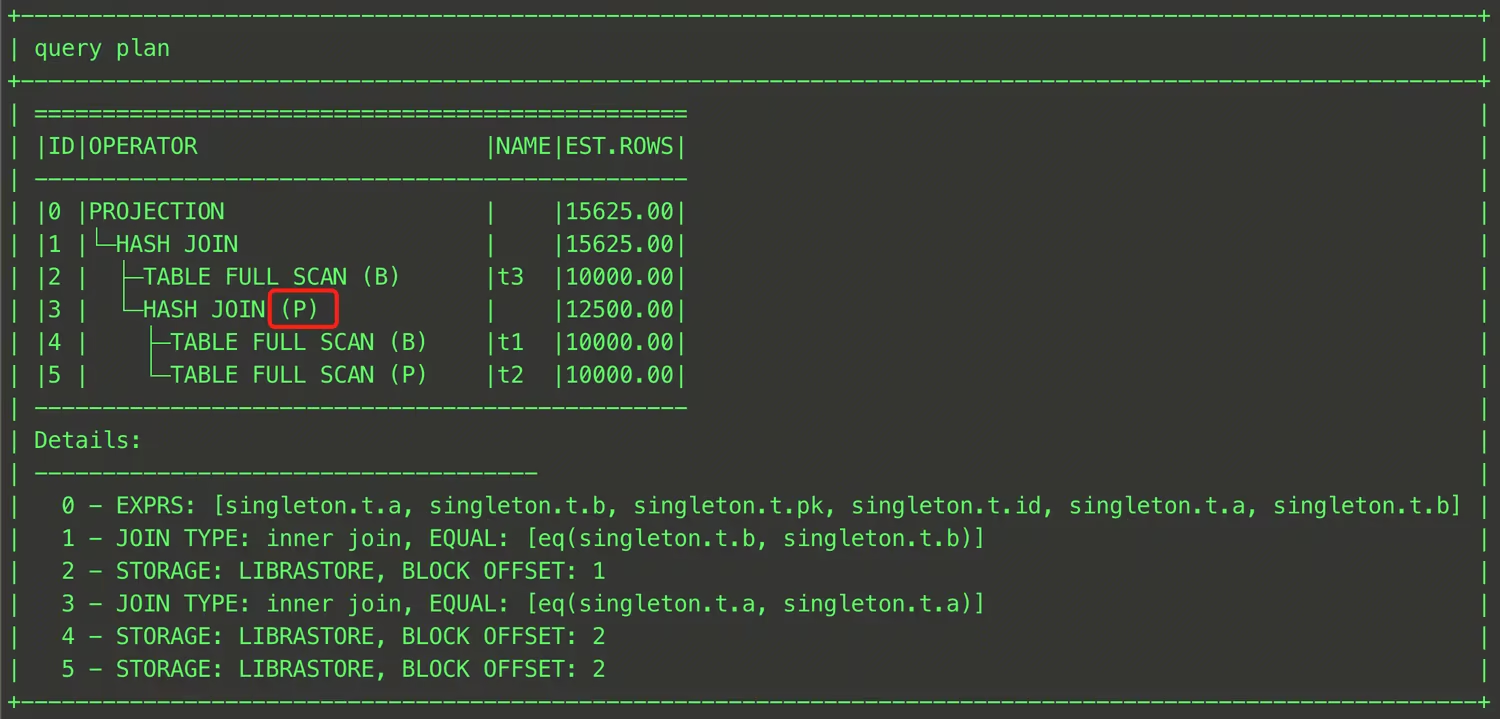
EXPLAIN SELECT /*+ HASH_JOIN_PROBE((t1@sel_2, t3@sel_1)) */ * FROM (SELECT t1.a, t1.b FROM t t1, t t2 WHERE t1.a = t2.a) t1, t t3 WHERE t1.b = t3.b;
As shown above, enclose the relevant tables in parentheses and specify a QB_NAME for each table. The final execution plan is shown in the figure below.
LEADING
Description
LEADING(t1_name, t2_name ...) controls the join order (Join Order) generated by the columnar read-only analysis engine optimizer during the Join Reorder stage. The optimizer determines the Join Order according to the sequence specified in LEADING.Reference examples
EXPLAIN SELECT /*+ LEADING(t1, t3, t2, t4) */ * FROM t1, t2, t3, t4 WHERE t1.a = t2.a AND t2.a = t3.a AND t3.a = t4.a;
In this SQL, the
LEADING hint explicitly specifies that the t1 table first JOINs with the t3 table, then with the t2 table, and finally with the t4 table. The final execution plan is shown in the figure below.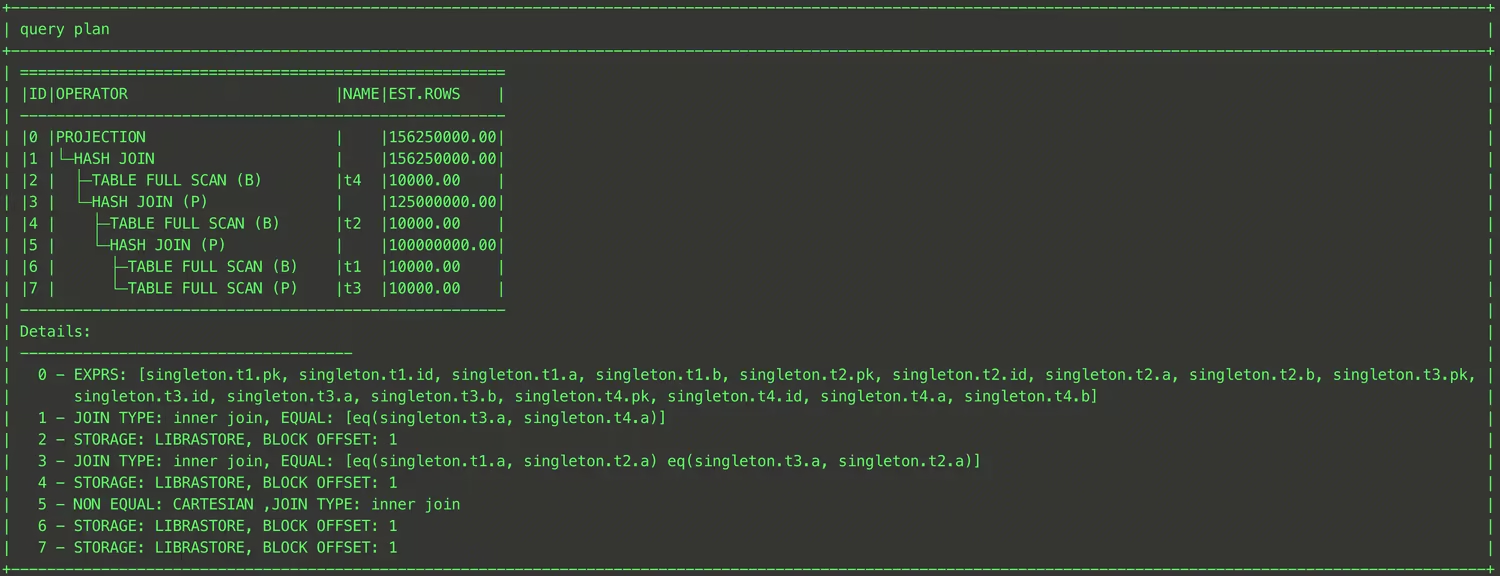
The method described above can only generate a Left Deep Tree. The columnar read-only analysis engine also provides an advanced syntax for
LEADING, which can generate a Bushy Tree through bracket nesting. An example is provided below:EXPLAIN SELECT /*+ LEADING((t1, t3), (t2, t4)) */ * FROM t1, t2, t3, t4 WHERE t1.a = t2.a AND t2.a = t3.a AND t3.a = t4.a;
In this SQL, the
LEADING hint uses (t1, t3) to instruct the optimizer to first JOIN t1 with t3, uses (t2, t4) to instruct the optimizer to first JOIN t2 with t4, and finally uses ((t1, t3), (t2, t4)) to instruct the optimizer to JOIN the results of the two preceding JOINs. The final execution plan is shown in the figure below.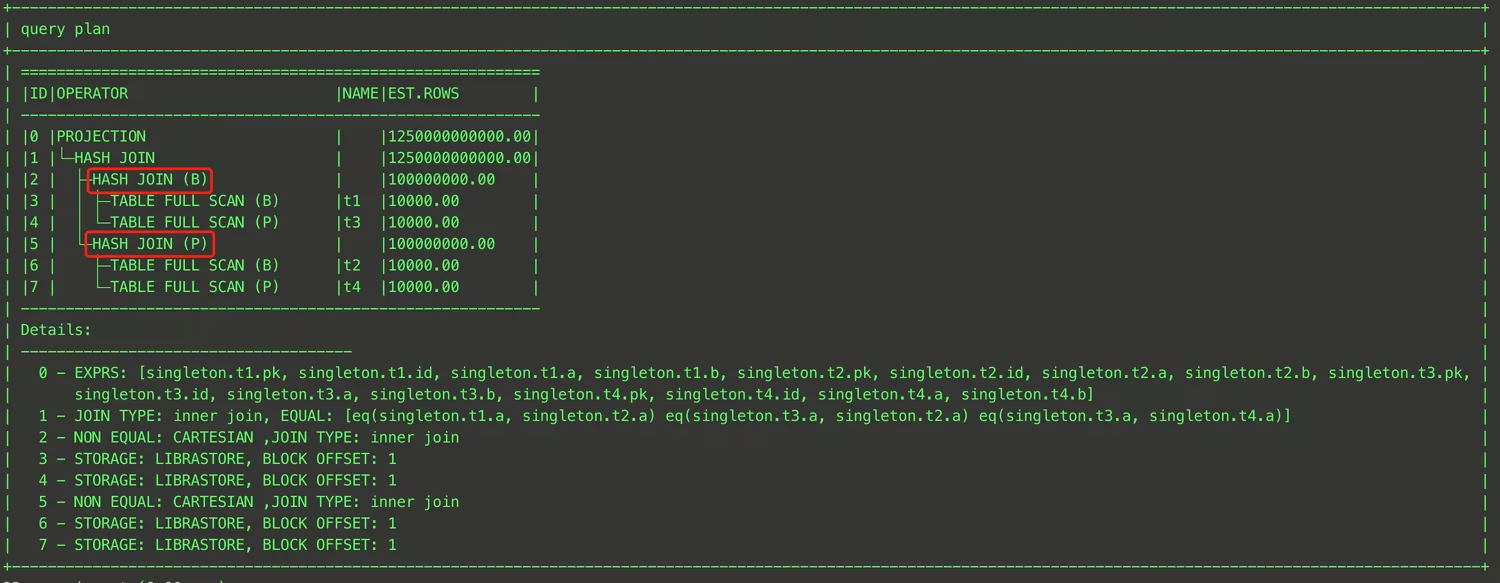
Attention:
When multiple
LEADING hints exist in the same query, the hints become ineffective.When the optimizer cannot join tables in the order specified by
LEADING, the Hint becomes ineffective.SET_VAR
Description
SET_VAR(setting_name = value) is used to temporarily modify a system variable during SQL execution. After the SQL execution completes, the modified system variable automatically reverts to its original value. The usage is as follows:Reference examples
SELECT /*+ SET_VAR(max_threads = 64) */ * FROM t1;
This SQL temporarily sets the maximum number of threads to 64 during its execution by using the
SET_VAR Hint.Attention:
Not all system variables can be modified via the
SET_VAR Hint. Before using it, confirm that the target system variable has Hint modification enabled. For a list of system variables that support modification via Hint, see System Variables.PX_JOIN_FILTER_ID and NO_PX_JOIN_FILTER_ID
Description
PX_JOIN_FILTER_ID(rf_id1, rf_id2 ...) and NO_PX_JOIN_FILTER_ID(rf_id1, rf_id2 ...) are used to control the enabling and disabling of Runtime Filters with specified IDs by the optimizer.Reference examples
Common Hint Issues
MySQL Client Clearing Hints Causing Ineffectiveness
Prior to version 5.7, the MySQL command-line client removes Optimizer Hints by default. To use Hint syntax with these earlier client versions, add the
-c (that is, --comments) option when starting the client. For example:mysql -h 127.0.0.1 -P 4000 -u root -c
Cross-Database Query Without Specifying Database Name Causing Hint Ineffectiveness
For tables accessed across databases in a query, explicitly specify the database name in the Hint. Otherwise, the Hint may not take effect. For example:
SELECT /*+ SHUFFLE_JOIN(t1) */ * FROM test1.t1, test2.t2 WHERE t1.id = t2.id;
Because the
t1 table is not in the current database and the Hint does not specify a database name, the Hint becomes ineffective. The Warning message is as follows:tdsql> SHOW WARNINGS;+---------+------+---------------------------------------------------------------------------------------------------------------------------------------------------------+| Level | Code | Message |+---------+------+---------------------------------------------------------------------------------------------------------------------------------------------------------+| Warning | 1815 | There are no matching table names for (t1) in optimizer hint /*+ SHUFFLE_JOIN(t1) */ or /*+ SHUFFLE_JOIN(t1) */. Maybe you can use the table alias name |+---------+------+---------------------------------------------------------------------------------------------------------------------------------------------------------+1 row in set (0.00 sec)
QB_NAME Not Specified or Incorrectly Specified Causing Hint Ineffectiveness
For a query containing multiple Query Blocks, if the Hint is not written in the Query Block where the target table resides, you must explicitly specify the QB_NAME in the Hint. Otherwise, the Hint may not take effect. For example:
SELECT /*+ HASH_JOIN_PROBE(t2) */ * FROM (SELECT t1.a, t1.b FROM t t1, t t2 WHERE t1.a = t2.a) t1, t t3 WHERE t1.b = t3.b;
Because the QB_NAME is not explicitly specified for the
t2 table in the Hint, the Hint does not take effect. The Warning message is as follows:tdsql> SHOW WARNINGS;+---------+------+---------------------------------------------------------------------------------------------------------------------------------------------------------+| Level | Code | Message |+---------+------+---------------------------------------------------------------------------------------------------------------------------------+| Warning | 1815 | There are no matching table names for (t2) in optimizer hint /*+ HASH_JOIN_PROBE(t2) */. Maybe you can use the table alias name |+---------+------+---------------------------------------------------------------------------------------------------------------------------------+1 row in set (0.00 sec)
At this point, you can use
EXPLAIN to view the SQL execution plan and confirm the QB_NAME of the Query Block where each table resides.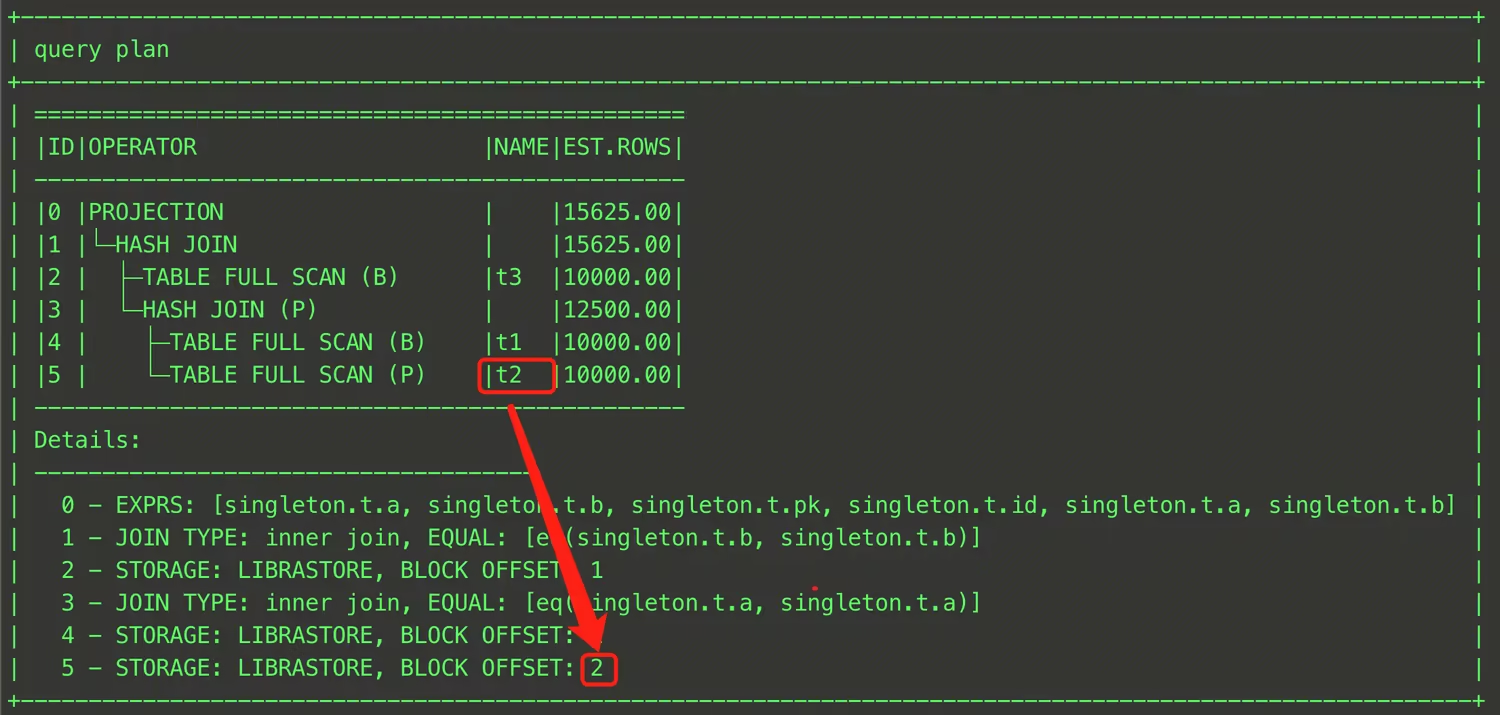
Incorrect Hint Position Causes It Not Effective
The Hint must be placed strictly according to the Optimizer Hint syntax after the specified keyword (for example,
SELECT). Otherwise, it will not take effect. For example:tdsql> SELECT * /*+ SET_VAR(max_threads = 64) */ FROM t;ERROR 1064 (42000): You have an error in your SQL syntax; check the manual that corresponds to your MySQL server version for the right syntax to use line 1 column 42 near "/*+ SET_VAR(max_threads = 64) */ FROM t"
Ajuda e Suporte
Esta página foi útil?
Você também pode entrar em contato com a Equipe de vendas ou Enviar um tíquete em caso de ajuda.
comentários