Renewal Instructions
Baixar
Modo Foco
Tamanho da Fonte
Pro Edition
Auto-renewal: Monthly and yearly subscriptions are renewed automatically by default. You can cancel auto-renewal at any time in the management center.
Expiration handling: After the subscription expires, it is downgraded to the Free edition. Generated content remains unaffected, but advanced features are restricted.
Automatic Renewal
Auto-renewal means that each time your purchased plan is about to expire, the system automatically deducts the fee for the next renewal cycle from your contracted account.
Enabling Auto-Renewal
Enable auto-renewal on your personal homepage at the official website. The detailed steps are as follows:
1. Log in to the official product website and go to Personal Homepage > Plans and Usage from the avatar in the upper-right corner.
2. Manage auto-renewal in Subscription Plans.
Canceling Automatic Renewal
Official product website
Log in to the official product website and go to Personal Homepage > Manage Plans from the avatar in the upper-right corner.
In Subscription Plans, click Cancel Auto-Renewal.
Third-party payment channel
In WeChat, choose Me > Services > Wallet > Payment Settings > Password-Free Payment/Auto Debit, and then select the corresponding item to disable the service.
Note:
Due to version updates of each payment platform, the above operation paths may be slightly adjusted. Refer to the actual page of the payment platform for the final details.
To avoid being charged for the next cycle when canceling auto-renewal, make sure to complete the cancellation at least five calendar days before the current billing cycle expires.
Auto-Renewal Rules
After you select an auto-renewal type such as monthly/yearly subscription and enable the auto-renewal service, you authorize Tencent Cloud or a third-party payment channel entrusted by Tencent Cloud to automatically deduct the service fee for the next billing cycle from your bound payment account within five calendar days before the current subscription billing cycle expires, and the subscription period will be extended accordingly.
The specific deduction amount, subscription period, and entitlement details are subject to the activation page, order page, and payment channel display page.
If the deduction fails due to insufficient balance in your payment account, an abnormal payment account status, payment channel restrictions, or network faults, Tencent Cloud has the right to suspend or terminate the auto-renewal service and handle your service entitlements according to the subscription expiration rules.
Manual Renewal
Perform manual renewal on Personal Homepage of the official product website. The detailed steps are as follows:
1. Log in to the official product website and go to Personal Homepage > Manage Plans from the avatar in the upper-right corner.
2. Renew the current subscription plan, and then click Confirm and Pay.
3. After the payment is successful, your subscription will be extended by one month.
Team Edition
Automatic Renewal
Auto-renewal means that each time your purchased product/service is about to expire and your cloud service account has sufficient available balance, the system automatically deducts the fee for the next renewal cycle from your account.
Enabling Auto-Renewal
1. Log in to the Tencent Cloud console and go to Billing Center from Billing in the upper-right corner.
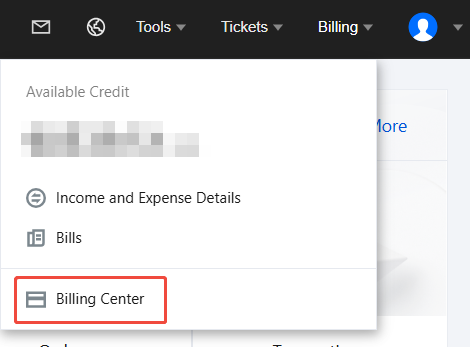
2. In Resource Package Management > CodeBuddy > Actions, select CodeBuddy from the dropdown filter, and then choose from More.
3. In the dialog box, select the agreement terms and then click OK to complete the setup.
4. In Resource Package Management > CodeBuddy > Actions, you can modify the auto-renewal period. Currently, you can choose 1 month or 1 year.
Billing Deduction Notes
Deduction timing: For resources with auto-renewal enabled, the system deducts fees within 5 days before the expiration of the product/service by default. The specific deduction days are subject to the corresponding product/service rules. If your account has available vouchers or cash vouchers, the system will prioritize using vouchers or cash vouchers for renewal.
Note:
To avoid affecting the continuity of your resource/service usage, note that auto-renewal cannot be completed in the following situations: insufficient available balance in your account, restrictions on purchasing new services, or an abnormal real-name verification status.
Renewal price: The auto-renewal price may be affected by factors such as real-time quotes. The actual renewal price may differ from the currently displayed price. The price at the time when the system actually processes the auto-renewal order shall prevail.
Note:
Manual Renewal
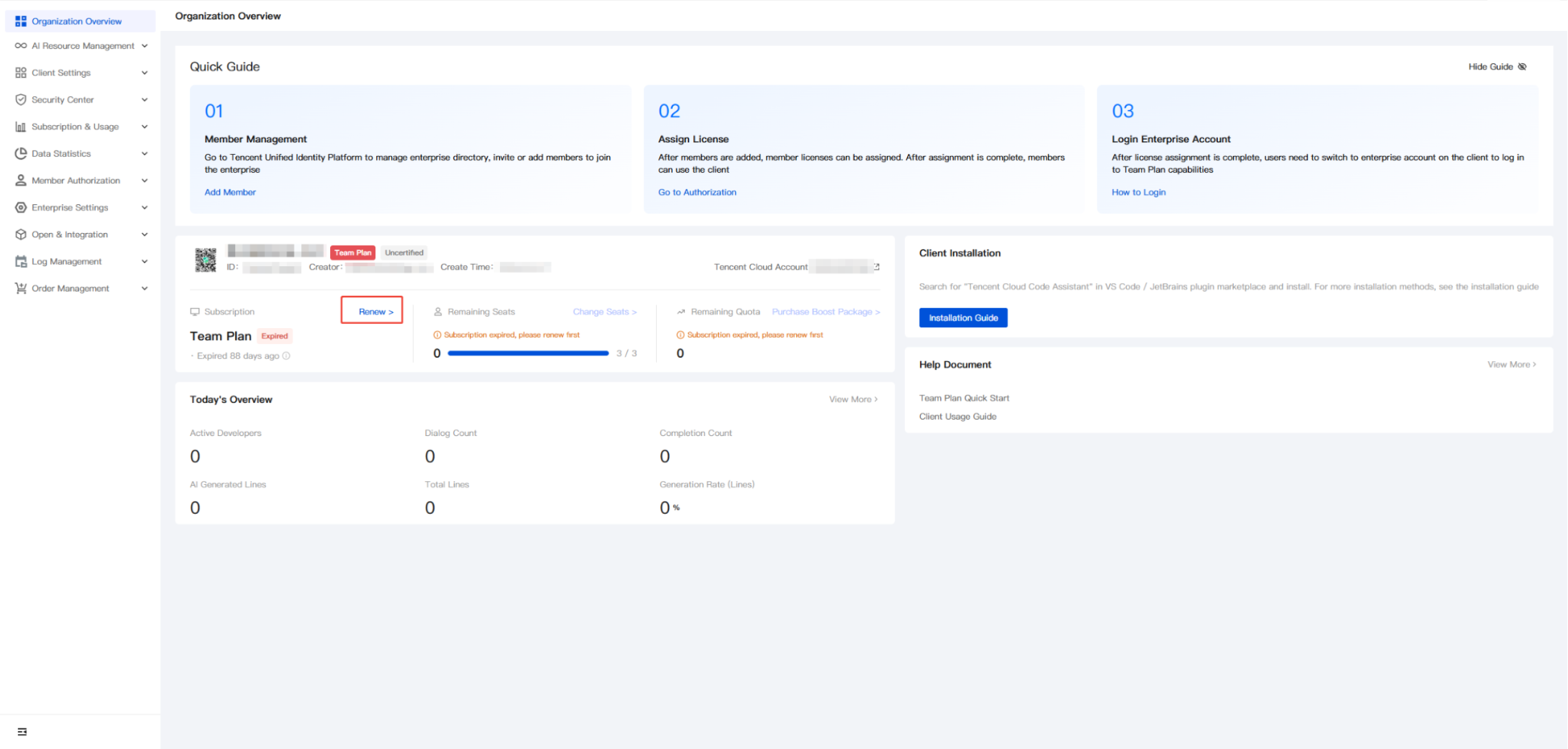
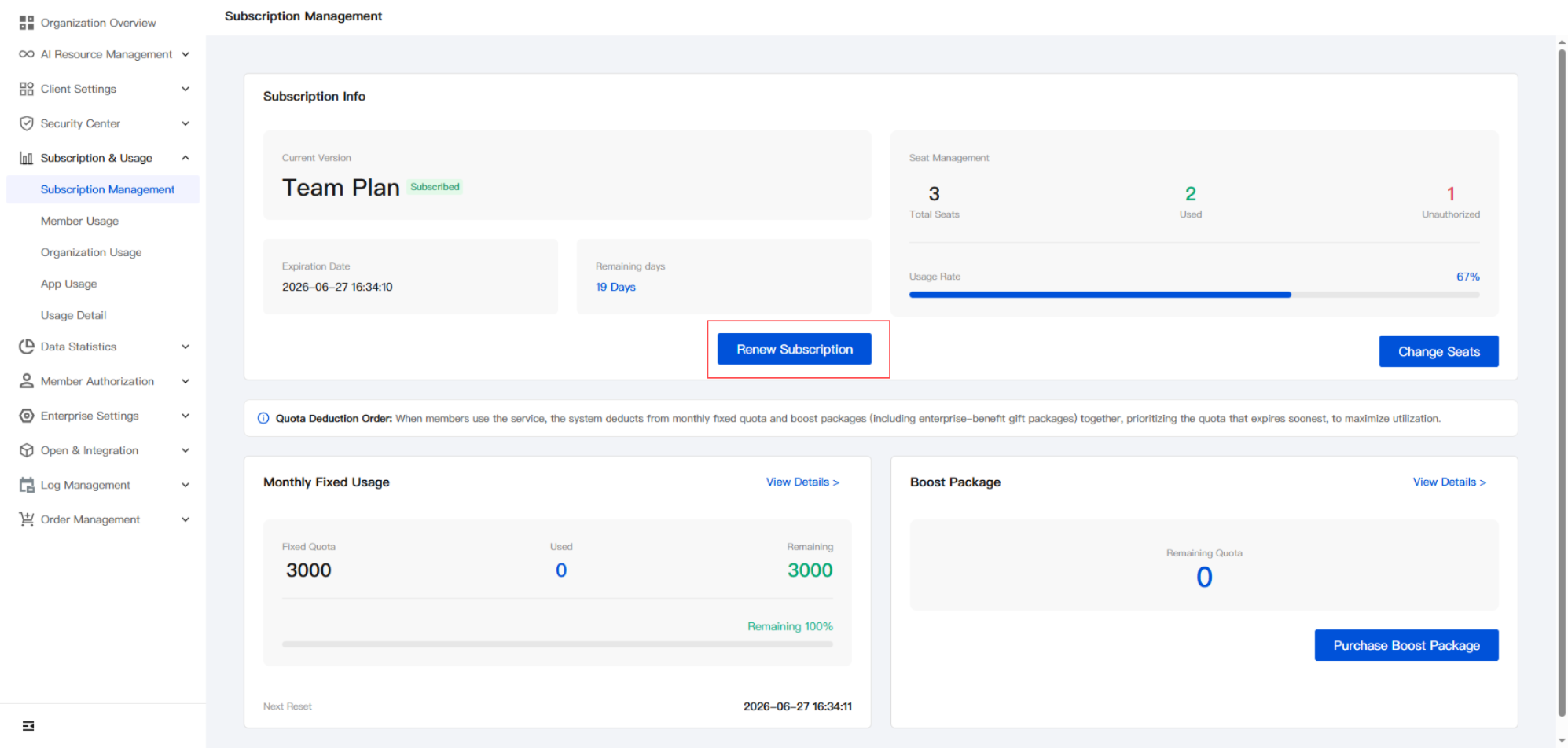
1. Log in to the Enterprise Management Console and initiate a renewal from Organization Overview or Subscription & Usage > Subscription Management. You will be automatically redirected to the renewal purchase page.
Note:
Use the Tencent Cloud account of the purchasing enterprise for renewal. You can view the Tencent Cloud account on the Organization Overview page. If the account is incorrect, log in again.
2. Go to the renewal purchase page and confirm and fill in the required information.
Confirm the license quantity. The license quantity cannot be changed during renewal. If you need to expand capacity, you can do so after the renewal is completed. For details, see Expansion Instructions.
Confirm the enterprise information and the enterprise super administrator's mobile number.
Select the renewal period. Monthly and yearly renewal are supported.
3. After the purchase is completed, return to the Enterprise Console and check whether the remaining duration has increased correctly.
Ajuda e Suporte
Esta página foi útil?
Você também pode entrar em contato com a Equipe de vendas ou Enviar um tíquete em caso de ajuda.
comentários