Execution Log Management
Baixar
Modo Foco
Tamanho da Fonte
This document introduces how to manage the retention duration of pg_log.
Introduction to PG_LOG
pg_log typically records the status information of the database, such as error information, slow log SQL, database startup and shutdown information, etc. This log will be automatically segmented by size and time, and the pg_log of TencentDB for PostgreSQL is retained by default for 30 days. pg_log will occupy the storage space of the database instance, and you can modify the retention duration based on your needs.
Note:
The slow log and error log of the database instance are retained for 7 days by default. Modifying the pg_log retention duration does not affect the slow log and error log retention duration.
Modifying PG_LOG Retention Duration
You can modify the pg_log retention duration based on your needs. The system currently supports two options: 7 days and 30 days. The detailed steps are as follows:
1. Sign in TencentDB for PostgreSQL Console.
2. Find the instance you need to modify in the instance list, click Operation > Manage to enter the instance details.
3. Find Parameter Settings in the Instance detail page, search for the parameter log_filename in the upper right corner and update it.
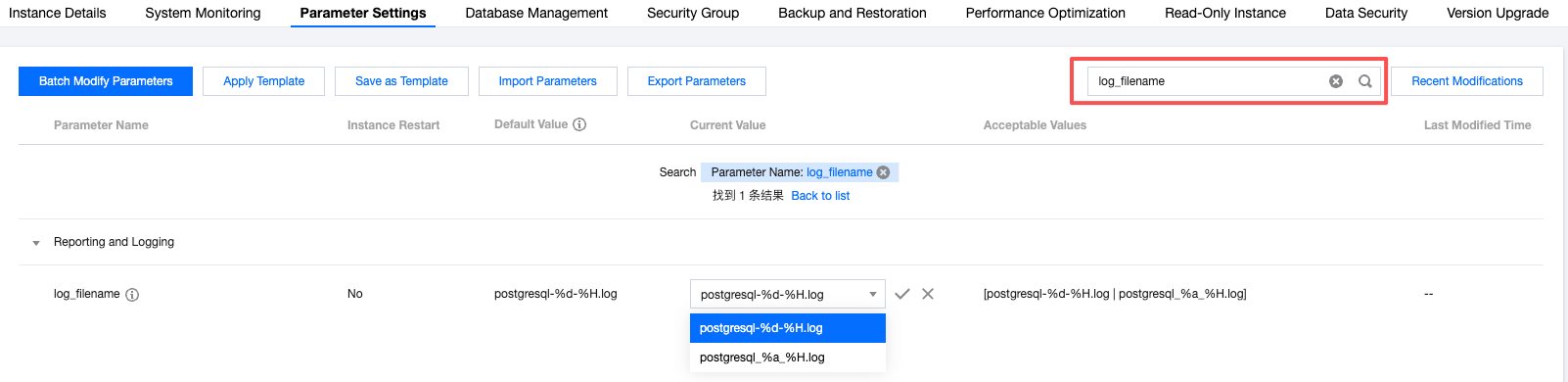
The introduction for the log_filename parameter is as follows:
Parameter Value | Description |
postgresql_%a_%H.log | Selecting this value will keep logs for 7 days. |
postgresql_%d_%H.log | Selecting this value allows logs to be retained for 30 days, which is the system default. |
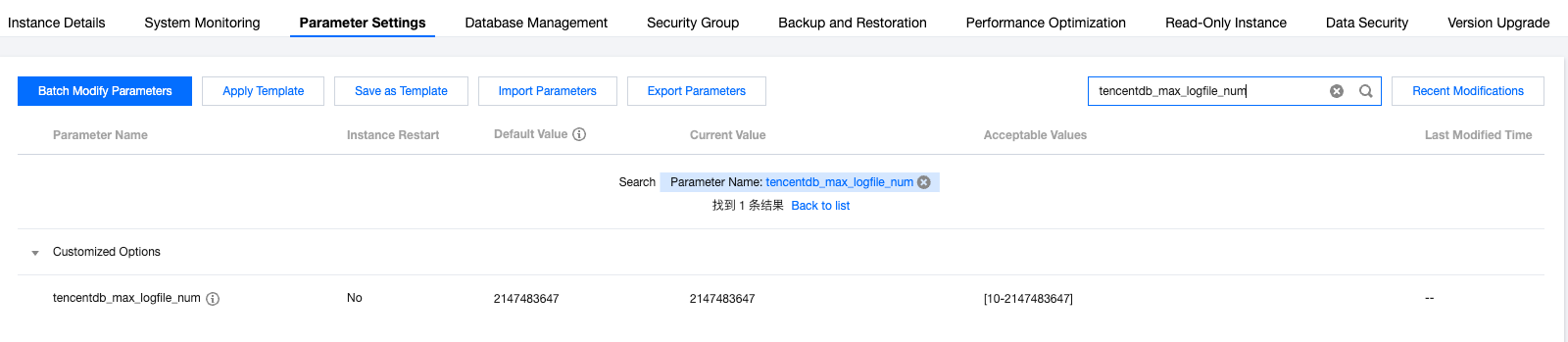
After modifying the log_filename parameter, you can set the number of retained running logs by modifying the tencentdb_max_logfile_num parameter to clean up historic log files. The system generates one log file per hour by default. Therefore, if the log_filename parameter is set to postgresql_%a_%H.log (7 days), set tencentdb_max_logfile_num to 168 or higher. If the log_filename parameter is set to postgresql_%d_%H.log (30 days), set tencentdb_max_logfile_num to 720 or higher. You can find the parameter setting on the instance details page by searching for tencentdb_max_logfile_num in the search box at the top right and updating it.
Note:
To retain sufficient running logs, set the tencentdb_max_logfile_num parameter to no less than 100.
The tencentdb_max_logfile_num parameter value 2147483647 means retain all.
If you cannot change the parameter tencentdb_max_logfile_num on the console, upgrade the minor kernel version.
Cleaning Extra Logs
For extra logs, you may execute the following statement after logging in to the instance to clean them immediately, or wait for the kernel to perform log rotation for auto cleanup.
SELECT pg_rotate_logfile();
Ajuda e Suporte
Esta página foi útil?
Você também pode entrar em contato com a Equipe de vendas ou Enviar um tíquete em caso de ajuda.
comentários