Log Shipping
Baixar
Modo Foco
Tamanho da Fonte
TencentDB for PostgreSQL provides a log shipping feature. Through log shipping, you can collect slow log and error log data from TencentDB for PostgreSQL instances and ship it to Cloud Log Service (CLS) for analysis, enabling quick monitoring and troubleshooting of business issues. This document describes how to enable or disable the log shipping feature via the console.
Prerequisites
Before using this feature, please ensure that:
The activation of CLS has been completed.
The service role for PostgreSQL has been created and authorized.
Definition of Error Logs
Field Value | Type | Description |
Timestamp | - | The reserved field in CLS, which is used to represent the log generation time. |
InstanceId | String | Database instance ID, such as postgres-xxx. |
Database | Long | The database used by the client to connect to the database instance. |
UserName | String | The username used by the client to connect to the database instance. |
ErrMsg | String | The raw SQL log of the error log. |
ErrTime | String | Error occurrence time. |
Definition of Slow Query Logs
Field Value | Type | Description |
Timestamp | - | The reserved field in CLS, which is used to represent the log generation time. |
InstanceId | String | Database instance ID, such as postgres-xxx. |
DatabaseName | String | The database to which the client connects. |
UserName | String | User of client connection. |
RawQuery | String | Slow log content. |
Duration | String | Duration. |
ClientAddr | String | Client address. |
SessionStartTime | Unix timestamp | Session start time. |
Enabling Slow Query Log Shipping
1. Log in to the TencentDB for PostgreSQL console and click Instance ID in the instance list to go to the management page.
2. On the instance management page, select Performance Optimization > Log Shipping.
3. The first time you enable the Log Shipping feature, you need to activate the CLS service, create a service role for PostgreSQL, and complete the authorization. The specific operations are as follows. If this has been done, ignore it.
3.1 Activate CLS
3.1.1 Click Go to Activate and go to the CLS Console to activate the CLS log service.
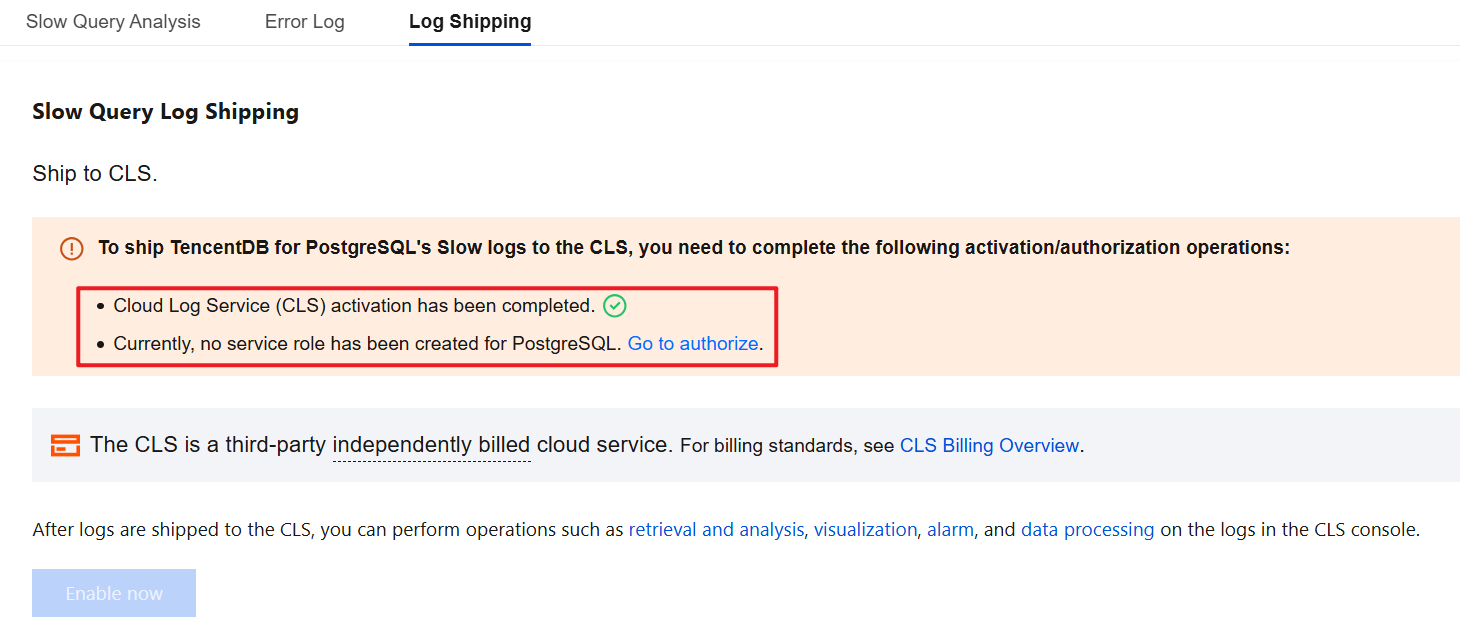
3.1.2 Click Activate Now to activate the CLS log service.
3.2 Create a service role for PostgreSQL and grant authorization.
3.2.1 Click Go to authorize.
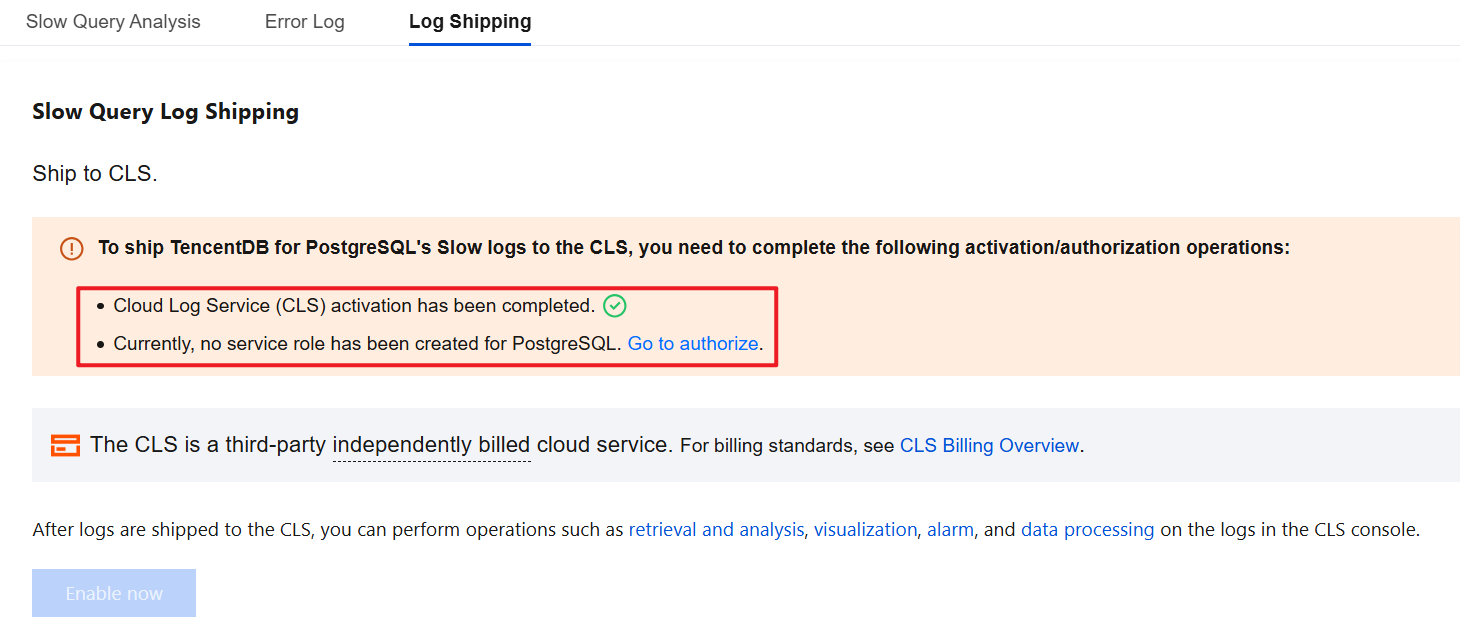
3.2.2 Click Grant to automatically create a service role for PostgreSQL and complete the authorization.
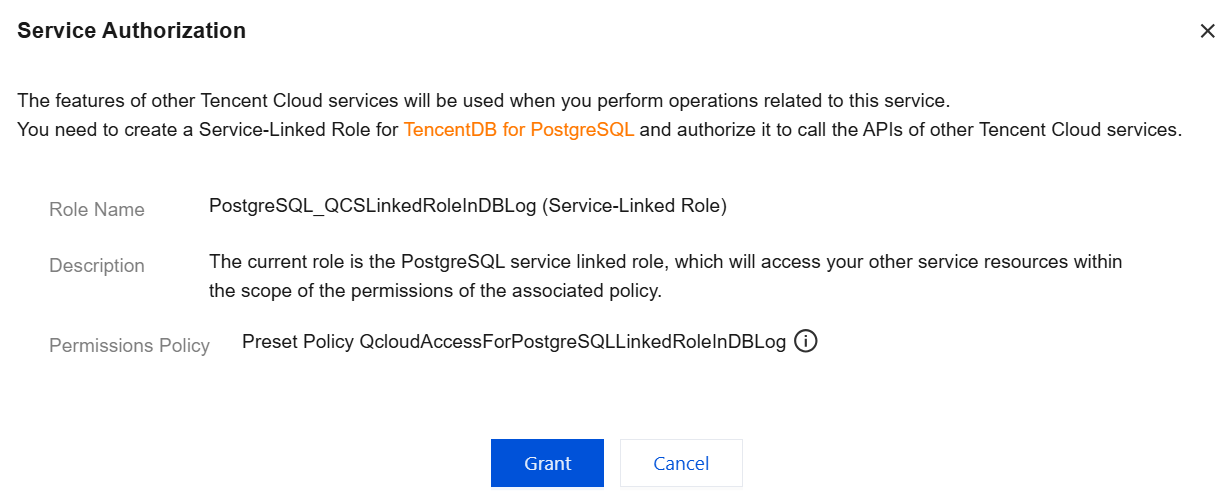
4. On the Slow Query Log Shipping page, click the Enable Now button.
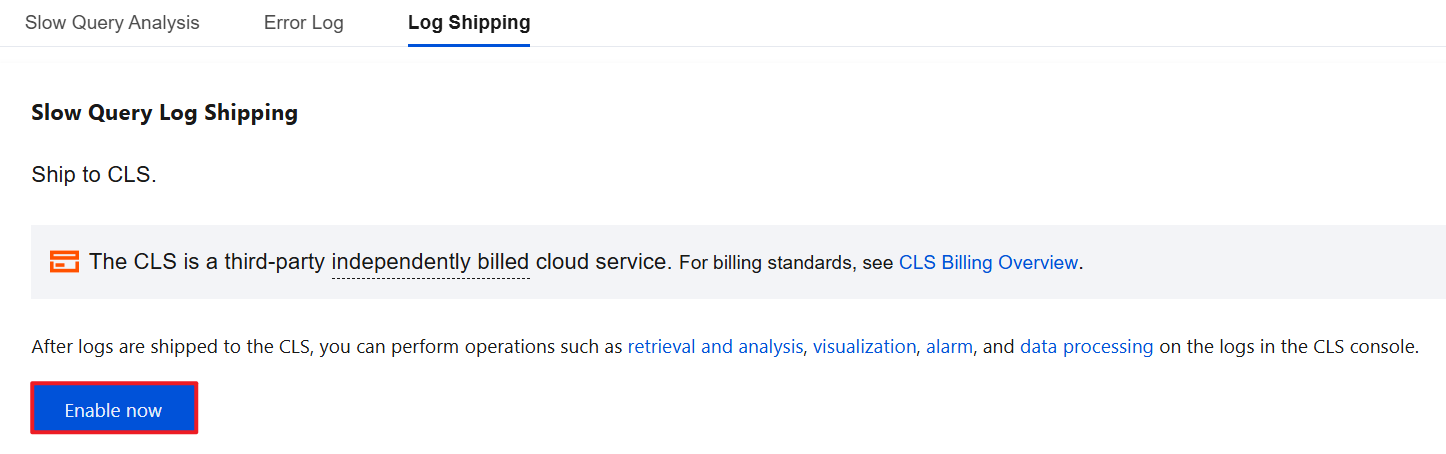
5. Complete the following configuration in the pop-up window and click Enable Now.
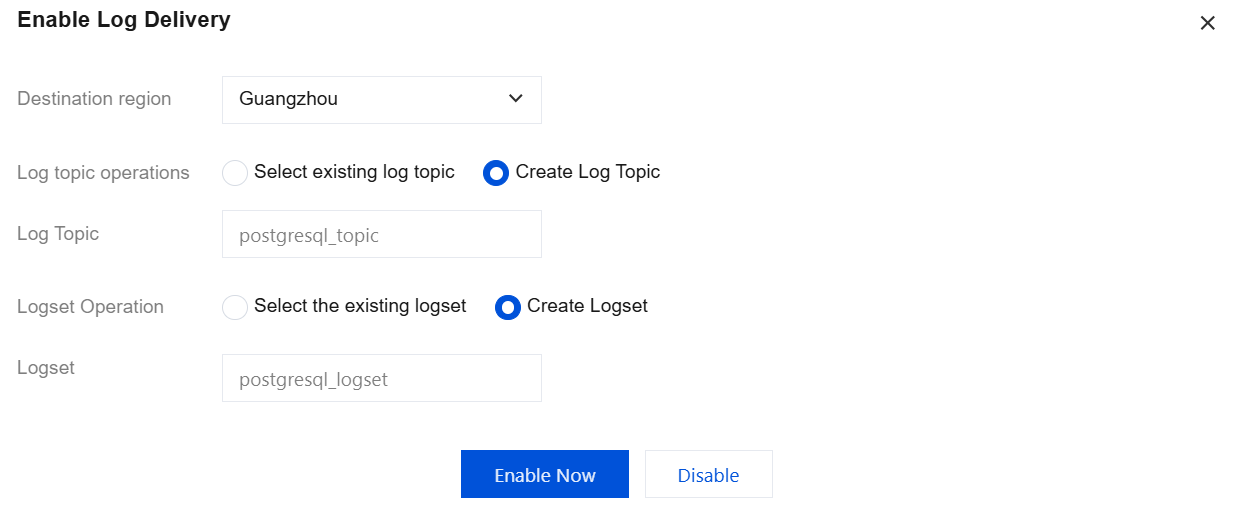
Parameter | Description |
Destination region | Select the region for log shipping. Cross-region shipping is supported. |
Log topic operations | A log topic is the basic unit for log data collection, storage, retrieval, and analysis. You can Select existing log topic or Create Log Topic. |
Select existing log topic | If the log topic is set to Select existing log topic, you need to further select the existing logset and log topic. Logset: Logset classify log topic to facilitate log topic management. You can filter existing logset in the search box. Log Topic: A log topic is the basic unit for collecting, storing, retrieving, and analyzing log data. You can filter log topics of the selected logset in the search box. |
Create Log Topic | If the log topic is set to Create Log Topic, you need to further customize the log topic and then assign it to an existing logset or a created logset. Log Topic: A log topic is the basic unit for collecting, storing, retrieving, and analyzing log data. You need to create a log topic. Select the existing logset: The log topic to be created will be added to an existing logset. If you select this option, you can filter existing logsets in the search box. Create Logset: The log topic to be created will be added to a newly created logset. If you select this option, you need to create a logset. |
Note:
Enabling log shipping enables log indexing by default. Index configuration is a prerequisite for using (CLS) for search and analysis. Only when indexing is enabled can logs be searched and analyzed. For details, see Index Configuration.
If an existing log topic is selected, the index status will be consistent with the index status of the corresponding existing log topic by default.
You can manage log topics. For details, see Log Topic.
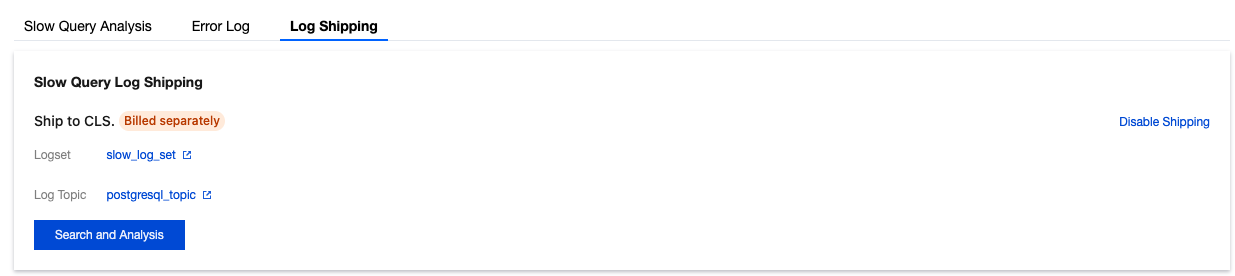
6. After slow log shipping is successfully enabled, you can see that slow log shipping is enabled under Log Shipping. Click the log topic name to jump to the CLS console for subsequent analysis and management.
Disabling Slow Log Shipping
Note:
After slow log shipping is disabled, the generated slow log shipping data will be saved at the saving time selected when slow log shipping is enabled, and will be automatically cleared only after expiration.
1. Log in to the TencentDB for PostgreSQL console and click Instance ID in the instance list to go to the management page.
2. On the instance management page, select Performance Optimization > Log Shipping.
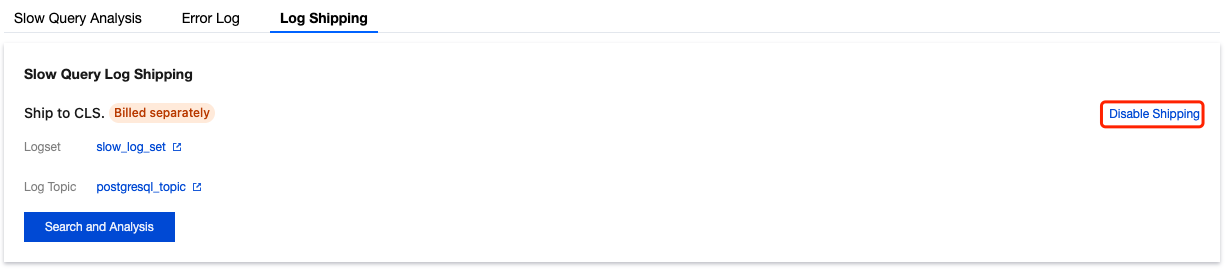
3. In Slow Query Log Shipping, click Disable Shipping.
4. In the pop-up window, select Confirm Disable and click Confirm.
Enabling Error Log Shipping
1. Log in to the TencentDB for PostgreSQL console and click Instance ID in the instance list to go to the management page.
2. On the instance management page, select Performance Optimization > Log Shipping.
3. Enabling the Log Shipping feature for the first time requires activating the CLS log service, creating a service role for PostgreSQL, and granting authorization. If this has been completed, you may skip this step.
3.1 Activate the CLS log service.
3.1.1 Click Go to Activate and go to the CLS Console to activate the CLS log service.
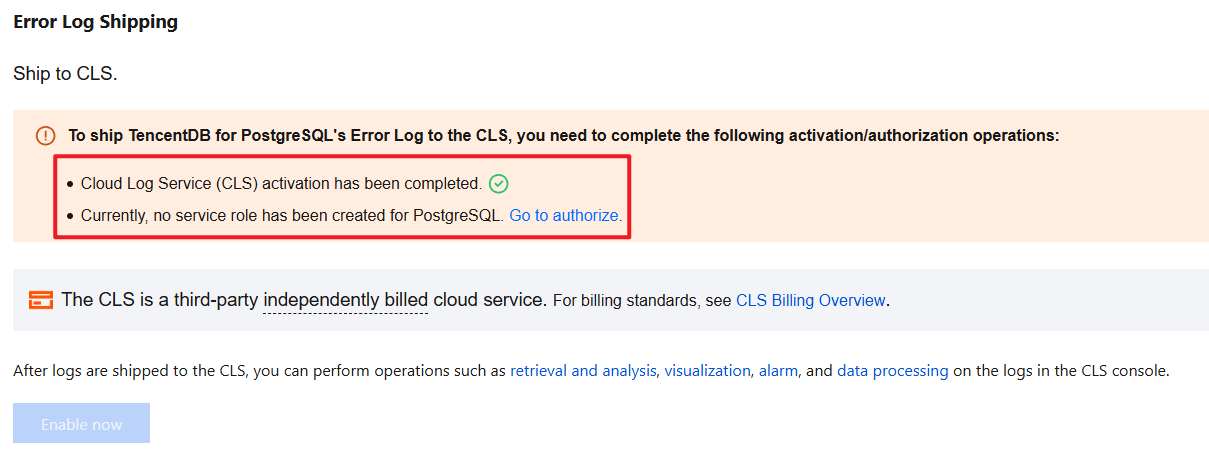
3.1.2 Click Activate Now to activate the CLS log service.
3.2 Create a service role for PostgreSQL and grant authorization.
3.2.1 Click Go to authorize.
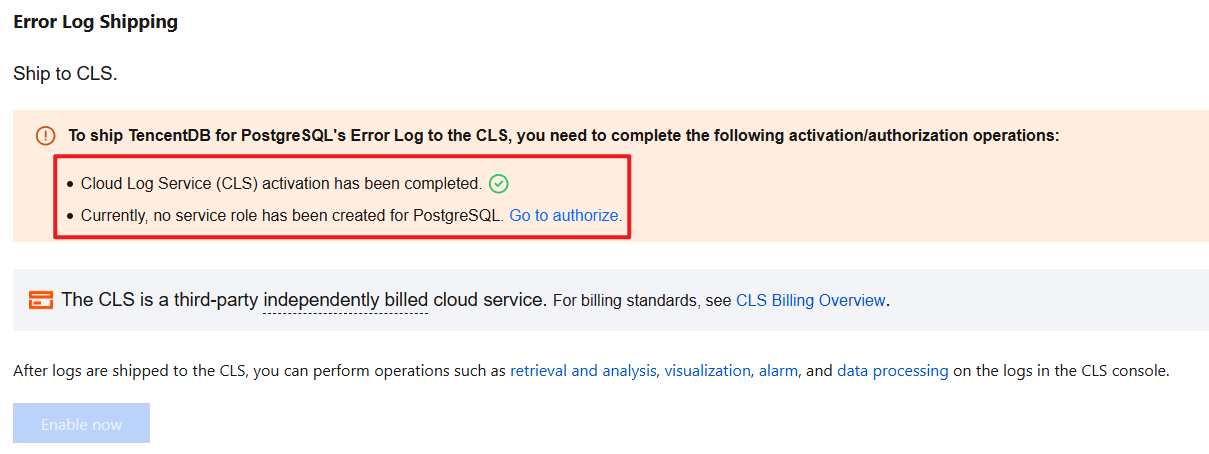
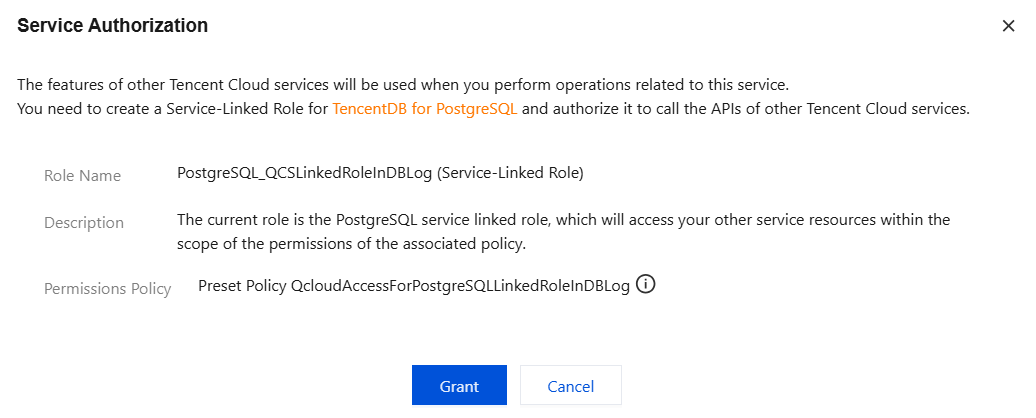
3.2.2 Click Grant to automatically create a service role for PostgreSQL and complete the authorization.
4. In Error Log Shipping, click the Enable Now button.
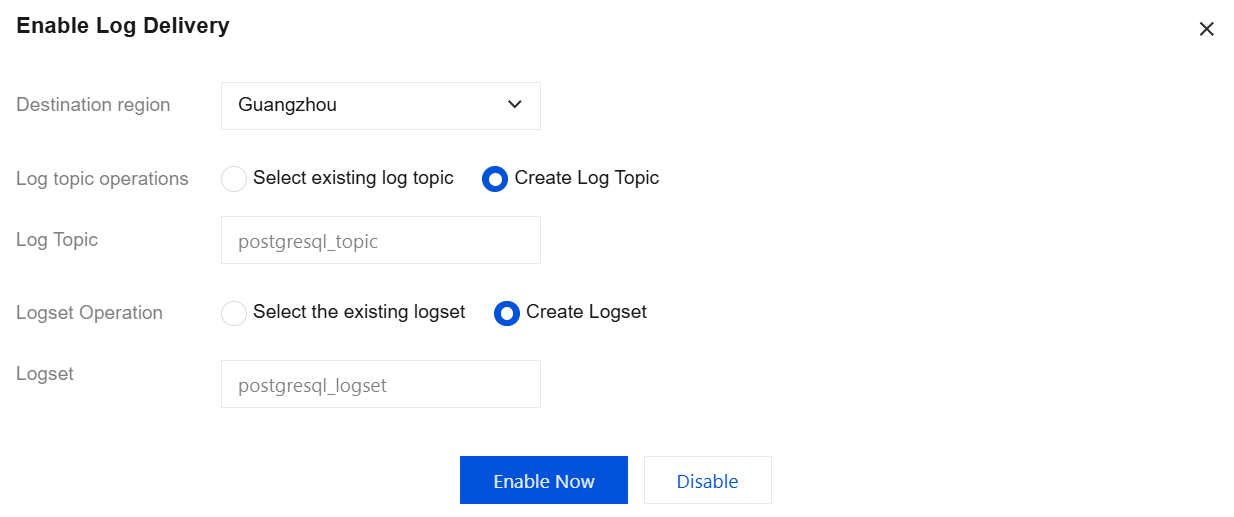
5. Complete the following configuration in the pop-up window and click Enable Now.
Parameter | Description |
Destination region | Select the region for log shipping. Cross-region shipping is supported. |
Log topic operations | A log topic is the basic unit for log data collection, storage, retrieval, and analysis. You can Select existing log topic or Create Log Topic. |
Select existing log topic | If the log topic is set to Select existing log topic, you need to further select the existing logset and log topic. Logset: Logset classify log topic to facilitate log topic management. You can filter existing logset in the search box. Log Topic: A log topic is the basic unit for collecting, storing, retrieving, and analyzing log data. You can filter log topics of the selected logset in the search box. |
Create Log Topic | If the log topic is set to Create Log Topic, you need to further customize the log topic and then assign it to an existing logset or a created logset. Log Topic: A log topic is the basic unit for collecting, storing, retrieving, and analyzing log data. You need to create a log topic. Select the existing logset: The log topic to be created will be added to an existing logset. If you select this option, you can filter existing logsets in the search box. Create Logset: The log topic to be created will be added to a newly created logset. If you select this option, you need to create a logset. |
Note:
It is enabled by default. Index configuration is a necessary condition to use CLS for retrieval and analysis. Only by enabling the indexing feature can you retrieve and analyze logs. For details, see Index Configuration.
If an existing log topic is selected, the index status will be consistent with the index status of the corresponding existing log topic by default.
You can manage log topics. For details, see Log Topic.
6. After error log shipping is successfully enabled, you can see that error log shipping is enabled under Log Shipping. Click the log topic name to jump to the CLS console for subsequent analysis and management.

Disabling Error Log Shipping
Note:
After error log shipping is disabled, the generated error log shipping data will be saved at the saving time selected when error log shipping is enabled, and will be automatically cleared only after expiration.
1. Log in to the TencentDB for PostgreSQL console and click Instance ID in the instance list to go to the management page.
2. On the instance management page, select Performance Optimization > Log Shipping.
3. In Error Log Shipping, click Disable Shipping.
4. In the pop-up window, select Confirm Disable and click Confirm.
References
Ajuda e Suporte
Esta página foi útil?
Você também pode entrar em contato com a Equipe de vendas ou Enviar um tíquete em caso de ajuda.
comentários