Setting soft_limit_connections Parameters
Baixar
Modo Foco
Tamanho da Fonte
Due to the needs of primary-secondary replication, the max_connections parameter value of the secondary database in PostgreSQL, must be greater than or equal to that of the primary database in it. Therefore, the max_connections parameter value of the primary instance may not be set to the maximum value allowed by its specification due to the configuration of the read-only instance and the primary instance. At this point, you can resolve this issue by enabling the soft_limit_connections parameter. Below, we will describe this in detail.
Note:
When the soft_limit_connections parameter is set to a value other than -1, the number of connections to the instance will be controlled by this parameter. If your TencentDB for PostgreSQL instance does not have any restrictions, it is recommended not to modify this parameter.
Suppose you now have a primary instance and two read-only instances. The configurations are as follows:
Instance Type | Instance Configuration | Maximum max_connections Value |
Primary instance | 8 CPU cores and 48 GB memory with 100 GB disk | 4500 |
Read-only instance | 1 CPU core and 2 GB memory with 100 GB disk | 2048 |
Read-only instance | 1 CPU core and 2 GB memory with 100 GB disk | 2048 |
If you need to adjust the connection count of the primary instance to 4000, you can perform the following operation:
1. Modify the soft_limit_connections of all read-only instances
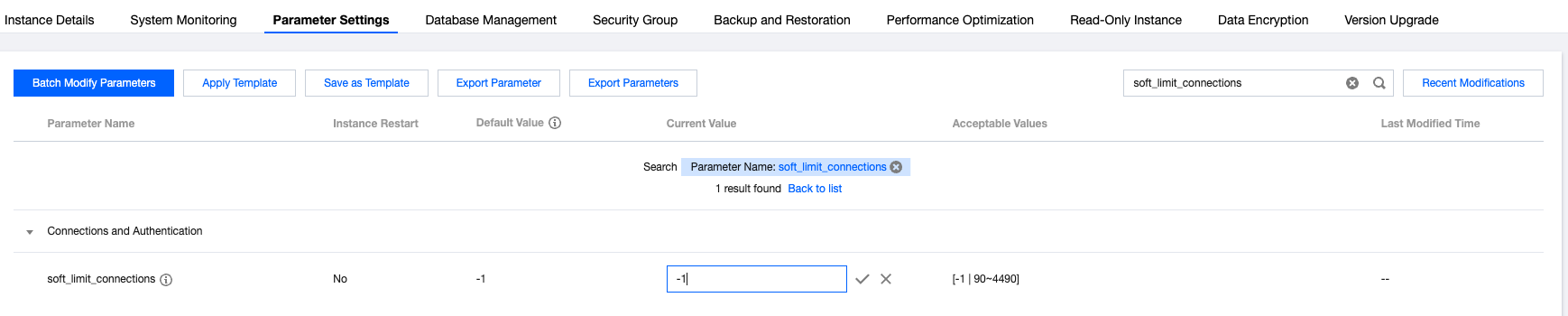
You can modify the soft_limit_connections parameter of the read-only instance to a value other than -1, then the connection count of the read-only instance will be controlled by the soft_limit_connections parameter. Modifying this parameter does not require a restart. You can search for soft_limit_connections in the Parameter Settings to change it, as shown below:
2. Modify the max_connections of all read-only instances
After modifying the soft_limit_connections parameter of the read-only instance to a value other than -1, the maximum limit of the max_connections parameter of the read-only instance will be consistent with that of the primary instance. Since the max_connections parameter value of the secondary database must be greater than or equal to that of the primary database, if you need to adjust the max_connections of the primary instance, you can first adjust the max_connections of the read-only instance to prepare for adjusting the max_connections of the primary instance later. You can search for max_connections in the Parameter Settings to change it, as shown below:

3. Modify the max_connections of the primary instance
If the max_connections of all read-only instances has been adjusted and you now want to adjust the connection limit of the primary instance to a higher value, you can directly modify the max_connections parameter of the primary instance. You can search for max_connections in the Parameter Settings to change it, as shown below:

At this point, the maximum connection count of your primary instance has been adjusted and is no longer limited by the specifications of the read-only instances.
If you no longer need to use the soft_limit_connections parameter to control the connection count of the read-only instances, you can follow the steps below to disable the parameter.
Modify the max_connections parameter of the primary instance to 2048
Modify the max_connections parameter of all read-only instances to 2048
Set the soft_limit_connections parameter of all read-only instances to -1
Ajuda e Suporte
Esta página foi útil?
Você também pode entrar em contato com a Equipe de vendas ou Enviar um tíquete em caso de ajuda.
comentários