Data consistency check compares table data between the source and target databases through Data Transfer Service (DTS) during data migration. It provides comparison results and inconsistency details to help users quickly verify synchronization results before cutover. The data consistency check task runs independently and does not affect the normal business of the source database or the DTS tasks.
Note:
The consistency check is only for auxiliary data verification. Users are required to perform experiment operations by themselves to ensure that the results meet the migration requirements before the formal migration.
Differences Between Independent Checks and Built-in Checks
Consistency checks are divided into two types: independent checks and built-in checks. Users can select an appropriate method based on their actual needs.
Comparison Item
Built-in Check
Independent Check
Definition
The consistency check service is integrated within the DTS task and is required to be initiated while the task is running. The check cannot be initiated once the DTS task stops running.
The check service serves independently from the DTS task and selects the same data blocks from both the source and target for comparison. Check tasks cannot be initiated once the DTS task stops running.
Link support
MySQL/MariaDB/Percona/TDSQL-C MySQL/TDSQL Boundless/TDSQL MySQL migration and synchronization links.
MySQL/MariaDB/Percona/TDSQL-C MySQL/TDSQL Boundless migration and synchronization links.
Comparison scope
Only the synchronization objects selected in the DTS task are compared. Objects not selected in the DTS task from the source database are excluded from the check scope.
Only data written by DTS to the target database is compared; data manually written by users to the target database is not included in the check scope.
Synchronization objects not selected in the DTS task can be compared.
Data manually written by users to the target database can be compared.
Requirements during the check process
The source allows DML write operations but does not allow DDL write operations; otherwise, the check results may become inaccurate.
It is recommended to initiate a check when data is static, which means no data write operations are performed on the source or target; otherwise, the check results may become inaccurate.
Scenarios
Currently, the following links support data consistency checks:
MySQL/MariaDB/Percona/TDSQL MySQL/TDSQL-C MySQL > MySQL
MySQL/MariaDB/Percona/TDSQL MySQL/TDSQL-C MySQL > MariaDB
MySQL/MariaDB/Percona/TDSQL-C MySQL > TDSQL-C MySQL
MySQL/MariaDB/Percona/TDSQL MySQL/TDSQL-C MySQL > TDSQL MySQL
TDSQL MySQL > TDSQL Boundless (supported only by independent checks)
Must-Knows and Constraints
1. The data consistency check task may increase the load on the source database instance. Therefore, it is recommended to perform these operations during off-peak hours.
2. Constraint comparison of checks:
Full checks and sampling checks: For tables without primary/unique keys, checks are supported if the number of rows is less than 50,000; checks are skipped if the number of rows exceeds 50,000.
Row quantity checks: No primary or unique key required for tables.
3. The current check task does not detect DDL operations. If users perform DDL operations on the source database during migration, inconsistent check results may occur. Users are required to re-initiate the check task to obtain accurate comparison results.
4. During data consistency checks, DTS enforces a 10-minute timeout limit for single queries on the source or target database. A single query refers to the query performed for each chunk check and the query for the row quantity check. If a single query exceeds 10 minutes (for example, when querying large tables on the source), the check task will fail.
5. Must-knows for the built-in check.
5.1 The scope of the built-in check only compares the selected database and table objects in the source database with those migrated to the target database. If users perform data write operations to the target database during the migration task, such data is excluded from the check scope. Additionally, other advanced objects (such as stored procedures and functions), views, and accounts are not included.
5.2 If the user chooses to Complete or Stop the DTS task before the data consistency check task is finished, the data consistency check task will fail.
5.3 As the consistency check requires creating a database named __tencentdb__ in the source database and writing data into the Checksum table under this database, the consistency check will be skipped if the source database is set to read-only mode.
6. Limitations on independent check restrictions.
Table renaming is configured in the synchronization link: When an independent check is performed, if you set Check Object to Custom, you need to select table objects one by one and cannot select the entire database. Otherwise, the tables that have been renamed previously will be excluded from the check.
How It Works
Built-in Checks
DTS performs consistency checks for MySQL series databases based on the row mode (binlog_format = row). This mode enables accurate replication between the master and slave databases, ensuring data security.
The implementation principles are as follows:
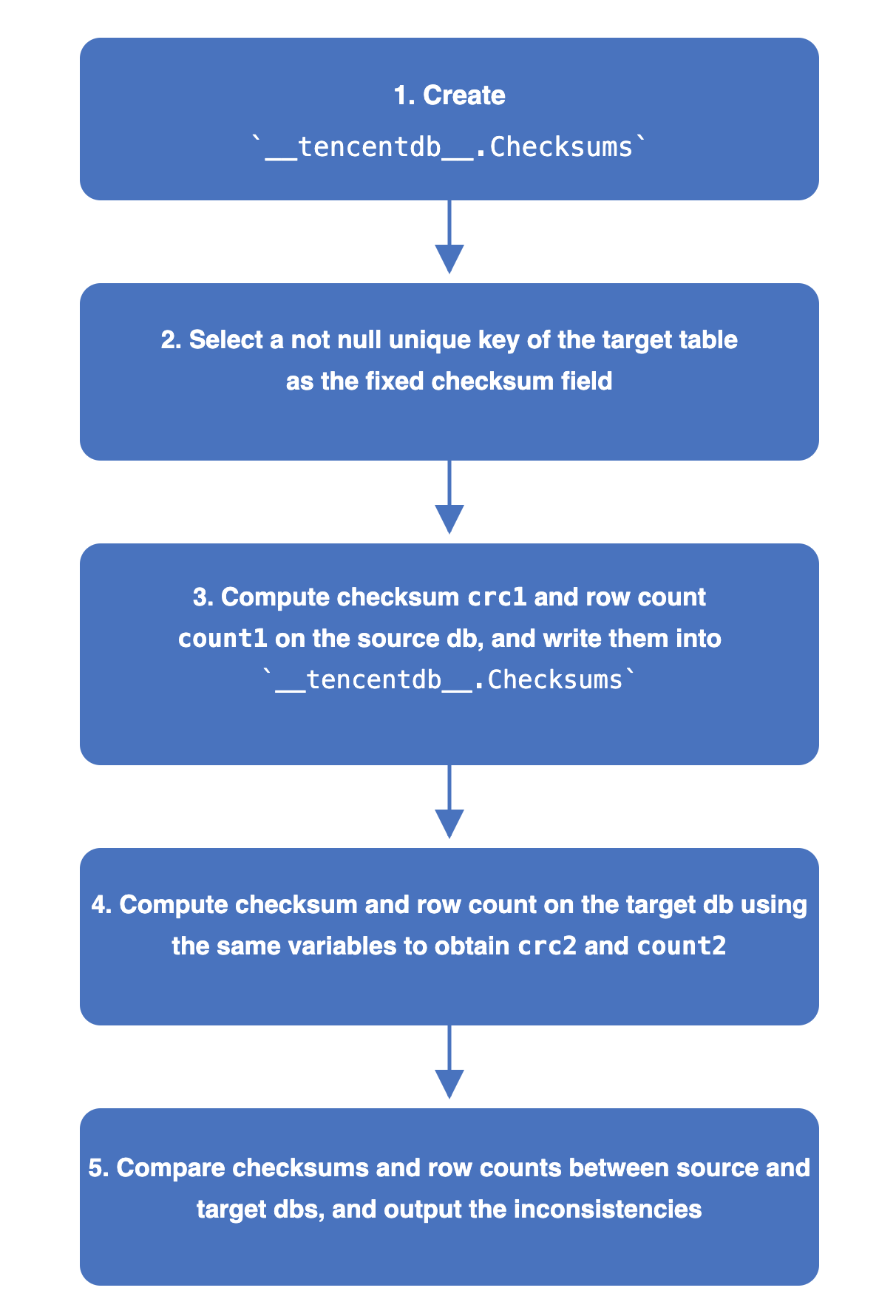
1. In the source database, create a check database named __tencentdb__.Checksums to store information about data comparison during the migration task.
2. The non-null unique key of the table to be checked is selected as the fixed field for the check.
3. The check value crc1 and number of rows (count1) of the source database are calculated and written to __tencentdb__.Checksums in the source database.
The calculation method of crc is similar to the chunk check. Based on the fixed check field, a fixed range is selected (for example, the data with primary keys from 1 to 1000 in Table A). The data is concatenated row by row to generate a crc value for each chunk. Meanwhile, the entire data of the source database is computed to produce crc1.
4. DTS parses binlog data in the row mode, reconstructs the SQL that wrote the check values in the source database, and then replays it on the target database.
The target database uses the same variables as the source database to compute the check value and row count, obtaining crc2 and count2 for the target database.
5. Compare the check values and row counts between the source and target databases, and display the comparison results.
Independent Checks
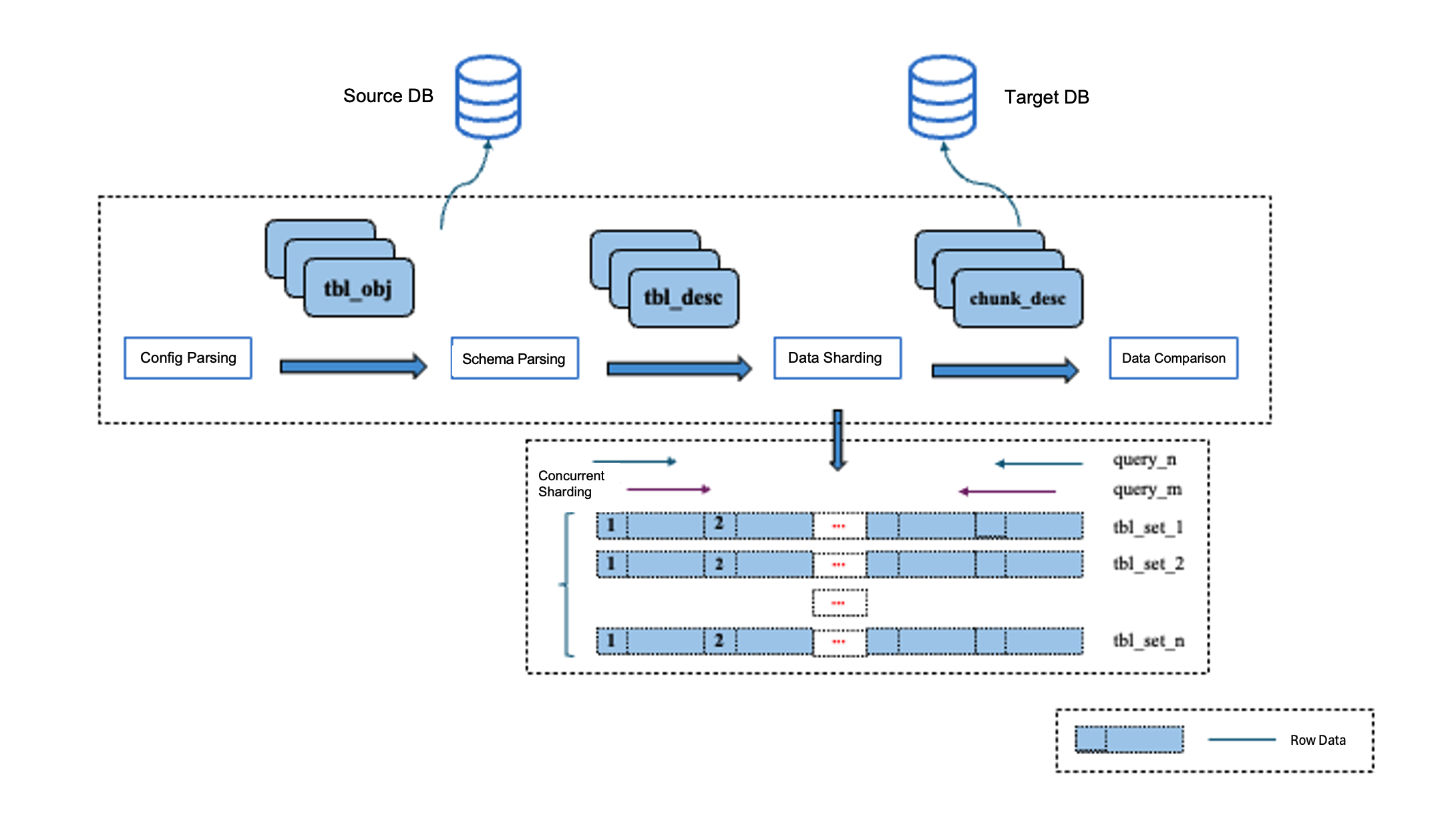
The independent check is a data comparison tool that operates independently from DTS data migration tasks. It performs data comparison by querying data from both the source and target in parallel, based on user-defined configuration files. To support data comparison between heterogeneous databases, data from different databases is converted according to unified data type mapping rules. In addition, to increase concurrency for data comparison and minimize the impact of delays in data synchronization, each table is split into slices, with each data shard serving as the smallest unit for data query and processing in the comparison.
The implementation principles are as follows:
1. Configuration parsing: It mainly involves identifying the databases and tables in the current data comparison task, processing renaming rules, and configuring the Where clause. The independent check allows users to configure different objects for data comparison, such as a whole instance, a whole database, or custom databases and tables. It allows users to set allowlists and blocklists for tables and columns, configure rename conversion rules for database, table, and column names, and supports setting Where filter conditions on tables. Through these configurations, users can select appropriate objects for data comparison based on their specific requirements.
2. Table structure parsing: It mainly includes steps such as parsing column names and types, querying character sets and collations, and querying primary keys, as well as non-null unique keys. For tables without primary keys or non-null unique keys: when the number of rows is less than or equal to 50,000, the independent check calculates crc values for data consistency comparison. Since no unique identifiers can be identified for the data, inconsistent row data or SQL statements for data correction cannot be accurately output for these tables. When the number of rows is greater than 50,000, data comparison for such tables is skipped. Column type parsing is particularly critical in heterogeneous scenarios. Based on unified type mapping rules, data from different sources is converted to a consistent in-memory data type, with column type parsing forming the foundation of this key process.
3. Data slicing: To enhance parallelism in data querying and comparison, the independent check splits table data into slices, with each data shard serving as the smallest unit for data querying and comparison.
The independent check uses a primary key-based sequential slicing strategy for MySQL databases. This is because MySQL organizes its data using the B+ tree structure, where range queries based on primary keys deliver higher efficiency with minimal I/O consumption. A typical data slicing algorithm used is based on the table's minimum and maximum primary key values, as well as the primary key order. It traverses all primary key values and queries the upper and lower boundary values (primary key values) of slices in a fixed chunk size each time, thereby defining the range of each data slice. The process further optimizes slicing through a multi-level concurrency strategy. First, for sharded or partitioned tables, data is split into multiple data segments by shard or partition to improve slicing parallelism. Second, within each data segment, a bidirectional approximation strategy is applied to concurrently perform data slicing from both ends.
4. Data comparison: It mainly involves data querying, data type conversion, and data consistency comparison. Data type conversion is a critical step in this phase. Due to differences in column types across heterogeneous databases, we convert column types from different databases into standardized in-memory data types based on predefined type mapping rules before performing data comparisons between them. This process also addresses differences in character set encoding, time types and ranges, and floating-point precision between heterogeneous databases to ensure accurate data comparison. The independent check compares whether each row of data is consistent based on primary keys or unique keys. For inconsistent data, it outputs specific data field differences and queries SQL to help users quickly locate issues. In addition, it generates SQL statements for correcting inconsistent data, facilitating data repair.
Creating a Data Consistency Check Task
Automatic Triggering
You can enable the data consistency check task when creating a DTS migration task. The data consistency check task is automatically triggered once the subsequent task proceeds to the incremental synchronization step.
On the Set consistency check page, select Enable data consistency verification, configure the parameters, and then click Next.
Full check: Perform a record-by-record comparison of all object data selected for migration from the source database to ensure the integrity of migrated data.
Verification Benchmark
Both ends: Use data from the source and target as the check benchmark.
Verification Parameters
Configuration Item
Description
Thread Count
The value range is 1–8. Select an appropriate value according to the actual situation. Increasing the number of threads can accelerate the consistency check speed, but it will also increase the load on the source and target databases.
Review count
Set the number of rechecks.
If the first full data check result is inconsistent, the background will re-initiate a check of the inconsistent data identified during the full check.
Recheck time interval
Set the interval for rechecks.
Verified Object option
Configuration Item
Description
Check Object
All migration objects: The check scope includes all objects selected for the migration task.
Custom: Select specific objects from the selected migration objects for checking.
Manual Creation
You can create a data consistency check task for an existing DTS migration task.
2. On the Data Migration page, select the migration task to be checked, and choose More > Create Data Consistency Check Task in the Operation column.
Note:
Data consistency checks can only be created when the migration task reaches the Incremental Sync phase. If the button on the page is grayed out, it indicates that the DTS task status does not meet the required conditions, such as the task not having entered the Incremental Sync phase, or having failed or been terminated.
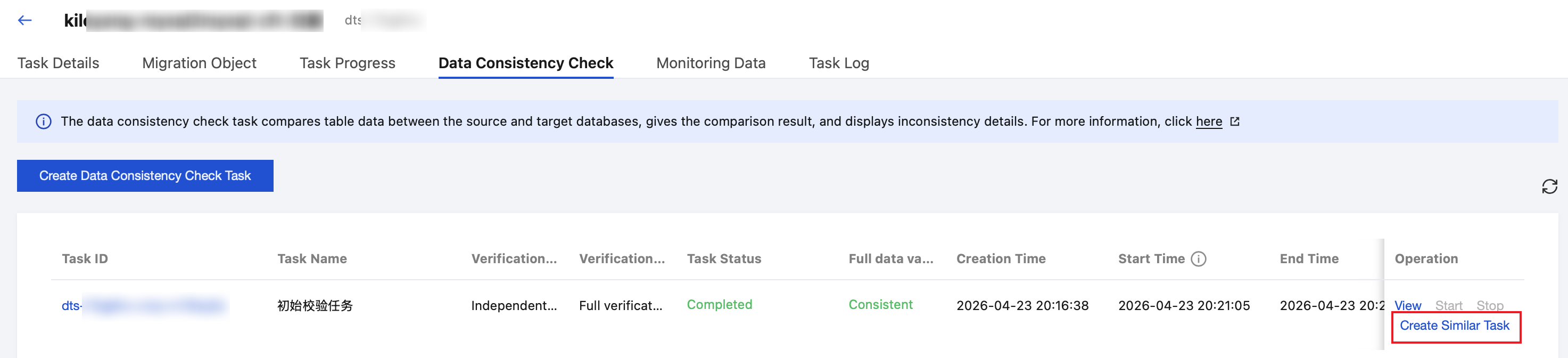
3. On the Data Consistency Check page, click Create Data Consistency Check Task.
Note:
If a consistency check task already exists, you can click Create Similar Task in the Operation column and configure the related parameters.
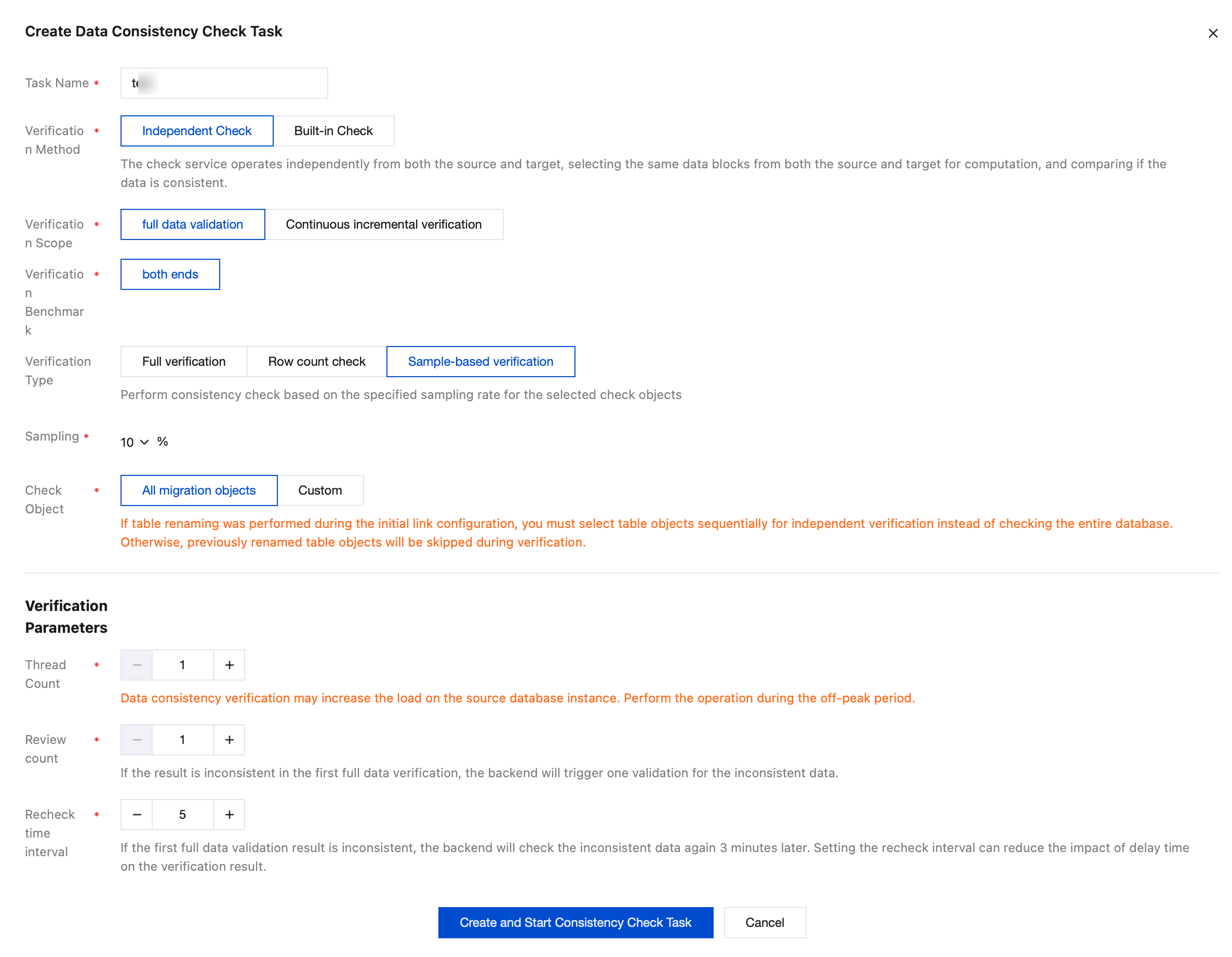
4. In the pop-up dialog box, click Create and Start Consistency Check Task after configuring the data consistency check parameters.
Parameter
Description
Task Name
Name of the created consistency check task.
Verification Method
Independent Check: The check service serves independently from the DTS task and selects the same data blocks from both the source and target for comparison. Check tasks cannot be initiated once the DTS task stops running.
Built-in Check: The consistency check service is integrated within the DTS task and is required to be initiated while the task is running. The check cannot be initiated once the DTS task stops running.
Verification Scope
Full data validation: Perform a record-by-record comparison of all object data selected for synchronization from the source database to ensure the integrity of migrated data.
Verification Type
Full verification: Perform a consistency check on the full data of the selected check objects.
Sample-based verification: Select a certain proportion of the selected check objects for checking.
Row count check: Compare only the number of rows in the selected check objects. It is not required that the table objects have a primary key during row quantity comparison, and this check can be performed on tables without primary keys.
Sampling
Configure the sampling ratio, which can be 10%, 20%, 30%, 40%, 50%, 60%, 70%, 80%, or 90%.
Note:
This parameter needs to be configured only when Verification Type is set to Sample-based verification.
Check Object
All migration objects: The check scope includes all objects selected for the migration task.
Custom: Select specific objects from the selected migration objects for checking.
Thread Count
The value range is 1–8. Select an appropriate value according to the actual situation. Increasing the number of threads can accelerate the consistency check speed, but it will also increase the load on the source and target databases.
Review count
Set the number of rechecks.
If the first full data check result is inconsistent, the background will re-initiate a check of the inconsistent data identified during the full check.
Recheck time interval
Set the interval for rechecks.
Viewing the Data Consistency Check Results
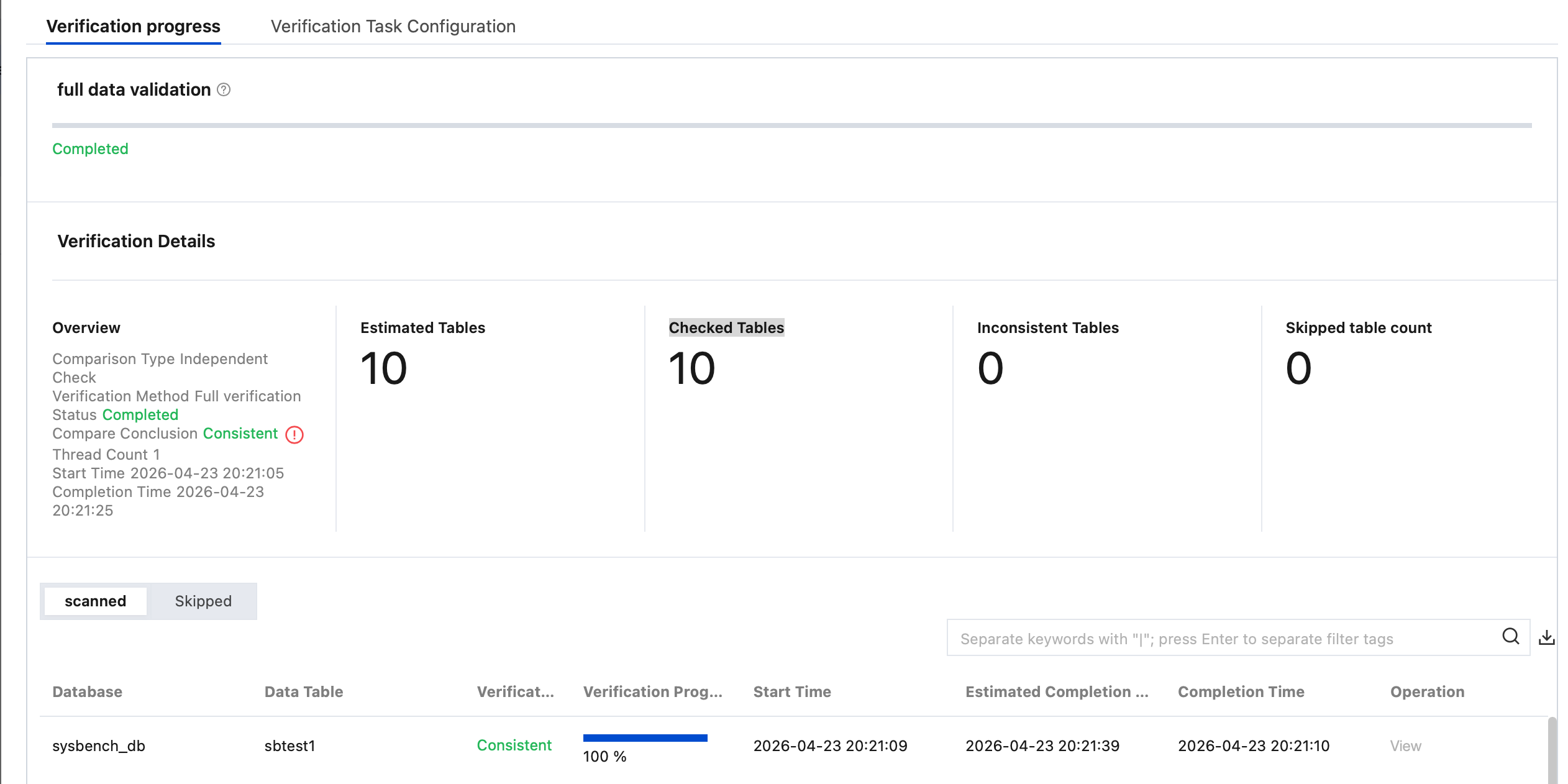
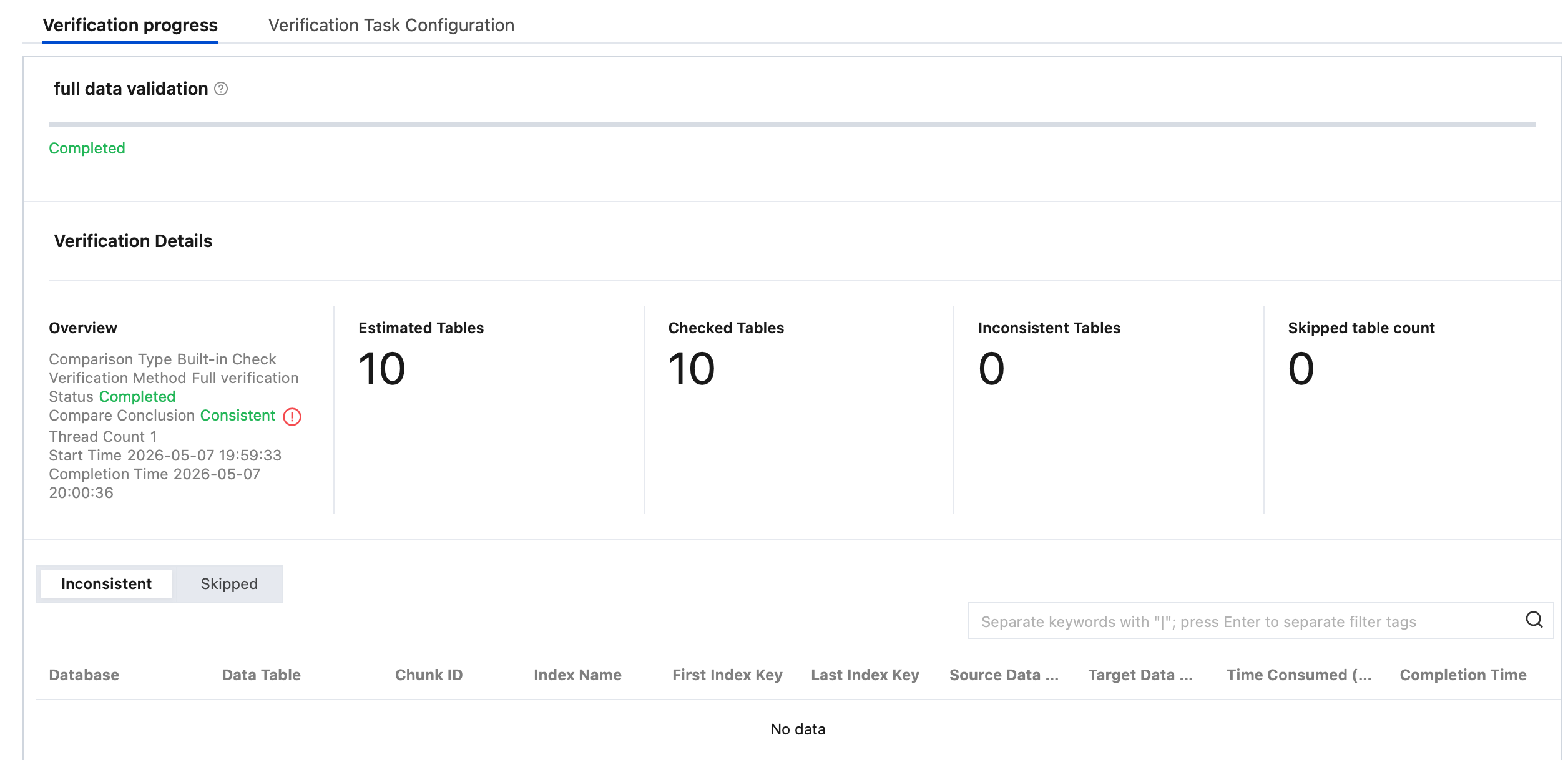
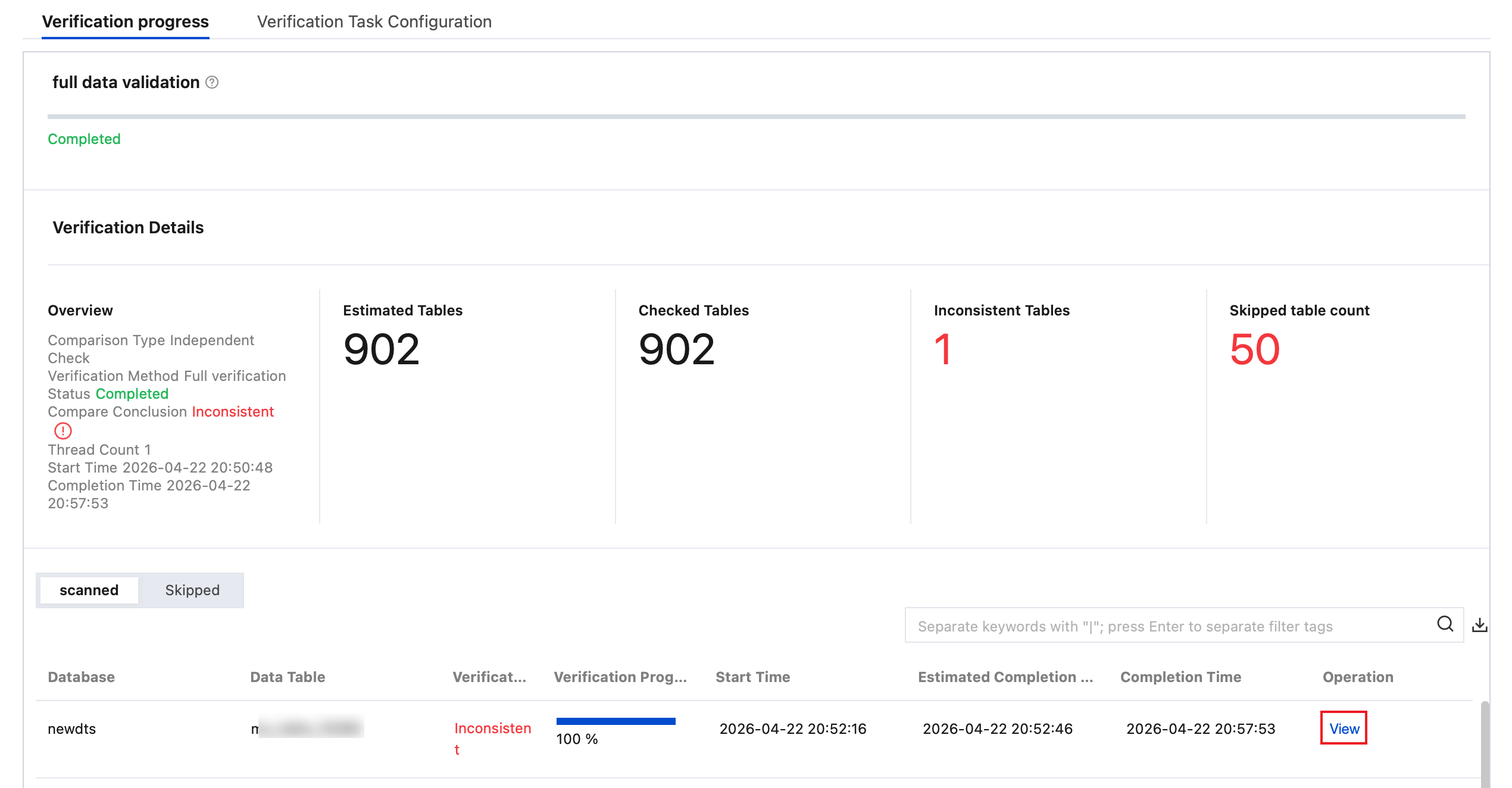
1. On the migration task homepage, view the check result (consistent or inconsistent) in the Last Check Result column, and click View More to go to the check details page.
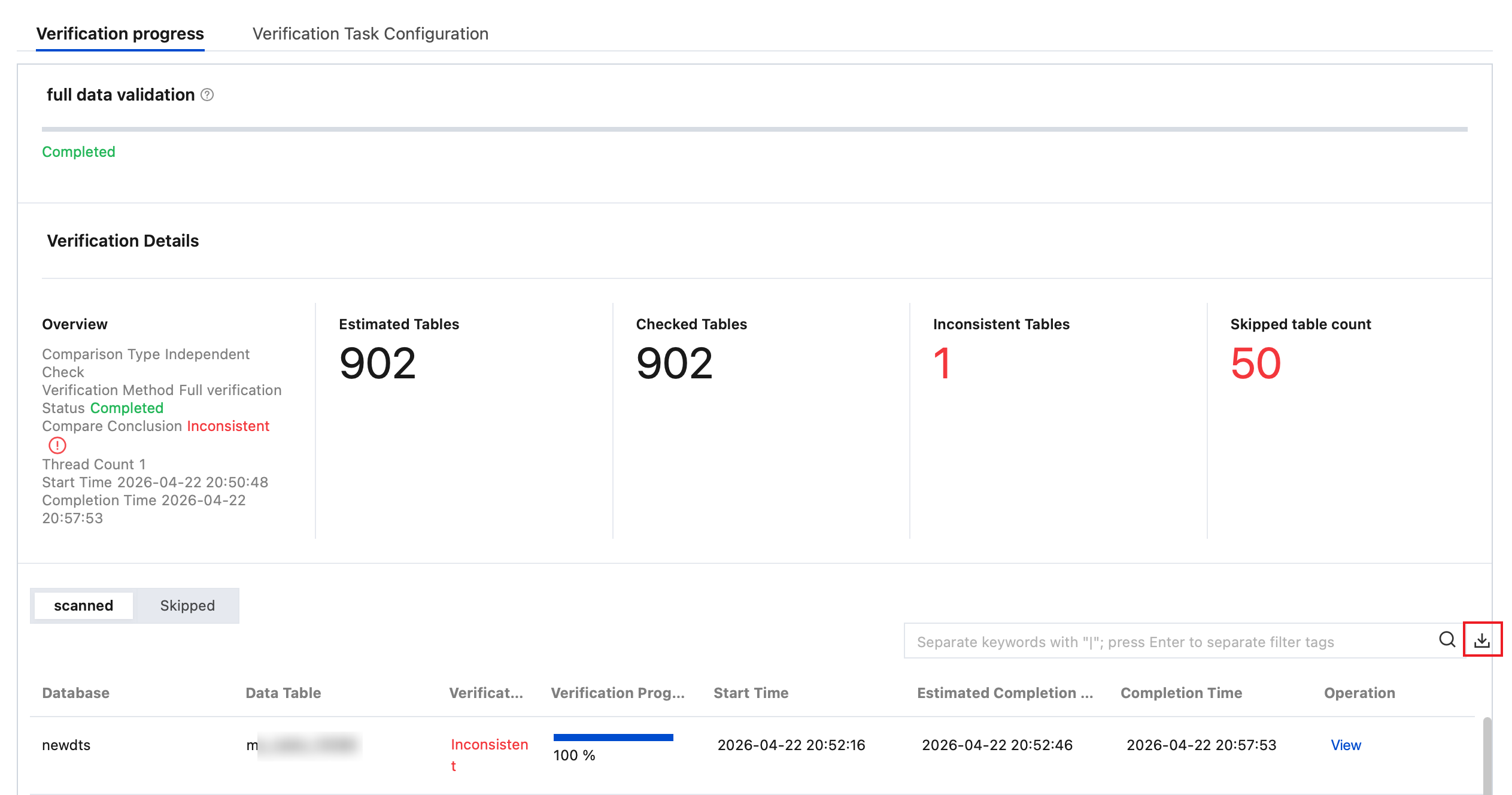
Estimated Tables: The estimated number of tables to be checked. It may slightly differ from the actual number of checked tables, as calculating an exact total number could affect overall check performance.
Reasons for Unchecked Tables: The table has no primary key or non-null unique key, is empty, uses an unsupported engine type, or does not exist.
4. View inconsistency details.
In the Built-in Check scenario, for inconsistent results, you need to manually compare the corresponding content between the source and target databases.
Follow the parameters prompted on the page, including Database, Data Table, Index Name, First Index Key, and Last Index Key, to locate the specific position for comparison.
Operations for reference:
1. Log in to the source database and query the prompted index range.
select * from table_name where col_index >=1 and col_index <=5;
2. Log in to the target database and query the prompted index range.
3. Compare the data discrepancy between the target and source.
Independent check scenario
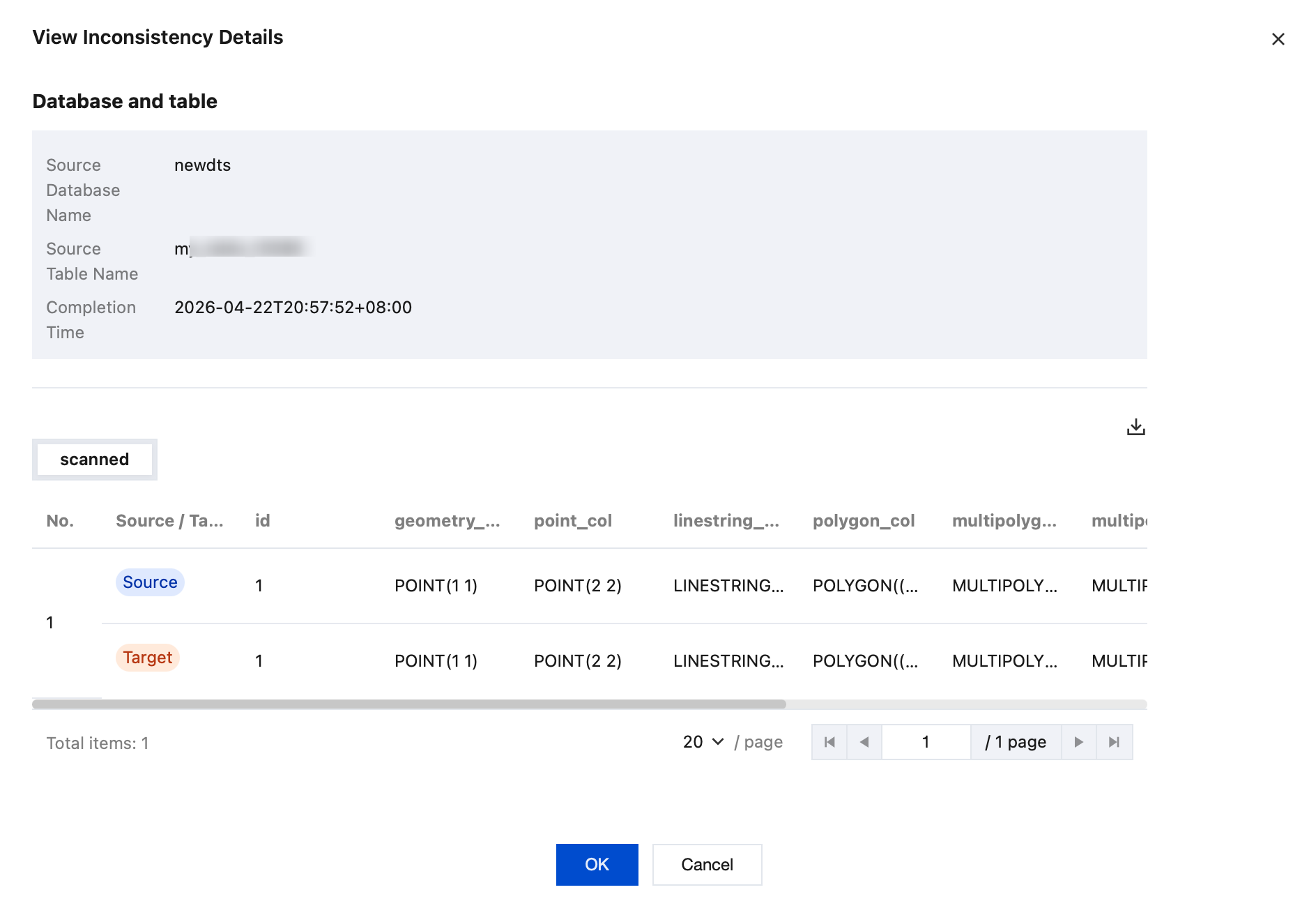
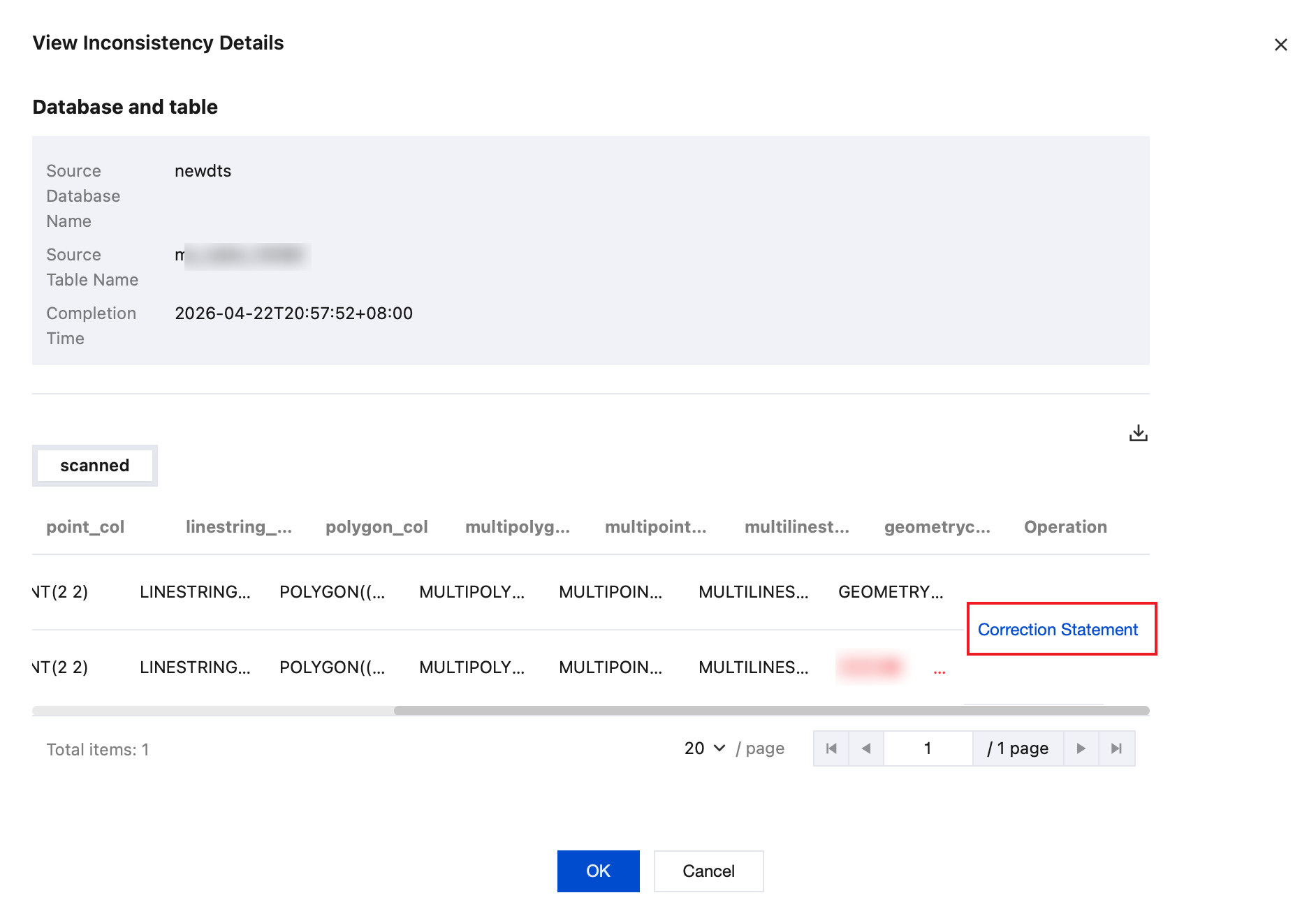
4.1.1 In the scanned section, click View in the Operation column of the corresponding table to view inconsistent data details.
4.1.2 View inconsistency details in the pop-up dialog box.
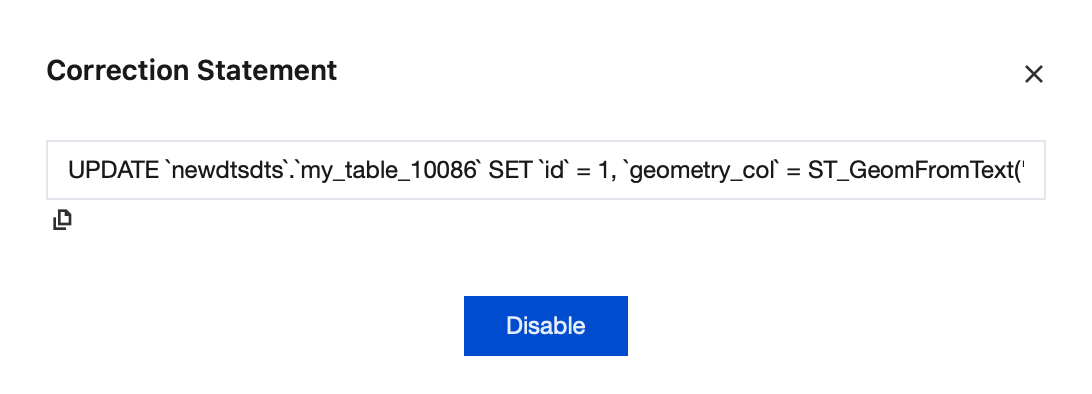
4.1.3 In the Operation column, click Correction Statement.
View the correction statement.
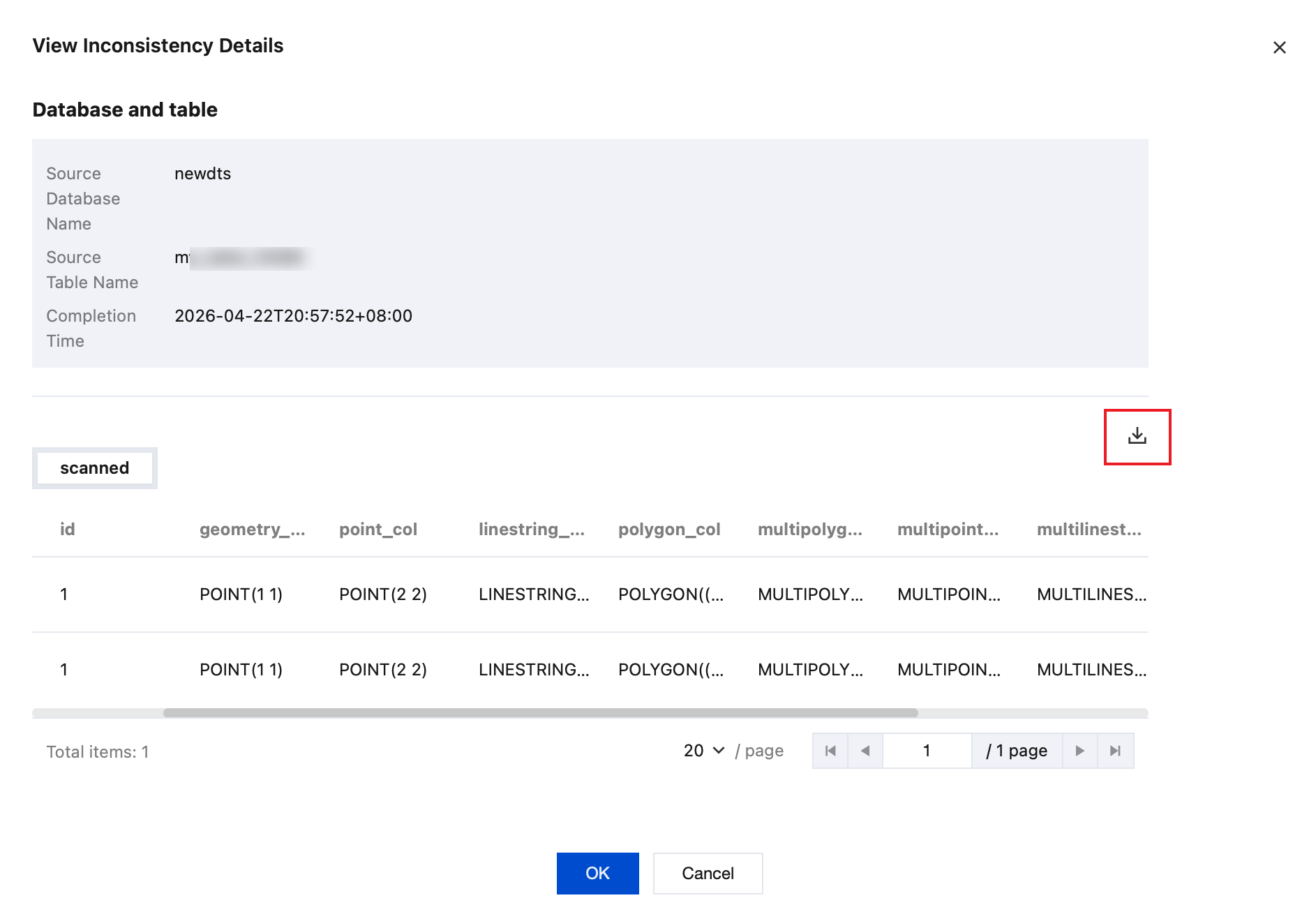
4.1.4 On the right side of the dialog box, click
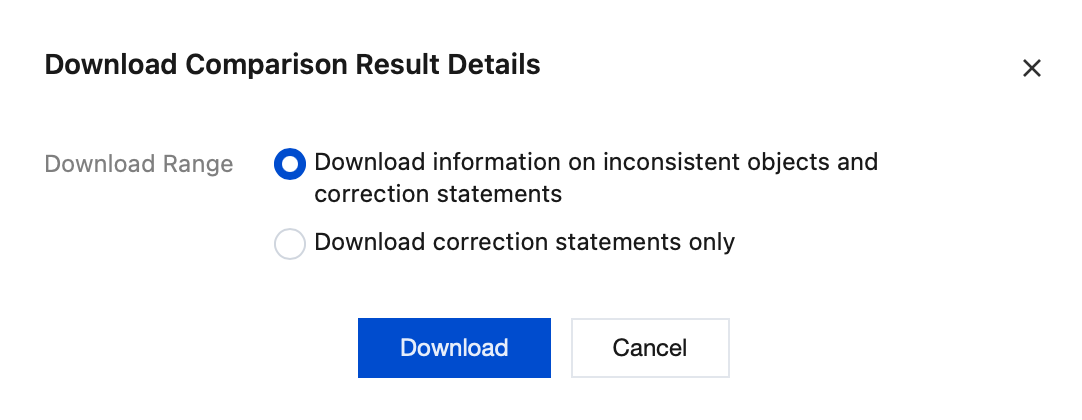
to download inconsistency details.
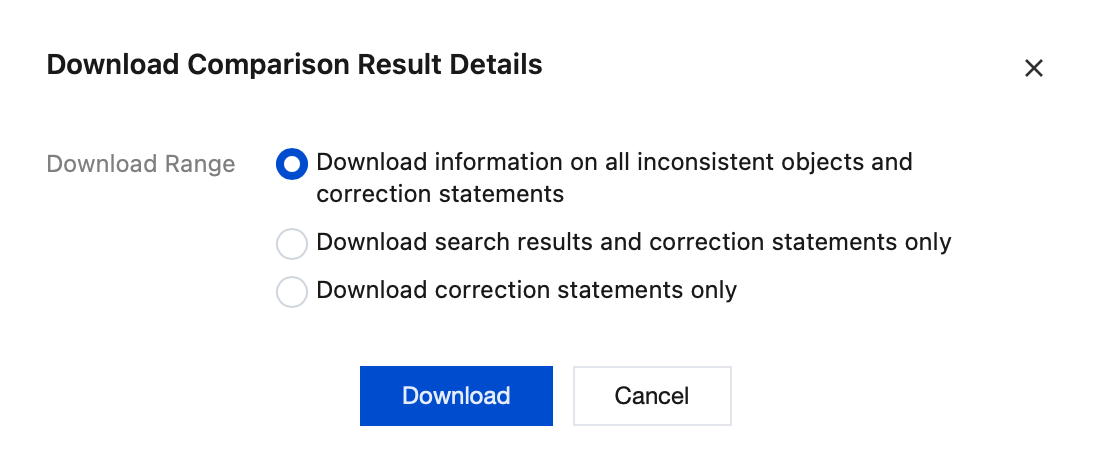
You can download inconsistent information and correction statements, or only the correction statements.
5. Download the comparison result details.
5.1 On the Verification Progress page, click
on the right to download the comparison result details.