Configuring the VPC Network
Download
Focus Mode
Font Size
Scenarios
When purchasing a cluster, if you select a Virtual Private Cloud (VPC) and specify a particular VPC (such as VPC A), only resources within that VPC can access the TDMQ for Apache Pulsar service (including producing/consuming data, and more) by default. If other VPCs (such as VPC B) need to access the TDMQ for Apache Pulsar service later, you can enable this by configuring VPC network routing policies for the Pulsar cluster to bind VPC B to the TDMQ for Apache Pulsar service.
Prerequisites
You have purchased Cloud Virtual Machine (CVM) or container resources on Tencent Cloud and configured the VPC.
Creating an Access Point
1. Log in to the TDMQ for Apache Pulsar console.
2. In the left sidebar, choose Cluster, select the target region, and click the ID of the target cluster to go to the Basic Information page.
3. Select the Access Point tab, click OK, and select the VPC network as the routing type. In the New VPC Access Point dialog box, select the VPC and subnet, and fill in the remarks.
VPC: Select the VPC network where your producers or consumers are deployed.
Subnet: Select the corresponding subnet based on your IP assignment method.
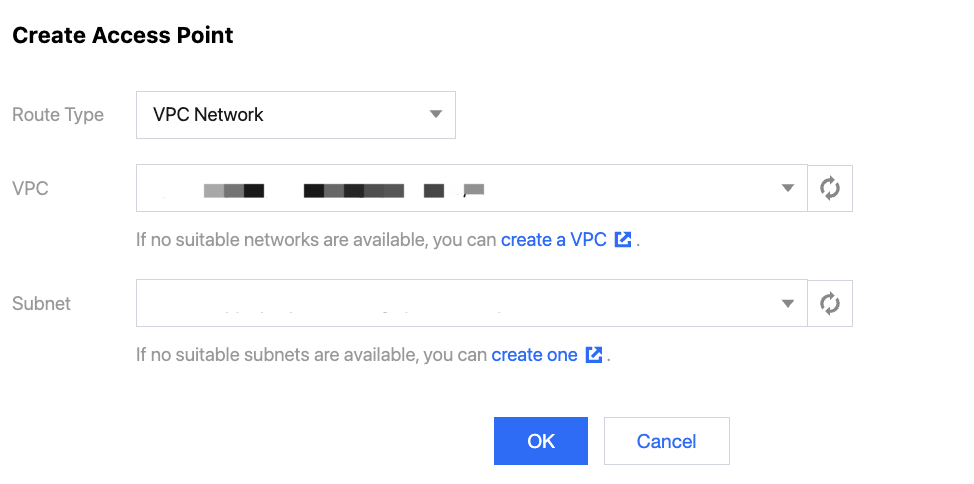
4. Click Submit to complete the VPC network access configuration. In the access point list, you can copy the access point address.

5. Configure security group policies. Ensure that the security group for your test program allows TCP traffic on ports 6000-7000.
Deleting an Access Point
If you no longer need an access point, you can delete it from the access point list. Before deleting an access point, ensure that no clients are using it to connect to the cluster for production and consumption. Otherwise, this may result in connection failures and cause exceptions.
1. On the Access Point list page, click Delete in the operation column of the access point you want to delete.
2. After confirming the Delete operation again in the pop-up window, you can delete the access point.
Help and Support
Was this page helpful?
You can also Contact sales or Submit a Ticket for help.
Help us improve! Rate your documentation experience in 5 mins.
Feedback