Adjusting Cluster Specification
Download
Focus Mode
Font Size
Scenarios
If the current cluster specification does not meet your business requirements, you can adjust it in the console based on your business requirements.
Cluster Type | Configuration Change Type | Change Item | Specification Upgrade | Specification Downgrade |
Managed Edition | Node specification | Node specification | Supported. | Submit a ticket for consultation. |
| | Number of nodes | Supported. | |
| | Deployment mode | Supports upgrading from single-availability zone (AZ) to multi-AZ deployment. | |
| Disk space | Single-node storage specification | Supported. | |
Serverless Edition | TPS specification | / | Supported. | |
| Number of queues | | Supported. | |
Change Impacts/Exception Descriptions
Cluster Type | Change Impact |
Managed Edition | Change of node specifications: Changing node specifications and the number of nodes involves resource changes and a restart of the open-source console. It is recommended to configure multi-node mirrored queues in the console before upgrading the specifications to avoid service interruptions and data loss during the upgrade. It is recommended that you perform such changes during off-peak hours. Change of disk space: This operation will not affect business operations. |
Serverless Edition | The change process enables seamless, hitless, and rapid migration, involving no resource changes or restart of the open-source console. |
Note:
Must-Knows
To ensure normal cluster operation, do not perform other operations on the cluster during the cluster specification change process.
After the cluster specification change, the fees charged for the cluster will change, specifically based on the pricing of your modified cluster specifications.
Prerequisites
You have created a RabbitMQ cluster, which is in the Normal status.
Operation Steps
1. Log in to the TDMQ for RabbitMQ console.
2. In the left sidebar, choose Cluste. On the cluster management list page, click Upgrade in the Operation column.
3. After setting the target specifications in the pop-up window, click Confirm the Adjustment and wait for the configuration change to complete.
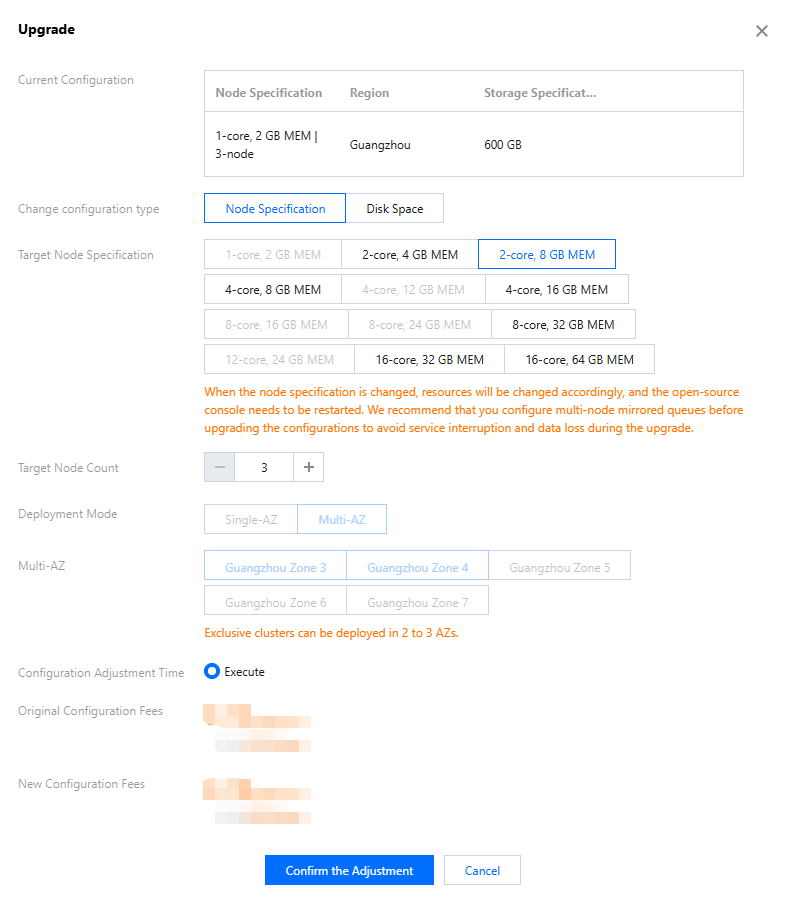
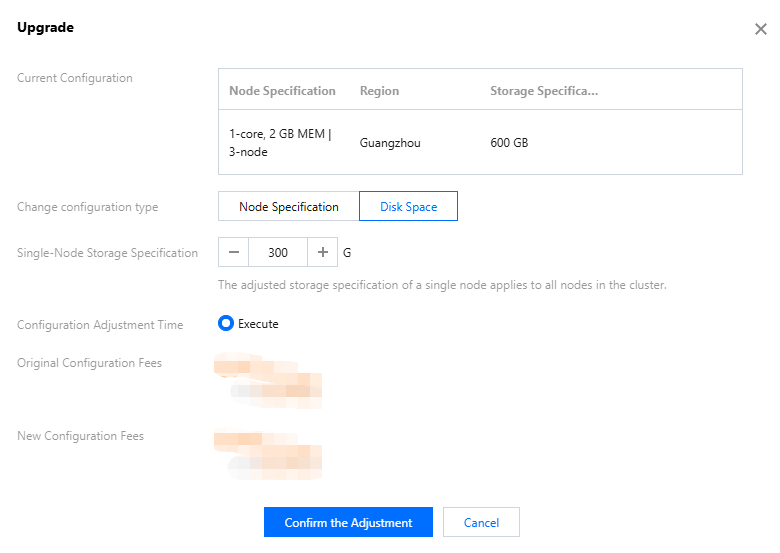
Select the configuration change type: node specification or disk space. Adjust the specific configuration items.
Target Node Specifications=: It is recommended that you select our recommended node specifications, such as 2 cores and 8 GB, 4 cores and 16 GB, 8 cores and 32 GB, 16 cores and 32 GB, and 16 cores and 64 GB.
Target Node Count: supports upgrading to 3, 5, or 7 nodes.
Deployment Mode: supports upgrading from single-AZ to multi-AZ deployment.
When the number of nodes increases from 1 to 3 or more, and if the cluster region supports multiple AZs, you can upgrade the deployment mode from single-AZ to multi-AZ to realize cross-AZ disaster recovery deployment for the cluster and improve its stability.
Single-Node Storage Specification: The new single-node storage specification takes effect on all nodes in the cluster.
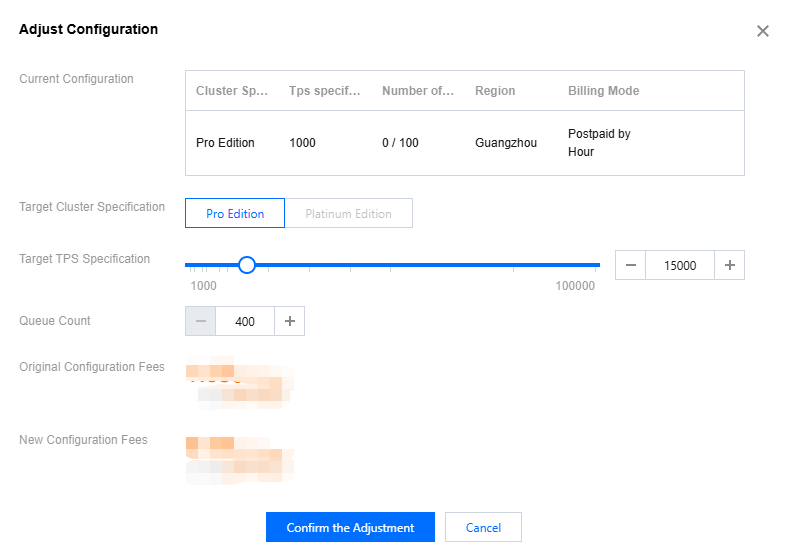
Set the target TPS specification and the number of queues.
You can view the fee details to understand the additional configuration fees for the current cluster in terms of specification upgrades and extra queues.
Help and Support
Was this page helpful?
You can also Contact sales or Submit a Ticket for help.
Help us improve! Rate your documentation experience in 5 mins.
Feedback