Beauty Flutter SDK requires dependence on the Beauty SDK of the Android/iOS end. Through the Plugins provided by Flutter, the native end features can be exposed to the Flutter client. Therefore, when integrating the beauty filter features, you need to manually integrate the SDK of the native end.
Running Demo
Download the demo project, modify the demo/lib under the main.dart file, add your licenseUrl and licenseKey in this file. The sample code for using beauty features in MLVB is primarily located in demo/lib/page/live_page.dart and demo/lib/main.dart.
Android
iOS
1. In demo/app, find the build.gradle file, open the file, and change the value of applicationId to the package name you used when applying for the license.
2. In demo/lib, execute flutter pub get.
3. Use Android Studio to open the demo project and run it.
1. In the demo directory, execute flutter pub get.
2. In the demo/ios directory, execute pod install.
3. Use Xcode to open Runner.xcworkspace.
4. Change the project's bundle ID (it needs to be the same as the bundle ID you provided when applying for the license).
SDK Integration
Flutter Integration:
Method 1:
Remote Dependency: Add the following reference in the pubspec.yaml file of your project:
Local dependencies: Download the latest version of tencent_effect_flutter from tencent_effect_flutter, then add the folders android, ios, lib, and the files pubspec.yaml and tencent_effect_flutter.iml to your project directory. Next, include the following reference in your project's pubspec.yaml file: (Refer to the demo for guidance.)
tencent_effect_flutter:
path: ../
Execute the following command:
flutter pub get
Method 3:
Execute the following command:
flutter pub add tencent_effect_flutter
Native Platform Integration
Android
iOS
1. Changing the Package (The default package integrated in `tencent_effect_flutter` is S1-07. If your package differs, you can change it using the method below.)
Version 4.2.0 and later
To modify the package in your Flutter project, add the following code to your pubspec.yaml file. By default, the package is set to S1-07. For reference, you can check the specific location in the demo.
TencentEffect:
te_sub_spec:'S1-07'// If you're using the S1-04 plan, then just write S1-04 here.
Versions before 4.2.0
In your project, locate the build.gradle file within the app module and add the Maven repository URL corresponding to your selected package. For instance, if you have chosen the S1-04 package, include the following:
For the Maven addresses corresponding to each package, please refer to thedocumentation. The latest version number of the SDK can be found in the Version History.
2. Add Test Material
Navigate to the src/main/assets folder within the android/app module of your project. Copy the lut and MotionRes directories from the demo project's demo/android/app/src/main/assets into the corresponding android/app/src/main/assets directory of your own project. If the assets folder does not exist in your project, you may create it manually.
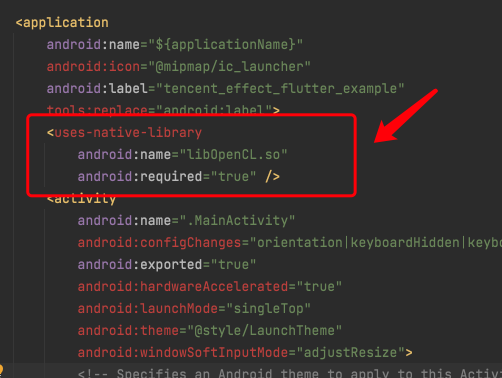
3. Navigate to the AndroidManifest.xml file within the app module, and add the following tag inside the application section:
<uses-native-library
android:name="libOpenCL.so"
android:required="false" />
//true means libOpenCL is required for the current app. Without this library, the system won't allow the app to be installed.
//false means libOpenCL is not required for the current app. The app can be installed normally whether this library exists or not. If the device has this library, GAN-type effects in the beauty effects SDK will work properly (like Fairy Face, Comic Face). If the device doesn't have this library, GAN effects won't work, but it won't affect other features in the SDK.
//For more info about uses-native-library, check out the official Android documentation: https://developer.android.com/guide/topics/manifest/uses-native-library-element
After addition, the result is as shown in the following image:
4. Obfuscation Configuration
When building a release package, if compilation optimization is enabled (by setting minifyEnabled to true), certain code that is not invoked at the Java layer may be removed. However, this code could potentially be called by the native layer, leading to exceptions such as no xxx method.
If you enable such compilation optimizations, you must add these keep rules to prevent the xmagic code from being stripped.
-keep class com.tencent.xmagic.**{*;}
-keep class org.light.**{*;}
-keep class org.libpag.**{*;}
-keep class org.extra.**{*;}
-keep class com.gyailib.**{*;}
-keep class com.tencent.cloud.iai.lib.**{*;}
-keep class com.tencent.beacon.**{*;}
-keep class com.tencent.qimei.**{*;}
-keep class androidx.exifinterface.**{*;}
-keep class com.tencent.effect.**{*;}
1. Changing Plans (The default plan integrated in tencent_effect_flutter is S1-07. If this does not match your plan, you can change it using the method below.)
Version 4.2.0 and later
To switch packages in your Flutter project, add the following code to your pubspec.yaml file. By default, the package is set to S1-07. For specific placement, you can refer to the demo.
TencentEffect:
te_sub_spec:'S1-07'// If you are using the S1-04 plan, then write S1-04 here
Versions before 4.2.0
1. The dependency method for the Beauty Flutter SDK needs to be changed to local dependency.
2. Locate the ios/tencent_effect_flutter.podspec file within the Beauty Flutter SDK, open it, and modify TencentEffect_All to the desired package. The version number can also be adjusted as needed.
3. Execute the pod update command in the ios directory of your project.
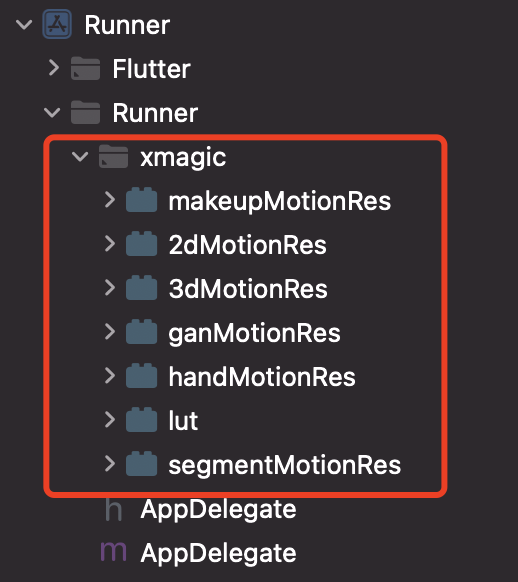
2. Add Test Material
Copy the xmagic folder from the ios/Runner directory in the demo project to the ios/Runner directory in your own project. After adding it, the structure should appear as shown in the following image:
Note:
The materials copied from the demo project are test materials. For official materials, please contact our staff after purchasing a package to obtain them and re-add them accordingly.
SDK usage
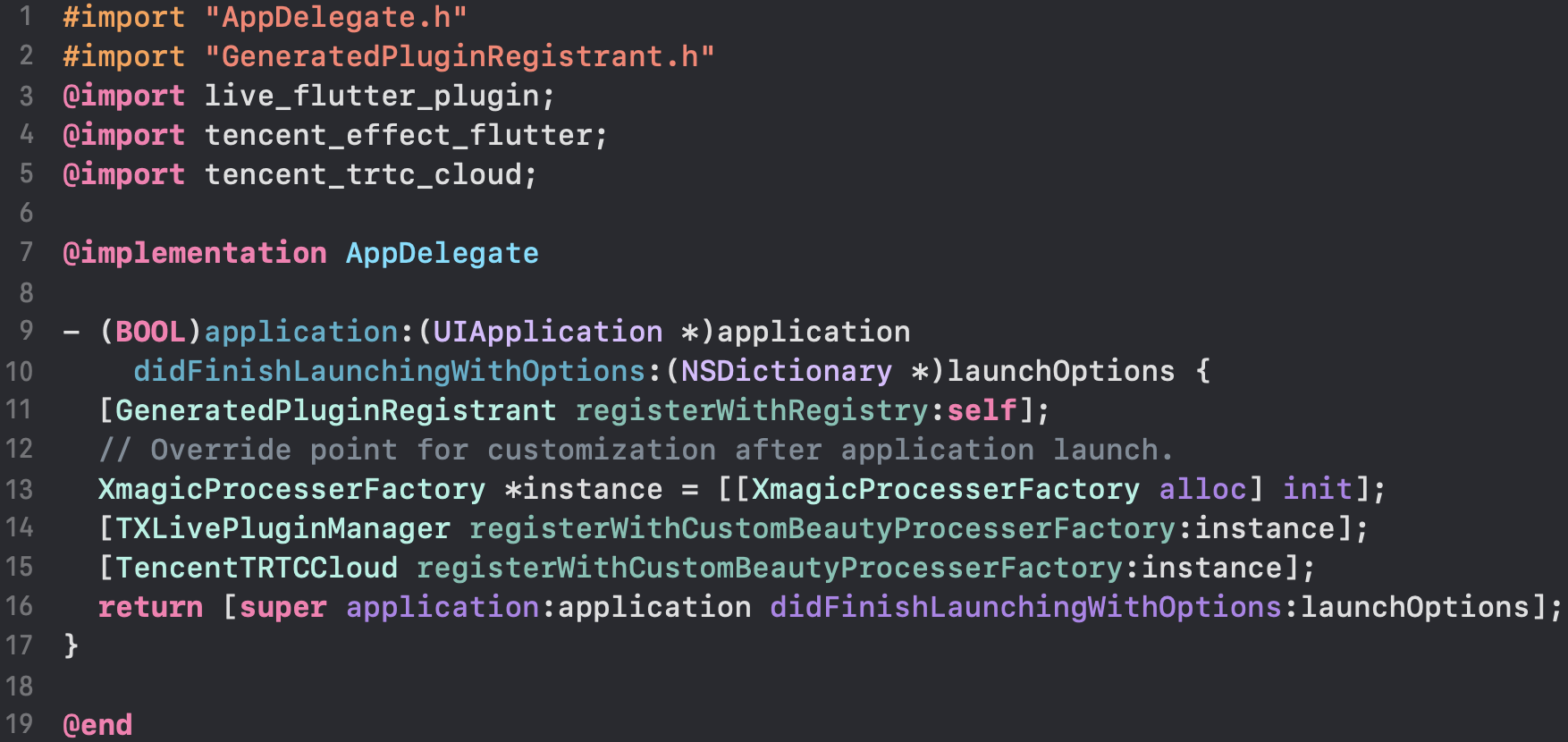
1. Associated with MLVB
Android
iOS
Add the following code in the onCreate method of the application class (or the onCreate method of FlutterActivity):
/// Resource copying only needs to be done once. In the current version, if copied successfully once, there is no need to copy the resources again.
/// Copying the resource only needs to be done once. Once it has been successfully copied in the current version, there is no need to copy it again in future versions.
TXLog.printlog("Print the authentication result errorCode = $errorCode msg = $msg");
if(errorCode ==0){
// Authentication succeeded
}
});
4. Enable/Disable Beauty Filter
/// Enable beauty filter operation
var enableCustomVideo = await _livePusher.enableCustomVideoProcess(open);
Note: When enabling the beauty filter on the page, you must disable the beauty filter first before closing the camera. The enable and disable operations should be paired to ensure proper functionality.
The Beauty SDK provides a default UI panel out of the box, which you can directly integrate into your code. For detailed implementation, please refer to the demo. Below are simplified steps for your reference.
// Here’s an example of multilingual adaptation. It checks the current language environment and loads the corresponding language JSON file. By default, the panel’s JSON only supports Simplified Chinese and English. If we want to support Traditional Chinese, here’s how we can do it:
// Create a folder named zt_hant under beauty_panel, then copy the existing JSON files into this folder, and change the disPlayName values to Traditional Chinese. When needed, just load this JSON file.
// Note: This only adapts the panel JSON files for multiple languages. For text used in the library, you can check demo/lib/languages/TEPanelLocalizationsZhTW.dart.
// For multilingual implementation, see: tencent-effect-flutter/docs/MULTI_LANGUAGE_GUIDE_.md
// Check if the current device language environment is Traditional Chinese
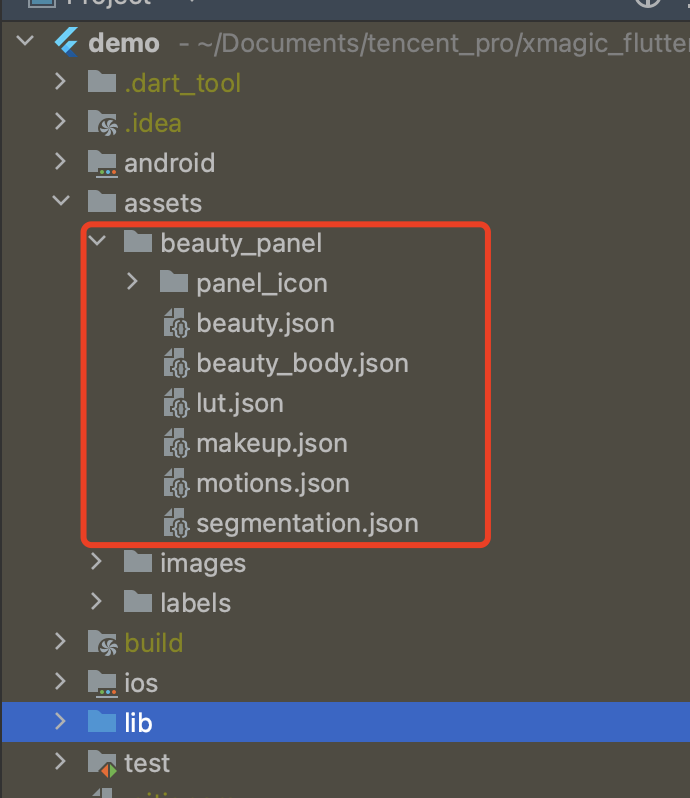
The panel attributes are configured through a JSON file, with the file location illustrated in the diagram below. Please refer to JSON File Description.