Flutter
Download
Focus Mode
Font Size
TencentEffectApi is the core API class of the Tencent Effect Flutter SDK. It offers capabilities including setting the effect strength and applying animated effects.Public Member APIs
API | Description |
Set the local storage path for beauty resources (added in V0.3.5.0 version). | |
Initialize the beauty enhancement data. This method must be invoked prior to applying any beauty effects (applicable to versions V0.3.1.1 and earlier). | |
Beauty Filter Authorization | |
Configure the log level of the SDK. It is recommended to set it to Log.DEBUG during development and debugging, and switch to Log.WARN for official releases. Setting Log.DEBUG in production environments may significantly impact performance due to excessive log output. | |
Resume rendering, invoked when the page becomes visible | |
Suspend rendering, invoked when the page becomes invisible | |
Enable the beauty enhancement mode. For detailed instructions, please refer to Enhanced Mode User Guide | |
Specifies the performance and effect mode, with available values of NORMAL and PRO. The NORMAL mode meets the requirements of most scenarios, offering better performance with slightly fewer features. Please select according to your needs. For detailed differences between the two modes, please refer to:EffectMode (High-Performance Mode) Usage Guide | |
Retrieve device tier | |
Enable mute (as some stickers may contain audio) | |
Enable or disable a specific feature | |
Set the image orientation to enable AI recognition of faces in various orientations. If configured, this setting will override the orientation provided by sensorChanged. | |
Update Beauty Enhancement Attributes (New in V0.3.5.0) | |
Set the callback interface when creating the beauty filter object (this interface will be called back if an error occurs) | |
Set the dynamic effect prompt callback function to display the prompt message on the frontend page. | |
Configure the callback for facial landmark data and related information (Note: A valid facial landmark license authorization, such as Atomic Capability X102, is required to enable this callback feature). | |
Configure callback for face, gesture, and body detection status | |
Determine whether the current device supports beauty filters (OpenGL 3.0) | |
Returns the list of atomic capabilities supported by the current device. | |
Check whether the current device supports this asset. | |
Enable synchronous processing of video frames. | |
Set the centered crop ratio of the output texture |
API Description
setResourcePath (V0.3.5.0)
To set the local path for storing beauty resources
/// Set the local path for storing beauty resources. This method must be called before using beauty effects./// Added in v0.3.5.0.
void setResourcePath(String xmagicResDir);
Parameters
Parameter | Description |
String xmagicResDir | The resource directory. |
initXmagic
Initialize beauty data. In versions prior to
V0.3.1.1, this method must be called before using beauty effects. Starting from V0.3.5.0, this method only needs to be called once per version, and the setResourcePath method must be called before this method to set the resource path. In V0.3.5.0, the previous xmagicResDir parameter has been removed. Please refer to the latest demo for more information.V0.3.5.0 :
void initXmagic(InitXmagicCallBack callBack);typedef InitXmagicCallBack = void Function(bool reslut);
V0.3.1.1 and earlier :
This API is used to initialize the Tencent Effect SDK.
void initXmagic(String xmagicResDir,InitXmagicCallBack callBack);typedef InitXmagicCallBack = void Function(bool reslut);
Parameters
Parameter | Description |
String xmagicResDir | The resource directory. |
InitXmagicCallBack callBack | The initialization callback. |
setLicense
This API is used to set the license.
///Set the Tencent Effect licensevoid setLicense(String licenseKey, String licenseUrl, LicenseCheckListener checkListener);//The callback of the authorization resulttypedef LicenseCheckListener = void Function(int errorCode, String msg);
Parameters
Parameter | Description |
String licenseKey | The license key. |
String licenseUrl | The license URL. |
LicenseCheckListener checkListener | The callback of the authorization result. |
setXmagicLogLevel
This API is used to set the log level of the SDK.
void setXmagicLogLevel(int logLevel);
Parameters
Parameter | Description |
int logLevel | You can set the log level using a type defined for LogLevel. |
onResume
This API is used to resume effect rendering.
void onResume();
onPause
This API is used to pause effect rendering.
void onPause();
enableEnhancedMode
void enableEnhancedMode();
setEffectMode
void setEffectMode(EffectMode effectMode);
Specifies the performance and feature mode, with valid values being NORMAL and PRO. The NORMAL mode suffices for most scenarios, delivering superior performance while offering fewer features. Please select according to your requirements.
For detailed differences between the two modes, please refer to:Guidelines for Using EffectMode (High-Performance Mode)
getDeviceLevel
Retrieve the device tier, which enables you to determine the device classification. Enable or disable specific SDK features,or configure on low-end mobile devices High-performance Mode
Future<int> getDeviceLevel();
setAudioMute(V0.3.1.1 New Features)
To set the mute status, the parameter "true" represents mute, while "false" represents unmute.
/// Is the background music muted?
void setAudioMute(bool isMute);
setFeatureEnableDisable(V0.3.1.1)
Enable or disable one feature
/// enable or disable one feature
void setFeatureEnableDisable(String featureName, bool enable);
Parameter
Parameter | Meaning |
String featureName | feature Name Values: "ai.segmentation.skin.enable" Skin segmentation capability, when enabled, allows for more precise skin smoothing and whitening areas."ai.segmentation.faceBlock.enable" The facial occlusion detection feature, when enabled, prevents makeup from being applied to obstructed areas."beauty.onlyWhitenSkin" Whitening effects are exclusively applicable to the skin."auto_beauty_switch" Intelligent Beauty Enhancement (with reduced beautification effects for males and infants)"ai.3dmmV2.enable" facial expressions feature."ai.body3dpoint.enable" 3D body data feature."ai.hand.enable" gesture detection. |
boolean enable | "true" indicates enabling a capability, while "false" indicates disabling a capability. Note: If it is in downgrade mode, enabling skin segmentation is not allowed. |
setImageOrientation
void setImageOrientation(TEImageOrientation orientation);enum TEImageOrientation {ROTATION_0,ROTATION_90,ROTATION_180,ROTATION_270,}
Configure the image orientation to enable AI recognition of faces in various orientations. When set, this will override the direction specified by sensorChanged. Example orientations are as follows:
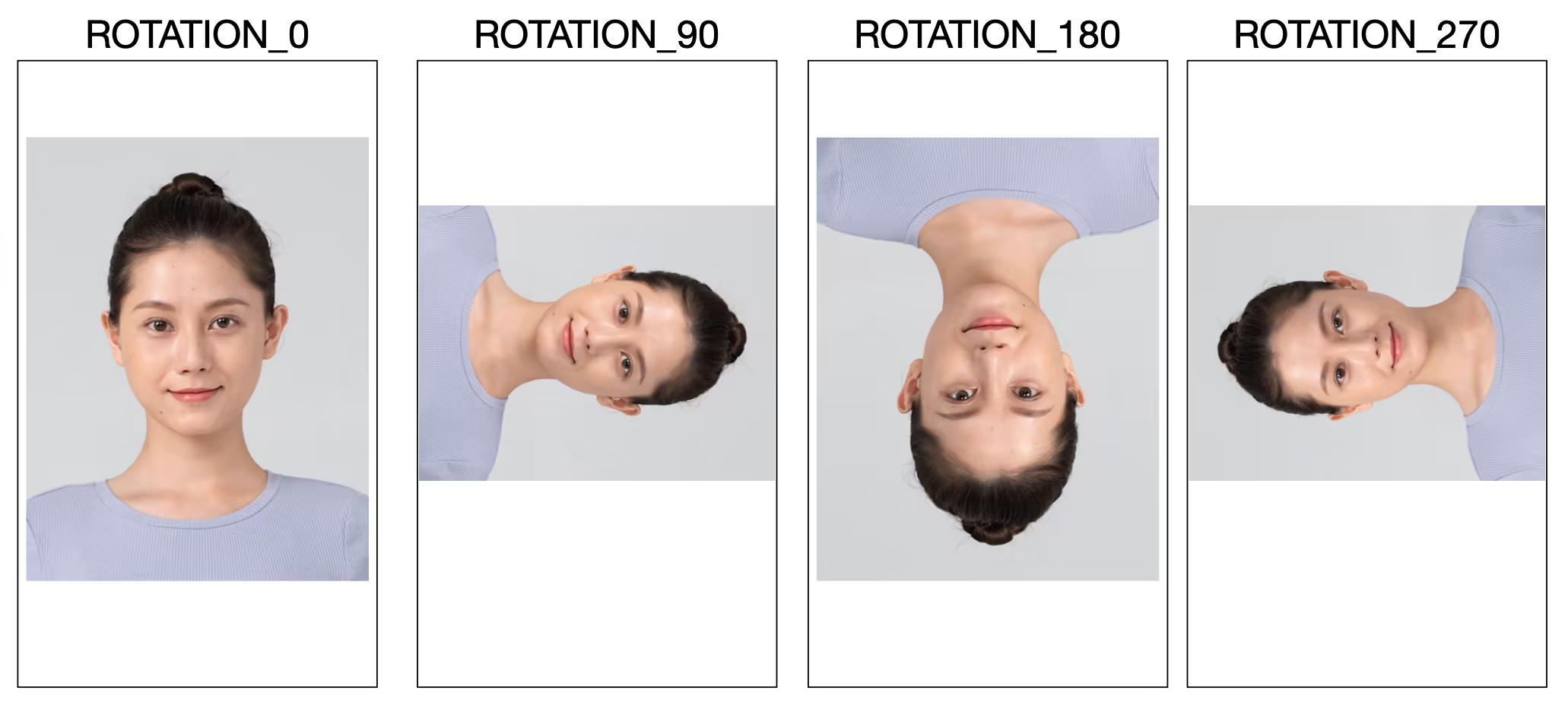
If the individuals in the images you provide to the SDK consistently maintain an upright orientation (Rotation = 0), there is no need to invoke this interface.
setSyncMode
The SDK internally handles certain recognition and rendering logic asynchronously. Invoking this interface enables the SDK to process input frames synchronously for the subsequent syncFrameCount frames, catering to specific scenario requirements. For instance, prior to the first frame processing, calling this interface to synchronously process several frames can prevent displaying unprocessed frames without beautification effects. However, this may prolong the initial black screen duration before rendering begins. Please use this feature judiciously based on actual needs.
void setSyncMode(bool isSync , int syncFrameCount);
Parameter | Meaning |
isSync | Whether to process image frames synchronously. |
syncFrameCount | The number of frames to be processed synchronously, with a value >=0. A value of -1 indicates an unlimited number of frames. |
setEffect(V0.3.5.0)
You can set beautification, filters, makeup, stickers, and segmentation effects. This can be done from any thread. Please refer to the specific parameters for more detailsBeautification Parameter Table。
///update beautification parameters
void setEffect(String effectName,int effectValue,String? resourcePath,Map<String,String>? extraInfo);
setOnCreateXmagicApiErrorListener
This API is used to configure the callback for errors for the creation of an effect object.
void setOnCreateXmagicApiErrorListener(OnCreateXmagicApiErrorListener? errorListener);/// The callback for errors for the creation of an effect objecttypedef OnCreateXmagicApiErrorListener = void Function(String errorMsg, int code);
Parameters
Parameter | Description |
OnCreateXmagicApiErrorListener? errorListener | The callback for errors for the creation of an effect object. |
Error codes:
Error Code | Description |
-1 | Unknown error. |
-100 | Failed to initialize the 3D engine. |
-200 | GAN materials are not supported. |
-300 | The device does not support this material component. |
-400 | The JSON template is empty. |
-500 | The SDK version is too old. |
-600 | Keying is not supported. |
-700 | OpenGL is not supported. |
-800 | The script is not supported. |
5000 | The resolution of the video to be keyed exceeds 2160 x 3840. |
5001 | Insufficient memory for keying. |
5002 | Failed to parse the video to be keyed. |
5003 | The video to be keyed is longer than 200 seconds. |
5004 | Unsupported video format for keying. |
setTipsListener
This API is used to configure the callback for animated effect tips. The tips can be displayed on the UI, asking users to nod, show their palms, or make finger hearts.
void setTipsListener(XmagicTipsListener? xmagicTipsListener);abstract class XmagicTipsListener {/// Show the tip/// @param tips: The content of the tip (string)./// @param tipsIcon: The icon for the tip./// @param type: The display type. If it is set to `0`, both the tip string and icon will be displayed. If it is set to `1`, only the icon will be displayed for PAG materials./// @param duration: How long (milliseconds) to show the tip.void tipsNeedShow(String tips, String tipsIcon, int type, int duration);/// */// Hide the tip/// @param tips: The content of the tip (string)./// @param tipsIcon: The icon for the tip./// @param type: The display type. If it is set to `0`, both the tip string and icon will be displayed. If it is set to `1`, only the icon will be displayed for PAG materials.void tipsNeedHide(String tips, String tipsIcon, int type);}
Parameters
Parameter | Description |
XmagicTipsListener xmagicTipsListener | The callback implementation class. |
setYTDataListener
This API is used to configure the callback of facial keypoints and other data.
/// Configure the callback of facial keypoints and other data (only available in S1 - 05 and S1 - 06)void setYTDataListener(XmagicYTDataListener? xmagicYTDataListener);Configure the callback of facial keypoints and other dataabstract class XmagicYTDataListener {// YouTu AI datavoid onYTDataUpdate(String data);}
onYTDataUpdate returns a JSON string structure that contains the information of up to 5 faces:{"face_info":[{"trace_id":5,"face_256_point":[180.0,112.2,...],"face_256_visible":[0.85,...],"out_of_screen":true,"left_eye_high_vis_ratio:1.0,"right_eye_high_vis_ratio":1.0,"left_eyebrow_high_vis_ratio":1.0,"right_eyebrow_high_vis_ratio":1.0,"mouth_high_vis_ratio":1.0},...]}
Fields
Field | Type | Range | Description |
trace_id | int | [1,INF) | The face ID. If the faces obtained from a continuous video stream have the same face ID, they belong to the same person. |
face_256_point | float | [0,screenWidth] or [0,screenHeight] | 512 values in total for 256 facial keypoints. (0,0) is the top-left corner of the screen. |
face_256_visible | float | [0,1] | The visibility of the 256 facial keypoints. |
out_of_screen | bool | true/false | Whether only part of the face is captured. |
left_eye_high_vis_ratio | float | [0,1] | The percentage of keypoints with high visibility for the left eye. |
right_eye_high_vis_ratio | float | [0,1] | The percentage of keypoints with high visibility for the right eye. |
left_eyebrow_high_vis_ratio | float | [0,1] | The percentage of keypoints with high visibility for the left eyebrow. |
right_eyebrow_high_vis_ratio | float | [0,1] | The percentage of keypoints with high visibility for the right eyebrow. |
mouth_high_vis_ratio | float | [0,1] | The percentage of keypoints with high visibility for the mouth. |
Parameters
Parameter | Description |
XmagicYTDataListener | The callback implementation class. |
setAIDataListener
This API is used to configure the callback of face, gesture, and body detection results.
void setAIDataListener(XmagicAIDataListener? aiDataListener);abstract class XmagicAIDataListener {void onFaceDataUpdated(String faceDataList);void onHandDataUpdated(String handDataList);void onBodyDataUpdated(String bodyDataList);}
isSupportBeauty
This API is used to check whether the current device supports effects (OpenGL 3.0).
Future<bool> isSupportBeauty();
Response
A Boolean value indicating whether effects are supported.
getDeviceAbilities
This API is used to get a list of Tencent Effect capabilities supported by the current device. You can use it together with
getPropertyRequiredAbilities.Future<Map<String, bool>> getDeviceAbilities();
Response
Map<String,Boolean>:key: The name of a capability (the material name).
value: Whether the current device supports the capability.
isDeviceSupportMotion (V0.3.5.0)
To check if the current device supports a particular material
Future<bool> isDeviceSupportMotion(String motionResPath);
Parameters
Parameter | Description |
motionResPath | The sticker local file path |
setOutputTextureKeepRatio
Set the centered crop ratio for the output texture.
Cropping rule: Based on the original output texture, calculate the cropped width and height according to the ratio, and crop the excess evenly from all sides.
void setOutputTextureKeepRatio(float ratio)
Parameter | Meaning |
ratio | Crop ratio, value range (0, 1]. For example, 0.8f means keeping 80% of the original output texture's center after cropping; 1f means no cropping. If an invalid value is passed, this call will be ignored. |
Deprecated APIs Summary
setDowngradePerformance(V0.3.1.1 New Features)
Enable Performance Mode
void setDowngradePerformance();
updateProperty
To set a specific beauty parameter, motion effect, or filter, the function can be invoked from any thread.
void updateProperty(XmagicProperty xmagicProperty);
Parameters
Parameter | Meaning |
XmagicProperty xmagicProperty | Beauty attribute encapsulation object |
isBeautyAuthorized
Determine which beauty enhancement or body beautification features are currently authorized by the License.
This detection is only applicable to BEAUTY and BODY_BEAUTY type features. The detection results will be assigned to the `XmagicProperty.isAuth` field of each beauty enhancement object. If the `isAuth` field is false, you may hide the corresponding entry in the UI.
Future<List<XmagicProperty>> isBeautyAuthorized(List<XmagicProperty> properties);
Parameters
Parameter | Meaning |
List<XmagicProperty> properties | Beauty enhancement items to be detected |
isDeviceSupport
Pass the list of animation resources to the SDK for detection. After execution, the `XmagicProperty.isSupport` field indicates whether the material is usable. Based on `XmagicProperty.isSupport`, you can implement UI-level click restrictions or directly remove the resource from the list.
Future<List<XmagicProperty>> isDeviceSupport(List<XmagicProperty> assetsList);
Parameters
Parameter | Meaning |
List<XmagicProperty> assetsList | List of motion graphic assets requiring inspection |
getPropertyRequiredAbilities
This API is used to get the Tencent Effect capabilities used by different animated effect resources.
Use case:
This API is useful if you have purchased animated effects or made your own animated effect materials. It returns the capabilities each material uses. For example, material 1 uses capabilities A, B, and C, and material 2 relies on capabilities B, C, and D. You can store such information in the server. When a user downloads the two materials from the server, call
getDeviceAbilities first to get the capabilities supported by their device. The result is then passed to the server. For example, if a user’s device supports capabilities A, B, and C, but not D, the server will not provide material 2 to the user.Future<Map<XmagicProperty, List<String>?>> getPropertyRequiredAbilities(List<XmagicProperty> assetsList);
Parameters
Parameter | Description |
List<XmagicProperty> assetsList | A list of the animated effects to check. |
Response
Map<XmagicProperty, List<String>?>:
key: The entity class of the animated effect.
value: A list of capabilities used by the effect.
Help and Support
Was this page helpful?
You can also Contact sales or Submit a Ticket for help.
Help us improve! Rate your documentation experience in 5 mins.
Feedback