Forwarding Policies
Download
Focus Mode
Font Size
Overview
Forwarding policies refer to a set of rules by which the GA2.0 service intelligently distributes traffic to different endpoint groups based on the request content (such as the domain name, URL path, and request header) at the application layer (HTTP/HTTPS). You can create a forwarding policy and bind it to a custom endpoint group to achieve fine-grained traffic control and routing.
Policy Types
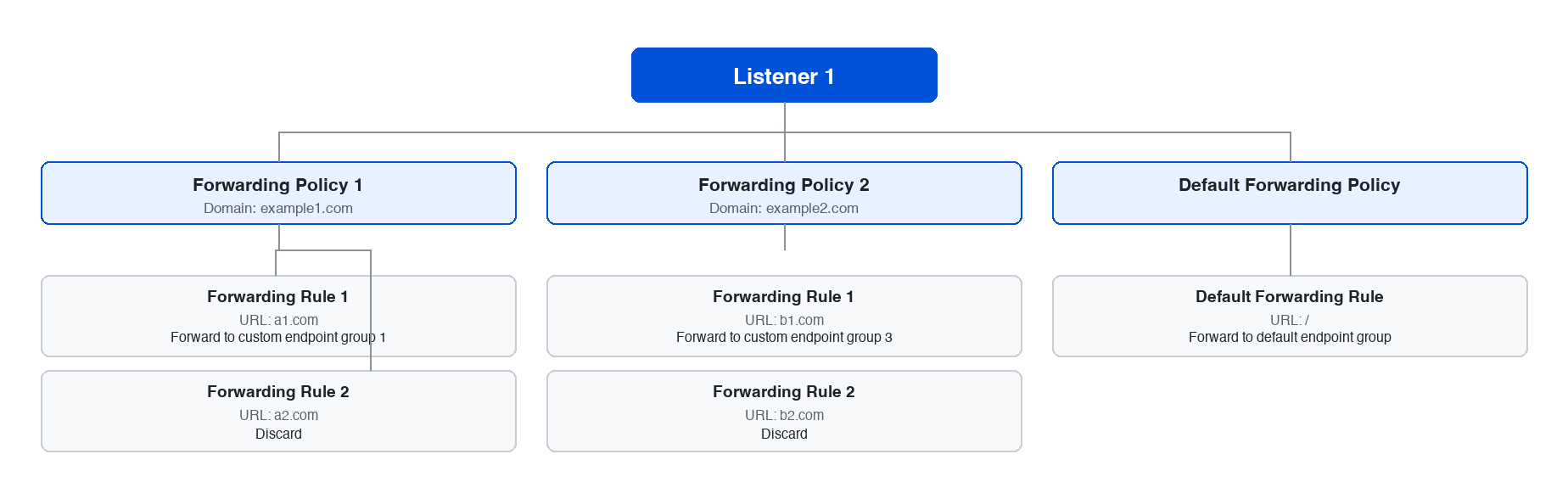
The forwarding policy types include the default policy and custom policy:
Default policy: Automatically created when a listener is created. It is automatically associated with the default endpoint group and cannot be edited, deleted, or bound to other custom endpoint groups. After the default endpoint group is deleted, the default policy is deleted by linkage.
Custom policy: Users can define fine-grained routing rules based on the domain name and path. A custom policy can be bound to a custom endpoint group to achieve traffic allocation, but it cannot be bound to the default endpoint group.
Policy Composition
Matching domain name: The domain name that needs to be matched. One forwarding policy corresponds to one domain name match, and a matching URL is added based on the domain name.
URL path: The path that needs to be matched. Multiple forwarding rules can be configured under one domain name, and one forwarding rule corresponds to one URL.
Forwarding action: The corresponding policy action executed by GA2.0 after the forwarding policy is hit, including Forward to the custom endpoint group bound to the policy and Discard.
Origin-pull HOST: The domain name identifier carried in the HOST field of the HTTP header when GA2.0 initiates a request to the origin server. The HOST field in an origin-pull request can be modified. If you do not fill it in, the default HOST is used.
Origin-pull SNI: The target domain name requested by the origin server that GA2.0 informs in the handshake stage of HTTPS origin-pull. It can only be modified for an HTTPS forwarding policy.
Working Principle
1. Parse a request.
After a GA2.0 endpoint receives a user request, it parses information such as the HTTP/HTTPS header, URL path, and domain name.
2. Match the custom forwarding policies one by one in order of priority.
Condition combination: The matching conditions for the forwarding policies include the domain name and path, both of which need to be met to trigger the action.
3. Execute an action.
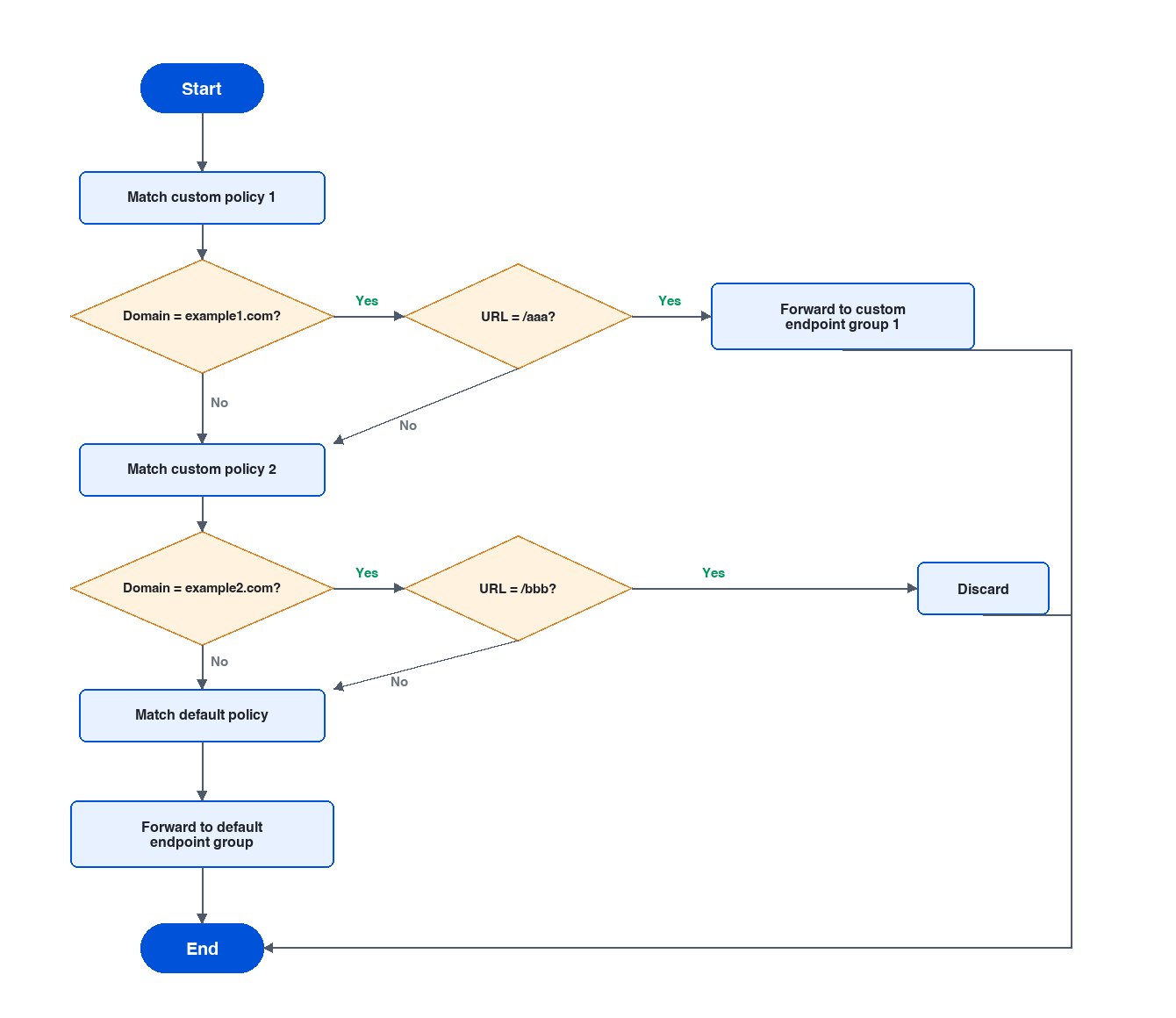
Matching successful: Immediately execute the action (Forward to the specified endpoint group or Discard) corresponding to the policy.
Matching failed: Continue to match other custom policies. If none of them is matched, execute the default policy action eventually and send the request to the default endpoint group.
Example:
A listener is configured with 2 custom forwarding policies. For custom policy 1, the matching domain name is example1.com, the matching URL is /aaa, and the forwarding action is Forward to a custom endpoint group 1. For custom policy 2, the matching domain name is example2.com, the matching URL is /bbb, and the forwarding action is Discard. The matching procedure for this listener is as follows:
Configuring a Forwarding Policy
Prerequisites
Operation Steps
1. Log in to the GA2.0 console.
2. On the instance list page, click the target instance ID and go to the instance details page.
3. On the listener tab, click the target listener ID to go to the listener details page.
4. Click Forwarding Policy to go to the forwarding policy tab, and click Add HTTP Forwarding Policy.
5. In the pop-up window, enter the domain name you want to match.
6. Click Add Forwarding Rule on the right side of the domain name and follow the guidelines to complete the corresponding configurations.
Domain Name: The domain name (for example, www.example.com) used by the clients to access the acceleration service. GA2.0 matches the preset forwarding rules based on the domain name.
URL: The forwarding path, which is required. It can contain 1 to 80 characters. Supported character sets are as follows: a–z, A–Z, 0–9, underscores (_), periods (.), hyphens (-), and slashes (/). GA2.0 performs precise matching of business traffic based on the domain name and URL.
Forwarding Action: After traffic hits the domain name and URL configured for the forwarding rule, GA2.0 executes the corresponding forwarding action.
Forward to: GA2.0 forwards the hit traffic to the custom endpoint group bound to the rule.
Discard: GA2.0 discards the traffic that hits the rule and does not forward it.
Origin-pull SNI: When GA2.0 uses the HTTPS protocol for origin-pull, it explicitly informs the origin server of the requested target domain name through SNI during the TLS handshake stage. The origin server then returns the corresponding SSL Certificates based on the information. For traffic that hits the rule, you can modify the SNI field in the origin-pull request.
Note:
Only HTTPS listeners allow the system to use the HTTPS protocol for origin-pull.
If a forwarding rule configured with origin-pull SNI is bound to an endpoint group whose origin-pull protocol is HTTP, GA2.0 still uses the HTTP protocol for origin-pull. In this case, the SNI configuration has no practical use.
Origin-pull HOST: When GA2.0 initiates a request to the origin server, it carries the domain name identifier in the HOST field of the HTTP header. For traffic that hits the rule, you can modify the HOST field in the origin-pull request. If you do not fill it in, the default HOST will be used.
Origin-pull Request Header: You can configure origin-pull request headers in HTTPS forwarding rules to customize the HTTP header information carried when GA2.0 initiates requests to the origin server.
Note:
The HTTP header name Key contains 1 to 20 characters by default, including digits 0–9, characters (a–z and A–Z), and special characters (-_:), and spaces. The Value contains 1–100 characters.
You can configure up to 10 origin-pull HTTP request headers for each rule.
Some standard headers do not support self-service setting/addition/deletion. This means that the Key fields cannot be configured. For the specific list, see the table below.
www-authenticate | authorization | proxy-authenticate | proxy-authorization | range | if-range | content-range | cross-origin-embedder-policy |
age | cache-control | clear-site-data | expires | cross-origin-opener-policy | cross-origin-resource-policy | content-security-policy | content-security-policy-report-only |
pragma | warning | accept-ch | accept-ch-lifetime | expect-ct | feature-policy | strict-transport-security | upgrade-insecure-requests |
early-data | content-dpr | dpr | device-memory | x-content-type-options | x-download-options | x-frame-options(xfo) | x-permitted-cross-domain-policies |
save-data | viewport-width | width | last-modified | x-powered-by | x-xss-protection | public-key-pins | public-key-pins-report-only |
etag | if-match | if-none-match | if-modified-since | sec-fetch-site | sec-fetch-mode | sec-fetch-user | sec-fetch-dest |
if-unmodified-since | vary | connection | keep-alive | last-event-id | nel | ping-from | ping-to |
accept | accept-charset | expect | max-forwards | report-to | transfer-encoding | te | trailer |
access-control-allow-origin | access-control-max-age | access-control-allow-headers | access-control-allow-methods | sec-websocket-key | sec-websocket-extensions | sec-websocket-accept | sec-websocket-protocol |
access-control-expose-headers | access-control-allow-credentials | access-control-request-headers | access-control-request-method | sec-websocket-version | accept-push-policy | accept-signature | alt-svc |
origin | timing-allow-origin | dnt | tk | date | large-allocation | link | push-policy |
content-disposition | content-length | content-type | content-encoding | retry-after | signature | signed-headers | server-timing |
content-language | content-location | forwarded | x-forwarded-host | service-worker-allowed | sourcemap | upgrade | x-dns-prefetch-control |
x-forwarded-proto | via | from | host | x-firefox-spdy | x-pingback | x-requested-with | x-robots-tag |
referer-policy | allow | server | accept-ranges | x-ua-compatible | max-age | - | - |
Editing a Forwarding Policy
1. Log in to the GA2.0 console.
2. On the instance list page, click the target instance ID and go to the instance details page.
3. On the listener tab, click the target listener ID to go to the listener details page.
4. Click Forwarding Policy to go to the forwarding policy tab.
5. Click Edit Forwarding Rule on the right side of an existing rule to modify it.
Deleting a Forwarding Policy
1. Log in to the GA2.0 console.
2. On the instance list page, click the target instance ID and go to the instance details page.
3. On the listener tab, click the target listener ID to go to the listener details page.
4. Click Forwarding Policy to go to the forwarding policy tab.
5. Click Delete on the right side of an existing rule to delete it.
Note:
The default forwarding policy cannot be edited or deleted. After the default endpoint group is deleted, the default policy is deleted by linkage. You can recreate the default endpoint group to restore the default policy.
References
Help and Support
Was this page helpful?
You can also Contact sales or Submit a Ticket for help.
Help us improve! Rate your documentation experience in 5 mins.
Feedback