Using HMAC Auth for Access Authentication
Download
Focus Mode
Font Size
Scenarios
This document describes how to implement authenticated access on a Kong cloud-native gateway using the HMAC Authentication plugin.
Prerequisites
The gateway instance has been purchased. For details, see Create Gateway.
Operation Steps
This section uses the configuration of a Route plugin as an example to describe how to implement HMAC Auth authentication access.
Step 1: Configuring the HMAC Authentication Plugin
1. Log in to the TSF console.
2. Select Cloud Native Gateway in the left sidebar and click the target instance to go to the instance details.
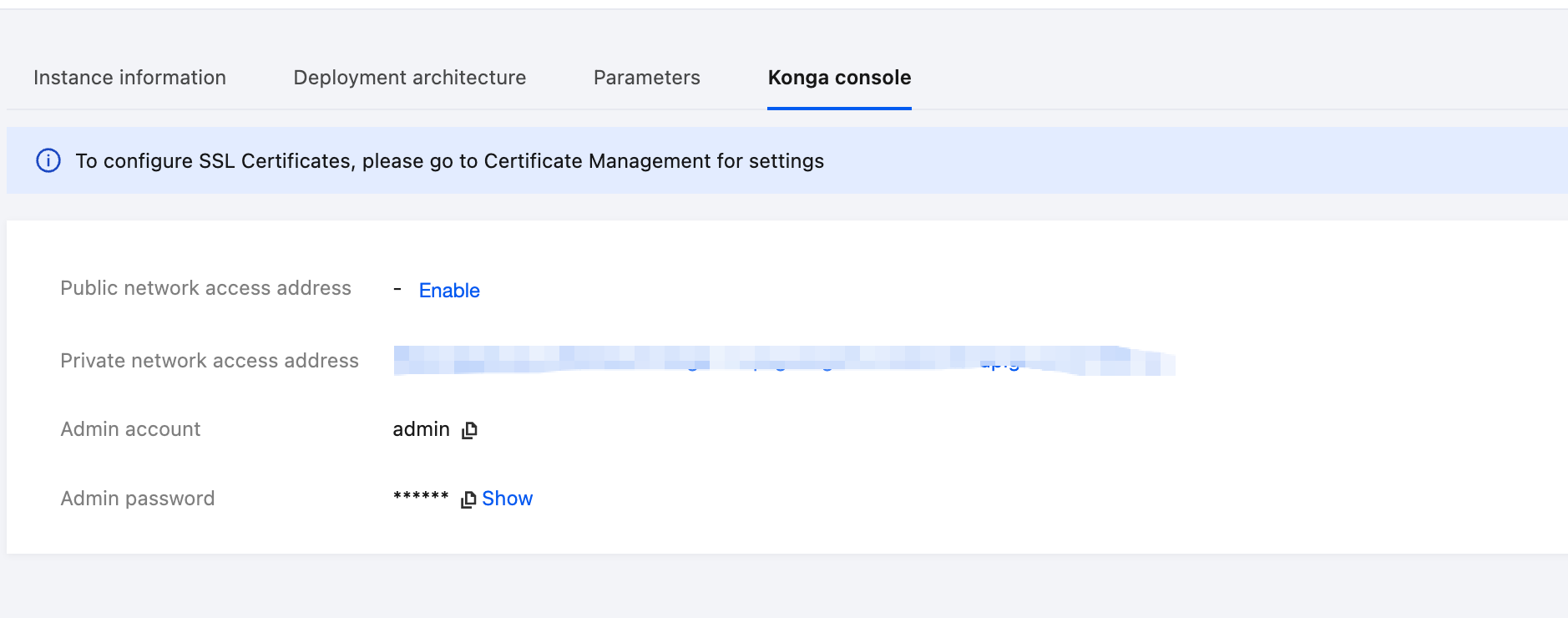
3. On the Basic Information page, click the Konga console Tag to view the management console login method.
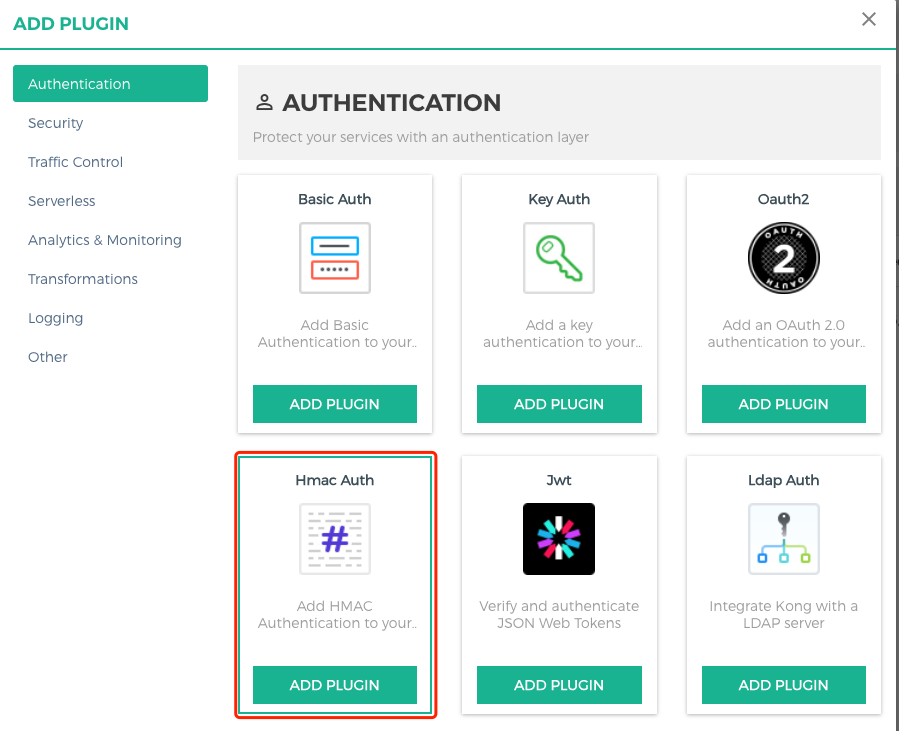
4. Log in to the Konga console, go to the details page of the Route that requires rate limiting, click the Add Plugin button, and select the HMAC Auth plugin under the Authentication group.
5. Set parameters for the Key Authentication plugin, press Enter, and save the configurations.
consumer: Enter the ID of the consumer that requires application access control. If it is left blank, the IP address access control applies to all consumers.hide credentials: whether to hide credentials from the upstream service.anonymous: optional string (user uuid) used as the "anonymous" user if authentication fails. If it is empty (default), the request fails, identity authentication fails, and a 4xx response is returned. Note that this value should refer to the consumer ID field rather than the custom_id field in Cloud Native API Gateway.clock skew: clock skew seconds to prevent the replay attack.validate request body: whether body verification is enabled.enforce headers: list of HTTP headers that should participate in HMAC signature calculation.algorithms: list of HMAC digest algorithms the user wants to support. Allowed values are hmac-sha1, hmac-sha256, hmac-sha384, and hmac-sha512. By default, all these values are supported.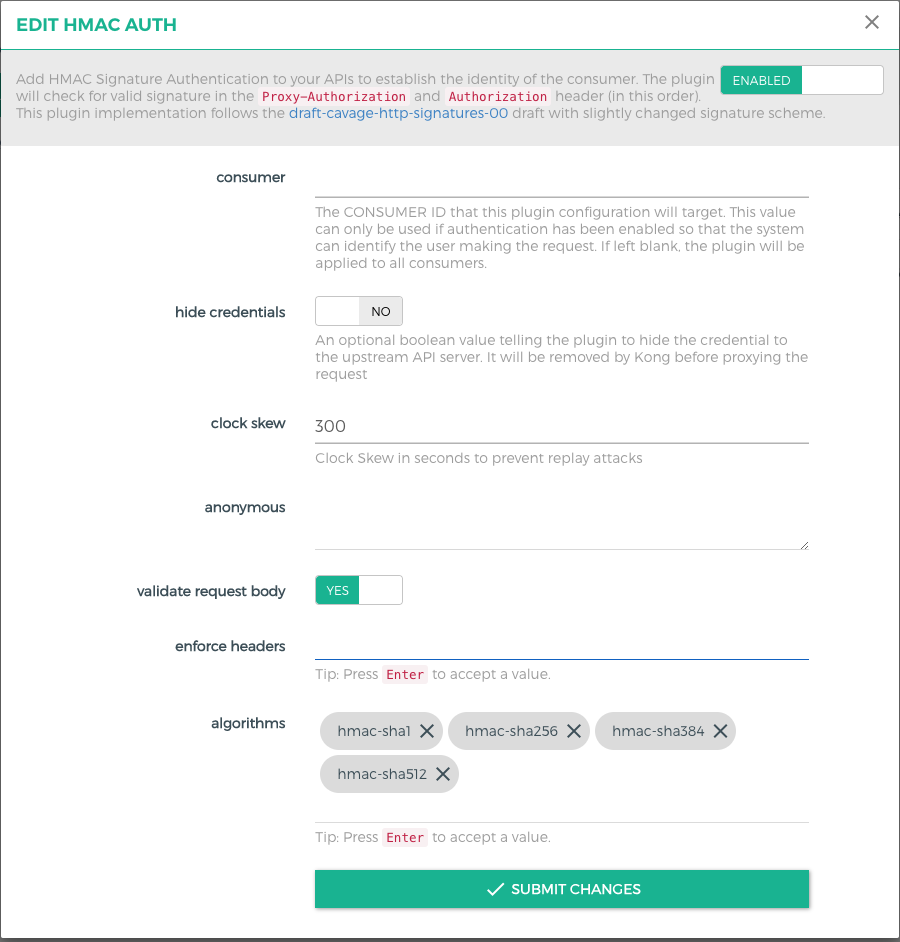
Step 2: Creating a Consumer
1. Go to the CONSUMERS page to create a consumer.
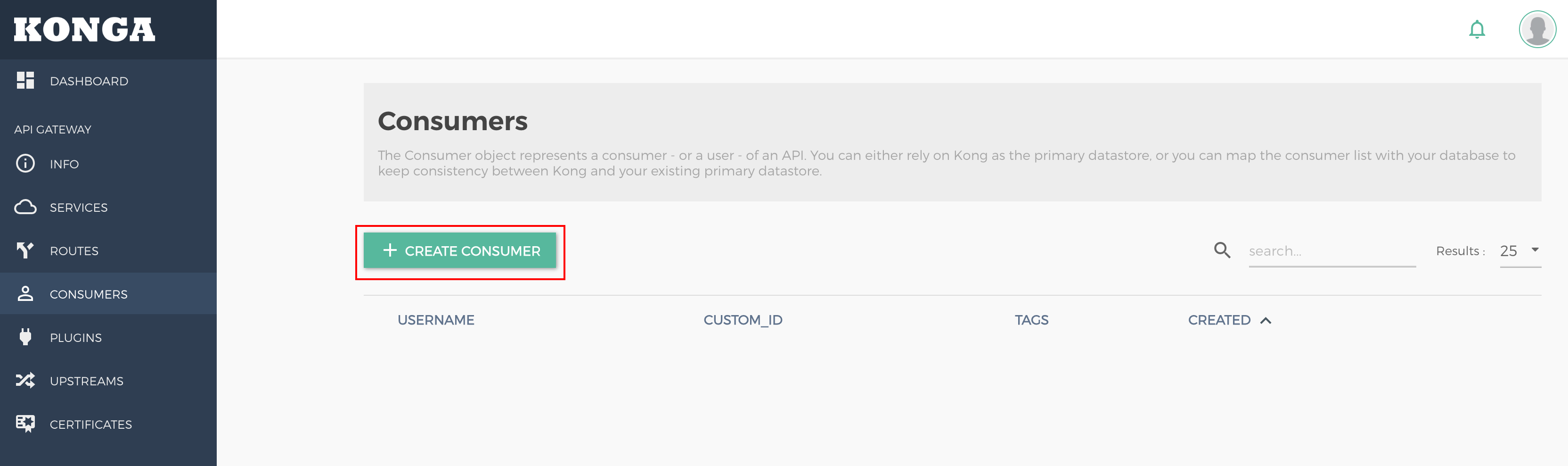
username: user (application) name. Either this field or custom_id should be specified.custom_id: custom identifier used to map the user to another database. Either this field or username should be specified.Tags: tag.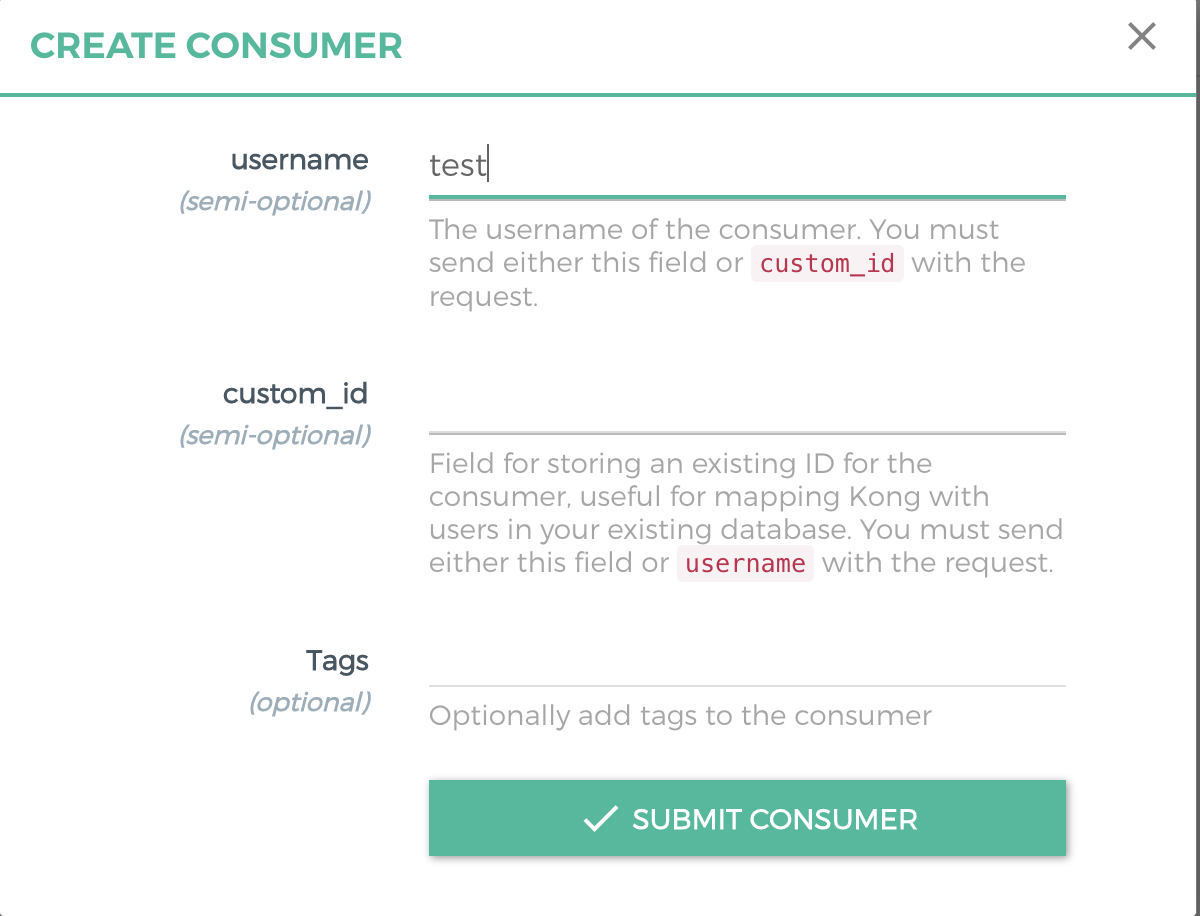
2. Create an HMAC Auth credential for the consumer.
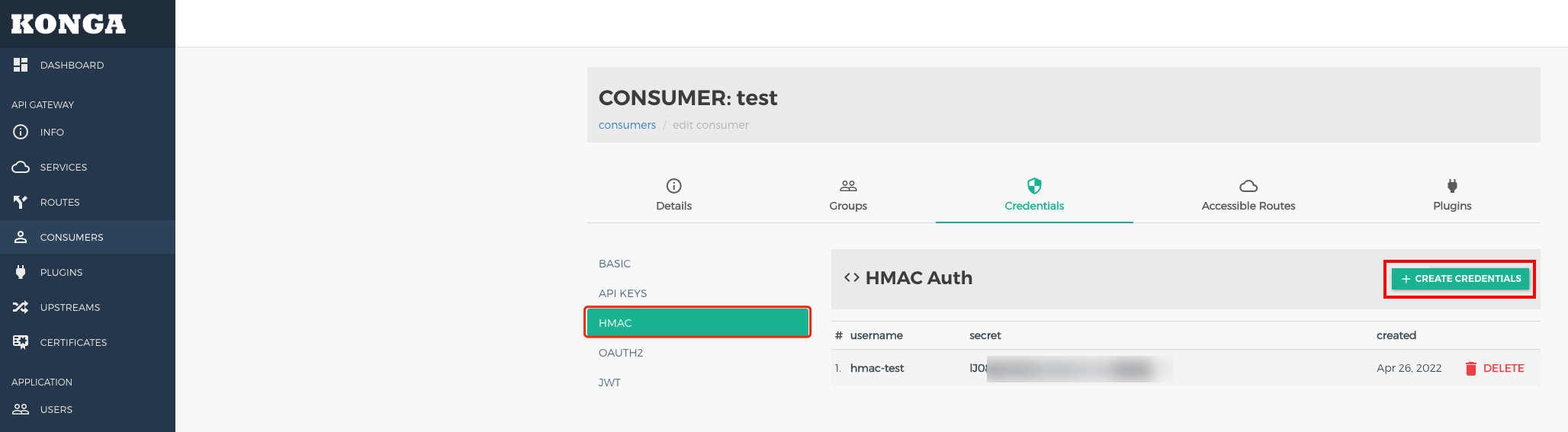
username: username used in HMAC signature verification.secret: secret value. If it is not specified, a secret is generated automatically by default.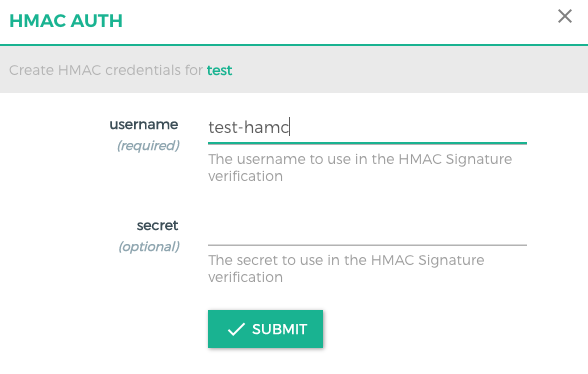
Step 3: Using the Signature Authentication Solution
The client is expected to send the Authorization or Proxy-Authorization header using the following parameters:
For example:
Authorization: hmac username="username", algorithm="hmac-sha1", headers="x-date digest", signature="Base64(HMAC-SHA1(signing_str, secret))"Signature Parameters
username: username of the credential.algorithm: digital signature algorithm used to create signatures.headers: list of HTTP header names used to sign requests, which are separated by spaces.signature: base64-encoded digital signature generated by the client.Signature String Construction
To generate a string signed with a key, the client should obtain the value of each HTTP header specified by headers in the order they appear.
1. If the title name is not request-line, attach the lowercase title name, followed by an ASCII colon: and an ASCII space.
2. If the title name is request-line, attach the HTTP request line (ASCII format). Otherwise, append the title value.
3. If the value is not the last, attach an ASCII line break \\n. The string should not contain trailing ASCII line breaks.
4. The server and request client should synchronize with the Network Time Protocol (NTP) server and send the validity date (in GMT format, such as Mon, 19 Mar 2018 12:08:40 GMT) using the X-Date or Date header.
Body Validation
Users can set config.validate_request_body to true to verify the request body. If enabled, the plugin calculates the SHA-256 HMAC digest of the request body and matches it against the value of the Digest header. The Digest header must use the following format:
Digest: SHA-256=base64(sha256(<body>))If no request body is available, set Digest to the body digest with a length of 0.
Attention:
To create a digest of the request body, the plugin needs to retain it in memory. This may cause pressure on the worker's Lua VM when large bodies are processed (several MB) or during high request concurrency.
Step 4: API Request Demo
Note:
The following demo is for reference only. For POST and GET requests, modify it based on the actual scenario.
Python Version
# -*- coding: utf-8 -*-import base64import datetimeimport hashlibimport hmacimport jsonimport requestsfrom urllib.parse import urlparse, urlencode#usernameUsername = 'xxx'#secretSecret = 'xxxx'# Access the address.Url = 'http://test.com/'HTTPMethod = 'POST' # methodAccept = 'application/json'ContentType = 'application/json'urlInfo = urlparse(Url)Host = urlInfo.hostnamePath = urlInfo.pathDigest = ''GMT_FORMAT = '%a, %d %b %Y %H:%M:%S GMT'xDate = datetime.datetime.utcnow().strftime(GMT_FORMAT)body_json = ''# Modify the body content.if HTTPMethod == 'POST' :# Enter the actual request body.body = { "arg1": "a", "arg2": "Chinese" }body_json = json.dumps(body)body_digest = hashlib.sha256(body_json.encode()).digest()Digest = "SHA-256=" + base64.b64encode(body_digest).decode()# Obtain the signature string.signing_str = 'x-date: %s\\ndigest: %s' % (xDate, Digest)# Calculate the signature.sign = hmac.new(Secret.encode(), msg=signing_str.encode(), digestmod=hashlib.sha1).digest()sign = base64.b64encode(sign).decode()auth = "hmac username=\\"" + Username + "\\", algorithm=\\"hmac-sha1\\", headers=\\"x-date digest\\", signature=\\""sign = auth + sign + "\\""// Send the request.headers = {'Host': Host,'Accept': Accept,'Content-Type': ContentType,'x-date': xDate,'Authorization': sign,'Digest': Digest}if HTTPMethod == 'GET' :ret = requests.get(Url, headers=headers)if HTTPMethod == 'POST' :ret = requests.post(Url, headers=headers, data=(body_json))print(ret.headers)print(ret.text)
Java Version
package org.example;import org.apache.http.HttpEntity;import org.apache.http.HttpResponse;import org.apache.http.client.methods.HttpPost;import org.apache.http.client.methods.HttpGet;import org.apache.http.entity.StringEntity;import org.apache.http.impl.client.CloseableHttpClient;import org.apache.http.impl.client.HttpClients;import org.apache.http.util.EntityUtils;import javax.crypto.Mac;import javax.crypto.spec.SecretKeySpec;import java.net.URI;import java.nio.charset.StandardCharsets;import java.text.SimpleDateFormat;import java.util.Base64;import java.util.Date;import java.util.Locale;import java.util.TimeZone;public class Main {public static void main(String[] args) throws Exception {String username = "xxxx";String secret = "xxxx";String url = "http://www.test.com/";String httpMethod = "POST";String accept = "application/json";String contentType = "application/json";URI uri = new URI(url);String host = uri.getHost();String digest = "";SimpleDateFormat format = new SimpleDateFormat("EEE, dd MMM yyyy HH:mm:ss z", Locale.US);format.setTimeZone(TimeZone.getTimeZone("GMT"));String xDate = format.format(new Date());String body = "";if (httpMethod.equals("POST")) {body = "arg1=a&arg2=Chinese";}byte[] bodyDigest = java.security.MessageDigest.getInstance("SHA-256").digest(body.getBytes(StandardCharsets.UTF_8));digest = "SHA-256=" + Base64.getEncoder().encodeToString(bodyDigest);System.out.println(digest);String signingStr = "x-date: " + xDate + "\\ndigest: " + digest;Mac mac = Mac.getInstance("HmacSHA1");mac.init(new SecretKeySpec(secret.getBytes(StandardCharsets.UTF_8), "HmacSHA1"));byte[] signBytes = mac.doFinal(signingStr.getBytes(StandardCharsets.UTF_8));String sign = Base64.getEncoder().encodeToString(signBytes);String auth = "hmac username=\\"" + username + "\\", algorithm=\\"hmac-sha1\\", headers=\\"x-date digest\\", signature=\\"";sign = auth + sign + "\\"";HttpResponse response = null;CloseableHttpClient httpClient = HttpClients.createDefault();if (httpMethod.equals("POST")) {HttpPost httpPost = new HttpPost(url);httpPost.setHeader("Host", host);httpPost.setHeader("Accept", accept);httpPost.setHeader("Content-Type", contentType);httpPost.setHeader("x-date", xDate);httpPost.setHeader("Authorization", sign);if (!digest.isEmpty()) {httpPost.setHeader("Digest", digest);}StringEntity entity = new StringEntity("arg1=a&arg2=Chinese", "UTF-8");httpPost.setEntity(entity);response = httpClient.execute(httpPost);} else if (httpMethod.equals("GET")) {HttpGet httpGet = new HttpGet(url);httpGet.setHeader("Host", host);httpGet.setHeader("Accept", accept);httpGet.setHeader("Content-Type", contentType);httpGet.setHeader("x-date", xDate);httpGet.setHeader("Authorization", sign);if (!digest.isEmpty()) {httpGet.setHeader("Digest", digest);}response = httpClient.execute(httpGet);}HttpEntity responseEntity = response.getEntity();System.out.println(EntityUtils.toString(responseEntity));}}
Related Instructions
Help and Support
Was this page helpful?
You can also Contact sales or Submit a Ticket for help.
Help us improve! Rate your documentation experience in 5 mins.
Feedback