Using Circuit Breaking to Protect Backend Services
Download
Focus Mode
Font Size
Scenarios
This document describes how to implement the following common circuit breaking scenarios using the circuit breaker plugin on a cloud-native gateway.
Performing circuit breaking based on the backend response time
Performing circuit breaking based on the error code
Prerequisites
The gateway instance has been purchased. For details, see Create Gateway.
Extension Descriptions
Plugin name: TSE BREAKER
Plugin group: Traffic Control
Overview: This plugin is used to perform circuit breaking for requests from the client to protect upstream services.
Specific capabilities:
The plugin supports the response time mode and the error code mode. For different modes, you can configure the conditions for enabling circuit breaking. The error condition supports the response time mode and the error code mode.
Response time mode: Configure the response time threshold for the backend service. A response time that exceeds the threshold is counted as an error. Circuit breaking is triggered when the condition for enabling circuit breaking is met.
Error code mode: Configure the abnormal HTTP status codes, separated by commas. A request that returns an abnormal status code is counted as an error. Circuit breaking is triggered when the condition for enabling circuit breaking is met.
The plugin supports half-open detection after circuit breaking: When circuit breaking is triggered for the first time, it lasts for 2 seconds. After this period, the request is forwarded to the backend again to check the error condition and the health condition.
When the error condition is met, circuit breaking lasts for 4 seconds. This process repeats until the preset maximum probe wait time is reached, at which point the exponential increase stops.
Circuit breaking ends when the health condition is met, which means the number of consecutive normal requests reaches the specified threshold.
The circuit breaking return content, such as the HTTP status code, HTTP response content, and response header can be customized.
Plugin Configurations
Field Name | Required | Field Description |
Response Time Threshold | No | Maximum response time of the upstream service backend server, in seconds. The value is greater than or equal to 1. |
Abnormal Status HTTP Status Code | No | HTTP status code returned when the upstream service is abnormal. The default value is 503, and the value range is 500 to 599. |
Error Rate Threshold | No | Threshold for the ratio of the number of requests that trigger an abnormal status of the upstream service to the total number of requests within a certain period. |
Threshold for the Number of Consecutive Errors | No | Threshold for the number of consecutive requests that trigger an abnormal status of the upstream service. The value is greater than or equal to 1. |
Maximum Detection Waiting Time | No | Maximum duration of the upstream service circuit breaker, in seconds. The value is greater than or equal to 1 and less than or equal to 300. |
Number of Consecutive Normal Requests | Yes | Number of consecutive normal requests when the upstream service is in a healthy status. The value is greater than or equal to 1. |
HTTP Status Code When Circuit Breaking Triggered | No | HTTP error code returned when the upstream service is in an unhealthy status. |
HTTP Response Content When Circuit Breaking Triggered | No | HTTP response body returned when the upstream service is in an unhealthy status. |
Response Header When Circuit Breaking Triggered | No | HTTP response header returned when the upstream service is in an unhealthy status. This field takes effect only when the break_response_body attribute is configured. |
Scenarios and Operation Steps
Scenario 1: Performing Circuit Breaking Based on the Error Code
1. Log in to the TSF console.
2. Select Cloud Native Gateway in the left sidebar and click the target instance to go to the instance details.
3. On the Basic Information page, click the Konga console Tag to view the management console login method.
4. Click the link to go to the Konga console login page. Enter your username and password to access the Konga console.
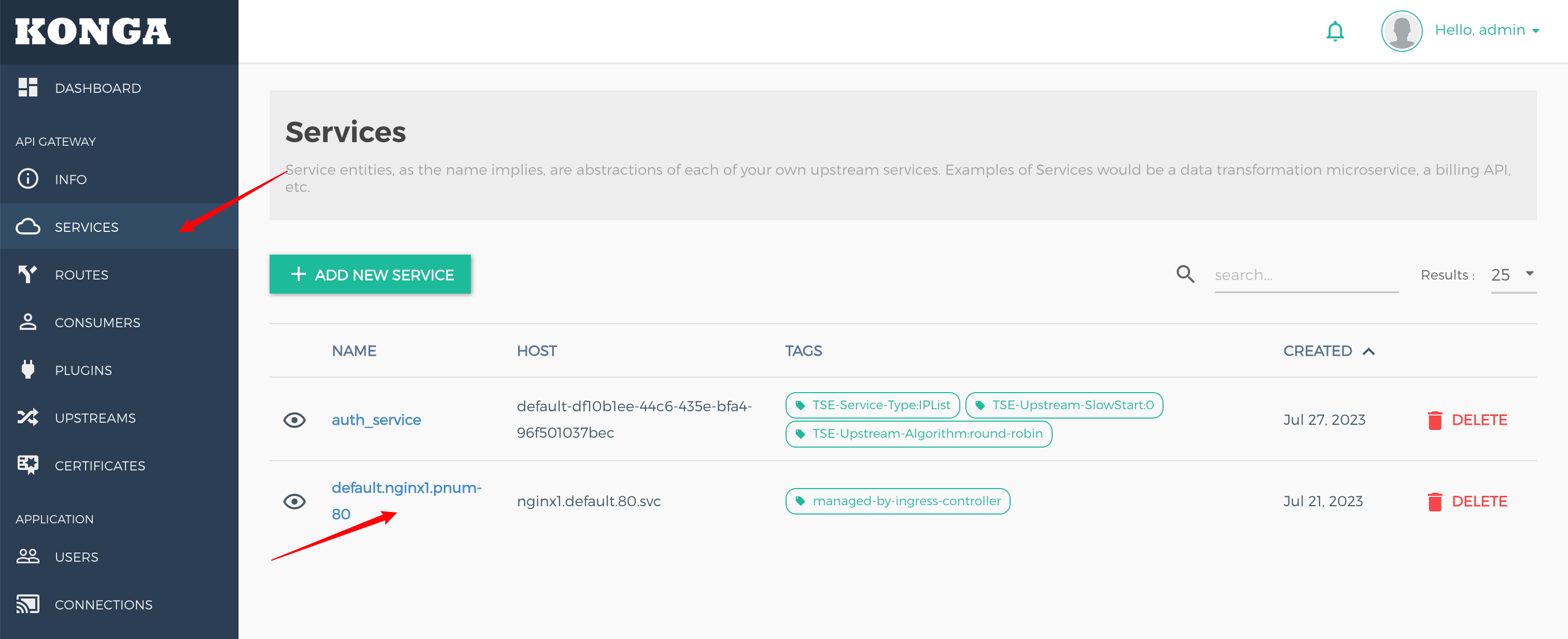
5. Go to the details page of the service for which you need to configure circuit breaking.
6. Click Add Plugin to add a plugin, and select the TSE BREAKER plugin under the Traffic Control group.
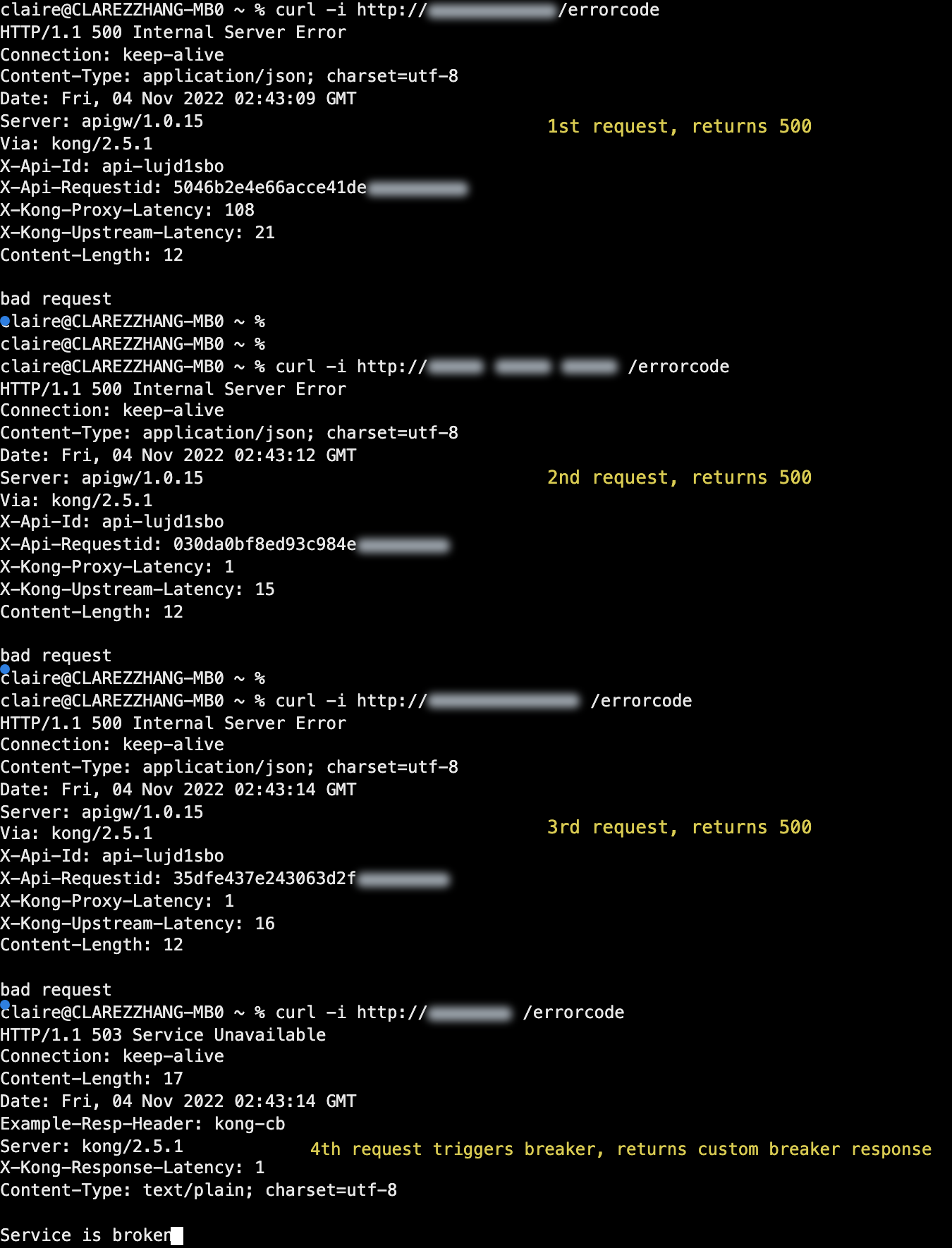
7. This scenario simulates a situation where the backend is considered abnormal when it returns 500, 501, or 502. Circuit breaking is triggered when three consecutive requests fail, and custom content is returned during the circuit breaking state.
In the plugin, enter the following configuration:
Error judgment condition: The backend service returns 500, 501, or 502.
Circuit breaking enabling condition: The number of consecutive errors exceeds 3.
(Optional) Circuit breaking response configuration
Status code: 503
Response header: example-resp-header:kong-cb
Response content: Service is broken
8. Initiate an API request. After three consecutive returns of 500, verify that circuit breaking is triggered successfully and that the custom circuit breaking response is returned.
HTTP/1.1 503 Service Unavailable // Custom response status codeExample-Resp-Header: kong-cb // Custom response headerService is broken // Custom response content
Scenario 2: Performing Circuit Breaking Based on the Response Time
1. Log in to the TSF console.
2. Select Cloud Native Gateway in the left sidebar and click the target instance to go to the instance details.
3. On the Basic Information page, click the Konga console Tag to view the management console login method.
4. Click the link to go to the Konga console login page. Enter your username and password to access the Konga console.
5. Go to the details page of the Service for which you want to configure circuit breaking. Click Add Plugin to add a plugin, and select the TSE BREAKER plugin under the Traffic Control group.
6. This scenario simulates a situation where the backend is considered abnormal when its response time exceeds 15 seconds. Circuit breaking is triggered when four consecutive requests are erroneous, and the circuit breaker is disabled when two consecutive requests are successful.
In the plugin, enter the following configuration:
Error judgment condition: The response time of the backend service exceeds 15 seconds.
Circuit breaking enabling condition: The number of consecutive errors exceeds 4.
(Optional) Circuit breaking response configuration
Status code: 503
Response header: example-resp-header:kong-cb
Response content: Service is broken
Circuit breaking disabling condition: The number of consecutive normal requests reaches 2.
7. Initiate an API request. After four consecutive request timeouts, verify that circuit breaking is triggered successfully. After two consecutive normal requests, verify that the circuit breaker is disabled.
Help and Support
Was this page helpful?
You can also Contact sales or Submit a Ticket for help.
Help us improve! Rate your documentation experience in 5 mins.
Feedback