tencent cloud

Tencent Real-Time Communication

문서Tencent Real-Time Communication

Participant Management (iOS)

다운로드
포커스 모드
폰트 크기
마지막 업데이트 시간: 2026-06-15 15:14:30
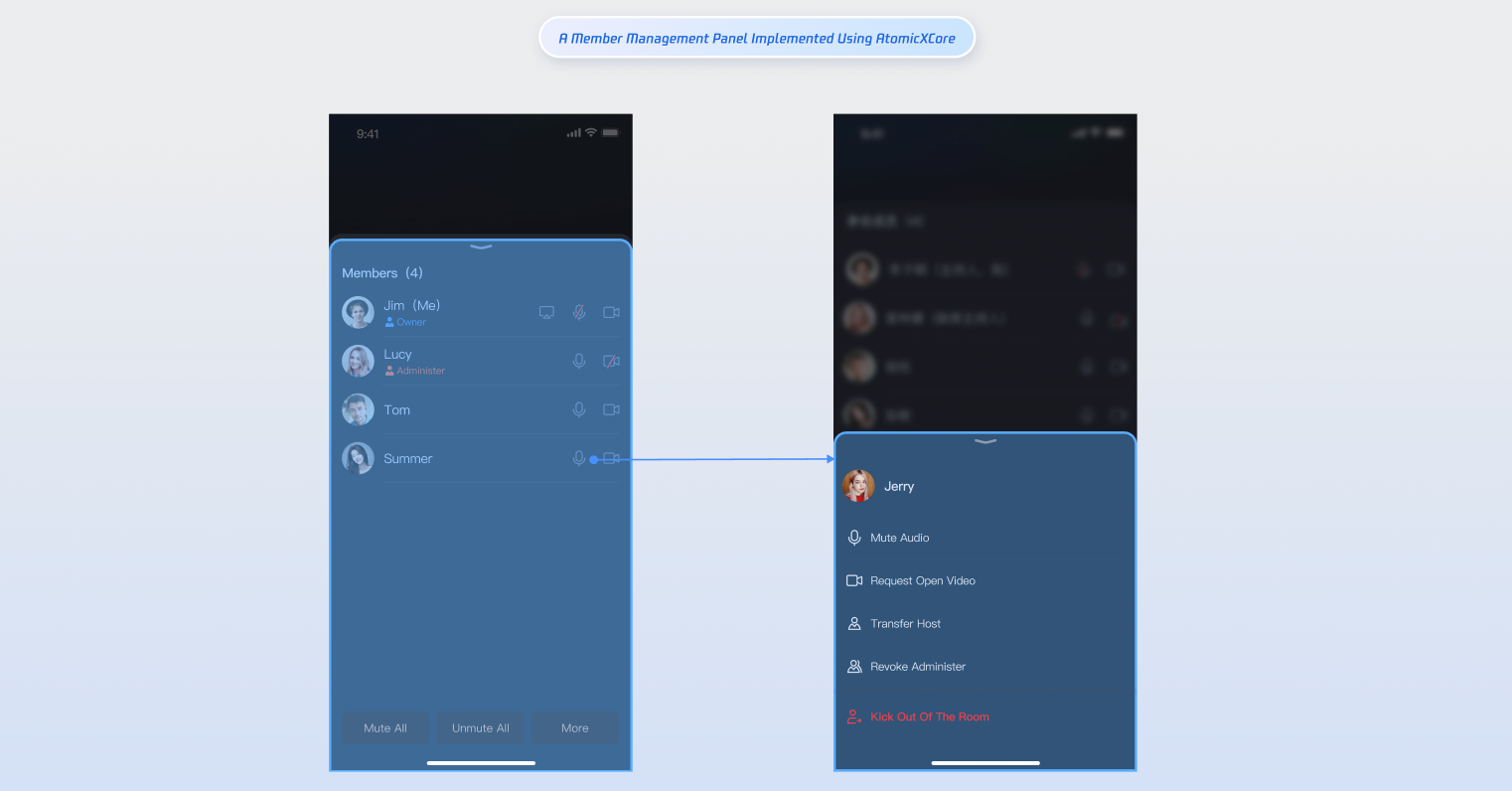
RoomParticipantStore is a specialized module within AtomicXCore designed for managing participants in a conference room. It provides essential functionality for multi-party conference scenarios, enabling you to build a robust participant management system.


Core Features

Get the participant list: Retrieve details for everyone currently in the room.
Transfer room ownership: The current owner can transfer ownership to another participant.
Grant/revoke admin role: The owner can promote participants to admins and revoke admin privileges.
Remove a participant: The owner or an admin can remove a participant from the room.
Update participant profile: Participants can update their own in-room profile information.
Manage audio/video devices: Invite participants to enable camera/mic, remotely turn off another participant’s camera/mic, and (for owners/admins) mute all or disable all video.

Core Concepts

The core concepts of RoomParticipantStore is summarized as follows:
Core Concept
Type
Core Responsibilities & Description
struct
Represents the participant data model, encapsulating participant information and state management.
Main functions include managing participant basic information (user ID, user name, user avatar, in-room role) and managing device status (microphone, camera, screen sharing, message status).
struct
Represents the participant state management structure, responsible for maintaining participant-related state information in the room. Main properties:
participantListcollection of all participant information in the current room.
participantListCursorsnapshot for paginated participant list.
localParticipantcurrent user's participant information in the room.
enum
Represents real-time participant events in the room. Main categories: participant join/leave, role changes, device control events.
class
Core class for participant control. Features: manage participant audio/video status, perform participant operations, receive real-time events via participantEventPublisher.

Implementation Steps

Step 1: Add the SDK

Follow the Integration Overview to integrate the AtomicXCore SDK. Make sure you have completed the Login Logic Implementation.

Step 2: Retrieve the Participant List

After joining a room, use the getParticipantList method in RoomParticipantStore to fetch the participant list.
import Foundation
import AtomicXCore

func getParticipantList() {
// Prerequisite: You must have joined the room and initialized RoomParticipantStore with roomID
let participantStore = RoomParticipantStore.create(roomID: "your_room_id")
// Retrieve participant list starting from the first page
let initialCursor: String? = nil // nil means fetch from the first page
participantStore.getParticipantList(cursor: initialCursor) { result in
switch result {
case .success(let participantInfo):
print("Participant list retrieved, count: \\(participantInfo.0.count)")
case .failure(let error):
print("Failed to get participant list [Error code: \\(error.code)]: \\(error.message)")
}
}
}

Step 3: Search Room Members

Once you've joined the room, use searchUsers to search for members by keyword.
import Foundation
import AtomicXCore

func searchUsers() {
// Prerequisite: You must have joined the room.
let participantStore = RoomParticipantStore.create(roomID: "your_room_id")
// Search by user name keyword
let keyword = "userName"
participantStore.searchUsers(keyword: keyword) { result in
switch result {
case .success(let usersInfo):
print("Room members found, count: \\(usersInfo.0.count)")
case .failure(let error):
print("Failed to search room members [Error code: \\(error.code)]: \\(error.message)")
}
}
}

Step 4: Transfer the Room Ownership

If you are the owner, use transferOwner to transfer ownership to any participant. The original owner becomes a regular participant; each room can have only one owner.
import Foundation
import AtomicXCore

func transferOwner(to userID: String) {
// Prerequisite: You must have joined the room and initialized RoomParticipantStore with roomID
let participantStore = RoomParticipantStore.create(roomID: "your_room_id")
// Only the current owner can transfer ownership
participantStore.transferOwner(userID: userID) { result in
switch result {
case .success():
print("Ownership transferred. New owner: \\(userID)")
case .failure(let error):
print("Ownership transfer failed [Error code: \\(error.code)]: \\(error.message)")
}
}
}
Participants can subscribe to the onOwnerChanged event via participantEventPublisher to receive ownership change notifications.
import Foundation
import AtomicXCore
import Combine

private var cancellableSet = Set<AnyCancellable>()

private func subscribeParticipantEvent() {
let participantStore = RoomParticipantStore.create(roomID: "your_room_id")
participantStore.participantEventPublisher
.receive(on: DispatchQueue.main)
.sink { event in
switch event {
case .onOwnerChanged(let newOwner, let oldOwner):
print("Ownership changed: newOwner: \\(newOwner), oldOwner: \\(oldOwner)")
default: break
}
}
.store(in: &cancellableSet)
}

Step 5: Grant or Revoke the Admin Privileges

As the owner, use setAdmin to assign admin privileges or revokeAdmin to remove them.
import Foundation
import AtomicXCore

let participantStore = RoomParticipantStore.create(roomID: "your_room_id")

func setUserAsAdmin(userID: String) {
participantStore.setAdmin(userID: userID) { result in
switch result {
case .success:
print("User \\(userID) set as admin")
case .failure(let error):
print("Failed to set admin [Error code: \\(error.code)]: \\(error.message)")
}
}
}

func revokeUserAdmin(userID: String) {
participantStore.revokeAdmin(userID: userID) { result in
switch result {
case .success:
print("Admin privileges revoked for user \\(userID)")
case .failure(let error):
print("Failed to revoke admin [Error code: \\(error.code)]: \\(error.message)")
}
}
}
Participants can subscribe to onAdminSet and onAdminRevoked events to be notified of changes.
import Foundation
import AtomicXCore

let participantStore = RoomParticipantStore.create(roomID: "your_room_id")
private var cancellableSet = Set<AnyCancellable>()

private func subscribeParticipantEvents() {
participantStore.participantEventPublisher
.receive(on: DispatchQueue.main)
.sink { event in
switch event {
case .onAdminSet(let userInfo):
print("Admin assigned: \\(userInfo)")
case .onAdminRevoked(let userInfo):
print("Admin revoked: \\(userInfo)")
default: break
}
}
.store(in: &cancellableSet)
}

Step 6: Remove Participants

Owners and admins can use kickUser to remove participants from the room.
import Foundation
import AtomicXCore

let participantStore = RoomParticipantStore.create(roomID: "your_room_id")

func kickUser(userID: String) {
// Only owners and admins have permission
participantStore.kickUser(userID: userID) { result in
switch result {
case .success():
print("User \\(userID) removed from room")
case .failure(let error):
print("Failed to remove user [Error code: \\(error.code)]: \\(error.message)")
}
}
}
Participants can listen for the onKickedFromRoom event to receive removal notifications.
import Foundation
import AtomicXCore
import Combine

let participantStore = RoomParticipantStore.create(roomID: "your_room_id")
private var cancellableSet = Set<AnyCancellable>()

private func subscribeParticipantEvent() {
participantStore.participantEventPublisher
.receive(on: DispatchQueue.main)
.sink { event in
switch event {
case .onKickedFromRoom(let reason, let message):
print("Removed from room: reason: \\(reason), info: \\(message)")
default:
break
}
}
.store(in: &cancellableSet)
}

Step 7: Update the Participant Information

After joining, call updateParticipantNameCard and updateParticipantMetaData to update your information, including display name and custom metadata.
import Foundation
import AtomicXCore

let participantStore = RoomParticipantStore.create(roomID: "your_room_id")

func updateParticipantNameCard(userID: String, nameCard: String) {
// Display name or custom identifier
// Usually only admins or the participant themselves can modify
participantStore.updateParticipantNameCard(userID: userID, nameCard: nameCard) { result in
switch result {
case .success():
print("Name card updated: user \\(userID), new value: \\(nameCard)")
case .failure(let error):
print("Failed to update name card [Error code: \\(error.code)]: \\(error.message)")
}
}
}

func updateParticipantMetaData(userID: String, metaData: [String: String]) {
// Custom business data such as tags or extended attributes
// Key length ≤ 50 bytes, value length ≤ 200 bytes
participantStore.updateParticipantMetaData(userID: userID, metaData: metaData) { result in
switch result {
case .success():
print("Custom metadata updated: user \\(userID), keys: \\(metaData.count)")
case .failure(let error):
print("Failed to update metadata [Error code: \\(error.code)]: \\(error.message)")
}
}
}

Step 8: Invite Participants to Enable Devices

Owners and admins can use inviteToOpenDevice to prompt participants to turn on their camera or microphone.
import Foundation
import AtomicXCore

let participantStore = RoomParticipantStore.create(roomID: "your_room_id")

func inviteUserToOpenDevice(userID: String, device: DeviceType, timeout: Int = 30) {
// Invite participant to enable device (microphone, camera, screen sharing)
// Participants receive a notification and can accept or decline
participantStore.inviteToOpenDevice(userID: userID, device: device, timeout: timeout) { result in
switch result {
case .success():
print("Device invitation sent: user \\(userID), device: \\(device)")
case .failure(let error):
print("Failed to send invitation [Error code: \\(error.code)]: \\(error.message)")
}
}
}
Participants:
Subscribe to onDeviceInvitationReceived for device invitation notifications.
Call acceptOpenDeviceInvitation or declineOpenDeviceInvitation to accept or decline.
import Foundation
import AtomicXCore
import Combine

let participantStore = RoomParticipantStore.create(roomID: "your_room_id")
private var cancellableSet = Set<AnyCancellable>()

private func subscribeDeviceInvitationEvent() {
participantStore.participantEventPublisher
.receive(on: DispatchQueue.main)
.sink { event in
switch event {
case .onDeviceInvitationReceived(let invitation):
print("Device invitation received: device: \\(invitation.device), sender: \\(invitation.senderUserName)")
// Handle accept/decline
default: break
}
}
.store(in: &cancellableSet)
}

func acceptOpenDeviceInvitation(userID: String, device: DeviceType) {
participantStore.acceptOpenDeviceInvitation(userID: userID, device: device) { result in
switch result {
case .success():
print("Device invitation accepted: \\(device)")
case .failure(let error):
print("Failed to accept invitation [Error code: \\(error.code)]: \\(error.message)")
}
}
}

func declineOpenDeviceInvitation(userID: String, device: DeviceType) {
participantStore.declineOpenDeviceInvitation(userID: userID, device: device) { result in
switch result {
case .success():
print("Device invitation declined: \\(device)")
case .failure(let error):
print("Failed to decline invitation [Error code: \\(error.code)]: \\(error.message)")
}
}
}

Step 9: Close Remote Devices

Owners and admins can use closeParticipantDevice to remotely disable a participant's camera or microphone.
import Foundation
import AtomicXCore

let participantStore = RoomParticipantStore.create(roomID: "your_room_id")

func closeParticipantDevice(userID: String, device: DeviceType) {
// Remotely disable specified participant’s device
participantStore.closeParticipantDevice(userID: userID, device: device) { result in
switch result {
case .success():
print("Closed device: user \\(userID), device: \\(device)")
case .failure(let error):
print("Failed to close device [Error code: \\(error.code)]: \\(error.message)")
}
}
}
Participants can listen for the onParticipantDeviceClosed event to receive device closure notifications.
import Foundation
import AtomicXCore
import Combine

let participantStore = RoomParticipantStore.create(roomID: "your_room_id")
private var cancellableSet = Set<AnyCancellable>()

private func subscribeDeviceClosedEvent() {
participantStore.participantEventPublisher
.receive(on: DispatchQueue.main)
.sink { event in
switch event {
case .onParticipantDeviceClosed(let device, let operatorUser):
print("Device closed: \\(device), operator: \\(operatorUser.userName)")
default:
break
}
}
.store(in: &cancellableSet)
}

Step 10: Request Permission to Turn On Devices

Participants can use requestToOpenDevice to ask the owner or admins for permission to enable their camera or microphone when restricted.
import Foundation
import AtomicXCore

let participantStore = RoomParticipantStore.create(roomID: "your_room_id")

func requestToOpenDevice(device: DeviceType, timeout: Int = 30) {
// Request to enable device
participantStore.requestToOpenDevice(device: device, timeout: timeout) { result in
switch result {
case .success():
print("Enable device request sent: \\(device)")
case .failure(let error):
print("Failed to send request [Error code: \\(error.code)]: \\(error.message)")
}
}
}
Owners and admins:
Subscribe to onDeviceRequestReceived for device enable requests.
Call approveOpenDeviceRequest or rejectOpenDeviceRequest to approve or deny.
import Foundation
import AtomicXCore
import Combine

let participantStore = RoomParticipantStore.create(roomID: "your_room_id")
private var cancellableSet = Set<AnyCancellable>()

private func subscribeDeviceRequestEvent() {
participantStore.participantEventPublisher
.receive(on: DispatchQueue.main)
.sink { event in
switch event {
case .onDeviceRequestReceived(let request):
print("Device request received: user \\(request.senderUserName), device: \\(request.device)")
// Approve or reject request
default:
break
}
}
.store(in: &cancellableSet)
}

func approveOpenDeviceRequest(device: DeviceType, userID: String) {
participantStore.approveOpenDeviceRequest(device: device, userID: userID) { result in
switch result {
case .success():
print("Device request approved: user \\(userID), device: \\(device)")
case .failure(let error):
print("Failed to approve request: \\(error.message)")
}
}
}

func rejectOpenDeviceRequest(device: DeviceType, userID: String) {
participantStore.rejectOpenDeviceRequest(device: device, userID: userID) { result in
switch result {
case .success():
print("Device request rejected: user \\(userID), device: \\(device)")
case .failure(let error):
print("Failed to reject request [Error code: \\(error.code)]: \\(error.message)")
}
}
}

Step 11: Mute All Microphones or Disable All Cameras

Owners and admins can use disableAllDevices to mute all microphones or disable all cameras in the room. Participants will not be able to enable these devices unless approved.
import Foundation
import AtomicXCore

let participantStore = RoomParticipantStore.create(roomID: "your_room_id")

func disableAllDevices(device: DeviceType, disable: Bool) {
// Mute/unmute all microphones or disable/enable all cameras
participantStore.disableAllDevices(device: device, disable: disable) { result in
switch result {
case .success():
let action = disable ? "Disabled" : "Enabled"
print("\\(action) all \\(device) successfully")
case .failure(let error):
let action = disable ? "Disabled" : "Enabled"
print("\\(action) all \\(device) failed [Error code: \\(error.code)]: \\(error.message)")
}
}
}
Participants can subscribe to onAllDevicesDisabled to stay updated on mute-all or disable-all camera actions and synchronize their UI. When restricted, participants must request permission to enable their devices.
import Foundation
import AtomicXCore
import Combine

let participantStore = RoomParticipantStore.create(roomID: "your_room_id")
private var cancellableSet = Set<AnyCancellable>()

private func subscribeAllDevicesDisabledEvent() {
participantStore.participantEventPublisher
.receive(on: DispatchQueue.main)
.sink { event in
switch event {
case .onAllDevicesDisabled(let device, let disable, let operatorUser):
let action = disable ? "Disabled" : "Enabled"
print("All \\(device) have been \\(action) by \\(operatorUser.userName)")
default:
break
}
}
.store(in: &cancellableSet)
}

Step 12: Listen for Participant Events

Subscribe to RoomParticipantEvent for participant join/leave notifications.
import Foundation
import AtomicXCore
import Combine

let participantStore = RoomParticipantStore.create(roomID: "your_room_id")
private var cancellableSet = Set<AnyCancellable>()

private func subscribeParticipantEvent() {
participantStore.participantEventPublisher
.receive(on: DispatchQueue.main)
.sink { event in
switch event {
case .onParticipantJoined(let participant):
print("Participant joined: \\(participant.userName), ID: \\(participant.userID)")
case .onParticipantLeft(let participant):
print("Participant left: \\(participant.userName), ID: \\(participant.userID)")
default:
break
}
}
.store(in: &cancellableSet)
}
Subscribe to changes in RoomParticipantState properties, such as tracking users who are currently speaking.
import Foundation
import AtomicXCore
import Combine

let participantStore = RoomParticipantStore.create(roomID: "your_room_id")
private var cancellableSet = Set<AnyCancellable>()

private func subscribeParticipantState() {
participantStore.state
.subscribe(StatePublisherSelector(keyPath: \\.speakingUsers))
.map { $0 }
.removeDuplicates { oldValue, newValue in
// Prevent redundant processing
return oldValue == newValue
}
.receive(on: DispatchQueue.main)
.sink { speakingUsers in
print("Speaking users updated: count = \\(speakingUsers.count)")
}
.store(in: &cancellableSet)
}

API Documentation

Store/Component
Description
API Documentation
RoomParticipantStore
Manage participants in the room: assign admin roles, transfer ownership, retrieve participant list, remove participants, control participant devices (e.g., close, invite to enable camera/microphone), request device enable (e.g., request to enable camera/microphone).

Contact Us

If you have any questions or suggestions during integration or use, please contact info_rtc@tencent.com.

도움말 및 지원

문제 해결에 도움이 되었나요?

피드백