Renewal Instructions
Download
Mode fokus
Ukuran font
Manual Renewal
PRO
To manually renew your subscription on the Personal Homepage of the product's official website, follow these detailed steps:
1. Log in to the product's official website, and then go to Profile > Manage Plan from the avatar in the upper-right corner.
2. To renew your current subscription plan, click Confirm and proceed to payment.
3. Upon successful payment, your subscription will be extended for one month.
Team Plan
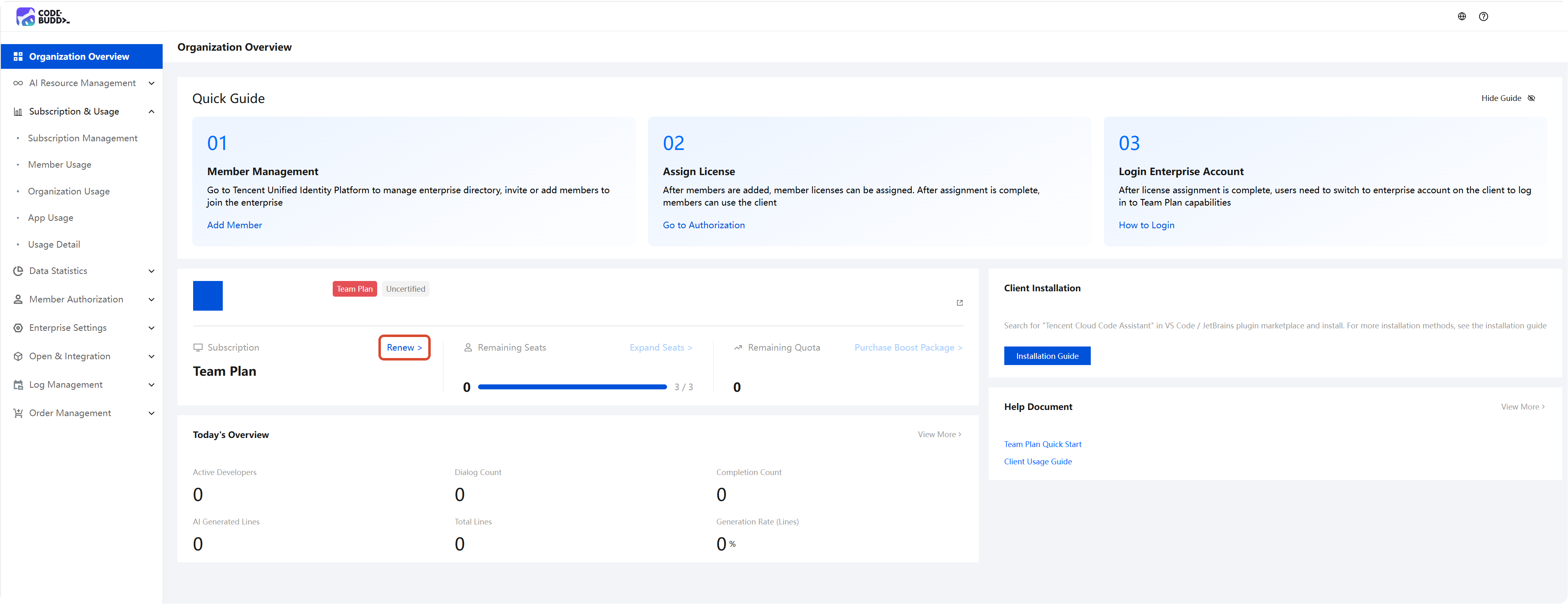
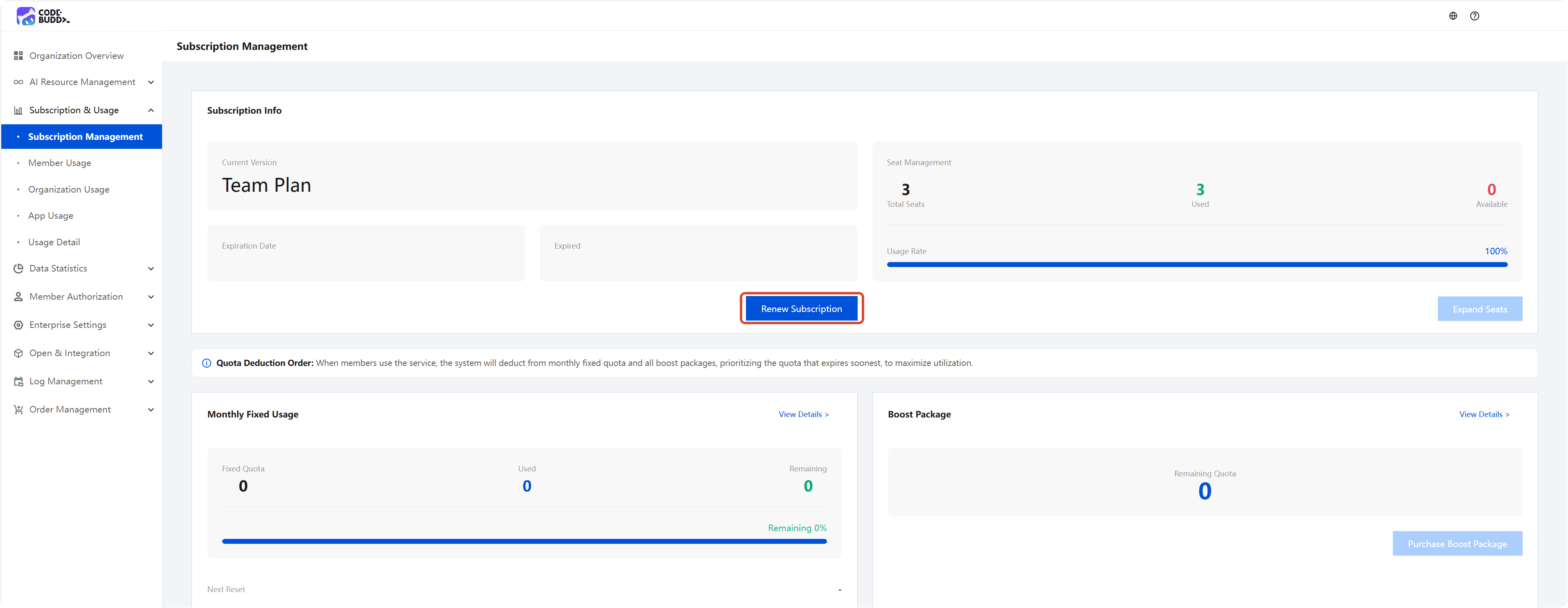
1. Log in to the Enterprise Management Console and initiate renewal from either Organization Overview or Subscription & Usage > Subscription Management. You will be automatically redirected to the renewal purchase page.
Attention:
Use the Tencent Cloud account associated with your purchased enterprise to renew your subscription. (You can view the Tencent Cloud account in the Organization Overview.) If the account is incorrect, log in again.
2. Go to the renewal purchase page, and then confirm and fill in the required information:
Confirm the license quantity. The license quantity cannot be changed during renewal. If you need to scale out, you can do so after the renewal is completed. For details, see the Scaling Instructions.
Confirm the enterprise information and the super administrator's mobile phone number.
Select the renewal duration. Monthly and annual renewal options are supported.
3. After the purchase is completed, return to the Enterprise Console and confirm whether the remaining duration has been correctly increased.
Automatic Renewal
PRO
Auto-renewal means that the system will automatically deduct the fee for the next renewal cycle from your contracted account each time your purchased plan is about to expire.
Enabling Auto-Renewal
To enable auto-renewal on the Personal Homepage of the official website, follow these detailed steps:
1. Log in to the product's official website, and then go to Personal Homepage > Plan & Usage from the avatar in the upper-right corner.
2. Manage auto-renewal in the Subscription Plan.
Canceling Automatic Renewal
Product Official Website
Log in to the product's official website, and then go to Profile > Manage Plan from the avatar in the upper-right corner.
Click Cancel Auto-renewal at the subscription plan.
Third-party Payment Channel
In WeChat, choose Me > Services > Wallet > Payment Settings > Password-free Payment/Auto-deduction, select the corresponding item, and disable the service.
Note:
Due to version updates on various payment platforms, the operation paths described above may be slightly adjusted. Please refer to the actual page of the payment platform for the specific details.
To avoid being charged for the next billing cycle when canceling the auto-renewal service, you must complete the cancellation at least five calendar days before the current billing cycle expires.
Auto-Renewal Rules
After you select an auto-renewal type such as Continuous Monthly/Yearly and enable the auto-renewal service, you authorize Tencent Cloud or a third-party payment channel authorized by Tencent Cloud to automatically deduct the service fees for the next billing cycle from your bound payment account within five calendar days before the expiration of each subscription billing cycle, thereby extending the corresponding subscription term for you.
The specific deduction amount, subscription period, and benefit details are subject to the information displayed on the activation page, order page, and payment channel display page.
If the deduction fails due to reasons such as insufficient balance in your payment account, abnormal payment account status, payment channel restrictions, or network failures, Tencent Cloud has the right to suspend or terminate the auto-renewal service and handle your service benefits according to the subscription expiration rules.
Team Plan
Auto-renewal means that each time the product/service you purchased is about to expire and your cloud service account has sufficient available balance, the system will automatically deduct the fee for the next renewal cycle from your account.
Enabling Auto-Renewal
1. Log in to the Tencent Cloud console, and then go to the Billing Center from Billing in the upper-right corner.
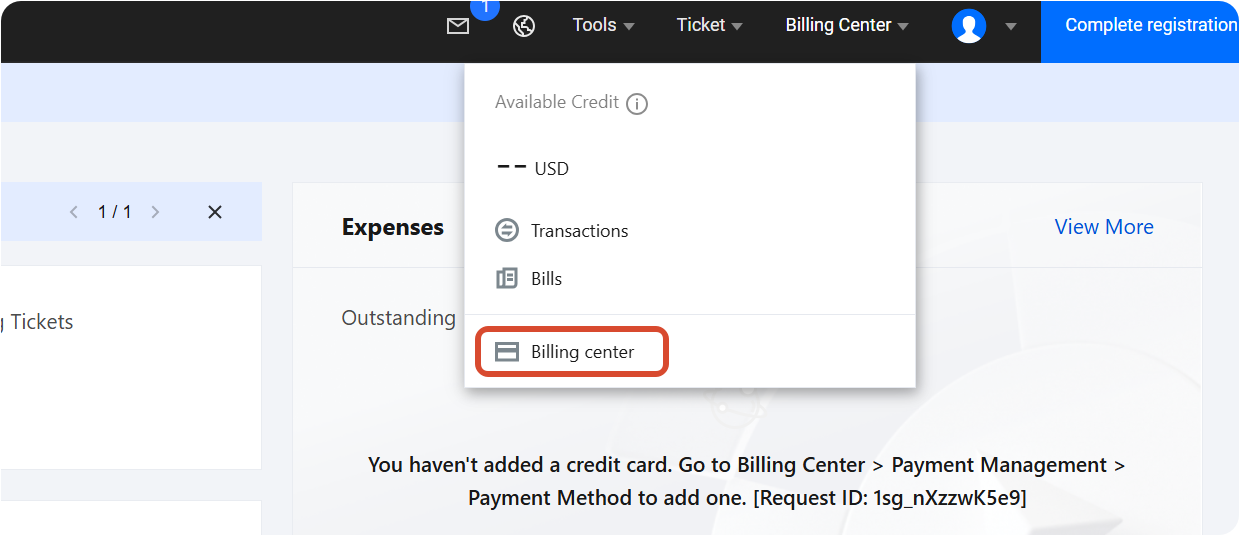
2. Enable auto-renewal for the product. Resources that have auto-renewal enabled can be managed in the auto-renewal section.
Team Plan Billing Details
Deduction Timing: For resources with auto-renewal enabled, the system, by default, deducts the fees within 5 days before the product/service expires. The specific number of days for deduction is subject to the rules of the corresponding product/service. If your account has available vouchers/cash vouchers, the system will prioritize using them for renewal.
Attention:
To avoid affecting the continuity of your resource/service usage, note that auto-renewal cannot be completed under circumstances such as insufficient available balance in your account, your account being restricted from purchasing new services, or your account's real-name verification being in an abnormal state.
Renewal Price: The auto-renewal price may be affected by factors such as real-time pricing. The actual renewal price may differ from the currently displayed price. Please refer to the order price at the time the system actually performs the auto-renewal.
Note:
Bantuan dan Dukungan
Apakah halaman ini membantu?
Anda juga dapat Menghubungi Penjualan atau Mengirimkan Tiket untuk meminta bantuan.
masukan