Logical Replication Slot Failover
Unduh
Mode fokus
Ukuran font
Background
Currently, you will create a logical replication slot when using logical replication in the TencentDB for PostgreSQL. As this information is not recorded in the catalog, it will not be synchronized from the primary database to the standby database. If an HA switchover occurs, the logical replication slot will be lost, causing the logical replication to be disconnected and causing inconvenience to the business. Therefore, the logical replication slot need to be failed over.
Feature Overview
The failover slot feature can synchronize the slot information from the primary database to the standby database, so that the disconnection of the logical subscription can be avoided after the HA switchover, and the user can continue to use the logical subscription without disruption. TencentDB for PostgreSQL provides
tencent_failover_slot, a plugin for users to create failover slots, convert them to non-failover slots, view failover slot information, and delete failover slots. At the same time, GUC parameters are added to help you configure for abnormal situations. The details are as follows.Creating a failover slot
To facilitate operations, when a user creates a slot, the system will create a failover slot by default. You can log in to the database and directly run the following command to create a failover slot.
-- Create plugincreate extension tencentdb_failover_slot;-- Create failover slotSELECT pg_create_logical_replication_slot('slotname', 'pluginname');
If you want to create a normal slot by default, go to the Console, click the Instance ID, go to the Parameter Settings page, find the tencentdb_force_enable_failover_slot parameter in the search box, set its value to off, and save the changes.
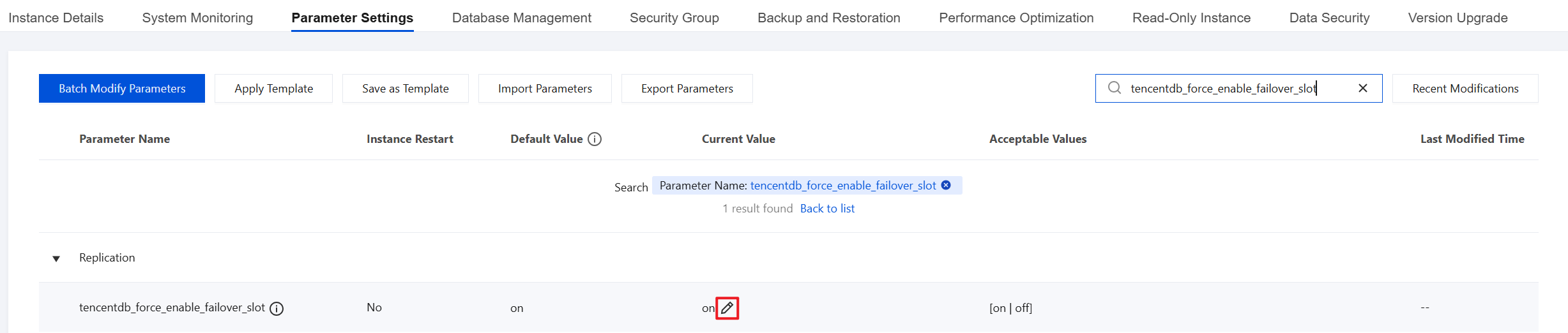
After setting the parameter value to off, you need to run the following commands to create a failover slot. If you use the CREATE slot statement at this time, a normal slot will be created.
-- Create plugincreate extension tencentdb_failover_slot;-- Create failover slotselect pg_create_logical_failover_slot('slotname','pluginname');
Note:
Slots are at the instance level, while plugins are at the database level. If you need to call functions in the plugins after switching the database, you need to recreate the
The
slotname: The name of the failover slot.
pluginname: The name of the logical decoding plugin used by the logical replication slot. The recommended option is pgoutput.
Converting a failover slot to non-failover slot
select transform_slot_to_nonfailover('slotname');
Note:
Slotname: The name of the slot.
Make sure that the slot is currently inactive, meaning that no publication or subscription is using it.
Viewing the information of a failover slot
postgres=# select * from pg_failover_slots;slot_name-----------------fsfsg(2 rows)
Note:
The
pg_failover_slots view contains a column showing the names of all current failover slots. For more information about failover slots, go to the pg_replication_slots view.Deleting a failover slot
select * from pg_drop_replication_slot('slotname');
Note:
Slotname: The name of the slot.
Parameter settings
TencentDB for PostgreSQL has added a new parameter
failover_slot_timeline_diverged_option with the type of enum, which is convenient for you to configure for abnormal situations. You can log in to the TencentDB for PostgreSQL console, and configure this parameter on Instance Details > Parameter Settings. The default value of this parameter is error, and the optional values are error and rewind. In extreme cases, the log receiving speed of the standby database is slower than that of logical replication and the HA switch occurs. If error is set as the value, it means that logical replication will be paused, and both the publisher and subscriber can receive an error report and wait for you to process it. If the value is set to rewind, the logical replication will start from the time point when the switch is performed.Note
Currently, only logical replication slot failover is supported, whereas physical replication slot failover is not.
Bantuan dan Dukungan
Apakah halaman ini membantu?
Anda juga dapat Menghubungi Penjualan atau Mengirimkan Tiket untuk meminta bantuan.
masukan