Setting instance availability zone for disaster recovery or region disaster recovery
Unduh
Mode fokus
Ukuran font
TencentDB for PostgreSQL allows cross-AZ disaster recovery and cross-region disaster recovery. The following explains them separately.
Setting Cross-AZ Disaster Recovery
This document describes how to modify the primary and standby AZs of an instance in the TencentDB for PostgreSQL console. Modifying AZs has no impact on the instance’s properties, configurations, or connection addresses. The amount of time required to modify AZs depends on the data volume of the instance.
Overview
Compared with a single-AZ deployment scheme, a multi-AZ one has better disaster recovery capabilities and can protect your databases from being affected by database instance failures, AZ outages, and even IDC-level failures.
Multi-AZ deployment provides database instances with high availability and failover support. Multiple AZ deployment is to combine several single AZs in the same region into a physical zone based on single-AZ deployment.
Notes
The region where the instance is located include at least two AZs.
The target AZ has sufficient computing resources.
Because a read-only instance has only one node, it cannot use the multi-AZ deployment scheme. When the AZs of its primary instance are changed, the region where the read-only instance resides remains unchanged.
Fees
No additional charge needs to be paid for the time being.
Directions
To create an instance, select an AZ on the Purchase page
1. Log in to the TencentDB for PostgreSQL console, and click Create.
2. On the Purchase page, select the corresponding region, and under this region, set the Primary AZ and Standby AZ fields.

3. After the purchase, you can enter the Instance Details page to query the primary and secondary AZs in the Availability Info area.
Modifying an Availability Zone in the Console
1. Log in to the TencentDB for PostgreSQL console, select the desired region, and click the name of the desired instance to enter the instance management page.
2. On the Instance Details page, click Modify AZ in the Availability Info area.
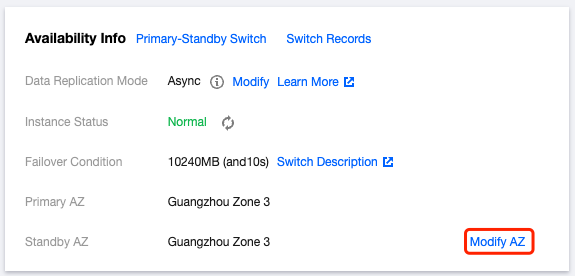
3. In the pop-up window for modifying deployment information, select the availability zone for either the primary or standby database.
Note:
Synchronous replication is used by default, which prioritizes data integrity. Therefore, the instance performance may be affected by the log transmission efficiency.
4. Select the switch time, and click OK.
Specify time: The switch will occur during the period of time you select.
Upon modification completion: The switch will occur right after the modification is completed.
Note:
Modifying the primary AZ of an instance will trigger an instance switch, during which the database will be temporarily disconnected. Please be sure that your services can be reconnected. However, modifying the standby AZ has no impact on instance access.
5. Once the instance status changes from Modifying AZ to Running, the AZ switch is complete.
Setting Cross-Region Disaster Recovery
Directions
1. Log in to the TencentDB for PostgreSQL console, and click Create. Purchase two TencentDB for PostgreSQL instances A and B. In this documentation, Instance A serves as the source instance, while Instance B acts as the target instance.
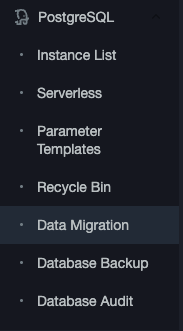
2. In the TencentDB for PostgreSQL console, click Data Migration to enter the data migration console.
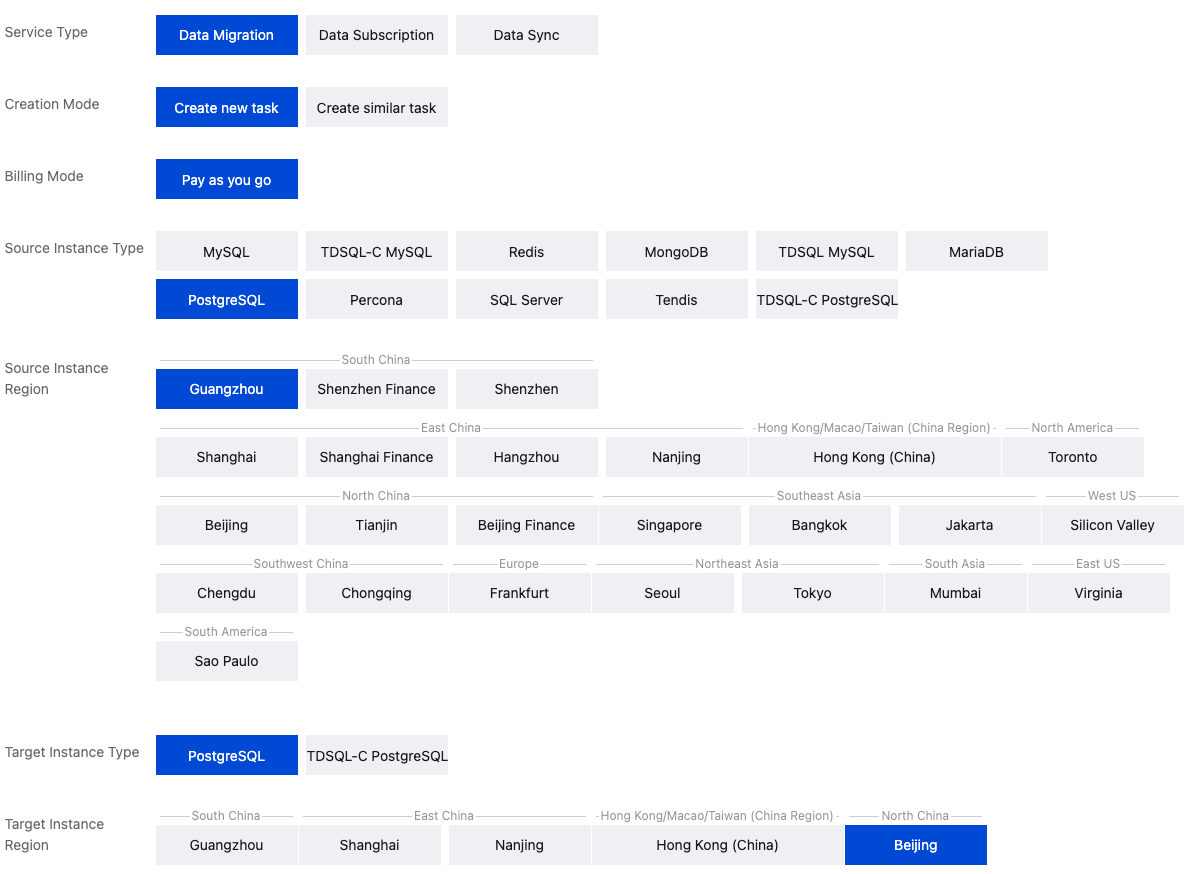
3. In the Data Migration Console, click Create Data Migration Task and select the appropriate parameters. Set both the source and target instance types to PostgreSQL.
Note:
When creating a new data migration task, ensure that the region of the source instance aligns with the region of Instance A, and the region of the target instance corresponds to the region of Instance B.
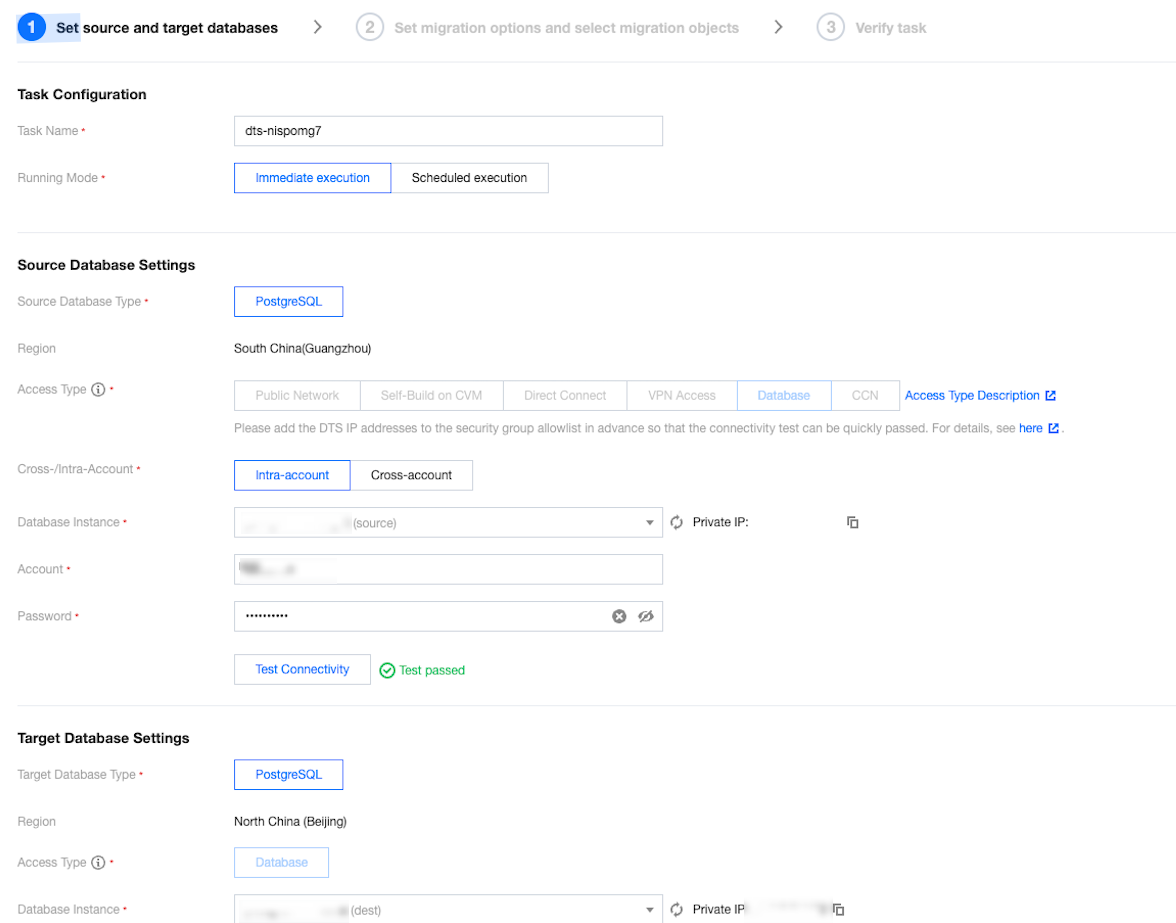
4. After the task is created, start configuring the parameters. Set Access Type to Database, select instance A as the source and instance B as the destination, and enter the accounts and passwords for connectivity tests.
5. Set Migration Type to Full + incremental migration, and Migration Object to Entire instance.
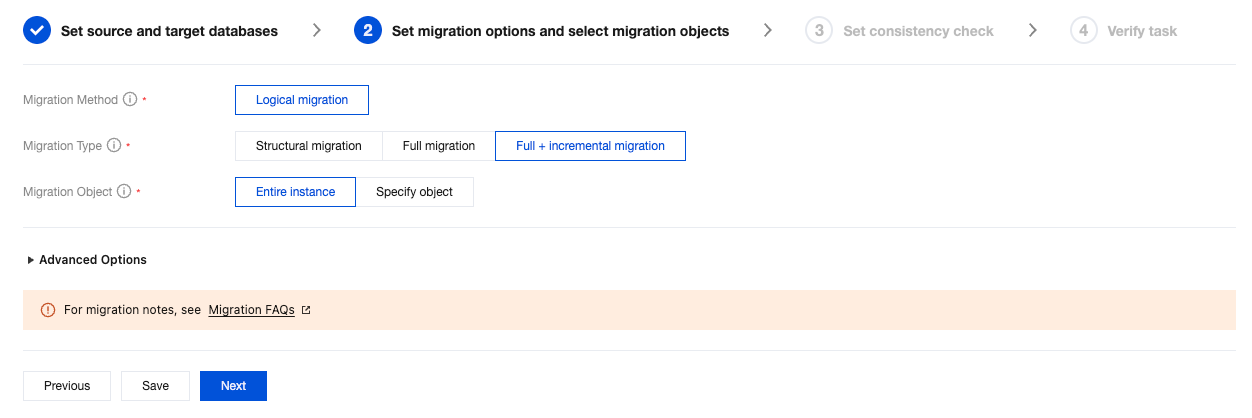
The above steps can realize data synchronization from instance A to instance B in a different region, ultimately implementing cross-region disaster recovery for instance A.
Bantuan dan Dukungan
Apakah halaman ini membantu?
Anda juga dapat Menghubungi Penjualan atau Mengirimkan Tiket untuk meminta bantuan.
masukan