tencent cloud

Game Multimedia Engine

Product Introduction
Overview
Strengths
Features
Scenarios
Compliance
Console Guide
Usage Querying
Activating Services
Getting Started
Quick Integration of SDK
Quick Integration of Sample Project
Basic Feature Development Guide
Authentication Key
Voice Chat Role Configuration
Sound Quality
Client API
SDK for Unity
SDK for Unreal Engine
Cocos2D SDK
SDK for Windows
SDK for iOS
SDK for Android
SDK for macOS
H5 SDK
Electron SDK
SDK for Flutter
SDK Version Upgrade Guide
Error Codes
Toolchain
Server APIs
History
Introduction
API Category
Usage APIs
Recording APIs
Making API Requests
Voice Chat APIs
Application APIs
Data Types
Error Codes
FAQ
Product Features
Troubleshooting Guide
Billing
Sample Project Usage
General
Authentication
Voice Chat Room Entry Failure
Sound and Audio
Network
Speech-to-text Conversion
Program Export
Service Agreement
Service Level Agreement
Kebijakan GME
Perjanjian Privasi dan Keamanan Data
Kebijakan Privasi

Project Export

PDF
Mode fokus
Ukuran font
Terakhir diperbarui: 2024-01-18 15:11:45
This document mainly describes the notes on exporting the iOS project so that the iOS developers can easily debug and integrate the APIs for Game Multimedia Engine (GME).

Export Configuration

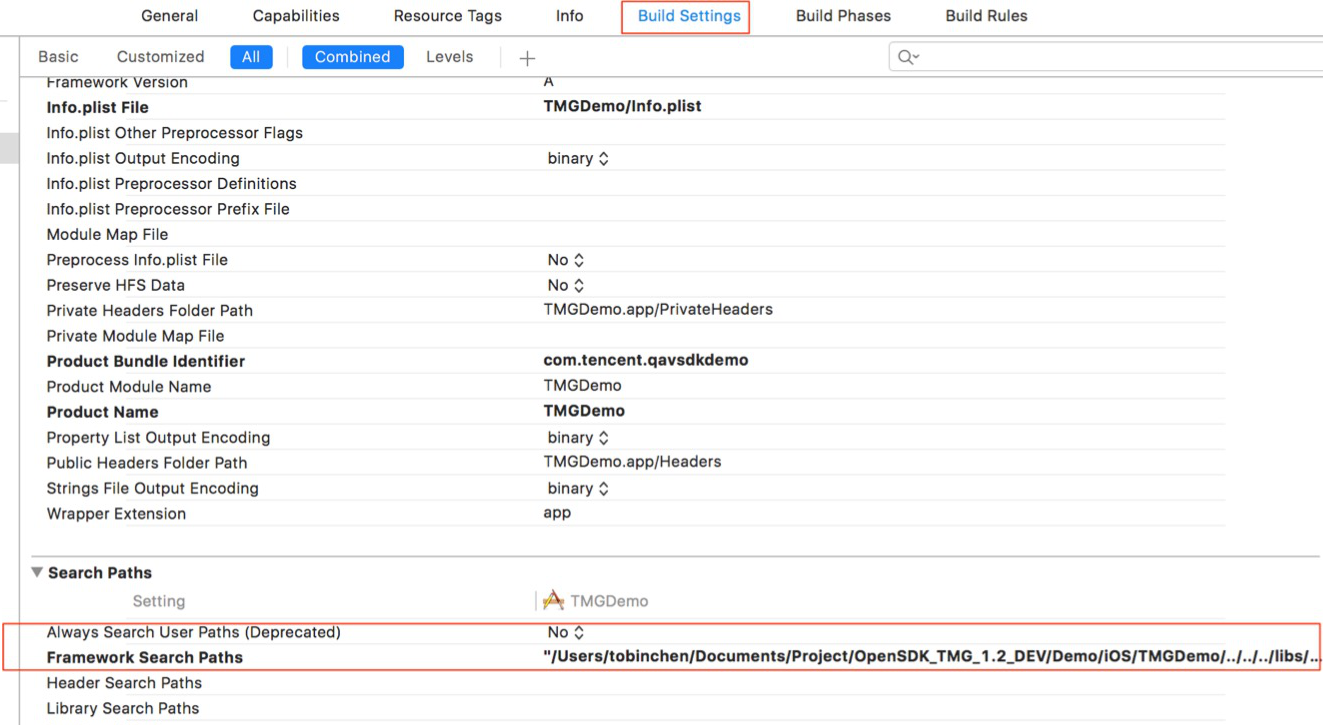
1. Add the following dependent library to Xcode > Link Binary With Libraries > Build Setting as needed, and set Framework Search Paths to point to the directory where the SDK resides, as shown below:


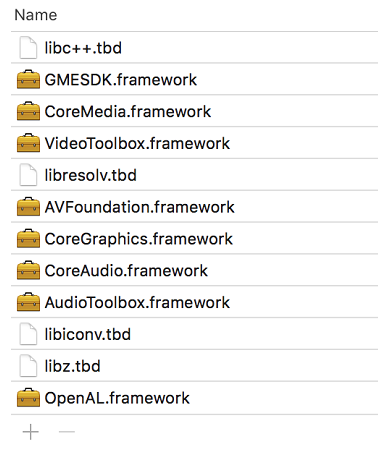
2. Add dependent libraries as shown below:


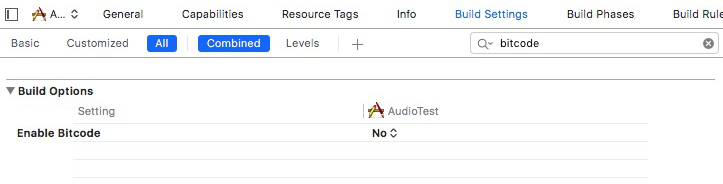
3. Bitcode should be supported by all class libraries that the project depends on. Bitcode is not supported by the SDK, so it can be disabled. To disable Bitcode, you only need to search for Bitcode under Targets > Build Settings and set the corresponding option to NO.


4. The GME SDK for iOS requires the following permissions:
Required background modes: Allows running in the background (optional).
Microphone Usage Description: Allows access to microphone.

GME 2.9 or Later

If the accessed SDK is on v2.9 or later, you need to configure it as instructed in iOS Project Upgrade Guide.
Bantuan dan Dukungan

Apakah halaman ini membantu?

masukan