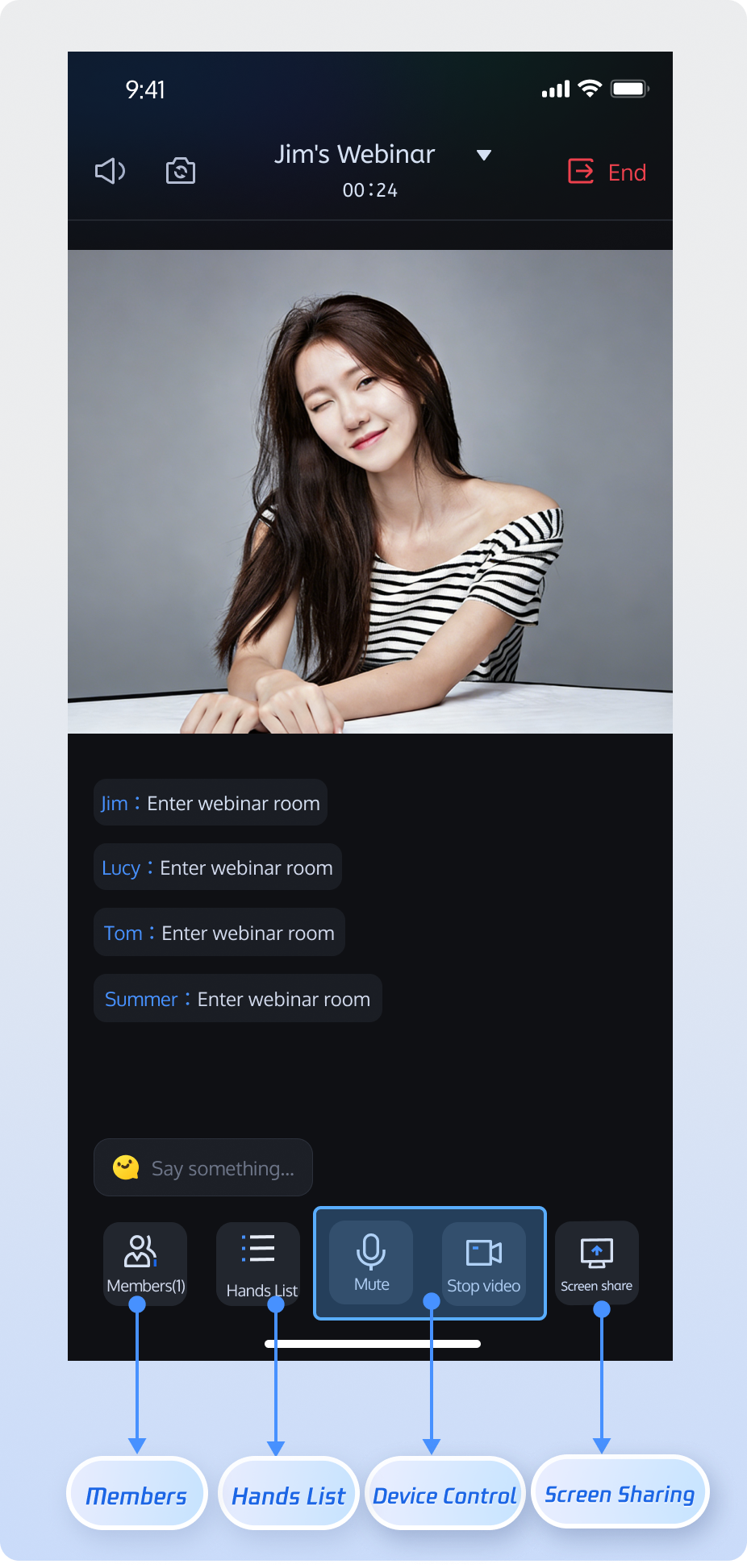
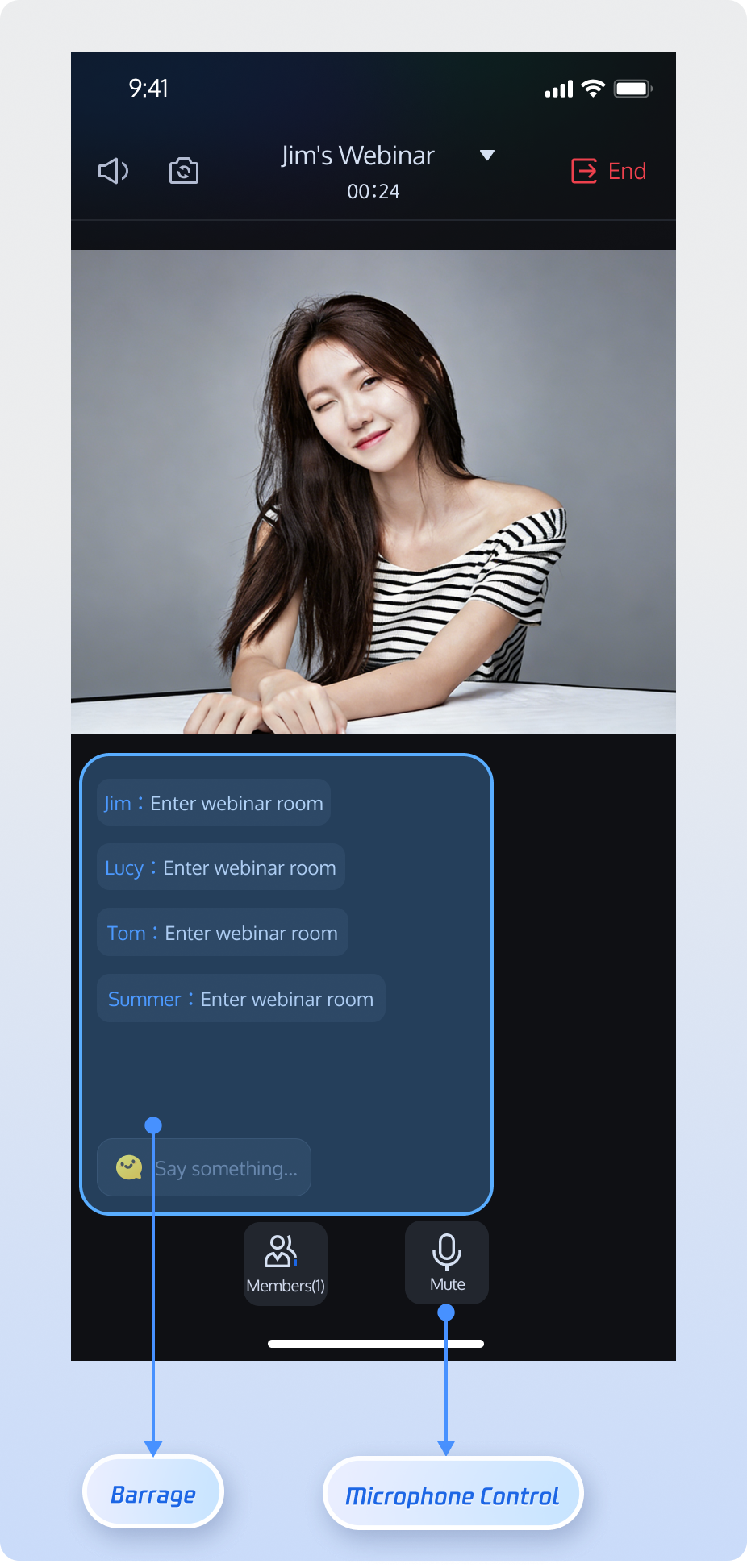
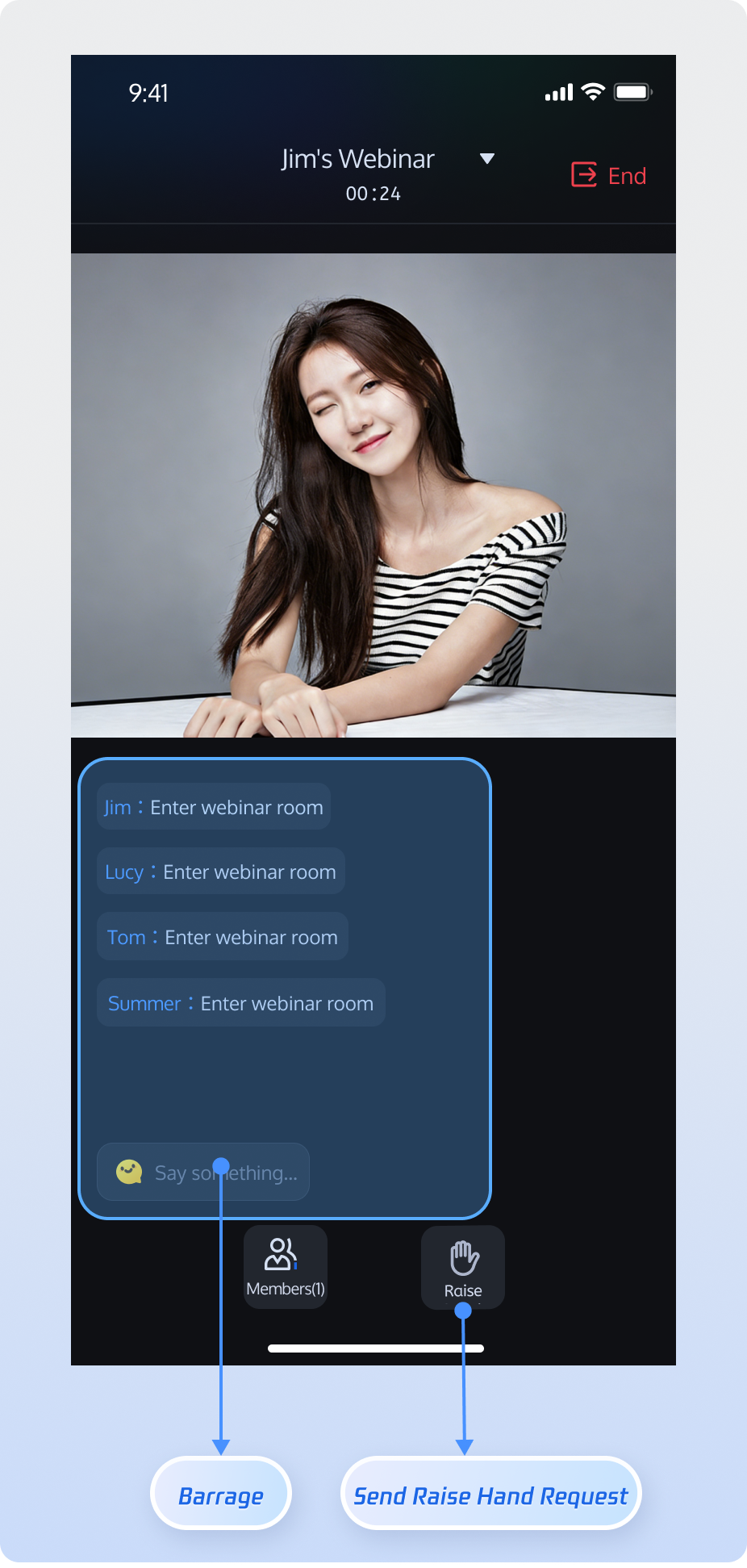
Host | Guest | Audience |
Host can start high-definition audio/video streaming, share screens, and manage participants. | Guest can enable their microphone for real-time voice discussions and sharing. | Supports unlimited concurrent audience entry, ultra-low latency viewing, and high-frequency chat. Audience can use "Raise Hand" to request guest access. |
![]() | ![]() | ![]() |
AtomicXCore provides all the capabilities you need to build a professional webinar solution:AtomicXCore include:RoomStore: Handles room management tasks, including create, join, and lifecycle operations.RoomParticipantStore: Manages room participants, including admin settings, guest/audience management, removing participants, device control, and more.build.gradle file, then sync your Gradle project:dependencies {implementation 'io.trtc.uikit:atomicx-core:4.0.6.181'api "com.tencent.imsdk:imsdk-plus:8.7.7201"}
LoginStore.shared.login in your project to authenticate. This step is required before using any feature of AtomicXCore.LoginStore.shared.login only after your own user account login succeeds, to ensure clear and consistent login flow.import android.os.Bundleimport androidx.appcompat.app.AppCompatActivityimport io.trtc.tuikit.atomicxcore.api.login.LoginStoreimport io.trtc.tuikit.atomicxcore.api.CompletionHandlerimport android.util.Logclass MainActivity : AppCompatActivity() {override fun onCreate(savedInstanceState: Bundle?) {super.onCreate(savedInstanceState)LoginStore.shared.login(this, // context1400000001, // Replace with your project's sdkAppID"test_001", // Replace with your project's userID"xxxxxxxxxxx", // Replace with your project's userSigobject : CompletionHandler {override fun onSuccess() {// Login successfulLog.d("Login", "login success");}override fun onFailure(code: Int, desc: String) {// Login failedLog.e("Login", "login failed, code: $code, error: $desc");}})}}
Parameter | Type | Description |
sdkAppID | Int | |
userID | String | Unique ID for the current user. Use only English letters, numbers, hyphens, and underscores. Avoid simple IDs like 1 or 123 to prevent multi-device login conflicts. |
userSig | String | Authentication token for Tencent Cloud. For development, generate with GenerateTestUserSig.genTestSig or the UserSig Helper Tool.For production, always generate UserSig server-side to protect your SecretKey. See Server-side UserSig Generation and How to Calculate and Use UserSig. |

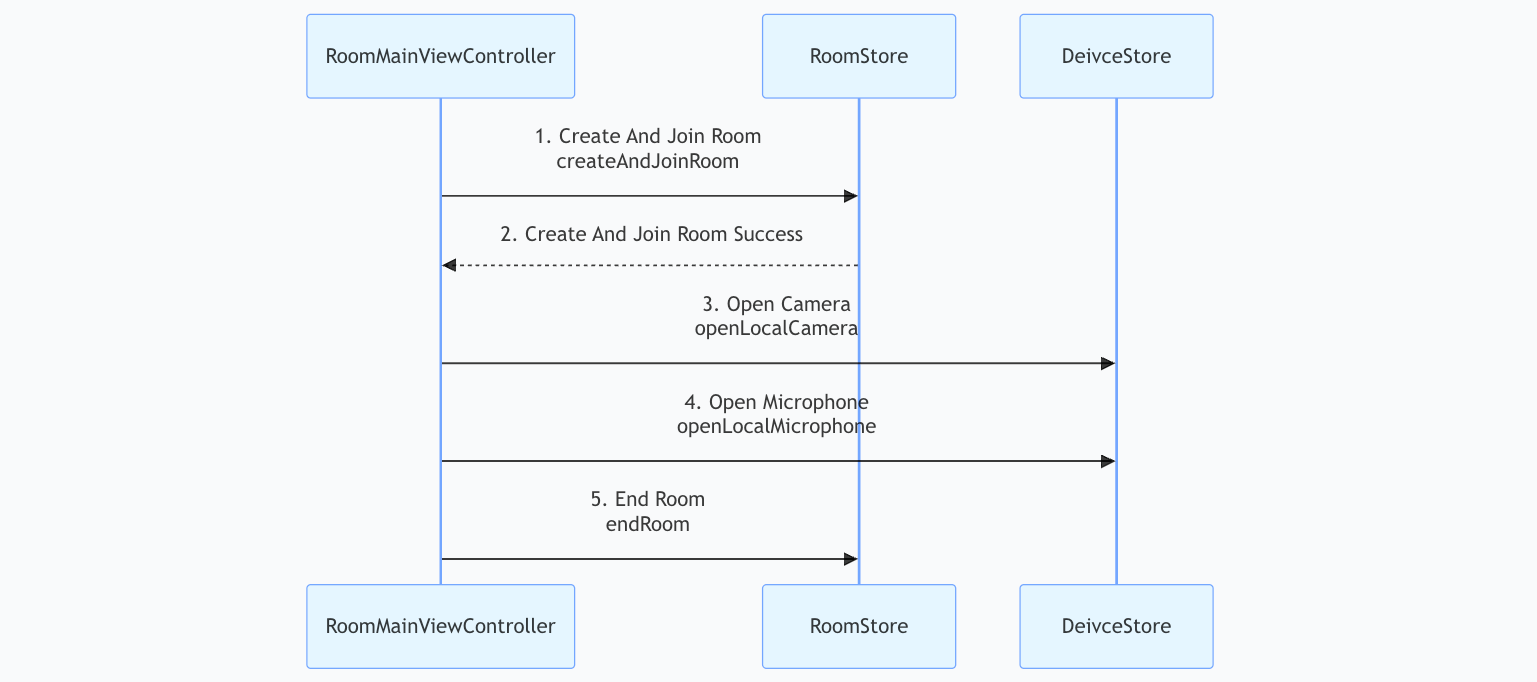
CreateRoomOptions object and set room name and configuration.RoomStore.createAndJoinRoom to execute the operation.import android.os.Bundleimport android.util.Logimport androidx.appcompat.app.AppCompatActivityimport io.trtc.tuikit.atomicxcore.api.CompletionHandlerimport io.trtc.tuikit.atomicxcore.api.room.CreateRoomOptionsimport io.trtc.tuikit.atomicxcore.api.room.RoomStoreimport io.trtc.tuikit.atomicxcore.api.room.RoomTypeclass RoomMainActivity : AppCompatActivity() {private val roomID = "webinar_123456"override fun onCreate(savedInstanceState: Bundle?) {super.onCreate(savedInstanceState)createAndJoinRoom()}private fun createAndJoinRoom() {val options = CreateRoomOptions()options.roomName = "My Webinar" // Room display nameoptions.password = "" // Not supported for webinar rooms// Permission presets for initial room stateoptions.isAllCameraDisabled = falseoptions.isAllMessageDisabled = falseoptions.isAllMicrophoneDisabled = falseoptions.isAllScreenShareDisabled = falseRoomStore.shared().createAndJoinRoom(roomID, RoomType.WEBINAR, options, object : CompletionHandler {override fun onSuccess() {Log.d("Room", "Successfully created and joined webinar room")}override fun onFailure(code: Int, desc: String) {Log.e("Room", "Failed to create and join webinar room [Error code: $code]: $desc")}})}}
Parameter Name | Type | Required | Description |
roomID | String | Yes | Unique room identifier. 0-48 bytes. Use numbers, English letters, underscores (_), hyphens (-). Avoid spaces and Chinese characters. |
roomType | RoomType | Yes | Room type: STANDARD: Standard room.WEBINAR: Webinar room.Use WEBINAR for webinar scenarios. |
options | CreateRoomOptions | Yes | Room configuration object. See CreateRoomOptions Struct documentation. |
completion | CompletionHandler | No | Callback for operation result; returns error code/message on failure. |
Parameter Name | Type | Required | Description |
roomName | String | No | Room name (optional, defaults to empty). 0-60 bytes. Supports English/Chinese, numbers, special characters. |
password | String | No | Room password (empty means no password). 0-32 bytes. Use 4-8 digit numbers for easy input. Avoid plain-text sensitive data. Passwords not supported for webinars; leave empty. |
isAllMicrophoneDisabled | Boolean | No | Disable microphones for all. Only host/admin can open mic. Guests are muted by default. true: Disabled. false: Enabled (default). |
isAllCameraDisabled | Boolean | No | Disable cameras for all. Only host/admin can open camera. Guests are video-off by default. true: Disabled. false: Enabled (default). |
isAllScreenShareDisabled | Boolean | No | Disable screen sharing for all (only host/admin can share): true: Disabled.false: Enabled (default). |
isAllMessageDisabled | Boolean | No | Disable chat messages for all (mute): true: Disabled.false: Enabled (default). |
DeviceStore.openLocalCamera and DeviceStore.openLocalMicrophone to enable local audio or video capturing. To start screen sharing, call startScreenShare (the camera must be turned off before screen sharing).import android.os.Bundleimport androidx.appcompat.app.AppCompatActivityimport io.trtc.tuikit.atomicxcore.api.device.DeviceStoreclass RoomMainActivity : AppCompatActivity() {override fun onCreate(savedInstanceState: Bundle?) {super.onCreate(savedInstanceState)openDevices()}private fun openDevices() {// Open front cameraDeviceStore.shared().openLocalCamera(true, completion = null)// Open microphoneDeviceStore.shared().openLocalMicrophone(completion = null)// Start screen sharing (camera must be closed first)// DeviceStore.shared().closeLocalCamera()// DeviceStore.shared().startScreenShare()}}
Parameter Name | Type | Required | Description |
isFront | Boolean | Yes | Use front camera: true: Enable front camera. false: Enable rear camera . |
completion | CompletionHandler | No | Callback for camera activation result; returns error code/message on failure. |
RoomStore.endRoom. All room members will receive a room ended event.import android.os.Bundleimport android.util.Logimport androidx.appcompat.app.AppCompatActivityimport io.trtc.tuikit.atomicxcore.api.CompletionHandlerimport io.trtc.tuikit.atomicxcore.api.room.RoomStoreclass RoomMainActivity : AppCompatActivity() {override fun onCreate(savedInstanceState: Bundle?) {super.onCreate(savedInstanceState)endRoom()}private fun endRoom() {// Only the host can end the room. All members are removed and audio/video capture is stopped.RoomStore.shared().endRoom(object : CompletionHandler {override fun onSuccess() {Log.d("Room", "Room ended successfully")}override fun onFailure(code: Int, desc: String) {Log.e("Room", "Failed to end room [Error code: $code]: $desc")}})}}
RoomStore.joinRoom.import android.os.Bundleimport android.util.Logimport androidx.appcompat.app.AppCompatActivityimport io.trtc.tuikit.atomicxcore.api.CompletionHandlerimport io.trtc.tuikit.atomicxcore.api.room.RoomStoreimport io.trtc.tuikit.atomicxcore.api.room.RoomTypeclass RoomMainActivity : AppCompatActivity() {private val roomID = "webinar_123456"override fun onCreate(savedInstanceState: Bundle?) {super.onCreate(savedInstanceState)joinRoom()}private fun joinRoom() {val targetRoomID = this.roomIDRoomStore.shared().joinRoom(targetRoomID, RoomType.WEBINAR, completion = object : CompletionHandler {override fun onSuccess() {Log.d("Room", "Joined room successfully")}override fun onFailure(code: Int, desc: String) {Log.e("Room", "Failed to join room [Error code: $code]: $desc")}})}}
Parameter Name | Type | Required | Description |
roomID | String | Yes | Unique room identifier. 0-48 bytes. Use numbers, English letters, underscores (_), hyphens (-). Avoid spaces and Chinese characters. |
roomType | RoomType | Yes | Room type: STANDARD: Standard room.WEBINAR: Webinar room.Use WEBINAR for webinar scenarios. |
password | String | No | Room password (empty means no password). 0-32 bytes. Use 4-8 digits for mobile input. Avoid plain-text sensitive data. Passwords not supported for webinars; leave empty. |
completion | CompletionHandler | No | Callback for operation result; returns error code/message on failure. |
RoomStore.leaveRoom.import android.os.Bundleimport android.util.Logimport androidx.appcompat.app.AppCompatActivityimport io.trtc.tuikit.atomicxcore.api.CompletionHandlerimport io.trtc.tuikit.atomicxcore.api.room.RoomStoreclass RoomMainActivity : AppCompatActivity() {override fun onCreate(savedInstanceState: Bundle?) {super.onCreate(savedInstanceState)leaveRoom()}private fun leaveRoom() {// leaveRoom is used by ordinary members or the host to exit the room. The room remains if the host leaves.RoomStore.shared().leaveRoom(object : CompletionHandler {override fun onSuccess() {Log.d("Room", "Left room successfully")}override fun onFailure(code: Int, desc: String) {Log.e("Room", "Failed to leave room [Error code: $code]: $desc")}})}}
RoomView component encapsulates streaming logic for webinars. Simply render the RoomView component on your page to enable webinar room audio/video features. Pair video rendering with TUIRoomKit components.RoomView built-in capabilities:RoomView is a video rendering component for room streams. For full implementation details, see RoomView.kt in the open-source TUIRoomKit project.<com.trtc.uikit.roomkit.view.main.RoomViewandroid:id="@+id/room_view"android:layout_width="match_parent"android:layout_height="match_parent"app:layout_constraintStart_toStartOf="parent"app:layout_constraintTop_toTopOf="parent" />
RoomParticipantStore.promoteAudienceToParticipant to promote an audience member to guest.RoomParticipantStore.demoteParticipantToAudience.import android.util.Logimport io.trtc.tuikit.atomicxcore.api.CompletionHandlerimport io.trtc.tuikit.atomicxcore.api.room.RoomParticipantStorefun promoteAudienceToParticipant(userID: String) {val participantStore = RoomParticipantStore.create(roomID = "webinar_123456")participantStore.promoteAudienceToParticipant(userID = userID, completion = object : CompletionHandler {override fun onSuccess() {Log.d("Test", "Successfully promoted to guest")}override fun onFailure(code: Int, desc: String) {Log.e("Test", "Failed to promote to guest [Error code: $code]: $desc")}})}fun demoteParticipantToAudience(userID: String) {val participantStore = RoomParticipantStore.create(roomID = "webinar_123456")participantStore.demoteParticipantToAudience(userID = userID, completion = object : CompletionHandler {override fun onSuccess() {Log.d("Test", "Successfully demoted to audience")}override fun onFailure(code: Int, desc: String) {Log.e("Test", "Failed to demote to audience [Error code: $code]: $desc")}})}
RoomStore.addRoomListener and handling events in RoomListener.import android.os.Bundleimport android.util.Logimport androidx.appcompat.app.AppCompatActivityimport io.trtc.tuikit.atomicxcore.api.room.RoomInfoimport io.trtc.tuikit.atomicxcore.api.room.RoomListenerimport io.trtc.tuikit.atomicxcore.api.room.RoomStoreclass RoomMainActivity : AppCompatActivity() {private val roomListener = object : RoomListener() {override fun onRoomEnded(roomInfo: RoomInfo) {Log.d("Room", "The current room has ended")}// ... handle other RoomListener events ...}override fun onCreate(savedInstanceState: Bundle?) {super.onCreate(savedInstanceState)subscribeRoomEvents()}private fun subscribeRoomEvents() {RoomStore.shared().addRoomListener(roomListener)}override fun onDestroy() {super.onDestroy()RoomStore.shared().removeRoomListener(roomListener)}}
Store/Component | Description | API Documentation |
RoomStore | Complete room lifecycle management: create & join, join, leave, end room, update/get room info, and listen to passive events (such as room disband, room info update, etc.). | |
RoomParticipantStore | In-room member management: assign admin, transfer host, retrieve guest list, retrieve audience list, remove members, control guest devices. |

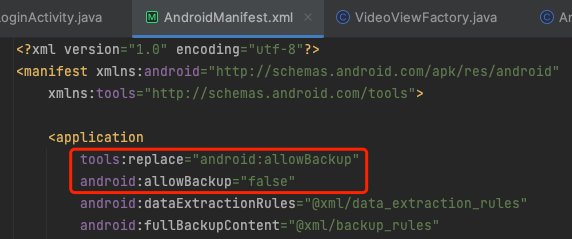
allowBackup attribute is defined in multiple modules' AndroidManifest.xml files, resulting in a conflict.allowBackup attribute from your project's AndroidManifest.xml or set it to false to disable backup and restore. To override settings from other modules, add tools:replace="android:allowBackup" to your application's manifest node. Example fix:
<uses-permission android:name="android.permission.CAMERA" /><uses-permission android:name="android.permission.RECORD_AUDIO" />
import android.Manifestimport android.content.pm.PackageManagerimport android.os.Bundleimport android.util.Logimport androidx.appcompat.app.AppCompatActivityimport androidx.core.app.ActivityCompatimport androidx.core.content.ContextCompatimport io.trtc.tuikit.atomicxcore.api.device.DeviceStoreclass RoomMainActivity : AppCompatActivity() {private val PERMISSION_REQUEST_CODE = 1001override fun onCreate(savedInstanceState: Bundle?) {super.onCreate(savedInstanceState)checkAndRequestPermissions()}private fun checkAndRequestPermissions() {val permissions = arrayOf(Manifest.permission.CAMERA,Manifest.permission.RECORD_AUDIO)val permissionsToRequest = permissions.filter {ContextCompat.checkSelfPermission(this, it) != PackageManager.PERMISSION_GRANTED}if (permissionsToRequest.isNotEmpty()) {ActivityCompat.requestPermissions(this,permissionsToRequest.toTypedArray(),PERMISSION_REQUEST_CODE)} else {openDevices()}}override fun onRequestPermissionsResult(requestCode: Int,permissions: Array<out String>,grantResults: IntArray) {super.onRequestPermissionsResult(requestCode, permissions, grantResults)if (requestCode == PERMISSION_REQUEST_CODE) {if (grantResults.all { it == PackageManager.PERMISSION_GRANTED }) {openDevices()} else {Log.e("Permission", "Some permissions were denied")}}}private fun openDevices() {DeviceStore.shared().openLocalCamera(isFront = true, completion = null)DeviceStore.shared().openLocalMicrophone(completion = null)}
FOREGROUND_SERVICE, FOREGROUND_SERVICE_CAMERA, and FOREGROUND_SERVICE_MICROPHONE permissions and the service in AndroidManifest.xml.<uses-permission android:name="android.permission.FOREGROUND_SERVICE" /><uses-permission android:name="android.permission.FOREGROUND_SERVICE_CAMERA" /><uses-permission android:name="android.permission.FOREGROUND_SERVICE_MICROPHONE" /><serviceandroid:name=".MediaCaptureService"android:foregroundServiceType="camera|microphone" />
import android.app.NotificationChannelimport android.app.NotificationManagerimport android.app.Serviceimport android.content.Intentimport android.content.pm.ServiceInfoimport android.os.Bundleimport android.os.IBinderimport androidx.appcompat.app.AppCompatActivityimport androidx.core.app.NotificationCompatclass MainActivity : AppCompatActivity() {override fun onCreate(savedInstanceState: Bundle?) {super.onCreate(savedInstanceState)startForegroundService(Intent(this, MediaCaptureService::class.java))}}class MediaCaptureService : Service() {override fun onCreate() {super.onCreate()val channel = NotificationChannel("media", "Media Capture", NotificationManager.IMPORTANCE_LOW)getSystemService(NotificationManager::class.java).createNotificationChannel(channel)val notification = NotificationCompat.Builder(this, "media").setContentTitle("Audio/Video Call in Progress").setSmallIcon(android.R.drawable.ic_menu_call).build()startForeground(1, notification,ServiceInfo.FOREGROUND_SERVICE_TYPE_CAMERA or ServiceInfo.FOREGROUND_SERVICE_TYPE_MICROPHONE)}override fun onBind(intent: Intent?): IBinder? = null}
Apakah halaman ini membantu?
Anda juga dapat Menghubungi Penjualan atau Mengirimkan Tiket untuk meminta bantuan.
masukan