Accessing Cluster from API
Unduh
Mode fokus
Ukuran font
Elasticsearch provides full-featured RESTful APIs for intercalation with clusters. For more information, please see Elasticsearch's official API documentation.
As Tencent Cloud ES is deployed in your VPC, you can use a CVM instance in the same VPC as the client to access the ES cluster over the private network or public network. Public network access has security risks; therefore, please enable it with caution.
Note:
Public network access is used for development and debugging only but cannot be used in the production environment, as the system limits the call frequency.
Currently, public network access to ES is free of charge with a bandwidth of 10 Mbps.
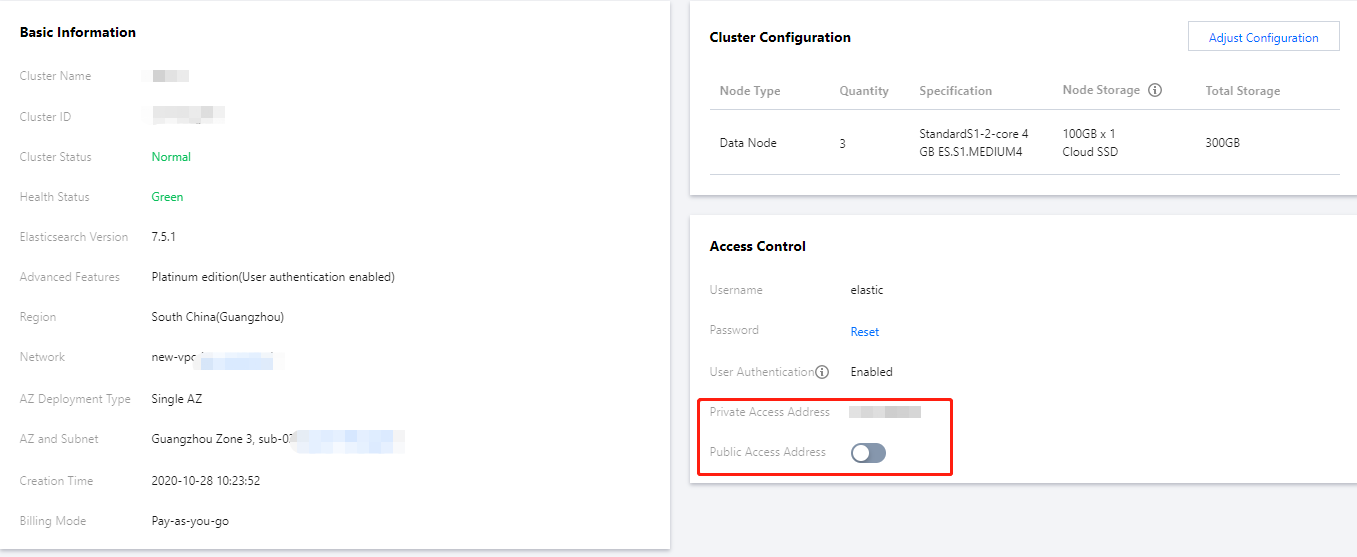
Viewing Private/Public Network Access Addresses
The private address can be directly found in basic configuration.
The public network address is disabled by default for the sake of security. For clusters having ES cluster user authentication enabled, the public network address can be enabled. Doing so may bring security risks to the clusters, as it allows data in ES clusters to be accessed, manipulated, and even deleted directly through APIs; therefore, please enable it with caution.
Testing Access
You can test access to clusters by running the
curl command. The ping command is not supported for connectivity test.Testing service accessibility
Note:
For clusters having ES cluster user authentication enabled, login requires authentication of username and password in the format of
curl action -u user:password host ..., where user, password, and host should be replaced with the actual username, password, and IP.The following uses a private network access address as an example to describe the access operations.
Enter the following command:
curl -XGET http://10.0.17.2:9200If ES cluster user authentication is enabled, remember to enter the username and password.curl -XGET -u user:password http://10.0.17.2:9200
The following content is returned, indicating that the cluster can be accessed normally. The specific parameter values vary by cluster version:
{"name": "15589826570000*****","cluster_name": "es-******","cluster_uuid": "NGIm1M_zRw-L3o_gH****","version": {"number": "6.4.3","build_flavor": "default","build_type": "zip","build_hash": "fe40335","build_date": "2019-05-17T14:22:47.286024Z","build_snapshot": false,"lucene_version": "7.4.0","minimum_wire_compatibility_version": "5.6.0","minimum_index_compatibility_version": "5.0.0"},"tagline": "You Know, for Search"}
Creating Document
Creating one document
If user authentication is not enabled for the cluster, enter the following command:
curl -XPUT http://10.0.0.2:9200/china/city/beijing -H 'Content-Type: application/json' -d'{"name":"Beijing","province":"Beijing","lat":39.9031324643,"lon":116.4010433787,"x":6763,"level.range":4,"level.level":1,"level.name":"Tier-1 city","y":6381,"cityNo":1}'
If user authentication is enabled for the cluster, you need to replace the
user and password below with your actual cluster username and password. Enter the following command:curl -XPUT -u user:password http://10.0.0.2:9200/china/city/beijing -H 'Content-Type: application/json' -d'{"name":"Beijing","province":"Beijing","lat":39.9031324643,"lon":116.4010433787,"x":6763,"level.range":4,"level.level":1,"level.name":"Tier-1 city","y":6381,"cityNo":1}'
The following response will be returned:
{"_index":"china","_type":"city","_id":"beijing","_version":1,"result":"created","_shards":{"total":2,"successful":1,"failed":0},"created":true}
Creating multiple documents
Enter the following command:
curl -XPOST http://10.0.0.2:9200/_bulk -H 'Content-Type: application/json' -d'{ "index" : { "_index": "china", "_type" : "city", "_id" : "beijing" } }{"name":"Beijing","province":"Beijing","lat":39.9031324643,"lon":116.4010433787,"x":6763,"level.range":4,"level.level":1,"level.name":"Tier-1 city","y":6381,"cityNo":1}{ "index" : { "_index": "china", "_type" : "city", "_id" : "shanghai" } }{"name":"Shanghai","province":"Shanghai","lat":31.2319526784,"lon":121.469443249,"x":7779,"level.range":4,"level.level":1,"level.name":"Tier-1 city","y":4409,"cityNo":2}{ "index" : { "_index": "china", "_type" : "city", "_id" : "guangzhou" } }{"name":"Guangzhou","province":"No.79, Jixiang Road, Yuexiu District, Guangdong Province","lat":23.1317146641,"lon":113.2595185241,"x":6173,"level.range":4,"level.level":1,"level.name":"Tier-1 city","y":2560,"cityNo":3}{ "index" : { "_index": "china", "_type" : "city", "_id" : "shenzhen" } }{"name":"Shenzhen","province":"No.37, Xinyuan Road, Futian District, Guangdong Province","lat":22.5455465546,"lon":114.0527779134,"x":6336,"level.range":4,"level.level":1,"level.name":"Tier-1 city","y":2429,"cityNo":4}{ "index" : { "_index": "china", "_type" : "city", "_id" : "chengdu" } }{"name":"Chengdu","province":"No. 88-1, Hongxing Road 4th Section, Jinjiang District, Sichuan Province","lat":30.6522796787,"lon":104.0725574128,"x":4387,"level.level":2,"level.range":19,"level.name":"New tier-1 city","y":4304,"cityNo":5}{ "index" : { "_index": "china", "_type" : "city", "_id" : "hangzhou" } }{"name":"Hangzhou","province":"No.316, Huancheng North Road, Gongshu District, Zhejiang Province","lat":30.2753694112,"lon":120.1509063337,"x":7530,"level.level":2,"level.range":19,"level.name":"New tier-1 city","y":4182,"cityNo":6}'
The following response will be returned:
"took":9,"errors":false,"items":[{"index":{"_index":"china","_type":"city","_id":"beijing","_version":4,"result":"updated","_shards":{"total":2,"successful":2,"failed":0},"created":false,"status":200}},{"index":{"_index":"china","_type":"city","_id":"shanghai","_version":2,"result":"updated","_shards":{"total":2,"successful":2,"failed":0},"created":false,"status":200}},{"index":{"_index":"china","_type":"city","_id":"guangzhou","_version":1,"result":"created","_shards":{"total":2,"successful":2,"failed":0},"created":true,"status":201}},{"index":{"_index":"china","_type":"city","_id":"shenzhen","_version":1,"result":"created","_shards":{"total":2,"successful":2,"failed":0},"created":true,"status":201}},{"index":{"_index":"china","_type":"city","_id":"chengdu","_version":2,"result":"updated","_shards":{"total":2,"successful":2,"failed":0},"created":false,"status":200}},{"index":{"_index":"china","_type":"city","_id":"hangzhou","_version":2,"result":"updated","_shards":{"total":2,"successful":2,"failed":0},"created":false,"status":200}}]
Updating Document
You can run the command for creating a single document again to update the document whose ID is
beijing. The following response will be returned:{"_index":"china","_type":"city","_id":"beijing","_version":2,"result":"updated","_shards":{"total":2,"successful":2,"failed":0},"created":false}
Querying Document
Querying specified ID
Enter the following command:
curl -XGET 'http://10.0.0.2:9200/china/city/beijing?pretty' -H 'Content-Type: application/json'
The following response will be returned:
{"_index" : "china","_type" : "city","_id" : "beijing","_version" : 4,"found" : true,"_source" : {"name" : "Beijing","province" : "Beijing","lat" : 39.9031324643,"lon" : 116.4010433787,"x" : 6763,"level.range" : 4,"level.level" : 1,"level.name" : "Tier-1 city","y" : 6381,"cityNo" : 1}}
Querying index
Enter the following command:
curl -XGET 'http://10.0.0.2:9200/china/city/_search?pretty' -H 'Content-Type: application/json'
The following response will be returned:
{"took" : 0,"timed_out" : false,"_shards" : {"total" : 5,"successful" : 5,"skipped" : 0,"failed" : 0},"hits" : {"total" : 6,"max_score" : 1.0,"hits" : [{"_index" : "china","_type" : "city","_id" : "guangzhou","_score" : 1.0,"_source" : {"name" : "Guangzhou","province" : "No.79, Jixiang Road, Yuexiu District, Guangdong Province","lat" : 23.1317146641,"lon" : 113.2595185241,"x" : 6173,"level.range" : 4,"level.level" : 1,"level.name" : "Tier-1 city","y" : 2560,"cityNo" : 3}}]},......}
Complex query
Sample SQL statement:
select * from city where level.level=2curl -XGET http://10.0.0.2:9200/china/city/_search?pretty -H 'Content-Type: application/json' -d'{"query" : {"constant_score" : {"filter" : {"term" : {"level.level" : 2}}}}}'
The following response will be returned:
{"took" : 2,"timed_out" : false,"_shards" : {"total" : 5,"successful" : 5,"skipped" : 0,"failed" : 0},"hits" : {"total" : 2,"max_score" : 1.0,"hits" : [{"_index" : "china","_type" : "city","_id" : "chengdu","_score" : 1.0,"_source" : {"name" : "Chengdu","province" : "No. 88-1, Hongxing Road 4th Section, Jinjiang District, Sichuan Province","lat" : 30.6522796787,"lon" : 104.0725574128,"x" : 4387,"level.level" : 2,"level.range" : 19,"level.name" : "New tier-1 city","y" : 4304,"cityNo" : 5}},{"_index" : "china","_type" : "city","_id" : "hangzhou","_score" : 1.0,"_source" : {"name" : "Hangzhou","province" : "No.316, Huancheng North Road, Gongshu District, Zhejiang Province","lat" : 30.2753694112,"lon" : 120.1509063337,"x" : 7530,"level.level" : 2,"level.range" : 19,"level.name" : "New tier-1 city","y" : 4182,"cityNo" : 6}}]}}
Aggregation query
Sample SQL statement:
select level.level, count(1) from city group by level.levelcurl -XGET http://10.0.0.2:9200/china/city/_search?pretty -H 'Content-Type: application/json' -d'{"size" : 0,"aggs" : {"city_level" : {"terms" : {"field" : "level.level"}}}}'
The following response will be returned:
{"took" : 10,"timed_out" : false,"_shards" : {"total" : 5,"successful" : 5,"skipped" : 0,"failed" : 0},"hits" : {"total" : 7,"max_score" : 0.0,"hits" : [ ]},"aggregations" : {"city_level" : {"doc_count_error_upper_bound" : 0,"sum_other_doc_count" : 0,"buckets" : [{"key" : 1,"doc_count" : 4},{"key" : 2,"doc_count" : 3}]}}}
Deleting Document
Deleting one document
Enter the following command:
curl -XDELETE 'http://10.0.0.2:9200/china/city/beijing?pretty' -H 'Content-Type: application/json'
The following response will be returned:
{"found" : true,"_index" : "china","_type" : "city","_id" : "beijing","_version" : 5,"result" : "deleted","_shards" : {"total" : 2,"successful" : 2,"failed" : 0}}
Deleting type
curl -XDELETE 'http://10.0.0.2:9200/china/city?pretty' -H 'Content-Type: application/json'
Deleting index
curl -XDELETE 'http://10.0.0.2:9200/china?pretty' -H 'Content-Type: application/json'
Bantuan dan Dukungan
Apakah halaman ini membantu?
Anda juga dapat Menghubungi Penjualan atau Mengirimkan Tiket untuk meminta bantuan.
masukan