You can grant a user the permission to view and use specific resources in the TencentDB console by using a CAM policy. The sample below shows how to allow a user to use certain policies in the console.
Note:
As TDSQL for MySQL was formerly known as DCDB, its API keyword in CAM is dcdb.
Syntax for creating custom policy
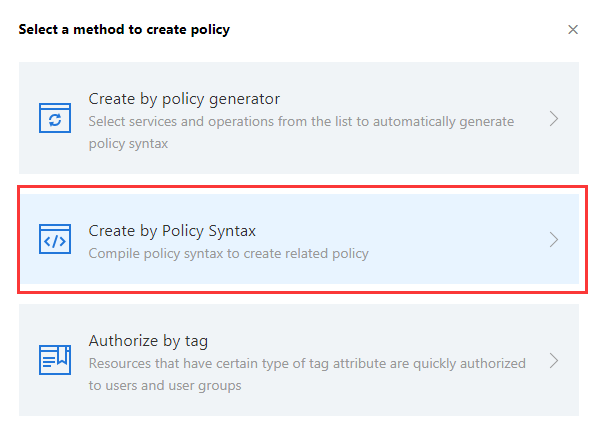
1. Enter the Policy Syntax configuration page and click Create Custom Policy.
2. Click Create by Policy Syntax in the pop-up window.
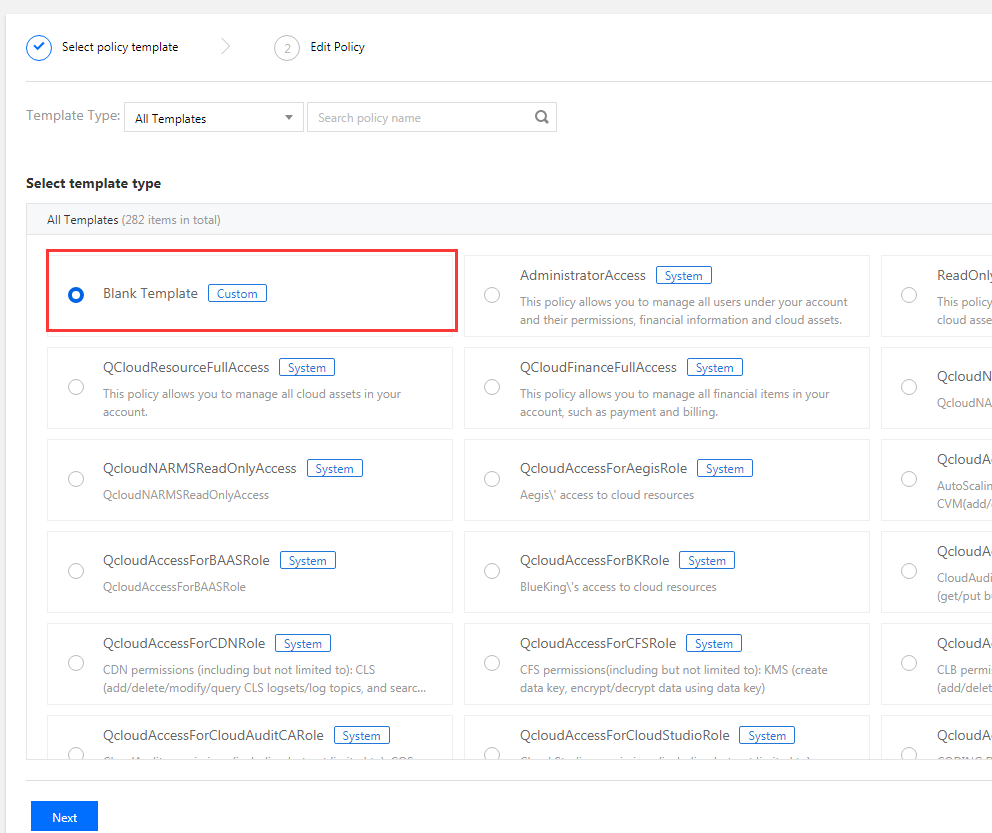
3. Select Blank Template and click Next.
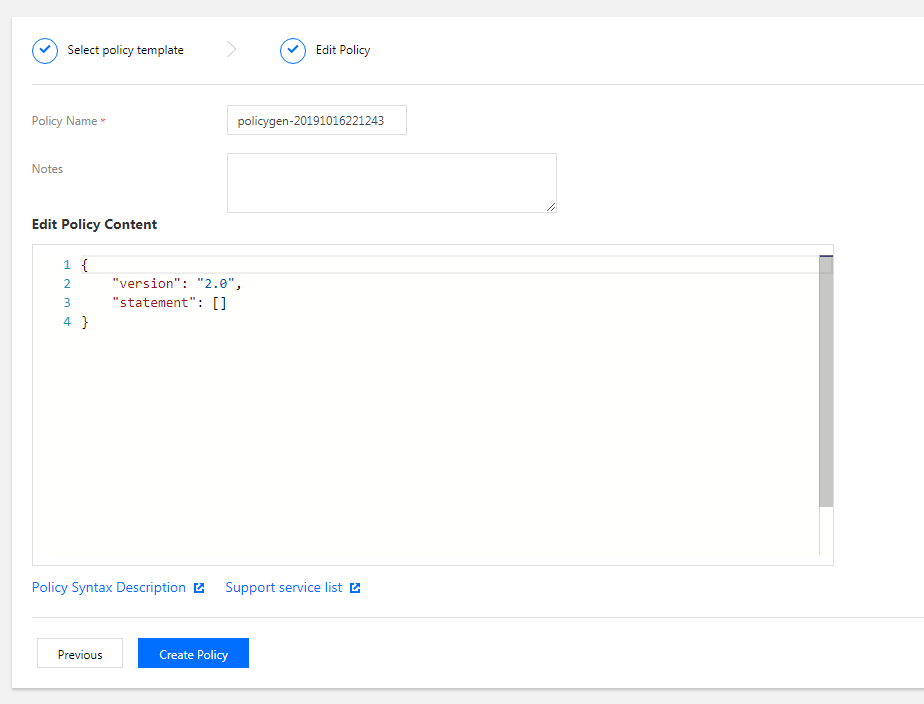
4. Enter the corresponding policy syntax.
Associating sub-account/collaborator and verifying
After the policy is created, associate it with a user/group. After the association is completed, use another browser (or server) to verify whether the sub-account/collaborator can work normally. If the policy syntax is written correctly, you can observe the following:
You have normal access to the intended target products and resources and can use all the expected features.
You will be prompted that "You do not have permission to perform this operation" when accessing other unauthorized products or resources.
Note:
To avoid mutual impact of multiple policies, we recommend you associate only one policy with a sub-account at a time.
The change to account access permission will take effect within 1 minute.
Appendix. Commonly Used Policy Syntax
Policy for authorizing the use of all features in all TencentDB instances
To grant a user permission to create and manage TencentDB instances, implement the policy named QcloudDCDBFullAccess for the user.
The policy syntax is as follows:
{
"version":"2.0",
"statement":[
{
"action":[
"dcdb:*"
],
"resource":"*",
"effect":"allow"
}
]
}
Policy for authorizing the query of all TencentDB instances
To grant a user permission to view TencentDB instances but not create, delete, or modify them, implement the policy named QcloudDCDBInnerReadOnlyAccess for the user.
The policy syntax is as follows:
{
"version":"2.0",
"statement":[
{
"action":[
"dcdb:Describe*"
],
"resource":"*",
"effect":"allow"
}
]
}
The above policy achieves its goal by allowing the user to separately authorize the use of all operations beginning with "Describe" in TencentDB with the CAM policy.
Note:
As not all functional APIs are covered currently, you may see that a small number of operations are not included in CAM, which is normal.
Policy for granting user permission to manipulate TencentDB instances in one specific region
To grant a user the permission to manipulate TencentDB instances in a specific region, associate the following policy with the user. For example, the policy below allows the user to manipulate the TencentDB instances in Guangzhou.
{
"version":"2.0",
"statement":[
{
"action":"dcdb:*",
"resource":"qcs::dcdb:ap-guangzhou::*",
"effect":"allow"
}
]
}
Policy for granting user permission to manipulate TencentDB instances in multiple specific regions
To grant a user the permission to manipulate TencentDB instances in a specific region, associate the following policy with the user. For example, the policy below allows the user to manipulate the TencentDB instances in Guangzhou and Chengdu.
Policy for granting user permission to manipulate one specific TencentDB instance
To grant a user the permission to manipulate a specific database, associate the following policy with the user. For example, the policy below allows the user to manipulate the TencentDB instance "dcdb-xxx" in Guangzhou.
Policy for granting user permission to manipulate multiple TencentDB instances
To grant a user the permission to manipulate TencentDB instances in batches, associate the following policy with the user. For example, the policy below allows the user to manipulate the TencentDB instances "dcdb-xxx" and "dcdb-yyy" in Guangzhou and "dcdb-zzz" in Beijing.
Policy for granting user different permissions to manipulate multiple TencentDB instances
To grant a user the permission to manipulate TencentDB instances in batches, associate the following policy with the user. For example, the policy below allows the user to manipulate the TencentDB instances "dcdb-xxx" and "dcdb-yyy" in Guangzhou and "dcdb-zzz" in Beijing.