Instance termination
다운로드
포커스 모드
폰트 크기
Overview
You can self-service refund pay-as-you-go instances in the console based on your business needs.
After a yearly/monthly subscription instance is returned, the instance will be moved to the cloud database recycle bin and retained for seven days. During this period, the instance will be inaccessible. If you want to restore the instance, you can renew it in the recycle bin.
After a pay-as-you-go instance is refunded, it is moved to the cloud database recycle bin and retained for 24 hours, during which it is inaccessible. If you want to restore the instance, you can renew it in the recycle bin.
After a self-service refund, charges associated with the instance are no longer incurred once its status changes to Isolated.
Attention:
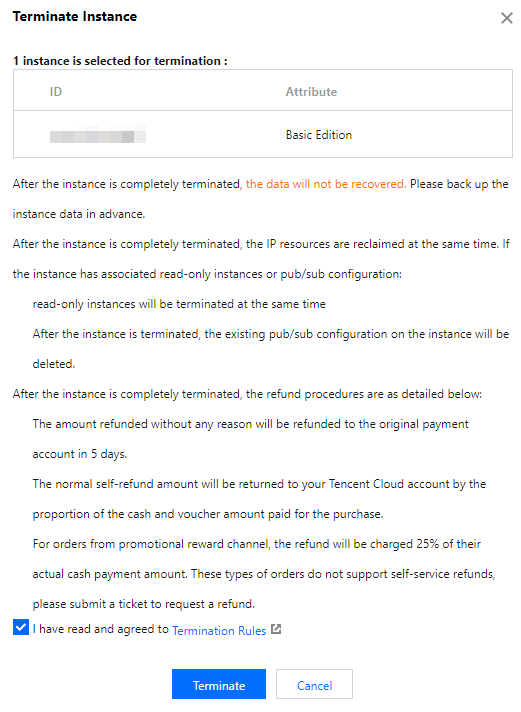
Data cannot be recovered after an instance is terminated. Backup files are also deleted, and data cannot be restored on the cloud. Please migrate your backup files in advance.
After an instance is terminated, its IP address resources are also released. If the instance has associated read-only or publish/subscribe configurations:
The read-only instances will also be terminated.
After an instance is terminated, the existing publish/subscribe configurations on that instance are deleted.
Refund processing after instance termination:
The common self-service refund is returned to your Tencent Cloud account based on the proportion of cash and free credits used for the purchase.
A refund processing fee of 25% of the actual cash payment amount is charged for refunds on promotion reward channel orders. Self-service refund is not currently supported for promotion reward channel orders. Please submit a refund request.
Enabling MFA for Sensitive Operations
To enhance cloud account security, TencentDB for SQL Server supports MFA (Multi-Factor Authentication), which adds an extra layer of protection beyond usernames and passwords. After you enable MFA device verification, a secondary authentication based on MFA dynamic codes is performed when you perform operations such as terminating an instance/modifying the network/modifying the IP address/resetting the password/deleting an account/restarting an instance/switching between primary and secondary. Operations can only be executed after the verification is passed. For an introduction to MFA and how to enable operation protection, see MFA Device.
Operation Steps
1. Log in to the TencentDB for SQL Server console, select the desired instance in the instance list, and then choose More > Terminate/Return in the Operation column.

2. In the pop-up dialog box, select the agreement and click Terminate.
Related APIs
API | Description |
This API is used to proactively isolate an instance, causing the instance to enter the recycle bin. |
피드백