Setting the Transmission Method
다운로드
포커스 모드
폰트 크기
This document describes the feature for modifying the primary/secondary replication mode in TencentDB for SQL Server.
Feature Overview
The primary/secondary replication mode defines the method for data transmission and synchronization between the primary and standby databases. This mode determines the impact on business performance and the level of data security assurance during data replication between primary and secondary nodes. TencentDB for SQL Server supports both asynchronous and synchronous replication modes. You can flexibly select the appropriate replication mode based on your specific business requirements for data consistency and performance.
Asynchronous Replication: The primary database returns success to the application immediately after completing a write operation, without waiting for confirmation from the standby database. In this mode, the primary database performance is optimal and has the least impact on business writes. Under asynchronous replication, data is not synchronized to the replica node in real time. If the primary node fails while the replica node has a delay, there is a small probability of data inconsistency. This mode is suitable for business scenarios that require high performance and can tolerate a small amount of data inconsistency under extreme conditions.
Synchronous Replication: After completing a write operation, the primary database must wait for the standby database to confirm receipt and write the log before returning success to the application. This mode provides the highest data security and ensures complete consistency between primary and secondary data. However, it can impact write performance to some extent when network latency is high. This mode is suitable for scenarios that require strict data consistency, such as those involving core business data.
Feature Support by Edition
Instances with the dual-node Cloud Disk Edition architecture for SQL Server 2017, SQL Server 2019, SQL Server 2022, and SQL Server 2025 Enterprise editions support this feature.
Feature Overview
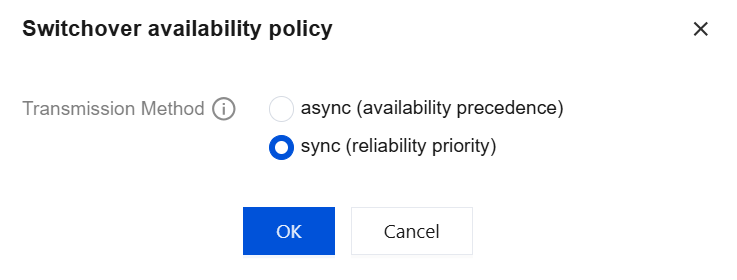
TencentDB for SQL Server allows you to select the primary/secondary transmission mode when creating an instance. After creation, you can also modify this mode. In the console, asynchronous replication and synchronous replication are displayed as "async (availability precedence)" and "sync (reliability priority)" respectively.
async (availability precedence): This is a high-performance mode that prioritizes availability. It is recommended for systems with high uptime requirements. During a switch between primary and secondary, it prioritizes database availability.
sync (reliability priority): This is a high-security mode that prioritizes reliability. It is recommended for systems with high data consistency requirements. During a switch between primary and secondary, it prioritizes data consistency.
Multi-node and read-only instances do not support setting or modifying the primary/secondary transmission mode.
The primary/secondary transmission mode for the current TencentDB for SQL Server instance is asynchronous replication by default.
Operation Steps
Setting the Transmission Method When an Instance is Created
You can log in to the TencentDB for SQL Server purchase page. When creating a new instance, select an instance that meets the version and architecture requirements. Then, configure the transmission method option as needed. For the complete configuration steps on the purchase page, see Purchase Methods.

Modifying the Transmission Method for Existing Instances
1. Log in to the SQL Server console. On the instance list page, click the Instance ID or Manage in the operation column to go to the instance details page.
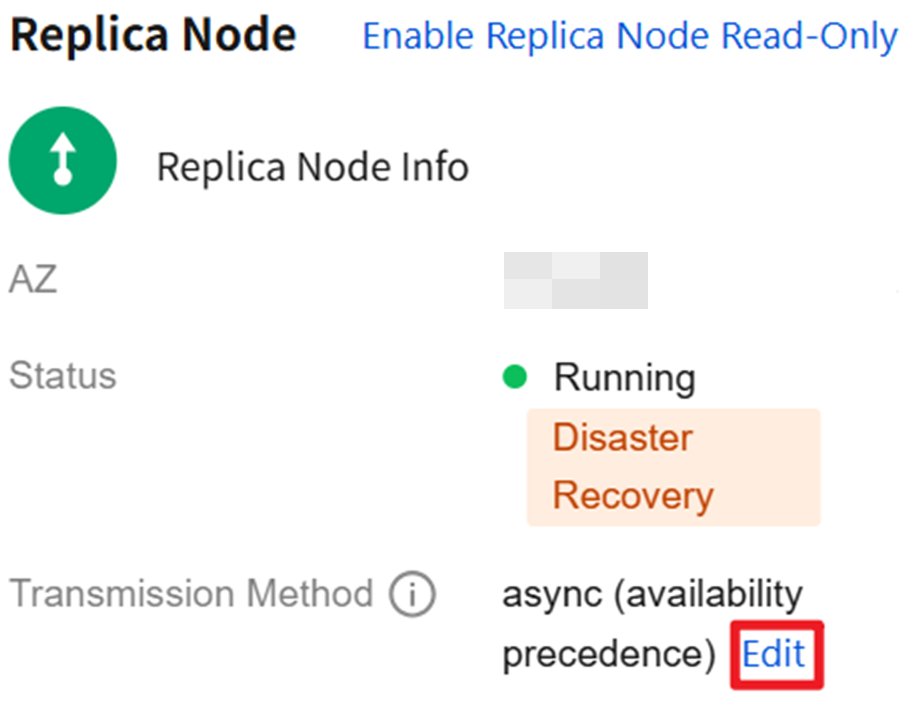
2. On the Instance Details page, within the Instance Info section on the right, click Edit after Replica Node > Transmission Method.
3. In the pop-up window, set the transmission mode and click OK.
피드백