Installing LogListener on a Self-Built K8s Cluster
Download
포커스 모드
폰트 크기
마지막 업데이트 시간: 2026-08-26 15:32:52
AI 번역
This document describes how to install, configure, upgrade, uninstall, and troubleshoot the LogListener component on a self-built Kubernetes cluster.
Prerequisites
A Kubernetes cluster of version 1.10 or later has been created.
kubectl is installed and can access the cluster normally.
The required TencentCloud API permissions for self-built K8s collection have been configured. For details, see the Upload Data Using a Self-built K8s document.
The region of the log topic has been obtained. For the detailed CLS region list, see the Available Regions document.
The API key ID (secretid) and API key Key (secretkey) required for accessing CLS-side authentication have been obtained. You can go to API Key Management to view them.
Operation Steps
Installing LogListener
Dependencies:
Standard Kubernetes clusters are supported, as well as Kubernetes distributions such as k3s and Huawei Cloud CCE. microk8s clusters are not supported.
The following command runs a collector as a daemonset on each non-Master node in your Kubernetes cluster. To run the collector on Master nodes, see Deploy LogListener on Master Nodes.
The target region for the CLS service. For region details, see Available Regions, for example: ap-guangzhou.
network
No
It indicates how LogListener accesses the CLS service. Values: intra for private network access(default) and internet for public network access.
Private network access: Applicable when the cluster's server is a Tencent Cloud CVM and the server's region matches the target CLS region.
Public network access: Applicable when the cluster's server is not a Tencent Cloud CVM, or when the server's region does not match the target CLS region.
docker_root
No
The root directory for Docker in the cluster. The default is /var/lib/docker. If the cluster does not use this default directory, you need to specify the specific Docker root directory.
cluster_id
No
After LogListener is installed on the K8s cluster, a corresponding machine group will be automatically created in CLS. You can specify the name of this machine group by configuring the cluster_id. If not specified, a default ID will be generated during installation (it is recommended to specify a cluster_id, as the default generated ID has poor readability).
Note:
The specified cluster_id cannot be the same as an existing machine group name.
local_region
No
The region where the K8s cluster is located. By default, its value is set to be the same as the region parameter. If the K8s cluster region differs from the region parameter, you can customize it.
api_network
No
Whether the TencentCloud API uses the private network or the public network. Values: intra for private network access and internet for public network access (default). This parameter only needs attention in DC scenarios.
api_region
No
The region for the TencentCloud API. It only needs attention in DC scenarios. By default, its value is set to be the same as the region parameter.
namespace
No
Specify the namespace for installing the log collection component. If not specified, it defaults to kube-system (generally, no special specification is required).
label
No
Supports customizing the Pod Label of the Pod where the log collection component resides.
For example: If you want to configure Pod Labels with service=a and app=b for the Pod where the log collection component resides, define the parameter here as --label label.service=a,label.app=b.
on_master
No
Whether to deploy on the Master node. If not specified, it defaults to false, meaning the collection component is not deployed on the Master node.
enable_metrics
No
Whether to install the metric collection component during installation. The default value is false, meaning the metric component is not installed by default.
immutable_rootfs
No
Set this parameter to true when the node root file system is read-only or LogListener reports a read-only file system error. In this case, the data directory is changed from the default /usr/local/loglistener to the writable /var/lib/loglistener. The default value is false.
3. Verify the installation.
3.1 Check the installation of the Helm package. After the installation is successful, check the Helm installation of tencent-cloud-cls-log.
helm list -n kube-system
3.2 Check the components. Use the following command to check whether all components have started normally. Under normal circumstances, a cls-provisioner Pod is started, and a tke-log-agent collection Pod is started on each host machine.
kubectl get pods -o wide -n kube-system |grep tke-log-agent
kubectl get pods -o wide -n kube-system |grep cls-provisioner
Configuring Log Collection
After completing the LogListener installation, you can configure log collection for your cluster using either of the following two methods.
Whether to install the metric collection component during an upgrade. If this parameter is not specified, the original state before the upgrade is retained (if it was installed, it remains installed; if it was not installed, it will not be installed). To explicitly enable or disable it, set this parameter to true or false.
namespace
The namespace for installing the log collection component. It is installed in kube-system by default and generally does not require special specification.
Viewing/Updating LogListener Keys
After you install and deploy LogListener on your self-built Kubernetes cluster, the user-specified secretid and secretkey are stored in a configmap within the Kubernetes cluster.
You can view the key by running the following command:
kubectl get configmap -n kube-system cls-credential
To modify the key, simply edit the key and expiration time in the configmap. The component will automatically update the key.
Uninstalling LogListener
Run the following command to uninstall the installed tencent-cloud-cls-log helm package, where -n specifies the namespace where LogListener resides, which is typically kube-system.
To completely remove the tencent-cloud-cls-log package, run the following command to delete the related secret configuration, where -n specifies the namespace where LogListener resides, which is typically kube-system.
kubectl delete secret -n kube-system cls-k8s
Deploying LogListener on Master Nodes
By default, the collector runs as a daemonset on each non-Master node in your Kubernetes cluster. To run the collector on Master nodes, refer to the following steps to modify the daemonset manifest file for tke-log-agent.
1. Execute the following kubectl command to modify the tke-log-agent manifest file.
kubectl edit ds tke-log-agent -n kube-system
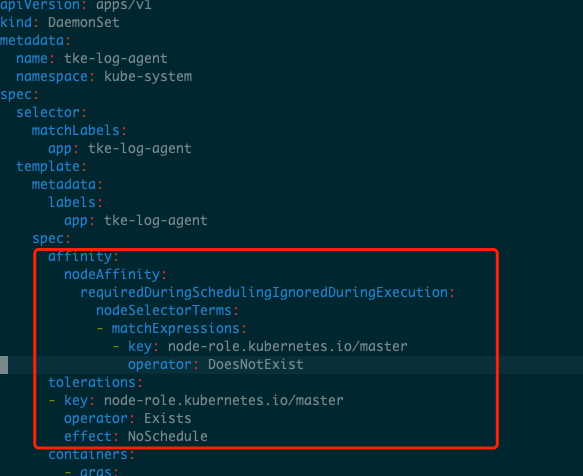
2. Delete the following configuration items from the figure below: affinity and tolerations.
Note:
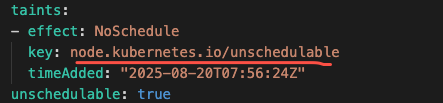
If a Master node has a taint, you do not need to delete the tolerations configuration item. Instead, you can replace the value of the key field in the configuration with the taint key of that Master node.
To find the taint, follow these steps:
1. Find the name of the Master node: Master nodes typically have the control-plane or Master Tag.
kubectl get nodes -l node-role.kubernetes.io/control-plane
# Or for older cluster versions
kubectl get nodes -l node-role.kubernetes.io/master
2. View the details of this node: replace <node-name> with the node name found in the previous step.
kubectl describe node<node-name>
3. Locate the Taints section in the output, where all taints are listed: