Audience Core View (iOS)
다운로드
포커스 모드
폰트 크기
AudienceView is the core UI component for the audience side. With this component, developers can quickly build a basic audience live streaming interface. This guide walks you through customizing the audience interface step by step—from simple button tweaks to advanced view replacements.
Prerequisites
Before customizing the audience interface, complete the main audience Enter Room flow as described in Audience Watch.
Feature Overview
On the host side, views are created and used directly. On the audience side, however, you need to support seamless vertical swiping between live rooms. AudienceView serves as a swipe container for this purpose.
Audience UI customization is handled within the internal single-room view, AudienceLiveView, not directly on AudienceView itself. The swipe container dynamically creates and displays these single-room views as needed. Use the AudienceViewDelegate protocol to access the relevant room view instance (the liveView parameter in callbacks) during the following key lifecycle events. Customize and manage resources at the appropriate times:
Method | Description |
audienceView(_:onCreateLiveView liveView:for:) | View Creation Callback. Returns the newly instantiated AudienceLiveView. Use for static style customization determined in advance. Because the container preloads the next room, the view may not be visible yet when this callback fires. Typically, use liveView here to replace built-in components, configure fixed buttons, and perform one-time layout operations. |
audienceView(_:liveViewDidAppear liveView:for:) | View Display Callback. Returns the AudienceLiveView currently visible on screen. Use for dynamic adjustments based on real-time status or signaling. Usually, record the currently active liveView instance here. When business signaling is received (such as product listing notifications), you can accurately update the UI currently on screen, or start room-specific timers and animations. |
audienceView(_:liveViewDidDisappear liveView:for:) | View Hide Callback. Triggered when the audience swipes out of the room or closes the interface. Use for state reset and resource cleanup. Typically, clear the active liveView record here, destroy custom business panels shown in the room, stop animations, or clean up timers. |
AudienceLiveView exposes the following key customization interfaces and properties:
Method/Property | Description |
topRightItems | Flexible configuration for the set of buttons in the top right corner of the live room. Add custom buttons or adjust the layout of built-in buttons. |
bottomItems | Flexible configuration for the set of buttons at the bottom of the live room. Add custom buttons or adjust the layout of built-in buttons. |
replace(node:with:) | Replace the default component at a specified location (such as the top info area or bottom action bar) with a fully custom view. |
overlayView | A dedicated widget layer for adding global business UI that floats above the video. |
perform(action:) | Directly trigger built-in default logic from custom views, such as displaying the default audience list or the default co-host management panel. |
Quick Start
The following example shows how to quickly build a shopping live room audience page. The main flow includes:
Hide unnecessary co-host buttons and add a shopping cart button.
Simulate receiving a product listing notification and display a product card.
Route click events to the product list page.
import UIKitimport TUILiveKitimport SnapKitclass AudienceViewController: UIViewController {weak var currentLiveView: AudienceLiveView?override func viewDidLoad() {super.viewDidLoad()// Step 1: Initialize AudienceView and add it to the current controllerlet audienceView = AudienceView(roomId: "your_room_id")audienceView.delegate = selfview.addSubview(audienceView)audienceView.frame = view.bounds}// Business method: Show product list pagefunc showProductListPanel() {print("Show product list page...")}// Business method: Simulate receiving IM product push notificationfunc onReceiveProductPushMessage() {// Step 5: When dynamically updating UI via signaling, operate on the currently displayed liveViewguard let liveView = currentLiveView else { return }let productCard = AudienceProductCardView() // Custom product card viewlet productTap = UITapGestureRecognizer(target: self, action: #selector(onProductCardTapped))productCard.addGestureRecognizer(productTap)liveView.overlayView.addSubview(productCard)productCard.snp.makeConstraints { make inmake.trailing.equalToSuperview().offset(-12)make.bottom.equalToSuperview().offset(-100)make.width.equalTo(150)}}}extension AudienceViewController: AudienceViewDelegate {// Step 2: Perform static UI style configuration in the creation callbackfunc audienceView(_ audienceView: AudienceView, onCreateLiveView liveView: AudienceLiveView, for liveInfo: LiveInfo) {// Configure bottom action bar: Hide co-host feature and add custom "shopping cart" buttonlet shopCartBtn = UIButton(type: .custom)shopCartBtn.setImage(UIImage(named: "shop_cart_icon"), for: .normal)shopCartBtn.addTarget(self, action: #selector(onShopCartTapped), for: .touchUpInside)// Rearrange the bottom bar: Keep gift and like, insert shopping cart button (not declaring .coGuest hides co-host)liveView.bottomItems = [.gift, .like, .custom(shopCartBtn)]}// Step 3: Record the currently active view in the display callback for dynamic signaling updatesfunc audienceView(_ audienceView: AudienceView, liveViewDidAppear liveView: AudienceLiveView, for liveInfo: LiveInfo) {self.currentLiveView = liveView}// Step 4: Clean up business state or destroy popups in the hide callback to prevent state confusion caused by view reusefunc audienceView(_ audienceView: AudienceView, liveViewDidDisappear liveView: AudienceLiveView, for liveInfo: LiveInfo) {if self.currentLiveView === liveView {self.currentLiveView = nil}}// Step 6: Handle business click events@objc func onShopCartTapped() { showProductListPanel() }@objc func onProductCardTapped() { showProductListPanel() }}class AudienceProductCardView: UIView {// Custom product card}
Adjusting Bottom Action Buttons
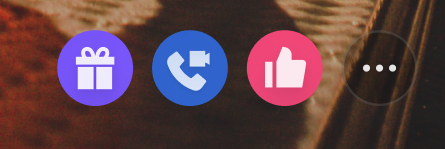
The bottom toolbar is the main area for audience interaction. By default, it includes buttons for gifts, co-host, likes, more, and others. Use the bottomItems property to add or remove built-in features, or insert custom buttons with .custom(UIView).
Implementation
Step 1: Prepare custom button views. Create custom button view objects as needed.
Step 2: Update the bottom button array. Implement the AudienceViewDelegate callback and assign an array of AudienceBottomItem enums to the view property in the corresponding callback method.
func audienceView(_ audienceView: AudienceView,onCreateLiveView liveView: AudienceLiveView,for liveInfo: LiveInfo) {// Step 1: Prepare custom button viewlet shopButton = UIButton(type: .custom)shopButton.setImage(UIImage(named: "shop_cart"), for: .normal)// Step 2: Update the bottom button array, keep gift, hide co-host, add product buttonliveView.bottomItems = [.gift,.custom(shopButton)]}
Adjusting Top Action Buttons
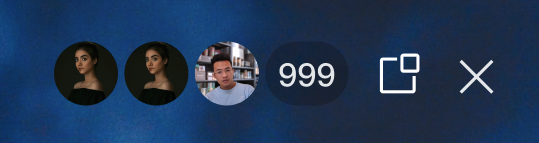
The top area displays room information and key actions. By default, it shows audience count, floating window, and exit buttons. Use the topRightItems property to streamline or add control buttons.
Implementation
Step 1: Prepare custom button views. Create custom button view objects as needed.
Step 2: Update the top button array. Implement the AudienceViewDelegate callback and assign enum items or custom views to the topRightItems property in the corresponding callback method.
func audienceView(_ audienceView: AudienceView,onCreateLiveView liveView: AudienceLiveView,for liveInfo: LiveInfo) {// Step 1: Prepare custom button viewlet reportButton = UIButton(type: .custom)reportButton.setImage(UIImage(named: "report_btn"), for: .normal)// Step 2: Update the top button array (keep audience count and close, add report)liveView.topRightItems = [.audienceCount, .custom(reportButton), .close]}
Replacing Specific View Areas
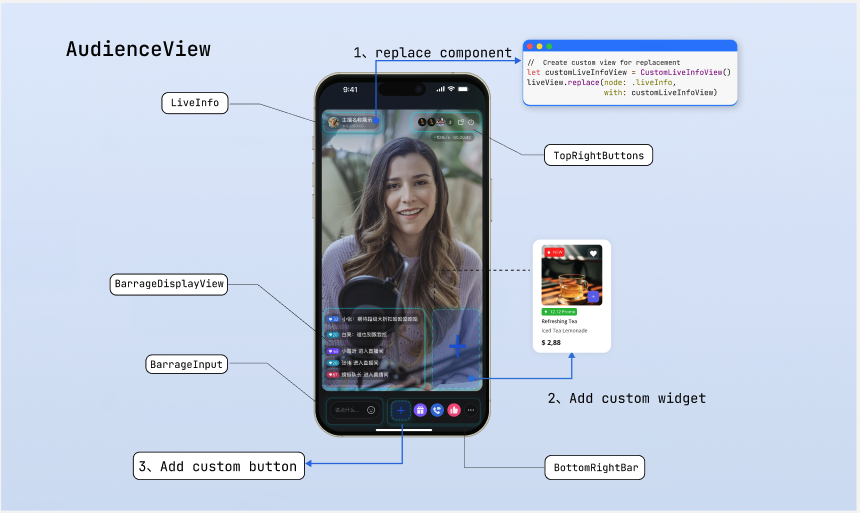
If button adjustments are not enough for structural changes, use the replace interface to fully replace a specified area view. The AudienceNode enum defines five areas that support replacement. Refer to the "Page Structure Diagram" above for details:
AudienceNode | Description |
liveInfo | Top left area displaying host and room information. |
topRightButtons | Top right area for system control buttons. |
networkInfo | Network status indicator area. |
bottomRightBar | Bottom right area for business action bar. |
barrageInput | Bottom left area for live comments input trigger. |
Layout Rules
The replace interface inserts custom views into the specified slot area. The framework manages the position, so you don't need to set it manually. The view's size is determined by itself. Declare the size using one of these methods:
Method 1: Use Internal Constraint Chain (Recommended)
Ensure child view constraints form a complete chain, so the parent view expands automatically.
class MyInfoView: UIView {init() {super.init(frame: .zero)let label = UILabel()label.text = "Live now"addSubview(label)label.snp.makeConstraints { make inmake.edges.equalToSuperview().inset(12) // Child view expands the parent view}}}
Method 2: Override intrinsicContentSize
Override the property to specify a fixed view size.
class MyInfoView: UIView {override var intrinsicContentSize: CGSize {CGSize(width: 200, height: 44)}}
Implementation
Step 1: Create custom view objects, following the layout rules above.
Step 2: Implement the AudienceViewDelegate callback. Call the replace interface of the AudienceLiveView component in the corresponding callback method, passing the node enum to be replaced and the new custom view.
func audienceView(_ audienceView: AudienceView,onCreateLiveView liveView: AudienceLiveView,for liveInfo: LiveInfo) {// Step 1: Initialize custom view following layout ruleslet customInfoView = MyInfoView()customInfoView.backgroundColor = .darkGray// Step 2: Call the replace interface to update the specific nodeliveView.replace(node: .liveInfo, with: customInfoView)}
Binding Events and Triggering Logic
After replacing a node, you need to handle interaction events for the view yourself. Execute business logic in event callbacks, or quickly trigger built-in logic using the perform(action:) method. Supported AudienceAction values include: show Gift Panel (.showGiftPanel), show audience list (.showAudienceList), and more.
Implementation
Step 1: Bind events to custom views. Use addTarget or gesture recognizers to add click events.
Step 2: Trigger built-in logic or execute business code. In the event callback, call the perform method with the AudienceAction enum, or run other business code.
func audienceView(_ audienceView: AudienceView,onCreateLiveView liveView: AudienceLiveView,for liveInfo: LiveInfo) {let btn = MyGiftButton()btn.liveView = liveViewliveView.bottomItems = [.custom(btn)]}class MyGiftButton: UIButton {weak var liveView: AudienceLiveView? // Weak referenceoverride init(frame: CGRect) {super.init(frame: frame)setImage(UIImage(named: "custom_gift"), for: .normal)addTarget(self, action: #selector(onTap), for: .touchUpInside)}required init?(coder: NSCoder) { fatalError() }@objc func onTap() {// Pop up the default Gift PanelliveView?.perform(.showGiftPanel)// Or trigger custom logic// presentCustomPanel()}}
Deep Customization of Business Popups
If the built-in panels triggered by perform don't meet your business needs, you can fully take over the logic and build custom panels using underlying data from the Core SDK.
Core Concept
Use the AtomicXCore data interface to access room, user, and status data, and build custom views and interaction bindings. After constructing your custom controller, use the AtomicPopover component to display it, ensuring your custom panel gets the same gesture handling and animation as SDK panels.
Implementation
Step 1: Build a custom business view. Create a standalone UIView and use the AtomicXCore interface inside it to fetch or listen to business data for UI updates.
Step 2: Configure popup container parameters. Instantiate the popup configuration object, specifying position, height, and animation type.
Step 3: Display the custom view. Instantiate your custom view, pass it as contentView to AtomicPopover, and present it using system methods.
import AtomicXCore // Introduce underlying data interface for business development// Step 1: Build custom audience list viewclass CustomAudienceListView: UIView {override init(frame: CGRect) {super.init(frame: frame)self.backgroundColor = .whitesetupUI()bindLiveData()}required init?(coder: NSCoder) {fatalError("init(coder:) has not been implemented")}private func setupUI() {// Add your custom UI controls here, such as displaying audience avatars, user levels, etc.}private func bindLiveData() {// Use AtomicXCore's core interface to get current room status or user data// After obtaining core data, refresh the custom UI built above}}// Example scenario: Slide up a fully custom panel from the bottom of the screen, occupying half the screen heightfunc presentBusinessPanel(from parentViewController: UIViewController) {// Step 2: Configure popup container parameterslet config = AtomicPopover.AtomicPopoverConfig(position: .bottom,height: .ratio(0.5),animation: .slideFromBottom)// Step 3: Pop up custom viewlet audienceListView = CustomAudienceListView()let popover = AtomicPopover(contentView: audienceListView, configuration: config)parentViewController.present(popover, animated: true)}
Refer to the following documents for using the AtomicXCore interface to implement custom feature panels:
Feature Description | Reference Documentation |
Implement audience co-host management panel: co-host application/invite/accept/reject, co-host member permission control (microphone/camera), status synchronization. | |
Implement host cross-room co-host panel: co-host host interaction management, initiate/accept/reject co-host. | |
Implement audience list: count audience numbers, listen to audience entry/exit events. | |
Implement audio effects panel: voice changer (child/male), reverb (KTV, etc.), monitoring adjustment, real-time effect switching. |
Adding Custom Floating Widgets
In complex live streaming scenarios, you may need floating activity icons or interactive stickers above the video. These views should be added to the overlayView layer, as they are positioned above the video and independent of the main layout.
Floating widgets are often used as entry points for activity panels. Combine them with the AtomicPopover component: bind click events to the widget, and display a deeply customized business popup when triggered.
Widget Lifecycle Management
Manage floating widgets according to your business needs and view lifecycle callbacks:
Persistent widgets (such as a fixed activity entry in the live room): Add directly to overlayView in the onCreateLiveView callback.
Dynamic widgets (such as red envelopes, temporary product cards): Add dynamically to the overlayView of the currently active view recorded in liveViewDidAppear after receiving business signaling.
Widget and popup destruction: For dynamically popped up business panels or widgets, remove them in the liveViewDidDisappear callback. This prevents UI state issues caused by view reuse when users swipe between rooms.
Implementation
Step 1: Create the widget view and enable interaction. Instantiate the floating control, set its size and position.
Step 2: Bind click events. Add gesture recognizers to the widget to respond to audience clicks.
Step 3: Add to overlay layer and link popup. Add the widget to overlayView, and call your custom popup logic in the click callback.
import UIKitimport TUILiveKitclass LiveRoomController: UIViewController {private weak var currentLiveView: AudienceLiveView? // Obtain current liveView in AudienceViewDelegate// Example scenario: Display a red packet widget floating in the top left corner, and pop up the previously defined business panel on clickfunc addRedPacketWidget() {// Step 1: Create widget view and enable interactionlet redPacketWidget = UIImageView(image: UIImage(named: "red_packet_icon"))redPacketWidget.frame = CGRect(x: 15, y: 120, width: 60, height: 60)redPacketWidget.isUserInteractionEnabled = true// Step 2: Bind click eventlet tapGesture = UITapGestureRecognizer(target: self, action: #selector(handleRedPacketClick))redPacketWidget.addGestureRecognizer(tapGesture)// Step 3: Add to overlay layercurrentLiveView?.overlayView.addSubview(redPacketWidget)}@objc func handleRedPacketClick() {// Call the previously written presentBusinessPanel method here to pop up the deeply customized business view// presentBusinessPanel(from: self)}}
FAQs
Why does the custom button added not respond to clicks?
If a custom view added via .custom() does not trigger its click event:
Troubleshooting Suggestions:
Check view size and internal constraints (most common cause): If you passed a custom container view (such as replacing the entire bottomRightBar), make sure the internal child controls form a complete constraint chain to expand the parent view, or override the main view's intrinsicContentSize. If the parent view's actual size is 0, even if the internal button is visible, click events will be discarded as they are outside the parent view's bounds.
Check interaction properties: Verify the isUserInteractionEnabled property. For UIImageView or generic UIView containers, this property defaults to false, so set it to true manually.
Check gesture scope: If the layout of custom views (or their child controls) exceeds the bounds of their parent container, clicks outside the parent view will not respond.
Check event binding and target: Confirm you have correctly added UITapGestureRecognizer or called addTarget. Also, since views are dynamically generated in delegate callbacks, make sure the target object for event binding (such as an external controller) is not released during the view's lifetime.
How to dynamically hiding or showing action buttons?
You may need to dynamically adjust the bottom or top toolbars based on room status (such as hiding co-host buttons during shopping).
Implementation: The bottomItems and topRightItems properties of AudienceLiveView support reactive updates. Assemble a new button array and reassign it; the SDK will automatically refresh the view without manual redraw.
Troubleshooting Suggestions:
When receiving signaling and updating the view dynamically, ensure you update the currently displayed view instance. Use the active instance recorded in the liveViewDidAppear callback, and do not mistakenly modify the adjacent room view in preload state.
Size issues after replacing views?
If you notice UI compression or overflow after replacing a specified area view, it's usually due to incomplete constraints.
Troubleshooting Suggestions:
Make sure child controls inside the main view form a complete constraint chain, or override the main view's intrinsicContentSize property. In swipe containers, adaptive view sizing is especially important; incomplete constraints can easily cause overlapping or deformation when swiping between rooms.
Custom views replaced via the replace interface do not display during swiping?
If a custom view disappears during swiping after using replace(node:with:), it's usually because the same custom view instance was reused across different live room views.
Analysis:
AudienceView is a swipe container. To ensure smooth swiping, the system preloads adjacent rooms in advance, calling the onCreateLiveView delegate method early. In iOS, a UIView instance can only have one parent view at a time. If you pass a shared global view instance, when the next room is preloaded, the system will remove the view from the current visible room and add it to the preloaded, invisible room, causing it to disappear from the screen.
Incorrect Example (Avoid this usage):
// ❌ Incorrect: Holding a shared view instance externallylet sharedBrandView = MyBrandView()public func audienceView(_ audienceView: AudienceView, onCreateLiveView liveView: AudienceLiveView, for liveInfo: LiveInfo) {// ⚠️ Warning: When preloading the next liveView, sharedBrandView will be pulled from the current screen and inserted into the next invisible liveViewliveView.replace(node: .liveInfo, with: sharedBrandView)}
Correct Approach:
Always create a new custom view instance for each AudienceLiveView in the onCreateLiveView callback.
public func audienceView(_ audienceView: AudienceView, onCreateLiveView liveView: AudienceLiveView, for liveInfo: LiveInfo) {// ✅ Correct: Instantiate a new custom view each time the callback is triggeredlet newBrandView = MyBrandView()liveView.replace(node: .liveInfo, with: newBrandView)}
피드백