VPC Firewall (Primary/Secondary Mode) Tutorial
Baixar
Modo Foco
Tamanho da Fonte
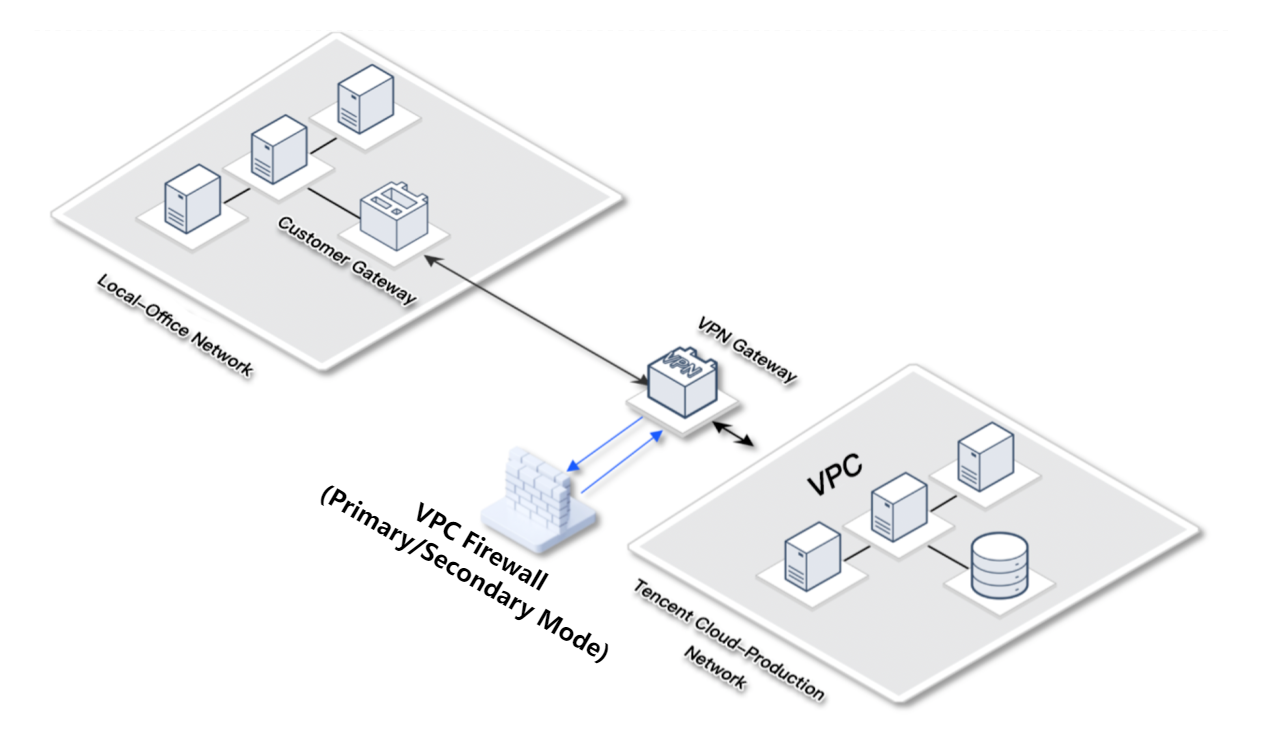
VPN Cloud Access Scenarios
User requirements: Use VPN Connections to connect the office network and the public cloud. Core services and data are on the public cloud, and the security monitoring of the office network is weaker than that of the production network.
Business challenge: When the local office network is compromised by attacks such as phishing, attackers can easily target core cloud services through a VPC dedicated connection.
Solution: Connect to the VPC Firewall (primary/secondary mode) and enable Intrusion Defense in interception mode to automatically block access from the office network to cloud services, as well as scanning and attack traffic.
Practical configuration: Configure by referring to Create a VPC Firewall (primary/secondary mode). Select CCN mode for access, select Automatic selection for the firewall VPC, and select Single-point interconnection for the routing mode.
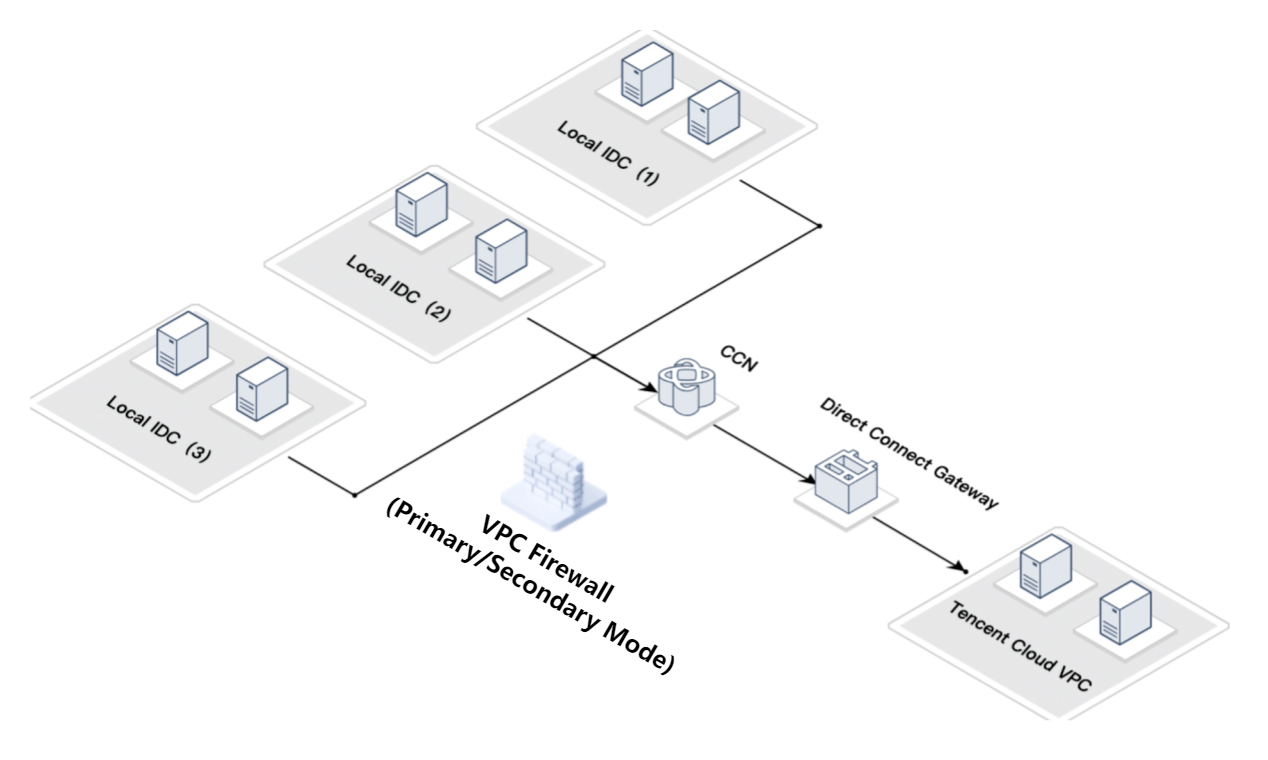
Hybrid Cloud Scenarios
User requirements: The customer has multiple local IDCs that are interconnected through CCN, and uses a dedicated connection to connect to the public cloud VPC.
Business challenge: When some IDCs need to be isolated to prevent them from accessing public cloud services, it is also necessary to prevent lateral movement to the cloud after a local IDC is compromised.
Solution: Connect to the VPC Firewall (primary/secondary mode) and enable Intrusion Defense. Configure Access Control rules to block traffic from specific IDC source addresses.
Practical configuration: Configure by referring to Create a VPC Firewall (primary/secondary mode). Select CCN mode for access, select Automatic selection for the firewall VPC, and select Multi-point interconnection for the routing mode. If the number of local IDCs is small, you can select Single-point interconnection.
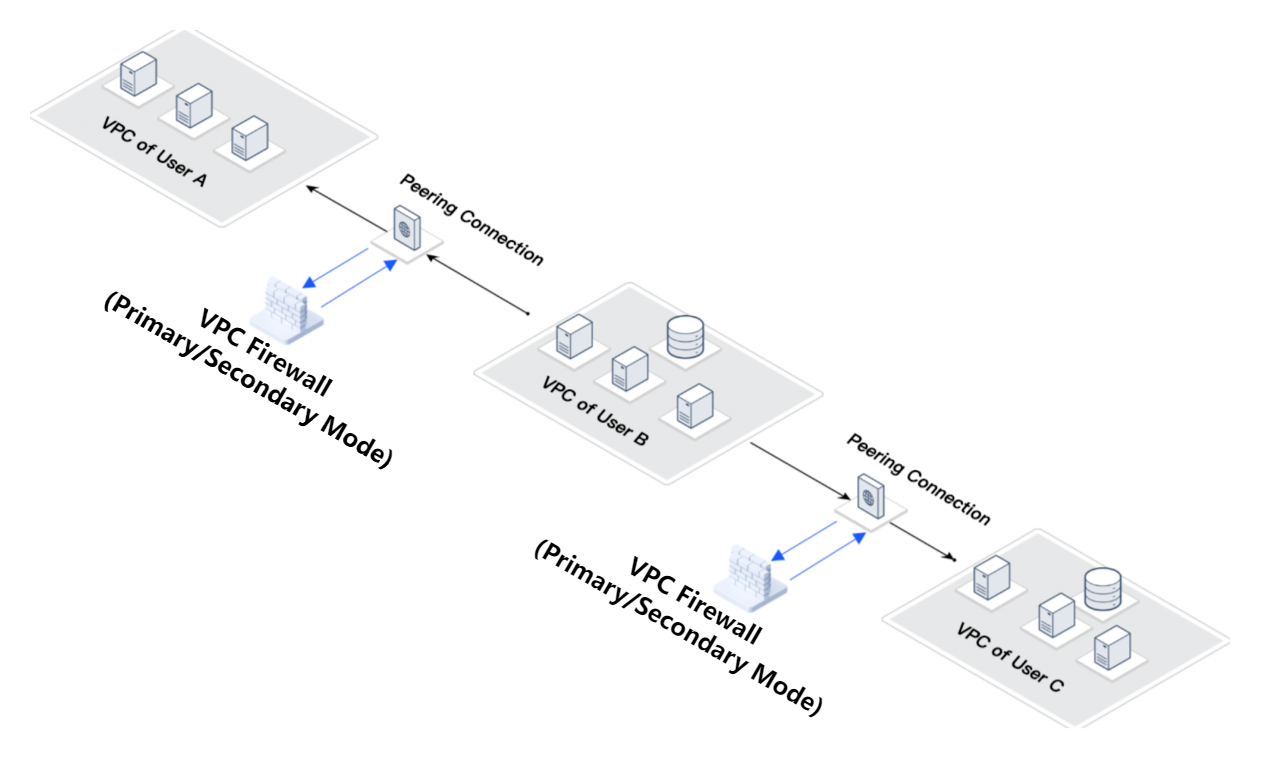
Cross-Account Peering Connection Scenarios
User requirements: User B's cloud services need to obtain data from Users A and C, with the requirement that data can only flow in and not out.
Business challenge: User B's VPC must be allowed to access the VPCs of Users A and C. To ensure data security, access from the VPCs of Users A and C to User B must be blocked.
Solution: Connect to the VPC Firewall (primary/secondary mode) and configure Access Control rules to block all traffic destined for User B's VPC.
Practical configuration: Configure by referring to Create a VPC Firewall (primary/secondary mode). Select VPC mode for access, select Automatic selection for the firewall VPC, and select Single-point interconnection for the routing mode.
FAQs
Does Access to VPC Firewall (Primary/Secondary Mode) Affect Business?
A very brief interruption may occur during the connection. It is recommended to perform the connection during off-peak business hours. CFW can provide R&D support. Based on experience, connecting to a VPC Firewall (primary/secondary mode) has minimal impact on business. If you are concerned about the impact on business, you can try it in a test environment.
Can Security Groups Replace VPC Firewall (Primary/Secondary Mode)?
The VPC Firewall (primary/secondary mode) supports Log Auditing, allowing you to view matched rules and allowed traffic, while server security groups do not provide this feature. In addition, the Intrusion Defense feature of the VPC Firewall (primary/secondary mode) can handle threats in traffic and detect scanning and attack traffic, while security groups do not have this capability.
Ajuda e Suporte
Esta página foi útil?
Você também pode entrar em contato com a Equipe de vendas ou Enviar um tíquete em caso de ajuda.
comentários