Interleaved Thinking
Baixar
Modo Foco
Tamanho da Fonte
Feature Overview
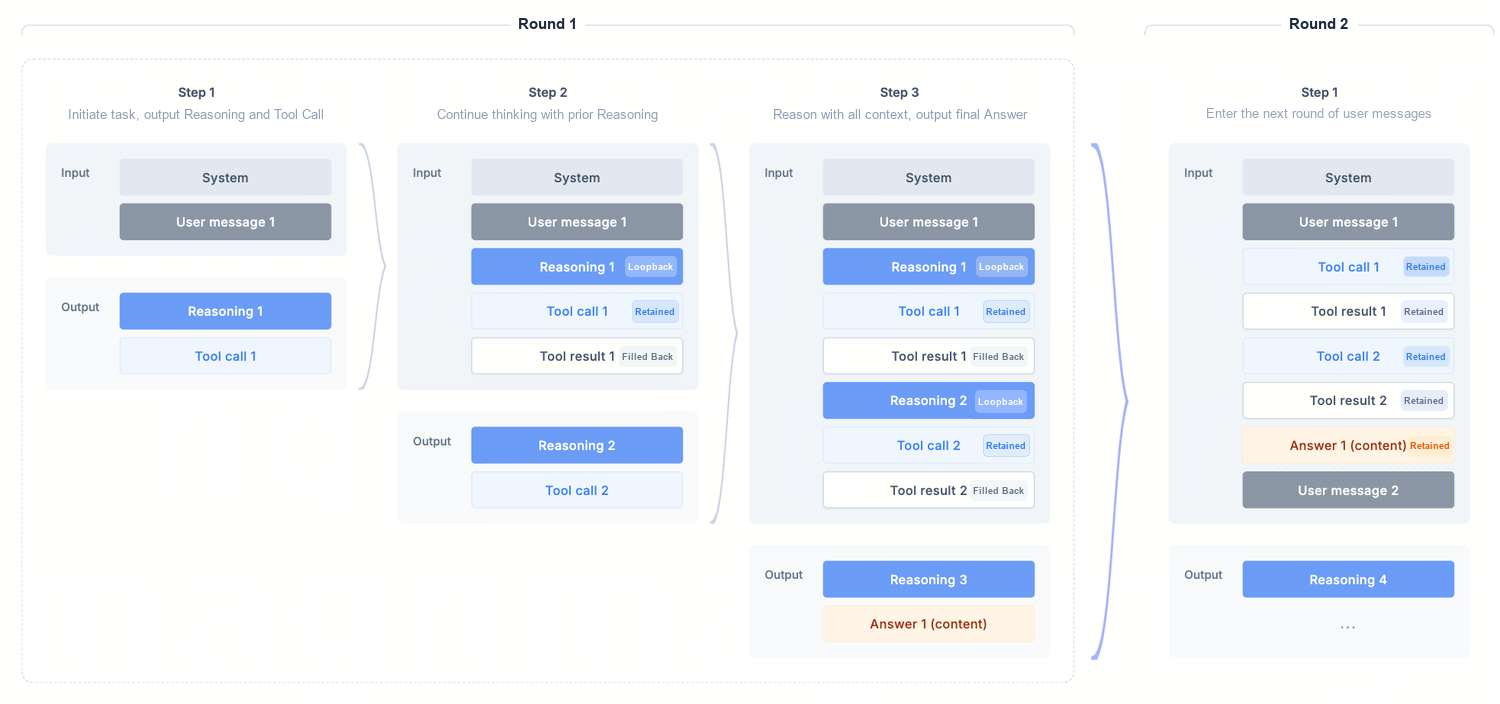
Interleaved thinking mode, which combines slow thinking with tool-calling capabilities, enables the model to interleave multiple rounds of thinking and tool calls before the final answer is generated. This enhances output stability and complex task execution in Agent workflows, leading to higher-quality responses.
Use Cases
This is applicable to scenarios that require tool calls in slow thinking (high/low) mode.
The invocation pattern for this scenario is shown in the figure below:
API Examples
Using the Chat Completions API protocol as an example, this section describes the API invocation method for slow thinking + tool calls (such as in various Agent scenarios).
Key Fields on the Request Side (Common)
model: The model name, for example deepseek-v4-pro.messages: The message array, which supports roles such as system/user/assistant/tool.reasoning_effort: Controls the model's thinking depth and reasoning cost (high/low). For optimal results, set it to high.tool_choice: The tool selection policy. In thinking mode, it supports auto (where the model autonomously decides whether to call tools) and none (which forces no tool calls). It does not support required or specifying a specific function ({"type":"function","function":{"name":"..."}}).tools: Pass in the tool definition list.stream: Whether to use streaming (true/false).Key Fields on the Response Side (Common)
reasoning_content: The reasoning content, which is used to continue interleaved thinking and extend the model's chain of thought. In scenarios involving slow thinking combined with tool calls, developers need to provide this content in the next API call.content: The final answer content.tool_calls: The tool call instructions output by the model.Developer Call Flow
Strictly follow this developer invocation process:
step1: Initiate the first request (containing only content such as system/user).
step2: The API outputs an assistant message, which may contain:
tool_callsreasoning_contentstep3: Your application executes the tool.
step4: Populate the tool results with role=
tool, and also pass the reasoning_content from the same round back to the API, enabling the model to continue its reasoning based on this information.step5: Based on step4, the model may initiate a new tool call or output the final user answer. If the model initiates a new tool call, repeat steps 3 to 5 until the model outputs the final user answer.
Note:
The reasoning content (
reasoning_content) output in step2 serves as the necessary information for interleaved thinking. During multi-step invocations, it must be passed back to the model for reasoning; otherwise, the effectiveness will be impacted.Call Example (Slow Thinking + Tool Call)
This example is provided solely to illustrate the complete process and the logic of field return. In actual use, adjust the specific values according to your business deployment environment and business fields. (This case is intended only to help understand the process and does not represent the boundaries of the model's capabilities.)
1. First Request (User Query)
Note:
Replace
YOUR_API_KEY in the sample code with your actual API Key. If you do not have an API Key yet, see Create API Key.Request:
curl -X POST 'https://tokenhub-intl.tencentcloudmaas.com/v1/chat/completions' \\-H 'Content-Type: application/json' \\-H 'Authorization: Bearer YOUR_API_KEY' \\-d '{"model": "deepseek-v4-pro","messages": [{ "role": "system", "content": "You are an Agent. You must reason step by step and invoke tools to complete tasks." },{"role": "user", "content": "What is the weather like in Shenzhen today?"}],"stream": false,"tool_choice": "auto","reasoning_effort": "high","tools": [{"type": "function","function": {"name": "get_weather","description": "Obtain weather information for a location by inputting the location.","parameters": {"type": "object","properties": { "location": { "type": "string" } },"required": ["location"]}}}]}'
from openai import OpenAIclient = OpenAI(api_key="YOUR_API_KEY",base_url="https://tokenhub-intl.tencentcloudmaas.com/v1",)tools = [{"type": "function","function": {"name": "get_weather","description": "Obtain weather information for a location by inputting the location.","parameters": {"type": "object","properties": {"location": {"type": "string"}},"required": ["location"],},},}]messages = [{"role": "system", "content": "You are an Agent. You must reason step by step and invoke tools to complete tasks."},{"role": "user", "content": "What is the weather like in Shenzhen today?"},]# The OpenAI Python SDK has strict type signatures. Non-standard fields, such as reasoning_effort, must be passed through the extra_body parameter.resp1 = client.chat.completions.create(model="deepseek-v4-pro",messages=messages,tools=tools,tool_choice="auto",extra_body={"reasoning_effort": "high"},)msg1 = resp1.choices[0].messageprint("Round 1 assistant.reasoning_content:", getattr(msg1, "reasoning_content", ""))print("Round 1 tool_calls:", msg1.tool_calls)
import OpenAI from 'openai';const client = new OpenAI({apiKey: 'YOUR_API_KEY',baseURL: 'https://tokenhub-intl.tencentcloudmaas.com/v1',});const tools = [{type: 'function',function: {name: 'get_weather',"description": "Obtain weather information for a location by inputting the location.",parameters: {type: 'object',properties: { location: { type: 'string' } },required: ['location'],},},}];const messages = [{ role: 'system', content: 'You are an Agent. You must reason step by step and invoke tools to complete tasks.' },{ role: 'user', content: 'What is the weather like in Shenzhen today?' },];const resp1 = await client.chat.completions.create({model: 'deepseek-v4-pro',messages,tools,tool_choice: 'auto',reasoning_effort: 'high',});const msg1 = resp1.choices[0].message;console.log('Round 1 reasoning_content:', msg1.reasoning_content);console.log('Round 1 tool_calls:', msg1.tool_calls);
import okhttp3.*;import com.google.gson.*;import java.util.*;public class InterleavedThinking {static final String URL = "https://tokenhub-intl.tencentcloudmaas.com/v1/chat/completions";static final String API_KEY = "YOUR_API_KEY";static final OkHttpClient HTTP = new OkHttpClient();static final Gson GSON = new Gson();/** A generic chat call that returns the raw JSON response string. */static String chat(List<Map<String, Object>> messages, List<Map<String, Object>> tools) throws Exception {Map<String, Object> body = new HashMap<>();body.put("model", "deepseek-v4-pro");body.put("messages", messages);body.put("tools", tools);body.put("tool_choice", "auto");body.put("reasoning_effort", "high");body.put("stream", false);Request req = new Request.Builder().url(URL).header("Authorization", "Bearer " + API_KEY).post(RequestBody.create(GSON.toJson(body), MediaType.parse("application/json"))).build();try (Response resp = HTTP.newCall(req).execute()) {return resp.body().string();}}public static void main(String[] args) throws Exception {List<Map<String, Object>> tools = List.of(Map.of("type", "function","function", Map.of("name", "get_weather","description", "Obtain weather information for a location by inputting the location.","parameters", Map.of("type", "object","properties", Map.of("location", Map.of("type", "string")),"required", List.of("location")))));List<Map<String, Object>> messages = new ArrayList<>();messages.add(Map.of("role", "system", "content", "You are an Agent. You must reason step by step and invoke tools to complete tasks."));messages.add(Map.of("role", "user", "content", "What is the weather like in Shenzhen today?"));// Round 1: The model decides whether to call the tool.String r1 = chat(messages, tools);System.out.println("Round 1 response: " + r1);// Next, backfill the reasoning_content / tool_calls from the response into messages. Refer to Step 2 for details.}}
package mainimport ("bytes""encoding/json""fmt""io""net/http")const (URL = "https://tokenhub-intl.tencentcloudmaas.com/v1/chat/completions"APIKEY = "YOUR_API_KEY")// Generic chat callfunc chat(messages []map[string]interface{}, tools []map[string]interface{}) (map[string]interface{}, error) {body, _ := json.Marshal(map[string]interface{}{"model": "deepseek-v4-pro","messages": messages,"tools": tools,"tool_choice": "auto","reasoning_effort": "high","stream": false,})req, _ := http.NewRequest("POST", URL, bytes.NewBuffer(body))req.Header.Set("Authorization", "Bearer "+APIKEY)req.Header.Set("Content-Type", "application/json")resp, err := http.DefaultClient.Do(req)if err != nil {return nil, err}defer resp.Body.Close()data, _ := io.ReadAll(resp.Body)var out map[string]interface{}json.Unmarshal(data, &out)return out, nil}func main() {tools := []map[string]interface{}{{"type": "function","function": map[string]interface{}{"name": "get_weather","description": "Obtain weather information for a location by inputting the location.","parameters": map[string]interface{}{"type": "object","properties": map[string]interface{}{"location": map[string]string{"type": "string"},},"required": []string{"location"},},},}}messages := []map[string]interface{}{{"role": "system", "content": "You are an Agent. You must reason step by step and invoke tools to complete tasks."},{"role": "user", "content": "What is the weather like in Shenzhen today?"},}// Round 1: The model decides whether to call the tool.r1, _ := chat(messages, tools)fmt.Printf("Round 1 response: %+v\\n", r1)// Next, backfill the reasoning_content / tool_calls from the response into messages. Refer to Step 2 for details.}
Response:
{"id": "31be91fe574e41e49616352366b4fa1b","object": "chat.completion","created": 1776057110,"model": "deepseek-v4-pro","choices": [{"index": 0,"message": {"role": "assistant","content": "I'll help you query the weather in Shenzhen today.","reasoning_content": "The user asks, 'What is the weather like in Shenzhen today?' This is a simple weather query request. I need to use the get_weather function to obtain weather information for Shenzhen. According to the function description, this function requires a location parameter, and the user has explicitly provided 'Shenzhen' as the location. Therefore, I should directly call the get_weather function with the location parameter set to 'Shenzhen'. No additional reasoning steps are required because the user's question is straightforward. Now, I am ready to call the function.","tool_calls": [{"id": "chatcmpl-tool-b39c6375f812783a","type": "function","function": {"name": "get_weather","arguments": "{\\"location\\": \\"Shenzhen\\"}"}}]},"finish_reason": "tool_calls"}],"usage": {"prompt_tokens": 209,"completion_tokens": 111,"total_tokens": 320}}
2. Backfilling Tool Results (Continuing the Thought Chain in the Same Round)
Assume the result returned by the tool execution is:
Cloudy, temperature 7~13°C. In the request, you need to backfill the tool execution result while retaining the reasoning_content obtained from the response body of the initial request.Request:
curl -X POST 'https://tokenhub-intl.tencentcloudmaas.com/v1/chat/completions' \\-H 'Content-Type: application/json' \\-H 'Authorization: Bearer YOUR_API_KEY' \\-d '{"model": "deepseek-v4-pro","messages": [{ "role": "system", "content": "You are an Agent. You must reason step by step and invoke tools to complete tasks." },{"role": "user", "content": "What is the weather like in Shenzhen today?"},{"role": "assistant","content": "I'll help you query the weather in Shenzhen today.","reasoning_content": "The user asks, \\"What is the weather like in Shenzhen today?\\"...","tool_calls": [{"id": "chatcmpl-tool-b39c6375f812783a","type": "function","function": {"name": "get_weather","arguments": "{\\"location\\": \\"Shenzhen\\"}"}}]},{"role": "tool","tool_call_id": "chatcmpl-tool-b39c6375f812783a","content": "Cloudy, temperature 7~13°C"}],"stream": false,"tool_choice": "auto","reasoning_effort": "high","tools": [{"type": "function","function": {"name": "get_weather","description": "Obtain weather information for a location by inputting the location.","parameters": {"type": "object","properties": { "location": { "type": "string" } },"required": ["location"]}}}]}'
# Continuing from the previous step: Include the assistant message from Round 1 (containing reasoning_content + tool_calls)# Backfill into messages along with the tool results.import json# Backfill of the assistant message from Round 1: reasoning_content must be retained.assistant_msg = {"role": "assistant","content": msg1.content,"reasoning_content": getattr(msg1, "reasoning_content", ""),"tool_calls": [{"id": tc.id,"type": tc.type,"function": {"name": tc.function.name,"arguments": tc.function.arguments,},} for tc in (msg1.tool_calls or [])],}messages.append(assistant_msg)# The business side executes the tool and backfills the result with role=tool.for tc in (msg1.tool_calls or []):args = json.loads(tc.function.arguments)# Replace with actual business logic heretool_result = "Cloudy, temperature 7~13°C"messages.append({"role": "tool","tool_call_id": tc.id,"content": tool_result,})# Round 2: Return the tool result to the model, which then continues reasoning and outputs the final response.resp2 = client.chat.completions.create(model="deepseek-v4-pro",messages=messages,tools=tools,tool_choice="auto",extra_body={"reasoning_effort": "high"},)print("Final answer:", resp2.choices[0].message.content)
// Continuing from the previous step: Include the assistant message from Round 1 (containing reasoning_content + tool_calls)// Backfill into messages along with the tool results.const assistantMsg = {role: 'assistant',content: msg1.content,reasoning_content: msg1.reasoning_content,tool_calls: msg1.tool_calls,};messages.push(assistantMsg);for (const tc of msg1.tool_calls || []) {const args = JSON.parse(tc.function.arguments);// Replace with actual business logic hereconst toolResult = 'Cloudy, temperature 7~13°C';messages.push({role: 'tool',tool_call_id: tc.id,content: toolResult,});}const resp2 = await client.chat.completions.create({model: 'deepseek-v4-pro',messages,tools,tool_choice: 'auto',reasoning_effort: 'high',});console.log('Final answer:', resp2.choices[0].message.content);
// Continuing from main(): Backfill the assistant message and tool results from Round 1, then initiate the Round 2 request.// Complete workflow illustration (only message construction is shown, the HTTP call reuses the chat() function from the previous step)// 1. Parse the Round 1 responseJsonObject r1Obj = JsonParser.parseString(r1).getAsJsonObject();JsonObject msg1 = r1Obj.getAsJsonArray("choices").get(0).getAsJsonObject().getAsJsonObject("message");// 2. Backfill the assistant message (including reasoning_content) entirely to messages.Map<String, Object> assistantEntry = new LinkedHashMap<>();assistantEntry.put("role", "assistant");assistantEntry.put("content", msg1.has("content") ? msg1.get("content").getAsString() : "");if (msg1.has("reasoning_content")) {assistantEntry.put("reasoning_content", msg1.get("reasoning_content").getAsString());}if (msg1.has("tool_calls")) {assistantEntry.put("tool_calls", GSON.fromJson(msg1.get("tool_calls"), List.class));}messages.add(assistantEntry);// 3. The business side executes the tool and backfills the result with role=tool.for (JsonElement el : msg1.getAsJsonArray("tool_calls")) {JsonObject call = el.getAsJsonObject();String toolResult = "Cloudy, temperature 7~13°C"; // Replace with actual business logic heremessages.add(Map.of("role", "tool","tool_call_id", call.get("id").getAsString(),"content", toolResult));}// 4. Round 2: Return the Tool Result to the ModelString r2 = chat(messages, tools);System.out.println("Round 2 response: " + r2);
// Continuing from main(): Backfill the assistant message and tool results from Round 1, then initiate the Round 2 request.// Complete workflow illustration (only message construction is shown, the HTTP call reuses the chat() function from the previous step)// 1. Extract the assistant message from the Round 1 response.msg1Wrap := r1["choices"].([]interface{})[0].(map[string]interface{})msg1 := msg1Wrap["message"].(map[string]interface{})// 2. Backfill the assistant message (including reasoning_content) entirely to messages.messages = append(messages, msg1)// 3. The business side executes the tool and backfills the result with role=tool.toolCalls, _ := msg1["tool_calls"].([]interface{})for _, c := range toolCalls {call := c.(map[string]interface{})toolResult := "Cloudy, temperature 7~13°C" // Replace with actual business logic heremessages = append(messages, map[string]interface{}{"role": "tool","tool_call_id": call["id"],"content": toolResult,})}// 4. Round 2: Return the Tool Result to the Modelr2, _ := chat(messages, tools)fmt.Printf("Round 2 response: %+v\\n", r2)
Response:
Afterwards, the model continues to output based on the actual reasoning results (which may involve further tool_calls or produce the final answer). Before the final answer is obtained, each call must follow the aforementioned process by "preserving reasoning_content + backfilling tool outputs" to maintain the large model's chain of thought.
{"id": "ae8941415e154a3c9749f0cf897469a4","object": "chat.completion","created": 1776057913,"model": "deepseek-v4-pro","choices": [{"index": 0,"message": {"role": "assistant","content": "According to the query results, Shenzhen's weather today is **cloudy**, with temperatures ranging from **7°C to 13°C**. The weather is relatively cool today, so it is recommended to add appropriate clothing and keep warm! 🧥","reasoning_content": "The user inquired about Shenzhen's weather today. I have already called the get_weather tool to obtain the weather information for Shenzhen. The result is displayed as \\"Cloudy, temperature 7~13°C\\".\\n\\nNow I need to reply to the user in Chinese and inform them of Shenzhen's weather conditions today. The weather is cloudy (Cloudy), with temperatures ranging from 7 to 13 degrees Celsius.\\n\\nI should reply to the user concisely and clearly."},"finish_reason": "stop"}],"usage": {"prompt_tokens": 340,"completion_tokens": 114,"total_tokens": 454}}
Ajuda e Suporte
Esta página foi útil?
Você também pode entrar em contato com a Equipe de vendas ou Enviar um tíquete em caso de ajuda.
comentários