Claude Code
Baixar
Modo Foco
Tamanho da Fonte
Claude Code is an AI-powered programming tool that runs in the terminal. It assists developers in efficiently coding, debugging, and managing code through flexible natural language. This article demonstrates how to integrate a model, using DeepSeek V4 Pro as an example, for use with Claude Code.
Installing Claude Code
Install Claude Code according to your actual environment type. For details, see Claude Code Installation. If Claude Code is already installed, you can skip this step.
Obtaining an API Key
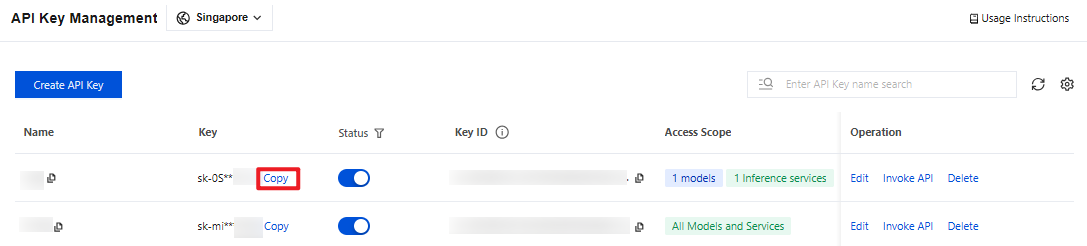
1. Go to the API Key Management page and click Create API Key. For operational details, see Create API Key.
Note:
When setting the Access Scope, if you select "Range", ensure that DeepSeek V4 Pro is selected.
2. After creation, be sure to copy and securely store the API Key. This information will be used in the subsequent process of configuring the tool.
Configuring Claude Code
1. Manually Configuring Model Environment Variables
After completing the installation of Claude Code and obtaining the API Key, you need to configure the API information for the DeepSeek V4 Pro model. The specific configuration steps are as follows:
Edit or create the
settings.json file. Then, based on the channel through which you obtained the API Key, add the corresponding configuration content. Note that the configuration file path varies across different systems. For details, refer to:For MacOS/Linux, the corresponding path is
~/.claude/settings.json.For Windows, the corresponding path is
%USERPROFILE%/.claude/settings.json.If the
settings.json file does not exist, you can manually create it using a text editor (such as VSCode or Notepad) or run the following command in the terminal to create it:# MacOS/Linuxmkdir -p ~/.claude && touch ~/.claude/settings.json# Windows(PowerShell)New-Item -ItemType Directory -Force -Path "$HOME\\.claude" | Out-Null; New-Item -ItemType File -Force -Path "$HOME\\.claude\\settings.json" | Out-Null
Configure the following content (note: replace
YOUR_API_KEY with your actual API Key):{"env": {"ANTHROPIC_BASE_URL": "https://tokenhub-intl.tencentcloudmaas.com","ANTHROPIC_AUTH_TOKEN": "YOUR_API_KEY","ANTHROPIC_MODEL": "deepseek-v4-pro","ANTHROPIC_DEFAULT_OPUS_MODEL": "deepseek-v4-pro","ANTHROPIC_DEFAULT_SONNET_MODEL": "deepseek-v4-pro","ANTHROPIC_DEFAULT_HAIKU_MODEL": "deepseek-v4-pro","CLAUDE_CODE_SUBAGENT_MODEL": "deepseek-v4-pro","ENABLE_TOOL_SEARCH": false}}
The meanings of the environment variables are as follows:
Environment Variable | Required | Description |
ANTHROPIC_BASE_URL | Yes | The API Gateway address used by Claude Code to make requests. When Claude Code is integrated with TokenHub, it is fixed as https://tokenhub-intl.tencentcloudmaas.com. |
ANTHROPIC_AUTH_TOKEN | Yes | The API Key used for authentication. Replace it with the real API Key you created in the TokenHub console. Keep it secure to avoid leakage. |
ANTHROPIC_MODEL | Yes | The model name called by default by Claude Code. This document uses deepseek-v4-pro as an example. You can also replace it with other models supported by TokenHub. |
ANTHROPIC_DEFAULT_OPUS_MODEL | No | The model to which the Opus tier (for high-complexity tasks) in Claude Code is mapped. It is set to deepseek-v4-pro here to make all tiers point to the same model. |
ANTHROPIC_DEFAULT_SONNET_MODEL | No | The model to which the Sonnet tier (for default daily tasks) in Claude Code is mapped. |
ANTHROPIC_DEFAULT_HAIKU_MODEL | No | The model to which the Haiku tier (for lightweight/quick tasks) in Claude Code is mapped. |
CLAUDE_CODE_SUBAGENT_MODEL | No | The model used by Claude Code when subtasks are created (subagents). It is recommended to keep it consistent with the main model to avoid compatibility issues caused by cross-model calls. |
ENABLE_TOOL_SEARCH | No | Whether to enable the native web search tool built into Claude Code. Since Claude Code prohibits third-party models from using the built-in search, set it to false here. |
After saving the configuration, open a new terminal window to run subsequent commands. This ensures that the environment variables are loaded and take effect.
2. Verifying Whether Environment Variables Are Effective
Go to the command-line interface and run the following command to start Claude Code:
# Open the project directory.cd your-project# Start Claude Code.claude
Note:
If this is your first time starting Claude Code, the terminal first enters an interactive initialization wizard. It then prompts you to select a Theme, a Login Method, and other options. Follow the prompts in the terminal to complete the initial configuration before proceeding with the subsequent steps.
After a successful startup, enter
/status in Claude Code to confirm that the model status is active (refer to the example in the figure below). The model configuration is effective when API Endpoint displays https://tokenhub-intl.tencentcloudmaas.com and Model displays deepseek-v4-pro.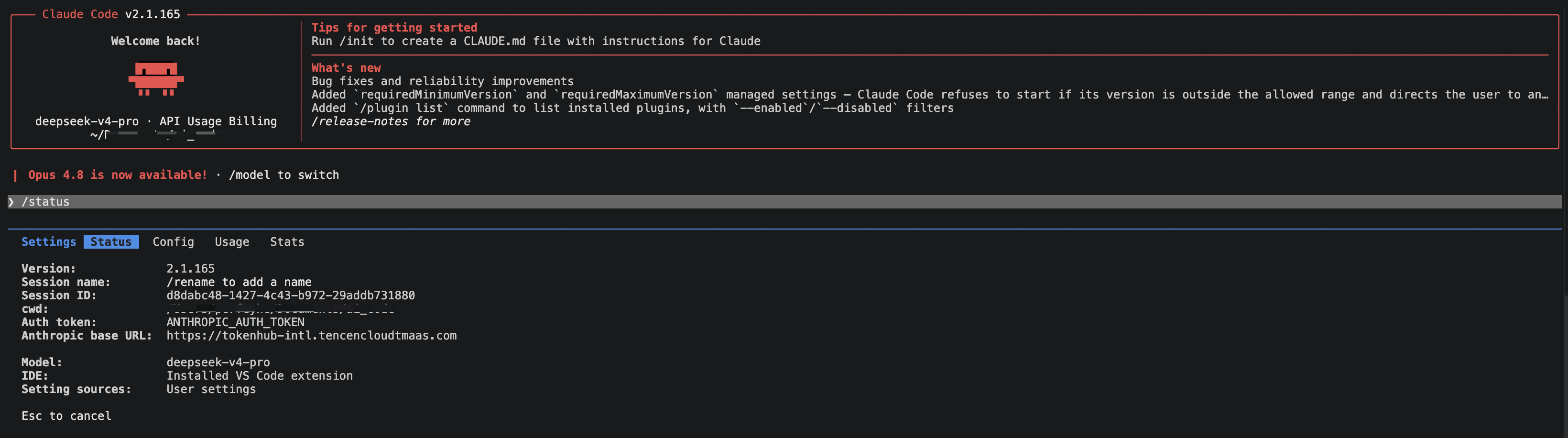
Ajuda e Suporte
Esta página foi útil?
Você também pode entrar em contato com a Equipe de vendas ou Enviar um tíquete em caso de ajuda.
comentários