Connection Method Decision Guide
Baixar
Modo Foco
Tamanho da Fonte
Scenario Description
In production environments, MongoDB deployments typically evolve from a replica set to a sharded cluster as your business scales. When managing database connections and routing across these architectures, you need to consider the following scenarios:
Traffic Distribution and Load Balancing: By default, the load balancer (LB) for a sharded cluster uses a source IP hash policy. When client IPs are limited (for example, when a small number of application servers initiate high-concurrency requests), traffic may be concentrated on a subset of mongos nodes, resulting in uneven load distribution.
Node Scaling and Connection Configuration Maintenance: After scaling mongos nodes in a sharded cluster, if the application does not promptly update the node address list in the connection string, the newly added nodes will not receive any traffic.
Primary/Secondary Switchover and Topology Awareness: When a primary node switchover occurs, if the application does not promptly detect the topology change and continues sending write requests to the original primary node, those write operations will fail.
Connection Methods Overview
To address these connection challenges, TencentDB for MongoDB provides multiple connection methods for sharded clusters. These methods differ in aspects such as load balancing policies, node auto-discovery, and operational complexity. The following table summarizes them in order of recommended priority.
Sharded Cluster Connection Methods
For sharded clusters, where scaling mongos nodes is common, the auto-discovery capability provided by SRV records offers a significant advantage, making it the recommended solution. The load balancer (LB) address works well in production environments with a large number of client IPs and can meet the requirements of most use cases.
Priority | Connection Method | Protocol Format | Core Advantage |
⭐⭐⭐ Recommended | SRV connection | `mongodb+srv://` | Automatically discovers Mongos nodes, requires no connection string changes during scaling, and provides driver-level CLB. |
⭐⭐ Secondary Choice | LB load balancer address (default) | `mongodb://` | Easy to access, uses a single VIP to shield the backend topology, and is applicable to most production scenarios. |
⭐ Supplementary | Connecting to all Mongos | `mongodb://` | Precisely controls traffic distribution and is applicable to special scenarios with uneven LB loads. |
Method 1: SRV Connection (Recommended for Sharded Clusters)
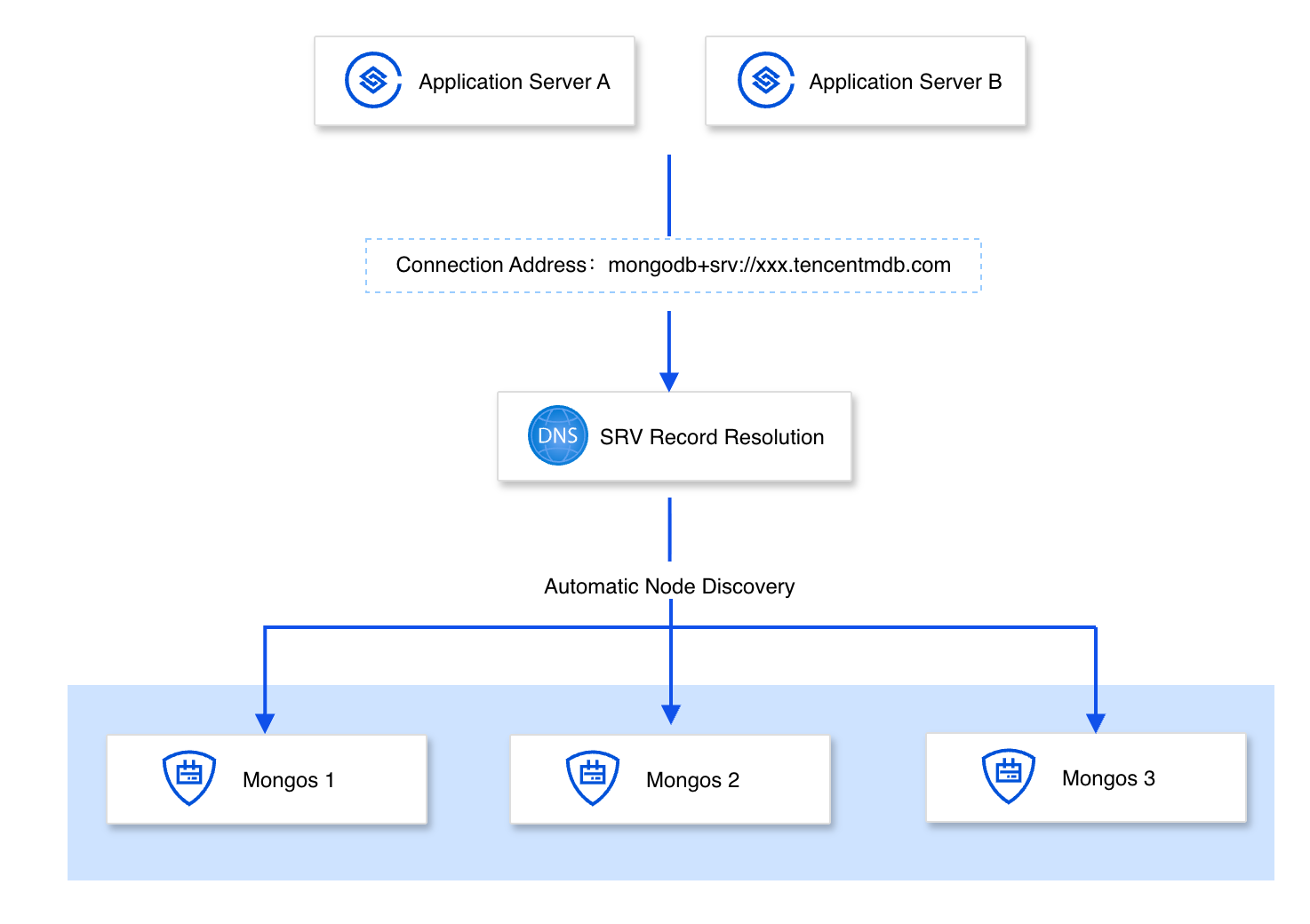
SRV connections leverage the DNS auto-discovery mechanism and the MongoDB driver's native routing capability to enable flexible node access and request-level load balancing. For sharded clusters, the driver automatically detects changes when mongos nodes are scaled in or out, requiring no modifications to the connection string and no application restart. This makes SRV connections the recommended solution for sharded clusters in terms of flexibility. A replica set's node topology typically remains stable, with a fixed set of primary, secondary, and hidden nodes and infrequent node additions or removals. Therefore, the default connection string from the console is sufficient. SRV connections can also serve as an optional solution for replica sets, with the added benefit of a simpler connection string.
Connection Principles
When an application connects via the mongodb+srv:// protocol, the driver queries DNS for SRV records to dynamically obtain the addresses of all mongos nodes in the cluster. When the cluster is scaled in or out, the DNS records are automatically updated. The driver then detects and connects to the new nodes on the next DNS refresh (typically within 60 seconds), with no application restart required.
Note:
The driver maintains a connection pool with all available mongos nodes and distributes requests across them in a round-robin fashion on the client side. This approach mitigates the single-point bottleneck caused by the source IP hash method used in traditional network load balancers. Furthermore, the official MongoDB driver natively supports session tracking, ensuring that all operations for getMore cursor scans and distributed transactions are routed to the same mongos node. This achieves load balancing while preserving consistency.
Enabling SRV Connection Mode
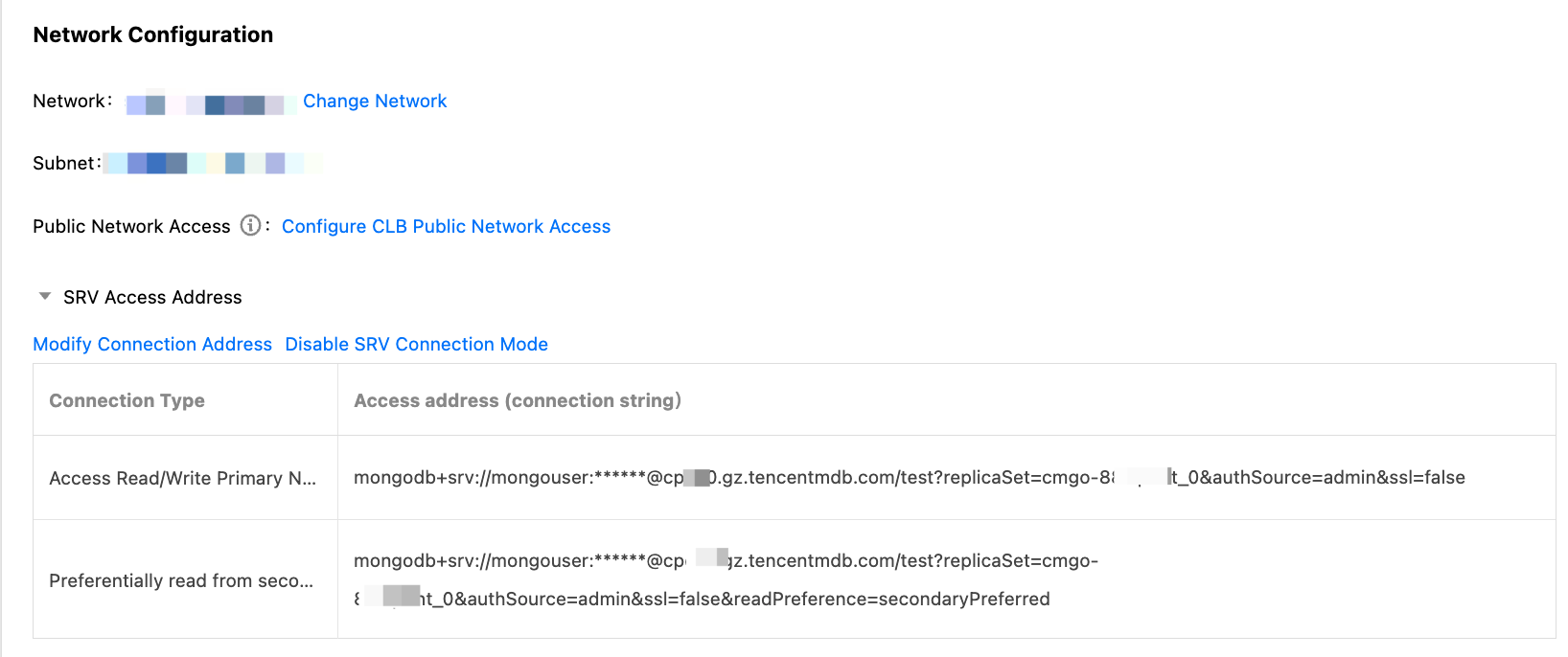
For MongoDB instances of version 4.0 or later, navigate to the TencentDB for MongoDB console. On the instance details page, locate the Network Configuration section and click Enable SRV Connection Mode to enable this connection method. For detailed steps, see Enable SRV Connection Mode.
Business Applications
A gaming company's sharded cluster was originally deployed with 8 mongos nodes. During an operational campaign, a sudden traffic surge required an emergency scale-out to 16 mongos nodes. With the traditional connection string method, the team would have had to manually add the addresses of the 8 new nodes in the application configuration, involving configuration adjustments and rolling restarts across 20+ microservices — a process that would have taken roughly 2 hours. After switching to SRV connections, the newly added mongos nodes were automatically resolved by DNS, and the driver discovered them on the next DNS refresh (typically within 60 seconds), with no service disruption or application restart required. As a result, the scaling time was reduced from 2 hours to 5 minutes.
Method 2: CLB Address (Default Connection for Sharded Clusters)
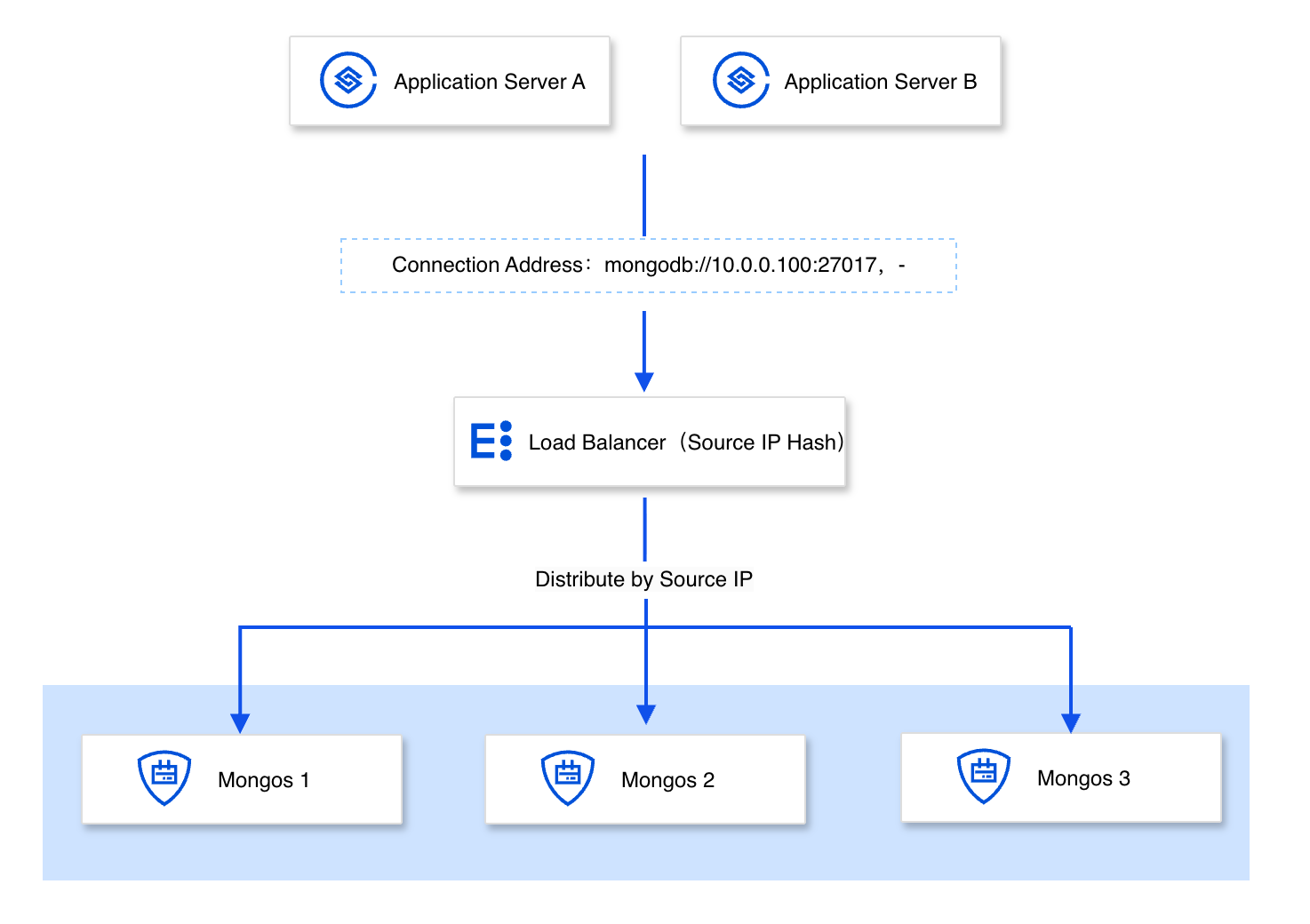
TencentDB for MongoDB sharded cluster instances provide a load balancer (LB) address by default. This single VIP masks the backend topology of multiple Mongos nodes, offering simple access and low Ops costs, making it suitable as the default connection solution for sharded clusters.
Connection Principles
Applications access the database through a virtual IP (VIP) provided by the load balancer service, which masks the real private IP addresses (RSIPs) of the backend mongos nodes. For request distribution, the load balancer uses a source IP hash routing policy, ensuring that requests from the same client IP are always forwarded to the same mongos node. This meets the state consistency requirements for getMore cursor scans and distributed transactions. Furthermore, if a backend mongos node changes (for example, due to a failure and replacement), the load balancer dynamically updates the mapping between the VIP and RSIPs. In this case, the application layer does not need to adjust any connection configurations, enabling a fully transparent switchover of underlying nodes for the business.
Note:
The load balancer (LB) address is currently applicable only to sharded cluster architectures. For replica sets, we recommend using either the default connection string provided by the console (which already contains the addresses of all nodes) or the SRV connection method. In addition, if you observe uneven load distribution across mongos nodes in scenarios with a limited number of client IPs, we recommend switching to the SRV connection method or directly configuring the addresses of all mongos nodes in the connection string to optimize request distribution.
Obtaining Connection Methods
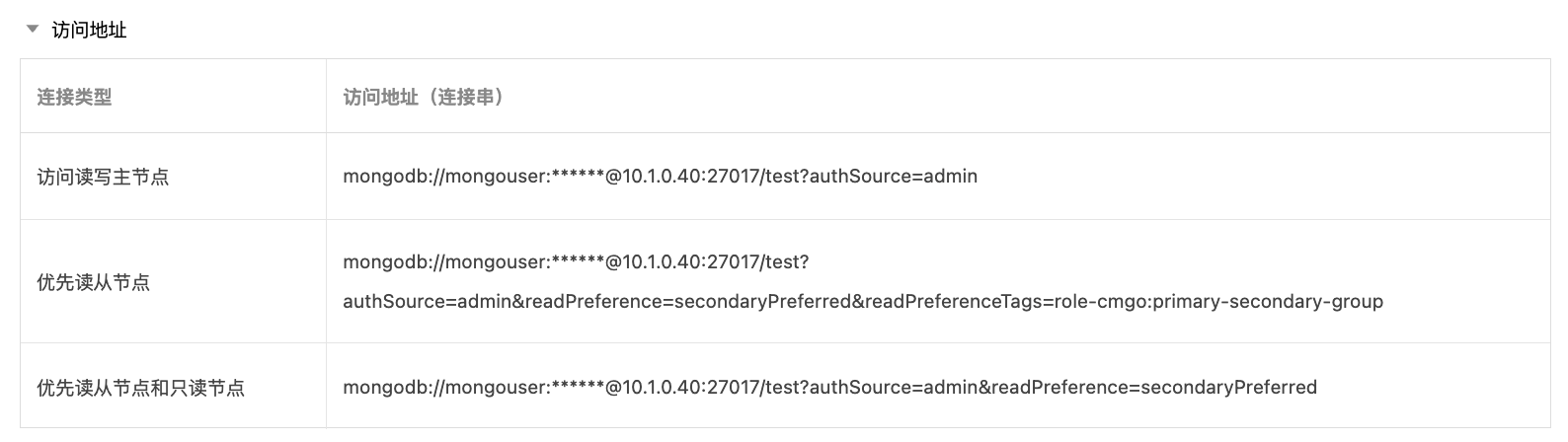
After the instance is created successfully, you can obtain the LB connection address in the Access Address section under Network Configuration on the Instance Details page of the MongoDB console.
Business Applications
Take an e-commerce platform as an example. Because its underlying business system uses an older database driver version that cannot parse the mongodb+srv:// protocol, the SRV connection method is not applicable. In such scenarios, using the VIP address provided by the load balancer (LB) to access the sharded cluster becomes the standard alternative. The application only needs to maintain a single VIP configuration to achieve transparent access to the entire cluster. When mongos nodes change or become unhealthy, the backend automatically isolates the faulty nodes and reroutes traffic, ensuring business continuity without any intervention from the application side.
Method 3: Connecting to All Mongos Access Addresses
The sharded cluster supports enabling Mongos access, assigning a fixed address consisting of a shared VIP and an independent VPORT to each Mongos node. When a Mongos node fails, the system automatically binds a new Mongos process to it. The VIP and VPORT remain unchanged, ensuring connection stability.
Connection Principles
The system assigns fixed virtual IPs and ports to mongos nodes, and the underlying mechanism continuously monitors node health. If a failure occurs, the system automatically switches the access address to a healthy node within seconds. Because the external entry point remains static, upper-layer applications achieve transparent self-healing without any configuration changes, ensuring continuous and stable business connections.
Note:
If you have configured all Mongos nodes in the connection string, you must synchronously update the connection string on the application side after the number of Mongos nodes in the instance is adjusted.
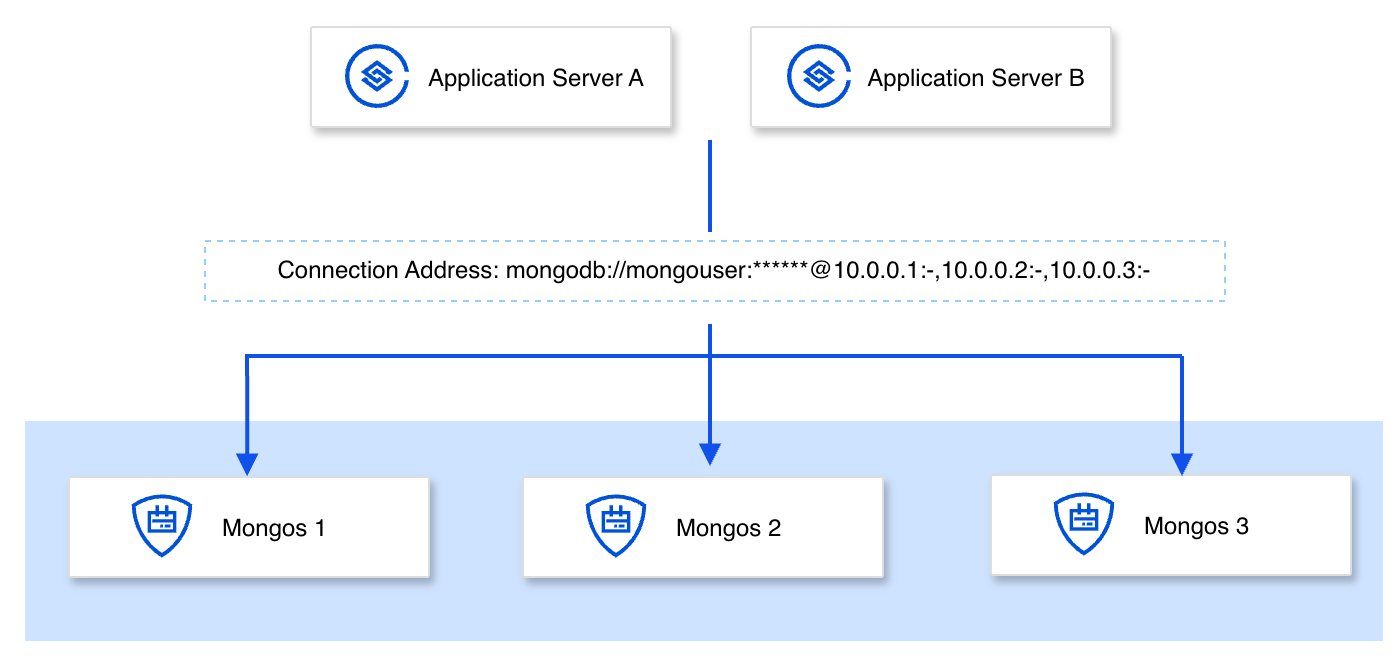
Enabling Mongos Access Addresses
In the MongoDB console, select Shard Instance. Go to the Mongos Node tab under Node Management on the instance details page, and click Enable Mongos Access Address. For detailed steps, see Enable Mongos Access Address.
Comparison and Selection of Connection Methods
TencentDB for MongoDB offers multiple connection methods for sharded clusters, each with different strengths in access complexity, load balancing effectiveness, and operational flexibility. The following table compares them across key decision-making dimensions and provides corresponding recommendations, helping you quickly identify the connection method best suited for your business scenario.
Decision Dimension | SRV Connection | LB Address | Connect to All Mongos |
Access complexity | Low: a short connection string | Low: single VIP | Medium: List all nodes. |
During Node Changes | No need to modify the connection string | No need to modify the connection string | ⚠️ Must update the connection string. |
Load balancing policy | Driver-level balancing (connection-level) | Source IP Hash | Driver-level balancing (connection-level) |
When client IPs are few | ✅ Balanced | ⚠️ Possibly unbalanced | ✅ Balanced |
Number of connections characteristics | Number of connections amplification (connecting to all Mongos) | No number of connections amplification | Number of connections amplification (connecting to all Mongos) |
Documentation
Ajuda e Suporte
Esta página foi útil?
Você também pode entrar em contato com a Equipe de vendas ou Enviar um tíquete em caso de ajuda.
comentários