Auto-payment
Baixar
Modo Foco
Tamanho da Fonte
Note:
All billing and payment dates and times for Tencent Cloud International are based on China Beijing time (UTC+8).
Introduction to Auto Payment
Tencent Cloud provides certain credit limits and billing cycles for postpaid accounts of international portal customers based on their customer tier, allowing you to purchase and use cloud services in advance within the credit limit.
If you enable the auto-payment feature, the system will automatically deduct the amount due from the default payment credit card bound to your account. This helps avoid overdue payments and service suspension or termination caused by insufficient balance.
Ensure that your default payment card is in normal status and has sufficient credit. If auto payment fails due to abnormal conditions, you can refer to Top-Up Process Instructions to make a manual payment.
Auto Payment Rules After Upgrade
The upgraded automatic payment feature will support both real-time collection and monthly deduction, and can be enabled or disabled at any time as needed. This feature is being gradually rolled out. If it is not yet available for your account, please wait patiently. If you have any questions, contact your business manager or submit a ticket to reach us.
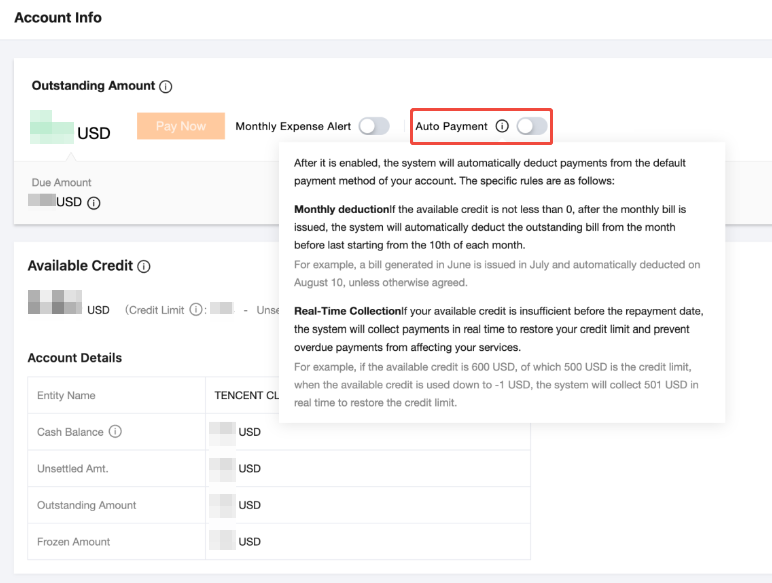
Real-Time Collection Description:
The payment due date is determined by the billing cycle of the pay-as-you-go products you purchase. For example, if a pay-as-you-go product is billed hourly, the system will check whether the credit limit is sufficient on an hourly basis. If it is insufficient, automatic payment will be triggered. Currently, the billing cycles for pay-as-you-go products include hourly, daily, and monthly.
Note:
For South Korean customers, the payment channel deducts fees in KRW with a minimum payment amount of 100 KRW. The billing currency for the international portal is USD, and the system will convert between USD and KRW based on the agreed exchange rate.
If the amount to be deducted on your payment due date is less than 100 KRW, the system will deduct a minimum of 100 KRW. The surplus amount will be credited to your account balance in the form of a recharge, which can be used for subsequent resource consumption.
If a payment due date is specified in a contract or other special agreement, real-time collection will not be performed.
Monthly Deduction Description:
On the monthly payment due date (starting from the 10th of each month), the system will collect payment from your account's default payment method to settle all due and unpaid historical bills.
The payment due date is determined based on the billing month and your account's billing cycle.
For example:
If your billing cycle is 1 month, the bill for May will be generated in early June (fixed to the following month), with a payment due date of July 10. The system will initiate automatic collection starting from July 10.
If your billing cycle is 2 months, the billing for May will also be generated in early June, with a payment due date of August 10. The system will initiate automatic collection starting from August 10.
If bills for previous months have not been confirmed, the system will still automatically deduct payment from your default payment method on the payment due date to ensure timely repayment and avoid service suspension caused by overdue payments.
How to Enable Auto Payment
1. Log in to the Tencent Cloud official website and go to Billing Center > Account Information. Click Auto Payment to enable the auto payment feature. Read the specific rules, confirm that the enabling conditions are met, and then click Confirm.
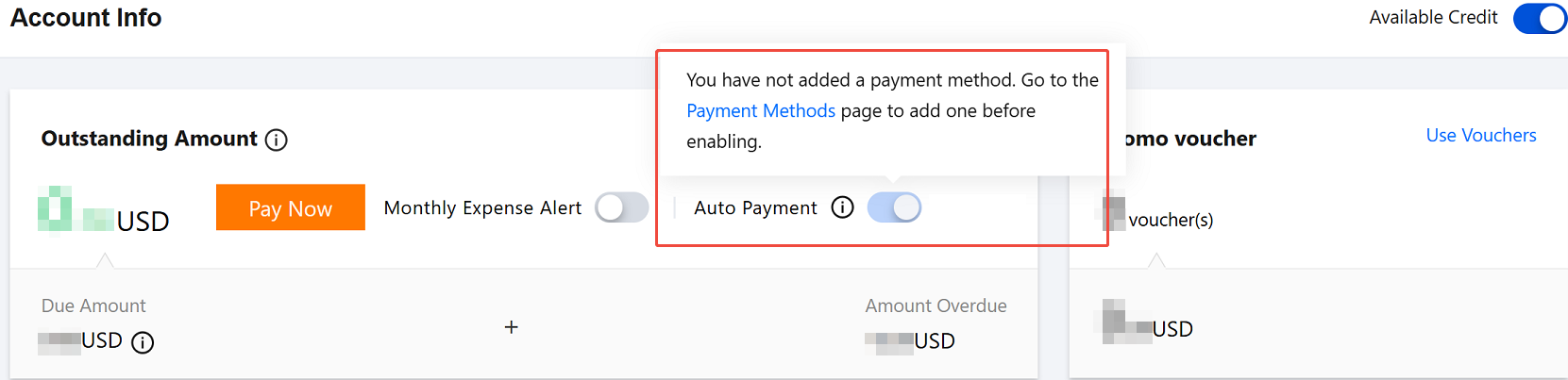
2. If your account does not have a default payment method bound, bind one in Bind Default Payment Method before enabling the auto payment feature.
How to Disable Auto Payment
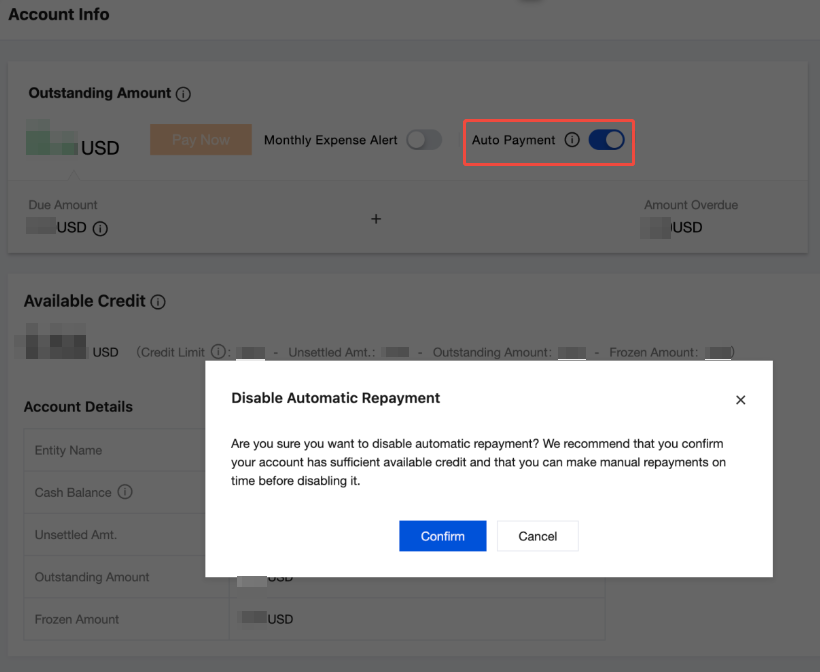
Log in to the Tencent Cloud official website and go to Billing Center > Account Information. Click Auto Payment, and then click Confirm to disable the auto payment feature.
Auto Repayment Rules Before Upgrade
Credit Limits and Auto Payment for Customers Without a Sales Rep
Starting from June 08, 2023 at 00:00 (UTC+8), for newly registered customers without a sales representative, Tencent Cloud will not provide a credit limit. For existing customers without a sales representative, Tencent Cloud reserves the right to adjust or cancel the credit limit based on the customer's risk profile.
About auto-payment frequency:
On the payment due date, the system will automatically deduct the payable amount from the default payment credit card bound to your account. The payment due date is determined by the billing cycle of the pay-as-you-go products you purchase. For example, if a pay-as-you-go product is billed hourly, the system will check whether the credit limit is sufficient on an hourly basis. If it is insufficient, automatic payment will be triggered. Currently, the billing cycles for pay-as-you-go products include hourly, daily, and monthly.
Note:
For South Korean customers, the payment channel deducts fees in KRW with a minimum payment amount of 100 KRW. The billing currency for the international portal is USD, and the system will convert between USD and KRW based on the agreed exchange rate.
If the amount to be deducted on your payment due date is less than 100 KRW, the system will deduct a minimum of 100 KRW. The surplus amount will be credited to your account balance in the form of a recharge, which can be used for subsequent resource consumption.
Credit Limits and Auto Payment for Customers with a Sales Rep
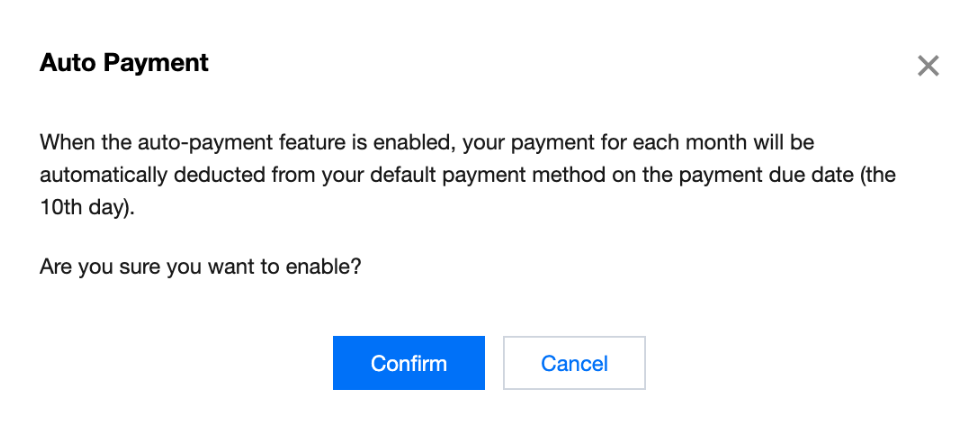
For customers with a sales rep, this auto-payment feature is disabled by default. To enable this feature, log in to the Tencent Cloud official website and go to Billing Center > Account Information to enable the auto-payment feature. If you enable this auto-payment feature:
On the monthly payment due date (starting from the 10th of each month), the system will collect payment from your account's default payment method to settle all due and unpaid historical bills.
The payment due date is determined based on the billing month and your account's billing cycle.
For example:
If your billing cycle is 1 month, the bill for May will be generated in early June (fixed to the following month), with a payment due date of July 10. The system will initiate automatic collection starting from July 10.
If your billing cycle is 2 months, the billing for May will also be generated in early June, with a payment due date of August 10. The system will initiate automatic collection starting from August 10.
If bills for previous months have not been confirmed, the system will still automatically deduct payment from your default payment method on the payment due date to ensure timely repayment and avoid service suspension caused by overdue payments.

FAQs
Why did automatic payment stop suddenly when it had been working normally before?
When you upgrade from a customer without a sales rep to a customer with a sales rep, the frequency of automatic payments will change. For customers without a sales rep, automatic payments are triggered based on the billing cycle of pay-as-you-go products, with the shortest interval being hourly. However, if you have a sales rep, they will apply for a payment period for your bills, with the shortest interval being monthly. If your current credit limit is insufficient to cover one month's consumption, we recommend that you contact your sales rep to increase your credit limit or top up your account in a timely manner.
Ajuda e Suporte
Esta página foi útil?
Você também pode entrar em contato com a Equipe de vendas ou Enviar um tíquete em caso de ajuda.
comentários